
Most of your traffic potential is probably sitting in pages you already wrote, not pages you haven't written yet. Google already crawled them, ranked them somewhere, and put them in front of real searchers, which makes them a much cheaper place to find more traffic than starting from zero.
HubSpot proved this on its own blog years ago. In its own words, "76% of our monthly blog views came from 'old' posts," and optimizing those old posts raised their organic search views by an average of 106%.
Picking the right pages decides most of the result, so that's where this process starts.
Step 1: pick pages from Search Console
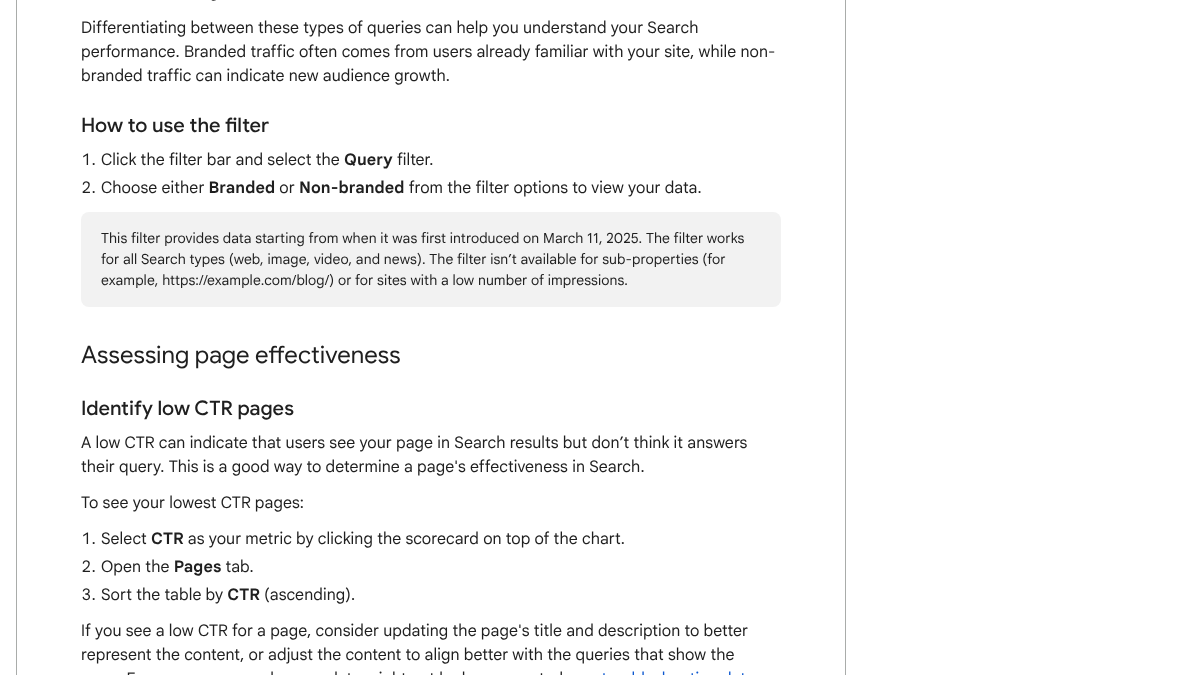
Skip the pages you assume are weak and open Search Console instead. Google's own Performance report guide spells out how to find your low-CTR pages. "Select CTR as your metric by clicking the scorecard on top of the chart. Open the Pages tab. Sort the table by CTR (ascending)."
Three kinds of page are worth your time.
| Page type | What it looks like in Search Console | Why it's worth fixing |
|---|---|---|
| Seen but skipped | Many impressions, low CTR | People see it but don't click |
| Almost there | Average position 8 to 20 | A small lift moves it onto page one or up page one |
| Slipping | Clicks down compared with last year | It used to work, so the topic has demand |
I think of this as the warm-page rule. Fix what Google already favors before spending time on a page with nothing going for it yet. A page with zero impressions is a different problem, and our guide on why some pages never rank at all covers that case instead.
Step 2: check the queries behind each page
Once you've picked a page, find out what people actually typed to land on it. Google's guide covers this step too. "Click the Queries tab. Click a query in the table to filter all report data to the selected query. View the Pages tab to see which URLs were shown." You can also run it backwards: open the page first, then its Queries tab, sorted by impressions.
Most intent problems surface right here. A page built around "email marketing tips" might be pulling impressions for "email marketing for restaurants," and if the page never mentions restaurants anywhere, you've found the gap.
We'll show you exactly where your brand stands in AI search.
No commitment. $0 due today, cancel anytime. See how ChatGPT, Perplexity, Claude, Gemini, Grok, Google AI Mode, and Google AI Overviews talk about your brand today.

Step 3: fix intent mismatch
Search the page's main queries yourself and see what actually ranks. If the top results are comparison posts and yours is a how-to, or the top results give a short answer and yours runs long, you're looking at an intent mismatch.
Google's guidance treats low CTR the same way. "Consider updating the page's title and description to better represent the content, or adjust the content to align better with the queries that show the page." That leaves you with two real options. Rewrite the page to match what people want, or rewrite the title and description so they match what the page already is. Pick whichever fits your goal for that page.
Step 4: rewrite the top of the page
CXL dug into 100 Google AI Overview citations and reported that "55% of cited passages appeared within the first 30% of the source page." That's the part both your readers and AI engines actually use.
Their advice follows directly from that number. "Find where the primary answer to your target query actually appears on the page. If it's below the 30% mark, that's your first optimization target."
In practice that means four moves.
- Answer the main question in the first paragraph, in plain words.
- Cut any warm-up that delays the answer.
- Add the key number, price or fact near the top.
- Make that first paragraph stand on its own.
Our guide to writing blog introductions has formulas for the first move, and our analysis of where AI engines pull citations from covers the research behind all four.
Step 5: update the facts before the date
Fix what's actually broken before you touch the date field. Old pages collect old numbers, dead links, outdated screenshots and steps that quit working years ago, and readers notice every one of those before they notice a date.
Google's helpful content guidance asks a pointed question. "Are you changing the date of pages to make them seem fresh when the content has not substantially changed?"
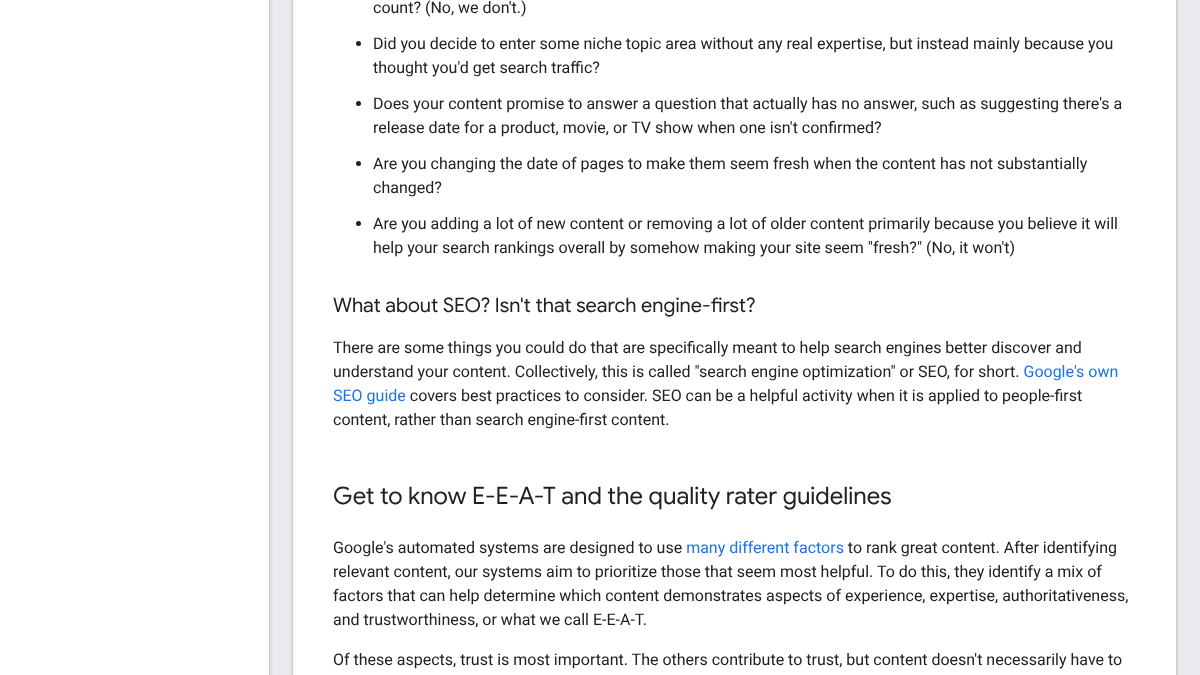
The same page asks whether you're padding or trimming content mainly to look fresh, and Google's answer is blunt. "No, it won't." Change the date once you've made a substantial change, and leave it alone for a typo fix.
Know exactly what AI says about your competitors.
RankControl's Recon Agent monitors competitor citations across ChatGPT, Perplexity, Claude, Gemini, Grok, Google AI Mode, and Google AI Overviews. See where they show up and you don't.

Step 6: fix internal links
Two moves matter here, and most pages are missing at least one of them. Add links out from the page to other related pages you want to rank, using anchor text that actually describes where it goes. Then add links the other way. Find two or three of your strongest pages on related topics and point them at the page you just fixed.
Search Console's Links report shows which pages already draw the most internal links, and our guide on seeing your backlinks in Search Console walks through reading that report.
Step 7: tighten the structure
Last, make the page easy to scan. Add a heading wherever a new idea starts, break up long paragraphs, and turn any comparison into a table instead of a paragraph. If the page's queries include questions you haven't answered, add a short FAQ for them.
Don't pad it to make it longer. Length rarely decides rankings on its own, and a tighter page usually performs better than a padded one.
If you only have an hour
Not every team has time for the full process on every page, so here's the order I'd use in about an hour.
- Open Search Console and sort pages by impressions.
- Pick the one page with the most impressions and the lowest CTR.
- Read its top queries and rewrite the title and description to match them.
- Rewrite its first paragraph so it answers the main query directly.
- Add one link to it from a strong related page.
That covers the changes that move the most, and it's about an hour of work. Do one page a week at that pace and you'll have worked through 50 of them by next year.
How to tell if it worked
Give each change two to six weeks before you judge it, then compare the page in Search Console against the same stretch of time before you touched it.
| What to check | What it tells you |
|---|---|
| Impressions | More impressions means Google is showing the page for more searches |
| Average position | A move up, even a few spots, often matters more than it looks |
| CTR | Shows whether a title or description change actually worked |
Our analysis of CTR by position in 2026 shows what to expect at each spot, which helps you judge whether a change is working at all. For how fast Google notices the change, our guide to re-indexing signals after a refresh covers the timing.
Treat the biggest wins as outliers, not a baseline. Backlinko's Brian Dean once reported a 260.7% jump in organic traffic within 14 days for a single rewritten page, on a well-known site with plenty of existing authority behind it already. That's what's possible, not what's typical.
What practitioners do with pages that won't improve
Not every old page deserves saving. Someone asked exactly this on r/SEO, and one reply laid out a simple rule for deciding.
Old Blog Posts -- What do you do with them?
Hello, if you've been posting blogs pages on your website for the past 5+ years, you probably have hundreds of blog posts. What do you do about the old blog posts? A lot of them may be outdated or irrelevant. Do you just let them be, or do...
If a page has no links, no traffic, no impressions and no real shot at becoming useful, fold it into a stronger page or redirect it to whichever page covers the topic best. If it still has search demand or decent links behind it, update it instead.
A widely shared SEO checklist on X put roughly the same split in one line. Go back and refresh whatever's getting impressions but few clicks, and keep investing in whatever's already bringing in real customers.
If you're new to SEO / AEO / GEO, here's a mini-course: - Pick a niche (SaaS, local businesses, e-commerce) - Build a website or find a business that lets you practice - Connect Google Search Console + GA4 - Learn crawling, indexing & ranking - Understand robots.txt, canonicals
 Ross Simmonds@TheCoolestCoolOct 15, 2026
Doing it yourself or handing it off
Optimizing one existing page takes an hour to three hours, depending on how much actually needs rewriting, and a site with 50 pages worth fixing turns into a few weeks of steady work at that pace.
You can work through this whole list yourself with nothing but Search Console and patience. For new pages, RankControl writes each article against the pages already ranking for its keyword, puts the answer near the top from the start, and scores it for how easily AI engines can quote it, with a list of fixes attached. It publishes straight to your site, and its AI visibility tracking checks up to 50 buyer questions every week across seven AI engines. Expect Google and AI search traffic to move first, with citations following more slowly as other sites link to you and mention your name.
26 content formats. Published on your domain. Matched to your brand.
Guides, comparisons, listicles, case studies, and more. RankControl generates content that gets cited by ChatGPT, Perplexity, Claude, Gemini, Grok, Google AI Mode, and Google AI Overviews.