Get traffic from 



 AI search. And from Google.
Everything a search team does, done by 7 AI agents: research, writing, competitor watch, link outreach, social posts, Reddit and X threads, AI visibility tracking & more.
Free for 7 days. Traffic that keeps coming when the ad budget stops.

Citation alert
ChatGPT cited your brand for “best CRM for startups”
10K+
Pages published
1M+
AI + Google citations tracked
7
AI engines checked every week
5 min
Average time to go live

The gap
Buyers ask AI and Google before they buy.
Ask ChatGPT for the best in your category. Are you in the answer?
01 / SHIFT
The Shift
An AI answer names a few brands, not ten links.
02 / GAP
The Gap
Ranking on Google doesn't mean AI names you. AI answers lean on pages that answer the question well, and on what other sites say about you. RankControl works on both: traffic first, AI citations over time.
03 / COST
The Cost
An agency costs $5,000 a month or more and takes weeks to start. RankControl is $400 a month, and setup takes about 5 minutes.
The protocol
Find it. Write it. Spread it. Track it.
Articles bring the traffic. Links and mentions bring the citations.
01 / Discover
Radar finds what your buyers are searching for.
The questions your buyers actually search, and the ones your competitors already answer. “142 questions your competitors answer and you don't.”
02 / Create
Forge writes articles worth ranking, quoting and linking to.
1,500-4,000+ word guides, brand-matched, built to answer the questions Radar found. They go live as native posts on your own site.
03 / Get mentioned
Outreach, Amplify and Social take every article further.
Outreach pitches sites to link to you, Amplify turns each article into social posts, and Social finds the Reddit and X threads it answers. Links and mentions on other sites are what build AI citations over time.
04 / Monitor
Sentinel tracks what comes back.
Weekly checks on rankings, traffic and the AI answers that cite you or your competitors, with a note when something changes.
The playbook changed
Buyers still search Google. Now they ask AI too.
2015
10 blue links
Rank #1, win the click
2023
ChatGPT launches
Answers join the links
2026
Buyers search and ask AI
You need to show up in both
RankControl writes articles built to rank on Google and to be quoted in AI answers, then helps you earn the links that keep them climbing.
+375% traffic in a month, see the case studyNew
Citation Signals shows who cites you, and for which questions
Every mention across seven AI engines, rated positive, neutral or negative, with the sources each answer used and the competitors it named.
Get notified when ChatGPT or Perplexity cites your brand
Show your team or your clients the real AI visibility numbers
Search citations by platform, query, or competitor in one click

How it works
Six steps from setup to traffic
We learn your brand, find the gaps against your competitors, write and publish, earn the links, and show you what comes back.
Lock in your brand, spot the gaps
We scan your tone, products, and competitors so everything reads like you, then track how ChatGPT, Perplexity, Claude, Gemini, Grok, Google AI Mode, and Google AI Overviews answer your market's questions. If you're not being mentioned, we show you why.
- Reads your brand from your site
- Tracks up to 10 competitors
- Ranks topics by opportunity
Draft, approve, publish on your domain
Review finished drafts, approve with one click, and articles go live on your site as native posts. Five-minute plugin setup, no code changes. Auto-publish is off by default.
- 26 content formats
- 5-minute plugin setup
- Native posts in your CMS
Earn backlinks, compound your authority
Outreach from your mailbox, links through the Editorial Circle, and Managed Backlinks if you want them. Then see which AI answers name you and which send visitors.
- AI-written outreach emails
- Every new backlink tracked as it lands
- Rankings and citations per published page
The full stack for AI search
Content, visibility, rankings, and links. One platform, one flat plan.
Know where you stand8
Analytics
Know which AI assistant sent each visitor. Traffic, crawls, and rankings in one view.
AI Visibility
Monitoring across 7 AI search engines: ChatGPT, Perplexity, Claude, Gemini, Grok, Google AI Mode, and Google AI Overviews.
Google AI Overviews
Know when Google's AI answer appears for your keywords, and whether your page is one of its sources.
Citation Signals
Get notified when an AI engine cites you, or a competitor.
Brand Perception
Every AI mention rated positive, neutral, or negative, with the wording behind it.
Citation Sources
See who the engines cite for your queries: you, your competitors, Reddit and YouTube, or editorial sites.
AI Crawlers
See which AI bots read which pages, and hear the day one of them gets locked out.
Competitor Recon
Track competitor citations across all AI models. Find the gaps.
Get found8
Content Engine
Brand-matched content built for AI citations and Google rankings.
Your Domain
Articles publish as native posts on your site. Full SEO equity, no subdomain.
Content Refresh
Flags pages when rankings or citations slip, and rewrites them on your approval.
Sounds Like You
Voice, products, and competitors learned from your site. Content matches your brand from day one.
Plan Content
A content calendar planned from the questions your buyers ask.
Your Buyers' Language
Choose the language your buyers search in. Titles, research, and articles all match.
Internal Links
Each new article links to your related pages.
Original Images
Original art and infographics, made for your articles.
Link Control
Track backlinks and manage outreach opportunities in one place.
Editorial Circle
Your best work, mentioned inside real articles on member sites.
Listicles
Ask for a spot in members' best-of lists, agreed in a chat.
Reddit and X
Threads your articles answer, with the reply drafted for you to post.
AI Sources
Find the pages AI already cites for your questions, then pitch your product for a spot.
Repurposing
Turn any article into posts for eight social platforms.
Managed Backlinks
Five links a month from DR 25+ sites, a $350/mo add-on.
Stay in control8
Agent Pipeline
Watch every move. Seven agents work in the open, with a full audit trail.
Approval Workflow
Review, comment, and approve. Auto-publish is off by default.
MCP, CLI, and API
Run RankControl from Claude, Cursor, or your terminal. 80+ tools, one command to connect.
Team
Invite your team and choose which screens each person can open or change.
Dashboard Chat
Ask about your numbers, or ask for a change, in plain words.
Weekly Brief
A Monday email on what moved last week.
Reports
PDF reports you can send to your team or your clients.
Owner Approvals
The chat, apps, and the API can't remove anything or change access until the owner approves.
Build authority that keeps working.
Every article, link and mention adds up. AI answers start naming you over time.
1
Publish
Articles on your site
2
Earn links
Other sites point to them
3
Get named
AI answers start to name you
Why teams switch to RankControl
Everything an agency does, without the agency price. $400 a month, setup in about 5 minutes, and you stay in control.
Price
Dedicated strategist
Time to results
Content approval
Transparency
Content hosting
Managed backlinks
Google AI Overviews
Your own AI agent
Setup time
Works with the tools you already use
 Cloudflare
 Search Console
 Bing Webmaster
 Gmail
Gmail Postiz
 Buffer
 Zapier
 n8n
n8n Make
Make Google Analytics
WordPress
Native posts through the RankControl plugin.

Shopify
Articles publish to your store blog.

Webflow
Items created in your Webflow CMS.

Ghost
Posts through the Ghost Admin API.

Framer
Straight into your Framer CMS collection.

Wix
Native posts on your Wix blog.

Notion
Pages created in your workspace.

Next.js
Headless sites via the Content API.
Sample articles
Judge it yourself
Four complete articles, four industries. Original writing, original art, original infographics. Yours come out the same way.
Travel · sample article
The 5 C's of Luxury Travel Explained for Modern Explorers

You booked the overwater villa at $1,400 a night. The airport transfer was on time, the welcome drink was cold, and by the fourth morning you were reading the same breakfast menu, wondering why a trip this expensive felt this forgettable. That gap between price and memory is what the 5 C's of luxury travel try to close. In the version used by Hospitality News, the five are Culture, Cuisine, Community, Content, and Customization: real access to a place and its people, food that could only come from there, travel that leaves measurable benefit behind, experiences you still describe five years later, and an itinerary shaped around one specific traveler rather than a brochure.
Other companies swap in Conservation, Craftsmanship, or Convenience for one of those words, which is why so many explanations of the framework feel interchangeable. This one uses the Culture, Cuisine, Community, Content, Customization model throughout, and it adds the piece most explainers skip: a way to test whether a trip you are about to pay for will deliver on each C before the deposit clears.
The short version
The 5 C's of luxury travel are Culture, Cuisine, Community, Content, and Customization. They describe what high-end travelers now pay for in place of marble lobbies and thread counts: privileged access to a destination's history and people, food rooted in the region, trips that benefit the host community in ways you can point to, experiences with emotional weight, and planning built around your pace and privacy. Customization is the C with the hardest numbers behind it.
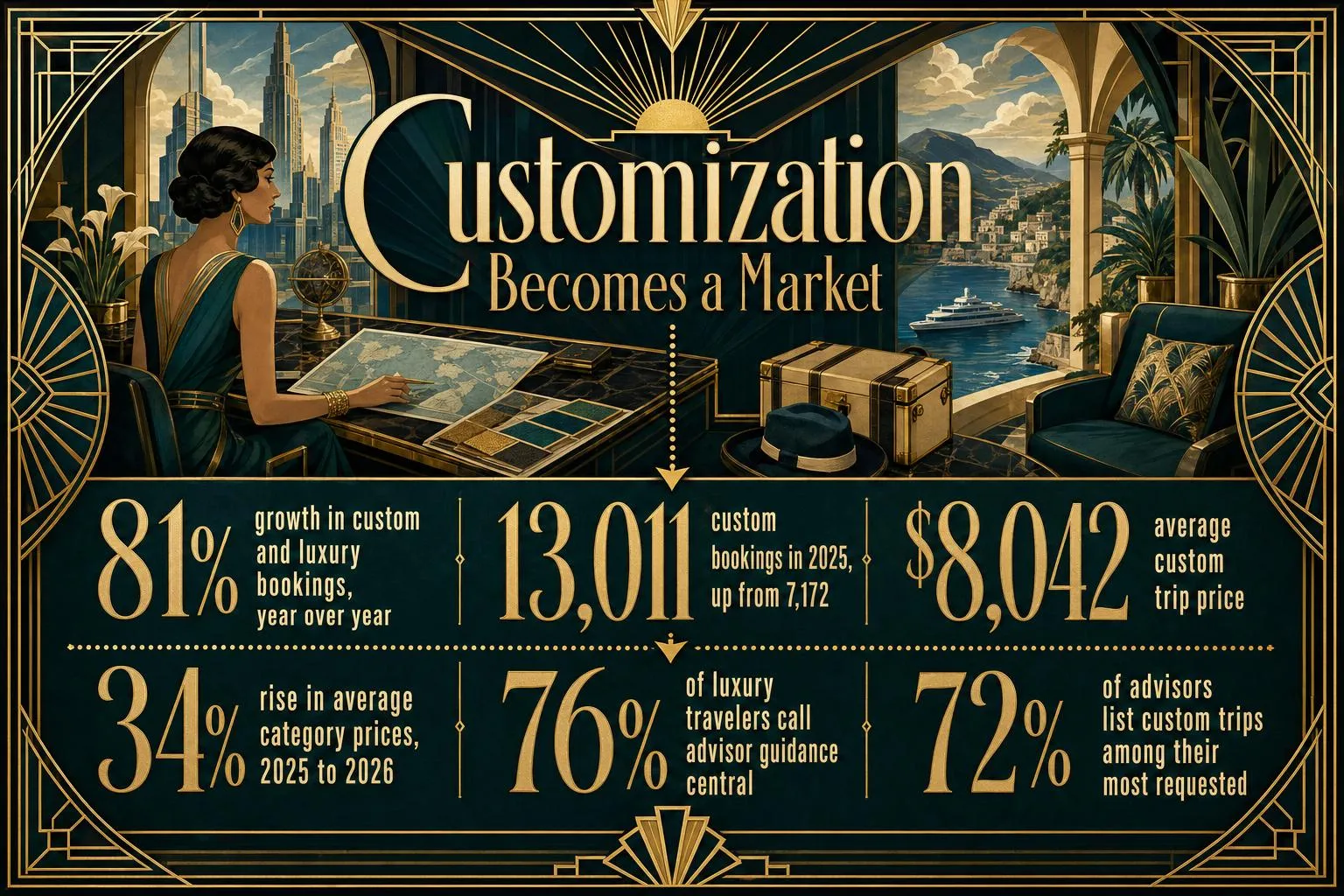
+81%
growth in custom and luxury bookings year over year among operators tracked by WeTravel, from 7,172 in 2024 to 13,011 in 2025, at an average trip price of roughly $8,042. One booking platform's operator base, so read it as a signal rather than a census.
Which five C's, exactly?
Ask five travel companies for the 5 C's and you will get at least three different lists. The Hospitality News version (Culture, Cuisine, Community, Content, Customization) is the one this article treats as canonical because it maps most cleanly onto what travelers report wanting and what operators are selling. Some advisors and hotel groups replace Content with Conservation to foreground environmental commitments. Others substitute Craftsmanship, meaning attention to design and materials, or Convenience, meaning frictionless logistics. A separate and older set of five C's circulates in hospitality training and refers to service qualities such as courtesy and consistency; it has nothing to do with the traveler-facing framework discussed here.
None of the variants is wrong. They emphasize different things. Conservation is arguably a subset of Community done properly, since local supply chains and lower-impact design produce local benefit. Convenience is what Customization looks like from the outside. Craftsmanship is a property-level detail rather than a trip-level principle. The Culture, Cuisine, Community, Content, Customization version wins for one practical reason: each word describes something you can check, budget for, and remember.
How the five C's work together
Think of the framework as a sequence rather than a checklist. Each C sets up the next.
- Culture defines the reason to go: something there cannot be experienced anywhere else
- Cuisine anchors the daily rhythm, because meals are where a place becomes physical
- Community determines who benefits, through the choice of guide, lodge owner and supplier
- Content is the output: moments with emotional weight, the only thing you actually take home
- Customization is the mechanism that makes the first four possible, sequenced around your energy and privacy
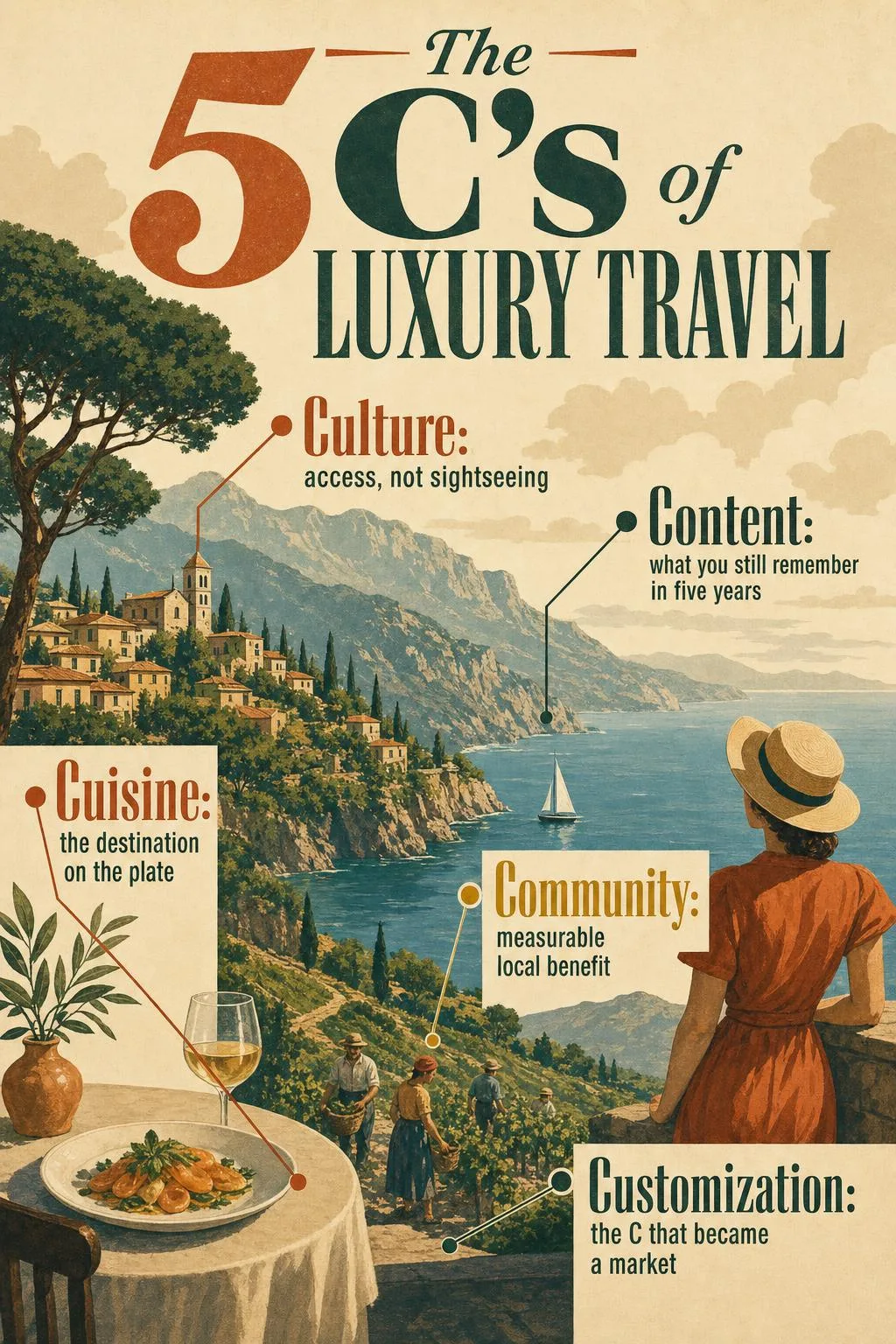
Weakness in one C shows up downstream. A trip with strong Culture but generic Cuisine loses its texture by day three. Strong Customization laid over weak Community produces a beautifully organized trip that the destination would rather you had not taken. The framework is most useful as a diagnostic.
Culture: access, not sightseeing
Culture in this framework means a level of access to a destination's history, arts, and people that a ticket holder does not get. The difference is concrete. A daytime visit to the Alhambra puts you among thousands of visitors on timed entry; an early-access or after-hours arrangement, which specialist operators can sometimes secure, puts you in the Court of the Lions with a historian and almost no one else. A tour of a Venetian glassworks is a standard stop; sitting with a maestro for an afternoon while he explains why his family's furnace runs at a specific temperature is Culture in the luxury sense.
The test is whether the experience depends on a relationship. Access secured through an operator's decade-long connection to a curator, a chef, or a family workshop cannot be bought off a booking site, and that scarcity is the point. Black Tomato, a Virtuoso member agency, says it works with more than 2,200 luxury properties and relies on that network for exactly this kind of door-opening. The same principle applies at lower budgets: renting a well-located apartment from a local owner, rather than staying in a chain hotel, changes who you talk to at breakfast and which bakery you learn about.
Culture is the C most easily faked with staged performances and “authentic” dinners in venues built for tour groups. If everyone on the itinerary is being paid to perform a version of local life for you, you are watching theater, and it should be priced like theater.
Cuisine: the destination on the plate
Cuisine means food and drink that could only come from where you are standing, sourced from producers you can name. Tasting-menu restaurants with international ambitions can be excellent and still fail this test if the same dishes appear in New York and Dubai. A lunch of Cantabrian anchovies at the cannery where they were packed passes it. So does a private chef in a rented villa on Paros who shops the morning market and explains why the capers are wild.
The luxury version of Cuisine tends to take three forms: producer access (vineyards, dairies, fisheries, orchards), private cooking with people who cook that food at home, and reserved seats at restaurants that treat regional ingredients as the whole point. Each has a different cost profile. Producer visits are often the cheapest and the most memorable. Private chefs in villa destinations commonly run several hundred dollars per day plus ingredients. Top-tier reservations cost what they cost, and an advisor's ability to secure one on short notice is frequently the reason people pay for an advisor at all.
Cuisine also connects to Community more directly than any other C. When the fish comes from a boat you saw that morning and the cheese from a farm 20 minutes away, the money stays in the region. Ask a simple question of any property or chef: where does this come from, specifically? An answer with place names is a good sign. An answer with adjectives is not.
Community: measurable local benefit
Community means the trip leaves the place better off in ways that can be counted, and it is the C most often diluted into eco-luxury marketing. The distinction worth holding onto is between claims and mechanisms. A lodge that says it supports local communities is making a claim. A lodge that employs staff from the surrounding villages, publishes the share of revenue that goes to a conservation trust, buys produce within a defined radius, and runs on solar rather than diesel generators is describing mechanisms you can verify.
Botswana's safari sector is the frequently cited example because several camps there operate on leases that pay community trusts and hire locally, and because low-volume, high-price tourism there was a deliberate policy choice rather than an accident. Travelers weighing Botswana, Japan, and Patagonia trips describe wanting a company that can prove its planning is worth the fee rather than one that only sells an expensive itinerary. Community is where that proof is easiest to demand and easiest to check: ask who owns the property, who works there, and where the food and building materials came from.
Slower itineraries belong here too. Three nights in one place instead of one night in three reduces transfers, spreads spending across more local businesses, and gives you a chance to return to the same cafe twice. It also improves the trip. Sustainability in luxury is increasingly expressed through operational choices such as renewable energy, lower-impact design, local supply chains, and slower pacing, and every one of those is something a traveler can ask about before booking rather than discover after.
When evaluating Community claims, ask for one number. Percentage of local staff, revenue share to a community fund, sourcing radius in kilometers. A property that has done the work will have it ready. A property that has not will send you a paragraph.
Content: what you still remember in five years
Content, in this framework, means experiences with lasting emotional weight, and it needs a clear definition because the word has been captured by social media. Content is not the photo. A sunrise balloon over Cappadocia produces a striking image and, for many travelers, a genuinely moving hour; those are two different outcomes, and only the second one counts here. The test for Content is memory, not shareability: which parts of the trip will you still be telling people about long after the images have scrolled off your feed?
Experiences that pass this test usually share a few traits. They involve people rather than views alone. They include something the traveler did rather than watched. And they frequently involve a small amount of difficulty, which is why a long walk to a remote bothy or an early call for a fishing boat often outlasts a spa afternoon in memory.
Cities test this principle hardest, because there is so much to see and so much of it is designed to be photographed. The filter that matters is this one: does the experience change how the visitor understands the city, or does it only fill an afternoon? If a place cannot describe what you will feel there, only what you will see, be skeptical of the price.
Customization: the C that became a market
Customization means the itinerary is built around one traveler's interests, pace, privacy requirements, and service expectations rather than adapted from a template. It has moved from a concierge add-on to a market category with its own pricing. Among operators tracked by WeTravel, custom and luxury bookings grew 81% year over year, the average custom and luxury trip price reached roughly $8,042, and average prices in the category rose 34% from 2025 to 2026. In the same report, 72% of travel advisors said custom or private trips were among their most requested offerings, and 31% named luxury as one of their highest-demand segments.
Those figures come from one booking platform's operator base and should be read as a signal, not a census. The signal is consistent with what advisors report elsewhere: 76% of luxury travelers surveyed said advisor guidance was central to their planning, according to Expedia's TAAP luxury trends analysis. Luxury planning now runs as a hybrid: travelers research destinations and hotels digitally, then hand off access, complex logistics, and personalization to a human.
What does Customization look like on the ground? Arrival timed to avoid the lobby rush. A guide chosen because she wrote the book on the site you are visiting rather than because she was available. Two free afternoons built in because the traveler said, in the intake call, that they hate being scheduled. A car waiting at the far end of a hike so nobody retraces their steps. Much of it is invisible when done well, which is why first-time buyers struggle to justify the cost until they have experienced a badly organized trip for comparison.
How do you test whether a trip delivers each C?
Descriptions are easy to write and easy to fake, so the practical version of the framework is a set of questions you can put to any operator, property, or your own draft itinerary. Each C has one test and one kind of evidence that answers it.
- Culture: does this access depend on a relationship I could not replicate myself? Evidence is named contacts and after-hours arrangements. Warning sign: a “private tour” that is a public tour with fewer people.
- Cuisine: can the kitchen name where the ingredients came from? Evidence is producer names and a sourcing radius. Warning sign: menus identical to the brand's other properties.
- Community: what number proves local benefit? Evidence is local staffing percentage, revenue share, ownership structure. Warning sign: a sustainability page with no figures.
- Content: what will I describe to a friend in five years? Evidence is participation and some effort required. Warning sign: an itinerary built around photo stops.
- Customization: what in this plan exists only because of what I told them? Evidence is intake questions about pace and privacy. Warning sign: a proposal delivered before anyone asked what you wanted.
Run a proposed trip through those five tests and most will score well on two or three C's and poorly on the rest. That is useful information. A trip that scores high on Culture and Cuisine and low on Customization might be worth taking with a different planner. A trip that scores high on Customization and low on everything else is a well-organized version of the forgettable villa week this article opened with.
Why does modern luxury look different from the old version?
Modern luxury travel has shifted from display to meaning: privacy, recognition, low-friction execution, and experiences that cannot be bought off the shelf now matter more than visible extravagance. In Flywire's 2026 survey of more than 500 U.S. luxury travelers, 79% planned to spend more on trips in 2026, and the number of travelers taking five or more vacations a year rose 38% year over year. More trips, more money, and a stronger preference for exclusivity over spectacle describe a buyer who has already done the gold-taps version and found it thin.
67%
of general-population travelers planned to include at least one luxury element in their main vacation (Mintel, 2025): a business-class leg, a single splurge hotel night, one exceptional meal. That is how most people actually encounter the five C's.
The old luxury expected you to adapt to the property. The new version expects the property to know you. Recognition on the second visit, a room set to the temperature you mentioned once, a dietary note that survives from the booking call to the kitchen: these small reliabilities are what travelers now describe as luxury, and their absence is what they complain about. The honest answer to whether the extra spend improves a trip is that it does when the spend buys one of the five C's, and it does not when it buys square footage.
Membership club or advisor: which route should you take?
Both routes can deliver all five C's, but they package them differently, and the right one depends on how often you travel and how much variety you want. A membership club sells an integrated service layer over a fixed portfolio; an advisor sells expertise and access across the whole market. If you take three or more high-end trips a year and value consistency, the club model earns its fee. If each trip is different and access is the point, an advisor is the better buy.
Inspirato is the clearest example of the membership model. Its offering bundles planning support, a dedicated care team, housekeeping, grocery delivery, curated experiences, and on-site concierge service across its residences. The company lists a one-year membership at $7,800 upfront and a Club Membership at $15,000 covering the initiation fee and first-year dues, though its page shows inconsistent renewal figures, so confirm current pricing directly. Nightly rates for the residences are on top of membership.
The advisor model works differently. Black Tomato, as a Virtuoso member agency, says it generally does not charge planning fees for most itineraries and earns supplier commissions instead, which means the design work is effectively bundled into the price of the hotels and experiences booked. The trade-off is that an advisor's quality is only as good as their network and their intake process, and a weak advisor produces a templated trip at bespoke prices.
Value anxiety does not disappear with income. Affluent frequent travelers openly debate whether a seven- to ten-day ultra-luxury trip at $25,000 to $40,000 is worth it, and the arguments turn on personal priorities rather than affordability. The five C's are a decent way to settle that debate: if the proposal cannot show how the price maps to specific Culture, Cuisine, Community, Content, and Customization outcomes, the price is buying prestige, and prestige has a short half-life.
Any operator, club, or advisor that quotes a total before asking about your pace, privacy needs, and what you actually want to remember from the trip has already failed the Customization test. Move on.
A worked example: $10,000 across the five C's
Here is one illustrative allocation for a couple spending eight nights in northern Portugal, with figures chosen to show how the framework distributes money rather than to quote any specific supplier. $10,000 is close to the roughly $8,042 average custom and luxury trip price WeTravel reported for 2026.
- Flights, premium economy, two people: $2,400. A modest upgrade that protects sleep on arrival. Customization spending, buying energy for day one.
- Accommodation, eight nights: $3,200. Four nights at a restored quinta in the Douro run by the family that owns the vines, four in a Porto apartment with a local owner. Both score on Culture and Community.
- Cuisine: $1,400. One producer day at roughly $600 for two, one reserved dinner built around regional ingredients at about $350, a private lunch cooked by a local at around $450 including ingredients.
- Culture and Content: $1,600. A half-day with an architectural historian, a private early visit to a site normally crowded by midday, a full day on the river with a small operator.
- Ground transport and transfers: $900. A hired driver for the Douro days so nobody navigates switchbacks after a tasting.
- Reserve: $500. Held for the thing you find out about on day three.
Roughly a third goes to Customization in the form of flights, a driver, and slack in the schedule. A third goes to places to sleep chosen for who owns them. The remaining third buys the meals and the people who will make this trip distinguishable from every other trip to Portugal. Compare that with $10,000 spent on five nights at a single flagship resort with international dining, and the difference is not comfort. Both are comfortable. The difference is what you can describe a year later.
Related concepts, briefly
Bespoke travel is itinerary design that starts from a blank page and a conversation rather than an existing package. Experiential travel is travel organized around doing and participating rather than seeing, and it is the broader movement the Content C names. Slow travel is the practice of staying longer in fewer places, which serves both Community and Content. Regenerative travel is the ambition to leave a destination measurably better than you found it, a stricter cousin of sustainable travel. Virtuoso is a consortium of luxury travel agencies whose members receive preferred access and perks at partner hotels. A travel advisor designs and books trips, typically compensated by supplier commissions, planning fees, or both. A destination club is a paid membership granting access to a portfolio of residences with bundled service.
Frequently asked questions
What are the 5 C's of luxury travel?
The 5 C's of luxury travel are Culture, Cuisine, Community, Content, and Customization, in the version published by Hospitality News. Culture means privileged access to a destination's history and people; Cuisine means food and drink rooted in the region and its producers; Community means measurable benefit to the host destination; Content means experiences with lasting emotional weight rather than photogenic ones; Customization means an itinerary built around one traveler's pace, interests, and privacy. Some companies substitute Conservation, Craftsmanship, or Convenience for one of the five.
How is modern luxury travel different from traditional luxury?
Traditional luxury sold visible extravagance: grand properties, formal service, and status. Modern luxury sells meaning and reduced friction: privacy, recognition, access that cannot be bought off the shelf, and reliable execution. Flywire's 2026 survey of more than 500 U.S. luxury travelers found they prioritize exclusivity over extravagance, and 79% planned to spend more on travel in 2026. Mintel found 67% of general-population travelers planned at least one luxury element in their main vacation, so the shift reaches well beyond the wealthiest buyers.
Do I need a $30,000 budget to experience the 5 C's?
No. The framework describes qualities, not a price tier. A single upgraded element, such as a producer lunch with a winemaker, a guide with real expertise, or a locally owned apartment instead of a chain hotel, can deliver strong Culture, Cuisine, or Community within an otherwise ordinary trip. WeTravel's 2026 report put the average custom and luxury trip at roughly $8,042, and many trips that score well on all five C's cost less than that.
Is Content in the 5 C's about social media?
No. Content in this framework means experiences with emotional weight that you remember and retell for years, whether or not they photograph well. The test is memory, not shareability. Experiences that pass it usually involve people rather than views alone, include something you did rather than watched, and often require a little effort. A trip designed around photo stops typically scores poorly on Content, however good the pictures.
Should I use a travel advisor or join a membership club?
Use an advisor if each trip is different and access is your priority; join a club if you travel at the high end several times a year and value consistent service. Inspirato lists a one-year membership at $7,800 and a Club Membership at $15,000 for initiation plus first-year dues, with nightly rates on top. Black Tomato, a Virtuoso member agency, says it generally charges no planning fees and earns supplier commissions instead. Expedia's TAAP analysis found 76% of luxury travelers considered advisor guidance central to planning.
How can I tell if a luxury trip is worth the price?
Run the proposal through the five C's and ask for one piece of evidence per C: a named contact for Culture, producer names for Cuisine, a local-benefit figure for Community, a clear description of what you will feel rather than see for Content, and an itinerary element that exists only because of something you told the planner for Customization. If the price cannot be mapped to specific answers on at least three of the five, you are paying for prestige rather than experience.
Pricing
One plan. Everything included.
Articles, links, social posts, Reddit and X threads, and AI visibility tracking, all on one plan. Your first 7 days are free.
RankControl
Seven AI agents. One pipeline.
$800/month
$400/month
Billed monthly
$0 due today. Cancel anytime
- Show up for hundreds of buyer searches100 pages/mo, published
- Buyers see you in feeds, not just search8 social drafts from each article
- Know when AI recommends you50 queries, every mention rated
- Covered on ChatGPT, Claude, Perplexity & moreAll 7 AI models
- Earn backlinks, not just rankingsProspects found, emails drafted
- Be in the conversationLive Reddit and X threads
- A pipeline that runs while you sleep7 AI agents
- Point your own AI agents at RankControlMCP, CLI, and API, 80+ tools
- Zero technical work on your sideSetup from just your URL
- A reply within 24 hoursEmail support
Questions? Answered.
Everything teams ask us before they hand their AI visibility to RankControl.
Something else on your mind? Talk to us
$400 a month, or $4,000 a year if you pay annually, which works out to two months free. One plan, everything included, no tiers to compare. Your first 7 days are free. You enter a card to start, and the first charge comes when the trial ends.
You keep every article. They publish as native posts on your own domain, not hosted by us, so nothing disappears when you leave. Cancel from the dashboard and the plan runs to the end of the period you already paid for.
No. There are no sales calls. Start the trial yourself, or click through the demo with sample data first. Questions go through the contact form.
It depends on things outside any tool's control: how established your domain is, how competitive your queries are, and how often each engine re-crawls. Plan on about 30 days for the first movement on an established site, and two to three months on a newer domain, where authority has to build first. What you get from day one is visibility: every tracked query is checked weekly across all seven engines, and Google and Bing positions are logged per page, so you can watch it develop instead of guessing.
No. Seven specialized agents research your business, your market, and your competitors, then plan and write each month's content calendar, and everything is fully customizable before it publishes. Our team has worked in SEO since 2009, including for Fortune 1000 companies, and that playbook is built into the pipeline. Want a human directing the pipeline? Add a dedicated strategist ($1,500/mo) anytime.
Google's spam policies target low-value content produced at scale, not the tool that wrote it. Its own guidance says how content is made matters less than whether it helps the reader. Every article here is researched against real search data, written to a format brief, and reviewed by you before it publishes. You are the publisher, which is why approval is on by default.
Yes, and that is the default. Every article waits in review until you approve it. If you would rather have the calendar publish on schedule, there is a setting to turn that on.
RankControl plans articles from the questions your buyers ask, writes them and publishes them as native posts on your site. They bring traffic from Google and AI search. As other sites link to and mention them, AI answers start citing you too. Everything stays on your domain.
Traffic and AI crawler visits stream in live, and each visitor is credited to its source, including which AI assistant sent them. Rankings on Google and Bing are tracked per published page, with a note on whether Google's AI answer showed for the keyword and named your page. Citation checks run weekly across all seven AI engines, and new backlinks are logged as they land.
No. Articles publish straight into your existing site as native posts, on any of nine destinations: WordPress, Webflow, Framer, Shopify, Ghost, Notion, Wix, webhooks, or the Content API for headless sites. On WordPress, setup is a plugin and one key. Everywhere else we connect through your CMS. No code changes, no migration, and RankControl works with your theme and SEO plugin.
As a native post in whatever CMS you already run: WordPress, Webflow, Framer, Shopify, Ghost, Notion, Wix, a webhook, or the Content API for a headless site. Your theme, your permalinks, your SEO plugin. Your visitors see your domain, search engines see your domain. Full SEO equity stays with you.
Yes. We built our app for people who have never published a blog post. Setup is a guided wizard: paste your URL, the workspace assembles itself, and articles publish to your site on schedule. If you can read an email and click approve, you can run RankControl.
Yes. For every tracked keyword we record whether Google's AI answer appeared and whether your page was one of its sources. You can filter to the keywords where it appears but never names you. That list is where the next rewrite goes. It's also one of the seven engines in your weekly citation checks.
Every mention is rated positive, neutral, or negative, with the wording behind it, so you see how you are framed and not only how often. Next to the ratings, Citation Sources shows who the engines cite for your queries: you, your competitors, Reddit and YouTube, or editorial sites.
Yes. The plan includes a hosted MCP server, a CLI, and a REST API, 80+ tools in all. Connect Claude, Cursor, or Codex in about two minutes, or paste the hosted server address into Claude's connectors and sign in.
Free research report
The State of AI Visibility in 2026
A 25-page report on how brands get cited by ChatGPT, Perplexity, Claude and Gemini, with the data behind it and what to do next.
No spam. Unsubscribe anytime.
RankControl Research
The State of AI Visibility in 2026
ChatGPT · Perplexity · Claude · Gemini
RankControl serves brands, not algorithms
2009
doing SEO since
F1000
clients served
0→20K
our own case study
The team behind RankControl has worked in SEO since 2009, including with multiple Fortune 1000 companies. When AI search arrived, one thing became clear:
Being in the answer matters as much as ranking.
So we built RankControl for ourselves first. Before we took a single customer, every playbook in the platform had to earn its keep on our own product. The numbers are in the case study above.
That's the product: not another dashboard, but a system that does the work and shows you every move we make.