You open Search Console on a Monday and organic clicks are up. It looks like a good month until you read the top queries and see that most of them are your own company name. Those people already knew you.
The split between branded vs non branded keywords tells you whether search found you new buyers or just served the ones you already had, and the same split now shows up in AI answers too.
This post compares the two keyword types side by side, then walks through how to track each one in Google Search Console, in GA4 and in AI engines like ChatGPT.
Branded vs non-branded keywords, side by side
A branded keyword has your name in it, or a typo of it, or one of your own product names. A non-branded keyword is everything else. To keep the examples concrete, the table uses a made-up local shop, Northfield Auto Repair.
| Branded keywords | Non-branded keywords | |
|---|---|---|
| What it is | A search with your brand, a misspelling or your own product name | A search about the category, problem or task, with no brand of yours |
| Example | northfield auto repair hours, northfeild auto | brake pad replacement cost, best mechanic near me |
| Who's searching | People who already know you | People who don't know you yet |
| CTR at position 1 (US, July 2026) | 27.32% | 19.38% |
| CTR at position 10 | 4.04% | 0.81% |
| What it tells you | How much demand your name already has | Whether search is bringing you new buyers |
| Where to track it in Google | Search Console's branded queries filter | The same filter set to Non-branded, or a regex that excludes your name |
| Where to track it in AI | Prompts that name you, checked for accuracy | Category prompts, checked for whether you get recommended |
The CTR rows come from Advanced Web Ranking's organic CTR study, published September 14, 2026. Google's own docs for the filter were checked on October 19, 2026. Our guide to types of keywords covers where brand sits next to intent, length and location.
Why branded numbers flatter your SEO report
The CTR gap is wider than most people expect. AWR tracks about 1.75 million US results pages a month, and its July 2026 snapshot shows branded results winning at every position. At position three the branded rate is 12.75% against 6.02%, and by position ten a branded result gets about five times the clicks of an unbranded one.
AWR gives two reasons. Brand searches get sitelinks and other extras that add more places to click, and AWR says Google seldom shows an AI Overview on a brand search.
That second reason is worth a pause. Ahrefs reported close to the opposite for the same quarter, with AI Overviews on most branded searches, as our post on whether AI recommendations lift branded search covers. The two studies likely define a "brand search" in different ways, so lean on AWR's click rates and treat its AI Overview remark with care. AWR also sells rank tracking, which is worth knowing when you quote it.
High CTR doesn't mean high value, either. Make It Bloom, a paid search agency, wrote up one lead-gen account in July 2025 where brand terms took 93% of clicks but only 36% of conversions. That's a single account, not a benchmark. It still shows how branded volume can bury the work that brings in new buyers.
A common complaint among SEOs on X makes the same point from another angle. Someone typing your name already heard of you from an ad, a friend or a post. Call it the already-sold click. A branded click mostly measures demand that something else created, so a report that leads with total clicks gives SEO credit for it.
See your first AI citation report in under 5 minutes.
No setup calls. No onboarding meetings. Connect your domain and see where AI mentions your brand right now.
How to split branded and non-branded queries in Search Console
Google added a branded queries filter to Search Console on November 20, 2025, and on March 11, 2026 it said the filter was open to all eligible sites. It's the fastest way to split branded vs non-branded keywords in your own data.
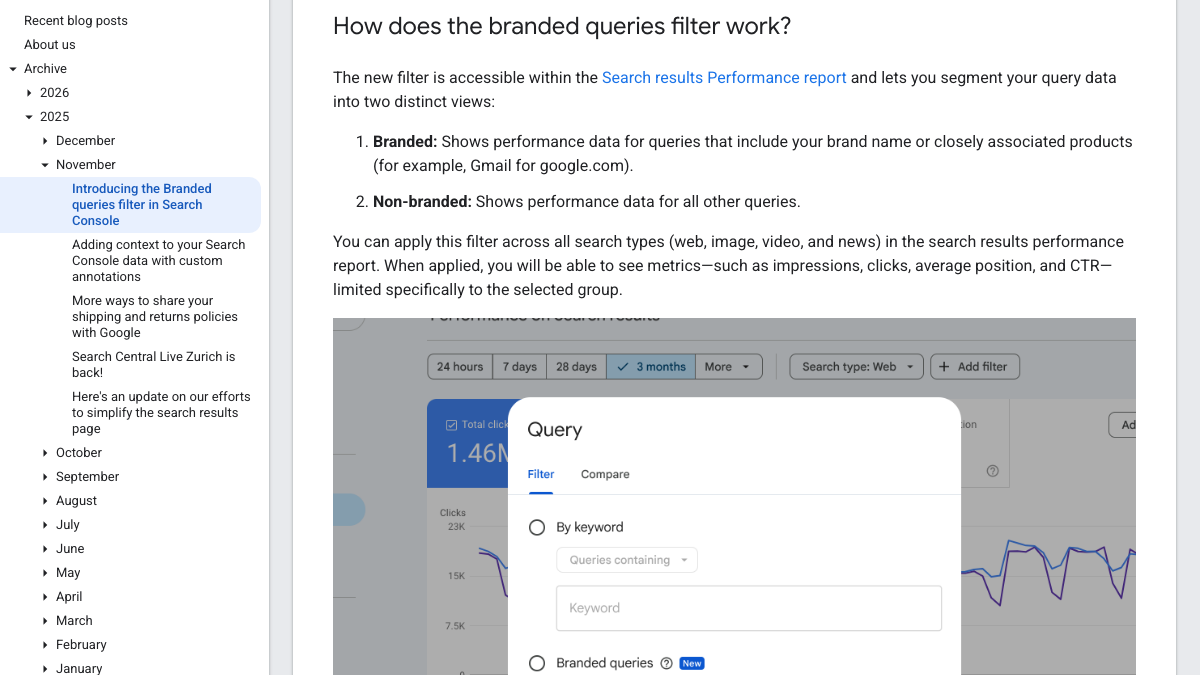
Here's how to use it.
- Open the Performance report for Search results.
- Click Add filter, then Query.
- Pick Branded queries, then choose Branded or Non-branded.
- Compare clicks, impressions, CTR and average position for each view.
Per Google's announcement, a branded query includes your brand name in all languages, typos of it, and searches for a product or service unique to your site, even when your name isn't in them. Google's example is Gmail counting as branded for google.com. The filter works on web, image, video and news results, and the Insights report gets a card with the same split of total clicks.
Google is clear that this isn't a keyword list. It says the split comes from "an internal, AI-assisted system" and not from regex, which is why it can catch product names you never thought to list.
There are two limits on who gets it. The filter only works on top-level properties, so URL-path properties like example.com/path and subdomain properties like blog.example.com miss out. It also needs "a sufficient volume of queries and impressions," and Google doesn't say how much that is. Google also warns that "some queries may occasionally be misidentified," and that the filter has no effect on rankings.
Where the filter gets it wrong
Google's warning about mistakes matches what people found. When the filter reached all sites in March 2026, an r/SEO post quoting Google's announcement drew 35 comments, and several were from people checking it against their own data.
Google is rolling out Branded and Non-branded Filters in GSC
What is a branded query? A branded query is a query that includes your brand name (for example, Google), variations or misspellings of the brand name (for example, Gogle), and brand-related products or services: (for example, Gmail). Differ...
One commenter found branded queries sitting under the non-branded filter across the board. Another said their team runs Search Console for a couple hundred local business sites, and initials were the most common thing the filter missed. Their example was a shop called "Fake Name Auto Repair," where "fn auto" didn't count as branded.
A third asked how anyone could know the labels stay steady week to week, and that's a fair worry for trend lines, since Google doesn't say whether past data gets relabeled.
There's an odder edge case too. One longtime SEO consultant posted in October that the filter marked about 77% of his site's clicks as branded, even though his top queries were generic phrases like "best search engine." His domain name is itself a generic phrase, so the filter read the category as his brand. If your name is a common term, expect the same.
The regex fallback, with a worked example
When the filter misses variants, or your property isn't eligible, a regex filter does the job by hand. It's also how SEOs split branded traffic before November 2025.
In the Performance report, click Add filter, then Query, then switch the dropdown to Custom (regex). Choose Matches regex to see branded queries. For Northfield Auto Repair, the pattern could look like this.
(?i)north\s?field|northfeild|nfar|\bnf auto
Each part covers one kind of variant. The (?i) makes it ignore capital letters, and north\s?field catches both "northfield" and "north field." Then northfeild covers the most likely typo, nfar covers the initials, and \bnf auto catches the short form the r/SEO commenter described. For non-branded data, keep the same pattern and switch to Doesn't match regex.
A few habits keep the pattern honest. Export your query list once a month, sort it and scan for name variants the pattern misses, then add them. Add your own product names if they're unique to you, but leave out any word that strangers also search, or the non-branded view will shrink for the wrong reason.
Search Console keeps filters in the page URL, so bookmark both views.
If you're eligible for both, run them side by side for a month. The gap between Google's branded count and your regex count tells you how many queries one of them is getting wrong, and reading those rows usually tells you which.
What GA4 can and can't show
GA4 can't split branded and non-branded keywords on its own, because it has no native dimension for the organic search query. Google stopped passing the query to analytics years ago, and Search Console is now the only place that has it.
Linking Search Console to GA4 helps a little. Per Google's help page, the link adds a Google Organic Search Queries report and a Google Organic Search Traffic report. But those Search Console metrics only work with Search Console dimensions plus three from Analytics, which are landing page, device and country, and they hold at most 16 months of data.
So you can see your branded queries inside GA4, but you can't tie one to a session or a sale.
The workaround is rough but useful. Group your landing pages by the kind of search that tends to reach them. Your homepage, login, pricing and about pages mostly catch branded searches, while guides and category pages mostly catch non-branded ones. Then compare conversions from organic sessions by group. It's a proxy, so label it as one in any report.
GA4 is still the right place for AI referral visits from ChatGPT and Perplexity, which our GA4 guide to AI referral tracking walks through. Just know that it measures clicks, and the branded vs non-branded split in AI happens before anyone clicks.
Your competitors are building backlinks while you read this.
Organic outreach, social mentions, and citations from Editorial Circle member sites, with managed backlinks available as an add-on. Grow your domain authority without running the campaign yourself.
Branded vs non-branded prompts in AI search
The same split works one layer up, in ChatGPT, Perplexity, Gemini and Google's AI answers. A branded prompt names you, like "what does Northfield Auto Repair charge for brakes?" A non-branded prompt names only the need, like "best place for brake repair in Northfield."
The two kinds of prompt test different things. A branded prompt tests accuracy, meaning whether the answer gets your prices, services and hours right. A non-branded prompt tests whether the AI recommends you to someone who has never heard of you, which is the version that brings new buyers.
The gap between them is large. Foundation Marketing and AirOps found brands' own sites drew 30.7% of citations on branded prompts and just 2.24% on unbranded ones. Our post on branded vs unbranded prompts compares that study with four others, so we won't repeat it here.
One r/DigitalMarketing commenter added a useful twist for branded prompts. For your bare name, Google's AI tends to lean on your own site. Add a modifier like "pricing," "reviews" or "alternatives," and it takes whoever wrote a page on that exact question, which is often a review site or a rival. So test your name with modifiers, as well as on its own.
Mentioned, recommended and cited are three different results
Marketers in recent Reddit threads keep running into the same problem. In r/AskMarketing, a commenter suggested writing down "whether the brand is just mentioned or actually recommended," since those seem like two pretty different things. In r/AISearchLab, another said citation visibility and recommendation visibility "need to be measured separately."
They're right, and the split matters most on non-branded prompts. Being one of eight names in a list is a mention. Being the brand the answer pushes is a recommendation. A citation is a link to your page as a source, and it can sit under an answer that recommends someone else.
Some data backs this up, though none of it is formal research. One r/AISearchLab poster ran the same buyer questions through six AI surfaces every week and logged about 2,200 answers. On ChatGPT, a brand that got named was cited in 21 of 22 answers. The same poster kept finding answers that used a brand's own blog post as a source and then recommended a rival. That's self-reported, so take it as a hint.
Engines also disagree with each other. Another Reddit commenter ran 20 buyer questions five times each on ChatGPT, Perplexity and Google's AI Overviews, and found only 9 of 41 brands cited by all three. A blended score would hide that.
So for each answer, log four things. Were you mentioned, were you the first pick, was your site cited, and was the description right? Our guide to mention tracking vs citation tracking goes deeper on the first and third.
Setting up both prompt lists
You can start this in an afternoon with a spreadsheet.
- Write ten branded prompts. Use your name alone, your name with "pricing" and with "reviews," your name against your main rival, and "alternatives to" plus your name.
- Write ten to twenty non-branded prompts in the words buyers use, like "best [category] for [audience]" and the problems your product fixes.
- Add a few "alternatives to [rival]" prompts to the non-branded list. They don't name you, and they come from buyers who are already shopping.
- Run every prompt in each engine you care about, the same day each week.
- Log the four fields above for every answer, and keep the two lists in separate tabs.
Never average the two lists into one number. A list that's mostly branded prompts will look great and tell you very little about new demand.
Which number to report to whom
Each audience needs a different slice, so here's a verdict for each.
- For a founder or board, report non-branded clicks from Search Console and the non-branded recommendation rate from AI checks, because those two show new demand you created.
- For a paid search team, report branded clicks and branded conversions, because that's how they decide how much to bid on your own name.
- For an agency client, report both, split, with branded search as the slow line that should rise weeks after AI mentions do. Our post on AI visibility reporting for clients lays out the full report.
- For a PR or product marketing team, report branded prompt accuracy, because a wrong price in an AI answer is their problem to fix.
- For the SEO team's own weekly check, watch non-branded clicks and average position on the pages you're working on, because that's where your changes show up.
If you need the whole scorecard on one page, our GEO KPIs guide puts these rows next to AI sessions and conversions.
Doing it yourself or handing it off
The Google side is quick. Setting up the branded filter and a regex takes under an hour, plus a short monthly scan for new name variants. The AI side is the slow part, because 20 prompts on four engines is 80 answers to read and log every week. That's a rough estimate of a couple of hours a week, before anyone writes the report.
You can do all of this by hand with Search Console and a spreadsheet. Or RankControl can run the AI half for you every week while your team works on the pages that win the non-branded questions.
RankControl's AI visibility tracking checks 50 questions every week on seven AI engines, marks each answer as mentioned or cited, and names the competitors that showed up. Our analytics track your Google and Bing rankings. We offer one plan at $400/mo with a 7-day free trial.
You're getting AI traffic. But do you know where it comes from?
RankControl credits every visit to the assistant that sent it: ChatGPT, Perplexity, Claude, Gemini, Copilot, or Grok. Full source attribution, next to your Google traffic.