
A store owner posted in r/SEO_Digital_Marketing this year with a problem plenty of shops share. Google kept indexing their color, size and price filter URLs, and they now had 10,000 thin pages sitting next to the category pages they actually wanted to rank.
That thread covers most of what ecommerce category page SEO is about. The page needs enough copy to rank, the filters on it need rules so they don't multiply into junk, and the links and pagination have to let Google reach every product. This guide takes all three from Google's own docs and one real split test, checked on October 19, 2026. It works the same on Shopify, WooCommerce, Magento or a custom build.
How much copy an ecommerce category page needs
Put a line or two above the products and the longer help below them. Shoppers came for the products, so they should show without scrolling. A block of text above the grid that shoves them down the page trades sales for a ranking you might get anyway.
The best evidence that the copy below the grid matters is old but clean. In a split test published February 4, 2020, SearchPilot removed below-the-fold "SEO text" from a travel client's category pages. Organic sessions fell 3.8%, which the team put at about 9,800 lost sessions a month.
Hold that number loosely. It's one client in one industry, tested almost seven years ago, and SearchPilot itself says results differed across clients and verticals. It's still a controlled test, which is more than most "write 300 words" advice can point to.
So what should the copy say? Write what a good shop assistant would tell someone standing in that aisle. Cover how to pick a size and what each price range gets you. HardyPaw's sensitive stomach dog food collection does this with a short guide under the grid that opens on a plain question heading.
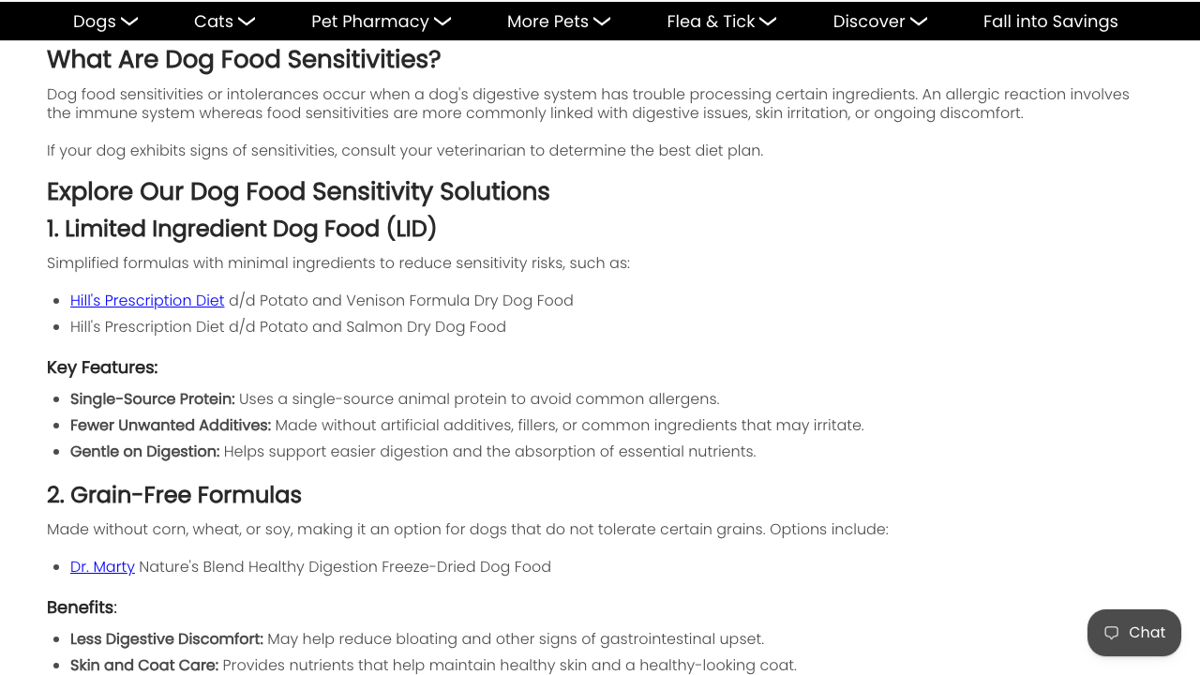
That page is one of the stores in our Shopify SEO case study, which covers the Shopify side in detail. The copy also has to match the right search, and the category name does most of that work. Our guide to ecommerce keyword research covers how to map shopper searches to categories.
We'll show you exactly where your brand stands in AI search.
No commitment. $0 due today, cancel anytime. See how ChatGPT, Perplexity, Claude, Gemini, Grok, Google AI Mode, and Google AI Overviews talk about your brand today.
Faceted navigation SEO is where most category pages go wrong
Google doesn't hedge on this one. In a December 17, 2024 post, Gary Illyes wrote that faceted navigation is "by far the most common source of overcrawl issues" site owners report to Google. He added that most of those cases could have been avoided.
The math explains why. Every filter value makes a new URL, and every combination makes another. Five colors, eight sizes and four price bands give you 160 three-filter URLs for one category, before you add sort orders. A crawler can't tell which of those are useful until it fetches them, so it burns time on junk and finds your new products later.
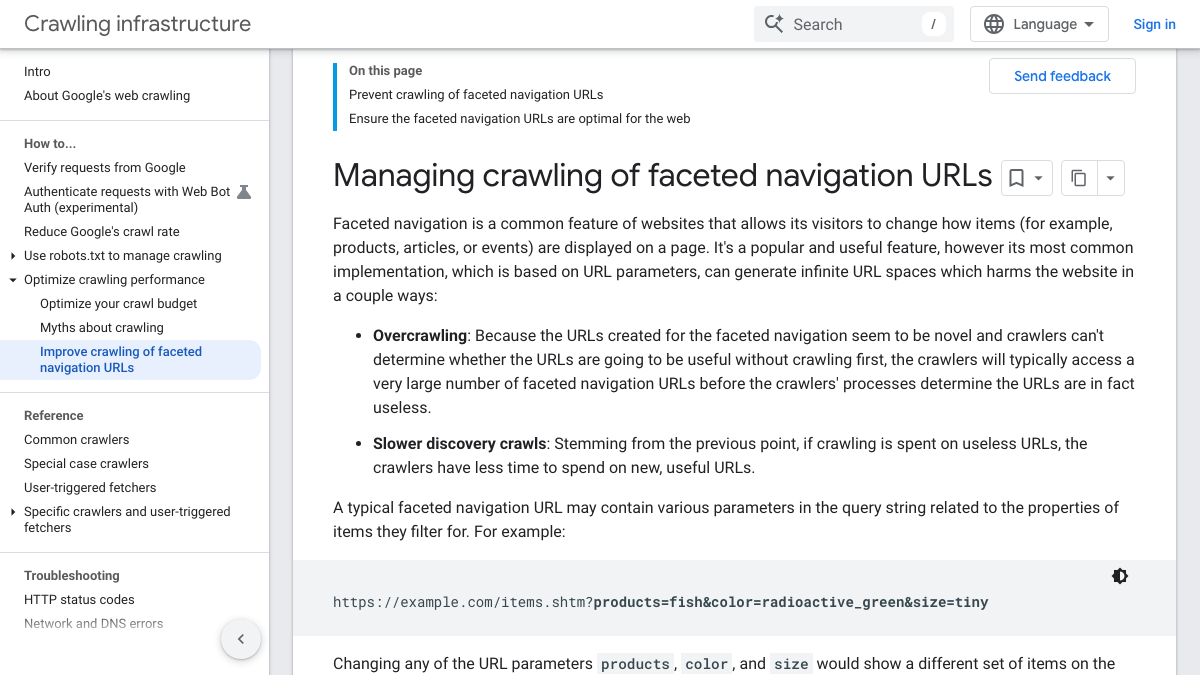
Google's faceted navigation doc, last updated December 18, 2025, gives two paths. If you don't need filter URLs in search, block them in robots.txt, or move filters into URL fragments (the part after the # sign), which crawlers skip. If you do need them indexed, keep the URLs clean. Use the standard & separator and keep filters in the same order every time. When a combination has no products, return a 404 instead of redirecting to a generic page.
Canonical tags work less well here than people think. They help Google fold filter pages into the main category, but the doc says they only "may, over time, decrease the crawl volume" of the other versions. Illyes put it more plainly, saying a canonical "takes time to get picked up." In an r/ecommerce thread about WooCommerce filter URLs, one commenter summed it up well. Canonicals guide indexing, they said, but they don't stop crawling.
Nofollow has a catch too. Google says it only works if every link pointing to the filter URL carries it, internal and external. One unmarked link in a theme snippet or a newsletter and the crawler is back in.
A decision table for filter URLs
The rule I'd use is something I call the demand line. A filter value earns an indexed page only when people search for it on its own, like "red sofas" or "running shoes for flat feet". Anything below that line stays out of the index or out of the crawl.
| Filter type | Example | What to do |
|---|---|---|
| Filter value people search for | /sofas?color=red | Index it with a self-canonical, its own title, heading and copy, or better, make it a real category |
| Single filter with no search demand | /sofas?size=small | Canonical to the parent category, or noindex if it's already indexed |
| Two or more filters combined | /sofas?color=red&size=small | Block in robots.txt, or use URL fragments |
| Sort orders | /sofas?sort=price | Block in robots.txt |
| Combination with no products | Filter returns zero items | Return a 404 |
| Paginated pages | /sofas?page=2 | Index, self-canonical, linked in sequence |
Noindex and a robots.txt block don't stack. If robots.txt blocks a URL, Google never fetches it, so it never sees the noindex tag. For filter pages that are already indexed, noindex them first, let them drop out, then add the block if crawling is still a problem.
Shopify's defaults show the block approach at work. The live robots.txt on Allbirds' store, which is Shopify's standard file, blocks sorted collection URLs and any collection URL with two filters or more.
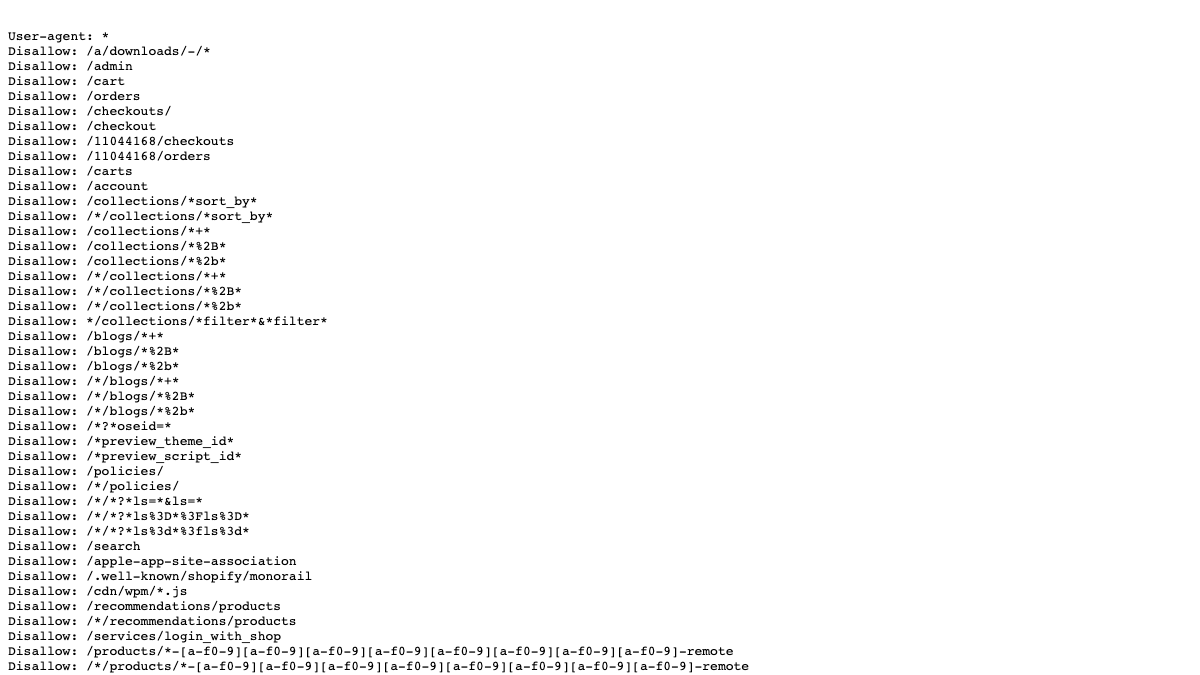
Look closely at the */collections/*filter*&*filter* line. It only matches URLs with at least two filters, so single-filter URLs stay open to crawling. That's close to the demand line out of the box, but it means a single size or price filter can still land in Google's index. Check your Page indexing report for them, and see our Shopify SEO checklist if you need to edit that file.
Pagination on category pages
Big categories split across pages, and Google's pagination doc, last updated December 10, 2025, keeps the rules short. Each page needs its own URL, like ?page=2. Each page links to the next with a normal <a href> link, and each page's canonical points at itself.
That last rule trips up a lot of stores. Pointing every page's canonical at page 1 looks tidy, but Google says "Don't use the first page of a paginated sequence as the canonical page." If page 3 claims to be a copy of page 1, the products listed only on page 3 lose their path in.
You can drop rel="next" and rel="prev" from your to-do list. Google stopped using them in 2019, and the doc still says Google "no longer uses these tags," though other search engines may.
Load-more buttons and infinite scroll need a fallback. Google's crawlers don't click buttons, so products that only appear after a click may never be found. Keep real paginated URLs behind the button.
Know exactly what AI says about your competitors.
RankControl's Recon Agent monitors competitor citations across ChatGPT, Perplexity, Claude, Gemini, Grok, Google AI Mode, and Google AI Overviews. See where they show up and you don't.

Internal links into your categories
Your own links tell Google which pages matter. The main menu, breadcrumbs and links from each product back up to its category do most of the work.
The links people forget come from content. A buying guide on how to choose a 50L backpack should link to the 50L backpacks category with that phrase, and the category should link back to the guide. Related categories should link sideways too, like trail running shoes to road running shoes.
Brand pages can blur this. An r/TechSEO thread asked whether a brand page cannibalizes category pages, and the advice was to link them on purpose. Keep the brand page on brand and range wording and the category on the generic term. Our guide to internal link structure covers planning the rest of the site.
Schema for category pages gets you less than you'd think
Plenty of guides tell you to add "collection schema" to category pages. In Google Search, it mostly does nothing you can see.
Google's ItemList carousel, the list-style rich result, works worldwide for courses, movies, recipes and restaurants, and products aren't on that list. There is a carousel beta that pairs ItemList with Product on summary pages like categories. Google's docs limit it to the EEA, Türkiye and South Africa, and Türkiye doesn't include product searches.
ProductCollection exists on schema.org, but it's still marked as a pending type, and no Google rich result uses it.
What does pay off is breadcrumb markup on the category and full Product markup on each product page. Our product schema guide covers the product side.
Where AI shopping answers get product data
AI shopping tools mostly learn what you sell from product feeds that stores send them.
Google's AI Mode shopping runs on the Shopping Graph. In a November 13, 2025 post, Google said that graph holds "more than 50 billion product listings, 2 billion of which are updated every hour." Merchant Center feeds are the main way stores send their own listings into it, so a clean feed matters more there than any category copy.
ChatGPT works in a similar way. OpenAI launched shopping research in ChatGPT on November 24, 2025. Its commerce docs ask merchants to "provide a structured product feed so ChatGPT accurately indexes and displays your products with up-to-date price and availability." Shopify catalogs flow in through Shopify's own integration, and other stores apply to send a feed.
So where does that leave category pages? They still win the Google searches that bring shoppers to a range. The buying guides linked from them are pages an AI answer can quote when someone asks how to choose. The product facts belong in the feed and on the product page.
Keeping ecommerce category page SEO from slipping
A category page you fix once can drift. A theme update can change how filter links are built, and a new filter app or sort option can open URL patterns nobody blocked. Check the Page indexing report in Search Console each month for jumps in "Crawled, currently not indexed" or "Duplicate without user-selected canonical" on filter URLs.
As a rough estimate, an intro and a short buying guide for each of your top ten categories takes about two hours apiece, so around 20 hours. A filter audit and robots.txt cleanup adds another day, and each guide you link into a category takes a few hours more.
RankControl takes on that last part. We write and publish articles such as buying guides and comparisons to Shopify and other publishing destinations, and those articles can link into your categories. We don't edit your category pages, filters or theme. We also run weekly checks on seven AI engines, so you can see whether those articles show up in answers. It's one plan at $400/mo with a 7-day free trial.
You can do all of this yourself with Google's docs, a crawler and Search Console. Or RankControl's agents can write and publish the guides that feed your categories every month while you run the store.
26 content formats. Published on your domain. Matched to your brand.
Guides, comparisons, listicles, case studies, and more. RankControl generates content that gets cited by ChatGPT, Perplexity, Claude, Gemini, Grok, Google AI Mode, and Google AI Overviews.