
A post in r/localseo this fall asked the question that sits under all local SEO automation. An agency owner's client wanted to buy fake reviews for her Google Business Profile, because her rivals had done it for months and nothing had happened to them.
Buying fake Google reviews
A client is asking me if she should buy fake reviews on her GBP. I advised her not to do it because Google is getting better at detecting fake reviews. The consequence of doing this is not worth the risk.But she said her competitors have be...
Some replies said fakes work until they don't. Others had watched Google pull reviews in batches, many at once. That tension runs through every local task you might hand to software.
This guide sorts those tasks into safe and risky, using Google's review, naming and spam policies and the FTC's 2024 fake-review rule. I read each policy page and each tool's pricing page on October 18, 2026.
Safe vs risky local SEO automation at a glance
Most of local SEO is upkeep, which software does well. The trouble starts when a tool stops doing the job and starts faking the result.
| Task | Safe to automate | Where it turns risky | The rule that applies |
|---|---|---|---|
| Review requests | Ask every customer after each job | Asking only the happy ones (review gating) | Google review policy |
| Buying reviews | Never safe | Any paid, fake or undisclosed staff review | FTC rule, in force since October 21, 2024 |
| Review replies | AI drafts, you approve each one | Replies posted with no one checking | Business Profile API policy |
| Listings and NAP | Same name, address and phone sent to every directory | Keywords or city names added to the business name | Google naming guidelines |
| Profile posts | Scheduled posts you wrote or checked | Bulk posts copied from blog summaries | Google's own filters |
| Local pages | Real pages for real places you serve | Near-copy pages for every nearby town | Google spam policy, updated August 28, 2026 |
| Rank tracking and reports | All of it | Nothing, since it only reads data | None |
Anything that reads data or sends a request to a real customer is safe. Anything that publishes in your name with nobody looking, or fakes trust you didn't earn, is where suspensions and fines start. I think of it as the button rule. Software can prepare almost anything, but a person presses the button on anything the public will see.
Automated review requests are fine, review gating is not
Review requests are the best local task to automate. BrightLocal's 2026 consumer survey found that 97% of people read reviews for local businesses, and nearly three in four want reviews from the last three months. A text or email after every job is how you keep that flow fresh.
BrightLocal sells local SEO software, though, and its 1,002 US adults reported their own habits, so read the figures as a direction.
The line is gating. Gating software asks "how did we do?" first, then sends happy customers to Google and unhappy ones to a private form. Google's review policy bans businesses that "selectively solicit positive reviews." It also bans offering discounts or gifts in return for a review.
Gating also gets found out. One SEO agency posted on X in October that it had set up gating for a client against its own advice, and after about 5,000 requests a customer called it out in public. Send the same request to everyone.
See your first AI citation report in under 5 minutes.
No setup calls. No onboarding meetings. Connect your domain and see where AI mentions your brand right now.

Bought reviews now come with a federal fine
Buying reviews is the one task with no safe version. The FTC announced its final rule on fake reviews on August 14, 2024, and it took effect that October 21. It bans buying or selling fake reviews and posting staff reviews without saying so. It also bars using threats to get reviews taken down and faking engagement numbers like followers or views.
Each violation can cost up to $53,088 in 2026, after the yearly inflation bump, and one case can cover many violations.
Plenty of small businesses assume nobody gets charged. An advertising lawyer who tracks these cases posted on the day a new FTC complaint was filed, aimed at the crowd that says no one gets in trouble for fake reviews. His point was that these cases are being filed now.
From an FTC case filed today against a business that claimed to help victims of sextortion: Another one for the "bro no one is getting in trouble for fake reviews" crowd. https://t.co/aQla5Ckjk4
 Rob Freund@RobertFreundLawOct 13, 2026
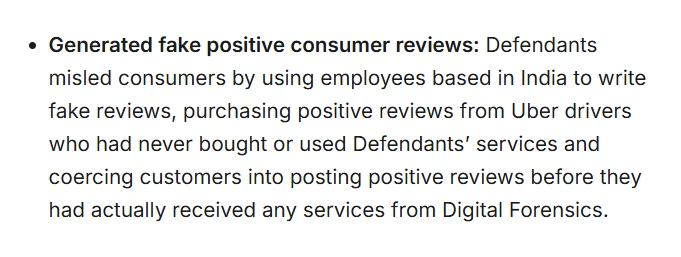
Google adds its own penalty. A local SEO in that r/localseo thread said they'd seen profiles drop from more than 80 reviews to 12 overnight in a purge, with rankings falling after. That's one person's account, but it fits what others described.
If fake reviews are hitting you instead, the top answer in a 103-comment r/SEO thread pointed to the Reviews appeal tool in your Business Profile manager. One appeal can cover several reviews.
Review replies need a human click
AI is good at drafting review replies. It can thank the customer by name, mention the job and stay calm under a one-star rant. Posting is where it gets risky.
Google's Business Profile API policies say a tool needs "prior specific and express consent" before it automates replies, Q&A answers, listing edits or "other actions" on a profile. Google doesn't spell out how much consent is enough. So the safer setup is a queue, where the tool drafts, you read it on your phone and you tap approve.
Automate your listings, but leave the name alone
Sending the same name, address and phone number to every directory is dull, exact work, a good fit for software. Google itself lets a business with 10 or more locations manage its profiles in bulk for free.
The risk is in what gets sent. Google's naming guidelines say the name must match the real-world name, and adding a service, product or location to it is banned. Google's own example of a bad name is a hotel listed as "Holiday Inn (I-93 at Exit 2)," and the page warns that breaking the rule "could result in the suspension of your Business Profile." A sync tool copies a stuffed name to 50 directories as fast as a clean one.
Our guide to NAP across multiple Google Business Profiles covers naming when you run several.
Bulk setup is the other trap. A few X accounts this fall described batches of auto-made listings getting suspended. I couldn't confirm their counts, and Google publishes none. Create and verify each profile by hand, then let software keep the details in sync.
Where Google's spam policy draws the line on local pages
Local content is worth making. Whitespark's study of AI Overviews in local search found them on about 68% of local business queries. Simple local searches showed them only 15% of the time, with the map pack on 93%, but informational and mixed-intent searches hit 92% to 97%. The study used 540 hand-collected queries in three US cities in May 2025, so treat it as a dated direction.
Pages that answer those questions are also where automation goes wrong fastest. Google's spam policies, updated August 28, 2026, name two problems. Scaled content abuse means many pages made mostly to rank, with little unique value. Doorway abuse means sets of city or region pages that all funnel people to one place. A tool that spins "Plumber in [Town]" for 40 nearby towns, with only the town name changed, is the textbook case.
The safe version is a page for each place you really serve, with details only that place has, like jobs you did there or local permit rules. Our post on automating SEO content within Google's quality standards goes deeper on that line.
Profile posts follow the same idea. In one r/localseo thread, a commenter who auto-posted blog summaries to Google Posts had them removed, which suggests Google's filters catch bulk promo posting. Schedule posts ahead if you like, but write or check each one.
RankControl works on the website side of this. Our content engine writes articles for the questions your buyers ask and publishes them on your own site through your CMS, and auto-publish is off by default. We don't post to your Business Profile or handle reviews.
Your competitors are building backlinks while you read this.
Organic outreach, social mentions, and citations from Editorial Circle member sites, with managed backlinks available as an add-on. Grow your domain authority without running the campaign yourself.

Rank tracking and reports are safe to fully automate
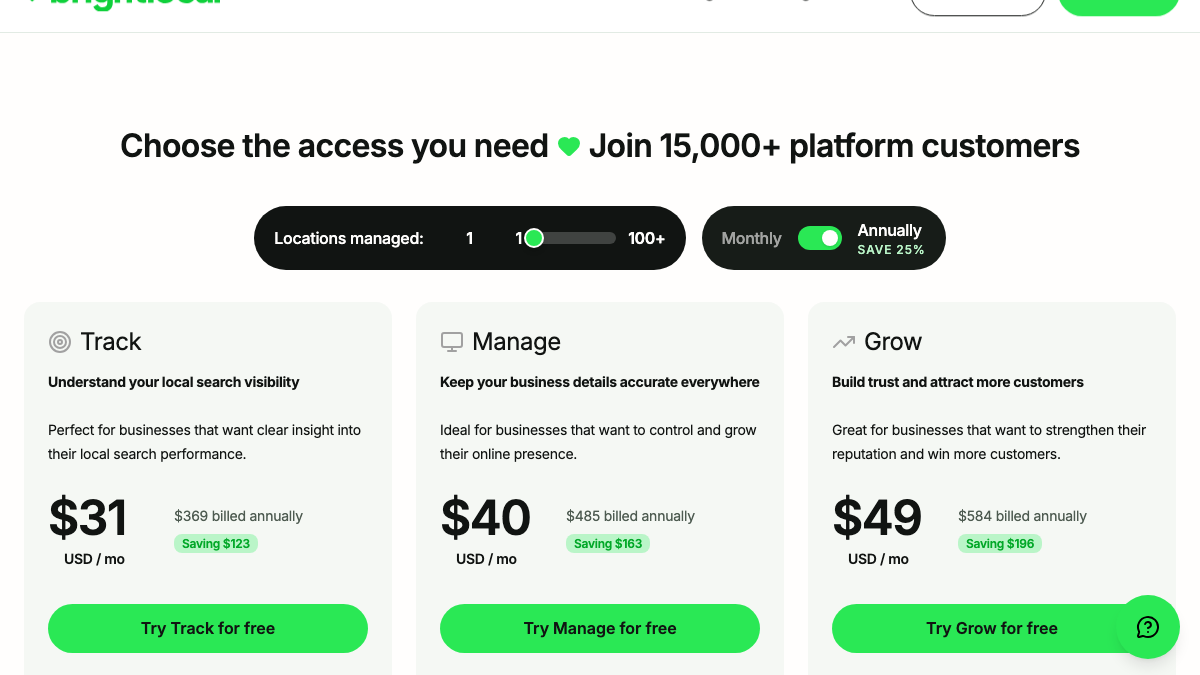
Tracking only reads data, so there's no policy to break, and the prices are low. BrightLocal's plans cost $31, $40 or $49 a month on annual billing, or $41 to $65 monthly, with a 14-day trial and no card. Track covers local rankings, Manage keeps listings accurate and Grow is aimed at reputation.
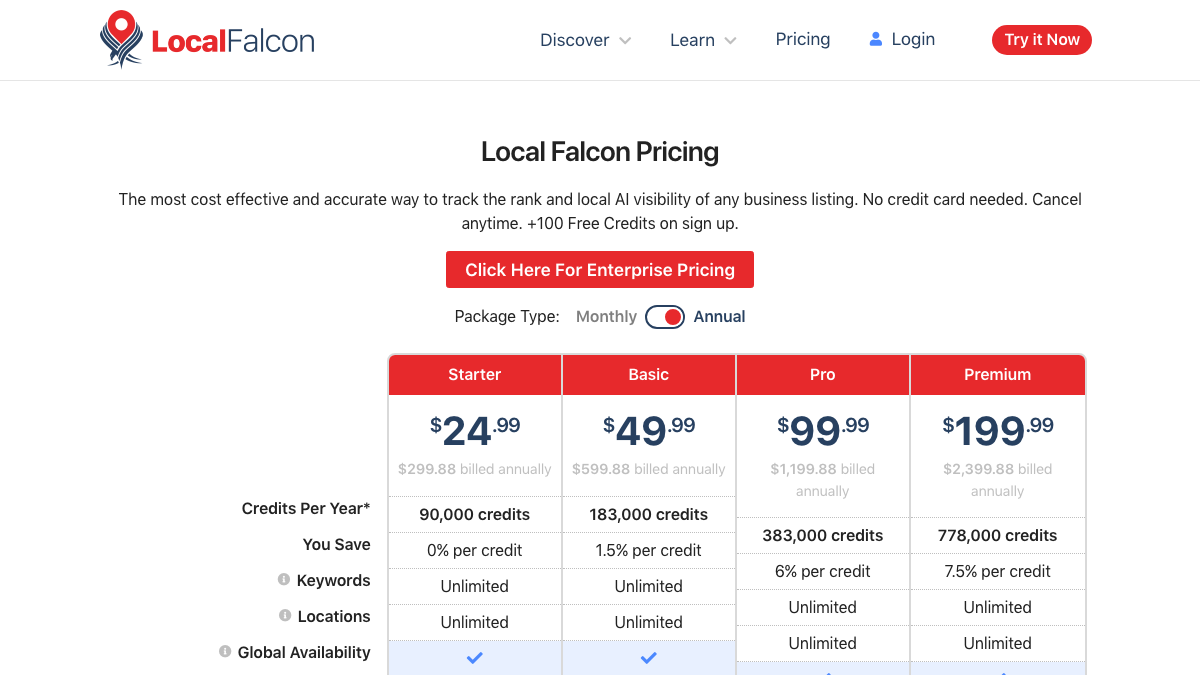
Local Falcon does grid tracking, which shows where you rank across a map of points around your business. Its plans run from $24.99 to $199.99 a month on annual billing, and new accounts get 100 free credits.
Whitespark sells its parts one by one. Its Local Platform for managing profiles costs $1 a month per location, and ranking grids begin at $10 a month. Its listings service is a one-time fee of $20 to $999.
Most people end up with two or three of these. A freelancer in r/localseo asked for one tool to run many profiles, and the replies kept naming BrightLocal for the profile dashboard, Local Falcon for grids and Whitespark for citations. One reply called the hunt for a single do-it-all platform a trap.
Looking for a tool to manage multiple Google Business Profiles
I manage Google Business Profiles for several small business clients and I'm looking for a tool that can simplify the day-to-day management. Ideally, I want something that allows me to manage profile information, publish and schedule Google...
Map rankings are only half the picture now. Buyers also ask ChatGPT, Perplexity and Gemini for a local pick, and those answers never show up in a grid report. RankControl's AI visibility tracking checks your buyer questions every week on seven AI engines and tracks your Google and Bing rankings beside them. A fixed listing can drift back and a page can slip, so the checks have to keep running.
Our guide to the Business Profile signals that move AI citations covers what those engines read.
A weekly local SEO routine with a person in the loop
Here's the safe split as a routine for one location, with my rough time estimates.
- After every job, software sends the same review request to every customer. Once set up, it takes none of your time.
- Twice a week, read the drafted review replies and approve or edit each one. About 20 minutes each time.
- Once a week, approve the scheduled profile posts. About 15 minutes.
- Once a week, skim the rank and AI-visibility report for drops. About 15 minutes.
- Once a month, check the listings report for an old address or phone. About 30 minutes.
- Once a month, publish one or two real local pages. Four to six hours each by hand.
That's roughly 10 to 17 hours a month, and most of it goes to the pages. Reviews and listings also shape what AI engines say about you, as our piece on what AI search engines trust explains.
What to hand off first
If you're starting from zero, automate review requests and rank tracking first. Both are cheap, and neither comes near a policy line. Listing sync comes next, then drafted replies behind an approval queue. Our guide to local SEO for AI search covers the AI side.
Leave out review gating, bought reviews, stuffed business names and near-copy city pages, whatever a vendor's demo shows. Each one breaks a named rule from the table above.
You can run all of this yourself with a review tool, a tracker and a few hours a month. Or RankControl's agents can write and publish your local articles and run the weekly AI and ranking checks, while the review and profile work stays in your hands.

You're getting AI traffic. But do you know where it comes from?
RankControl credits every visit to the assistant that sent it: ChatGPT, Perplexity, Claude, Gemini, Copilot, or Grok. Full source attribution, next to your Google traffic.