
SE Ranking's help center answers the question most people ask before they switch, and the answer is better than usual. Asked whether you lose your data right after cancelling, it says no: access runs to the end of the paid period, and after that "your projects remain stored for 60 days but stay inactive." Its terms of service use the same 60-day figure.
So you have time. What you don't have is an unlimited export, and that's where people lose history they meant to keep. This guide covers how to switch from SE Ranking without losing anything that matters. Every step comes from SE Ranking's own help center, pricing page and terms, checked on September 26, 2026, and it assumes you're moving your AI search work to RankControl, and possibly keeping a rank tracker for the rest. If you're still comparing the two, our RankControl vs SE Ranking breakdown covers engines, pricing and the verdict.
What you're actually moving
Most SE Ranking accounts hold four kinds of data. Rank tracking history is the one you can't recreate, because no tool can go back and check where you ranked last March. Keyword lists, audit results and backlink data can all be rebuilt, though rebuilding takes time.
If you added the AI Search toolkit or use SE Visible, SE Ranking's standalone AI visibility product, there's a fifth: the prompts you track in AI engines. And if you used the Content Marketing add-on, you'll have drafts sitting in the content editor too.
One thing to be plain about before you start. SE Ranking's rank tracker checks up to 2,000 keywords a day on its Core plan and 5,000 on Growth, and RankControl doesn't try to be that. RankControl reports Google and Bing positions for the keywords its own articles target, but if a daily 5,000-keyword report is part of your job, keep a rank tracker for it.
How to export your data from SE Ranking
SE Ranking documents the steps. In Rankings, pick the date range from the calendar, filter to the keyword group you want (or skip the filter for everything), and click Export. You can export all search engines at once or one at a time.
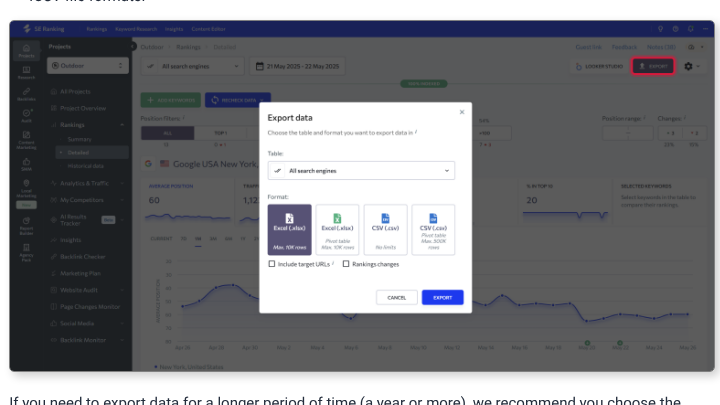
The format matters more than it looks. The dialog caps both Excel options at 10,000 rows, the pivot-table CSV at 300,000, and the plain CSV has no limit. SE Ranking's own advice for a year or more of history is to use CSV, and we'd tick "Include target URLs" so each row shows which page was ranking.
A long history for a large project can pass 10,000 rows quickly, which is how the Excel option can quietly cut it short. Export CSV, open it once to check the date range covers everything, and keep a copy somewhere other than your downloads folder.
Backlinks and the sample cap
Backlink data is where the in-app export falls short. SE Ranking's backlinks FAQ explains that the tables show an "analysed sample," such as 10,000 backlinks, rather than the full total, and exports come from that sample. The full list needs its Data API.
There's a recent change that helps. Plans sold since June 29 include a monthly allowance of Data API credits, 25,000 on Core and 100,000 on Growth, plus MCP access, so you may be able to pull more than the sample without buying the API add-on. If you only care about the links you built yourself, Backlink Monitor's list of your own tracked links is usually smaller and exports the same way.
Audits, content drafts and AI prompts
Website audits download as PDF reports from the audit page. There's no spreadsheet export of the audit table that we could find, so save the latest PDF as your before-picture.
Content drafts from the Content Marketing add-on export as .docx, HTML or Google Docs, or push to WordPress. If you have drafts that never went live, export them and read them before republishing, since a draft written months ago was written against the search results of that week.
AI Results Tracker and SE Visible prompts are simpler. Copy your prompt list, grouped the way you had it, into a document. Those prompts become your first tracked queries in RankControl.
15 hours a week manually. Or 15 minutes with RankControl.
Track citations, monitor competitors, and fix content gaps across every AI search engine. Automatically.

Cancel, then use the 60-day window
SE Ranking's cancellation steps are short: Billing, then Current plan, then Cancel subscription, and confirm on the next screen. The help article warns that the confirmation screen has required fields and a final button, and that choosing "Nevermind" aborts the whole thing.
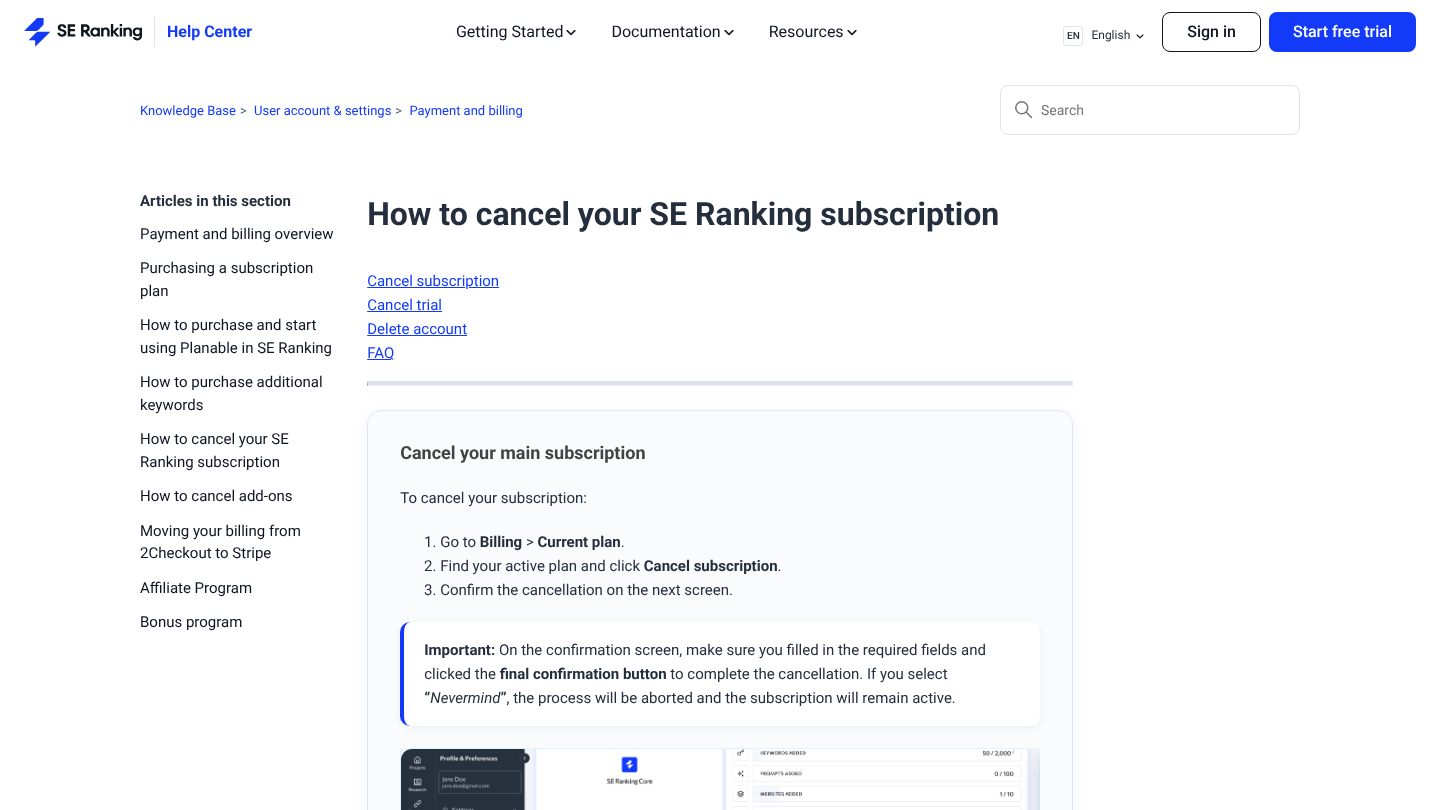
Auto-renewal stops as soon as you cancel, and access continues until the end of the period you paid for. Add-ons are the catch: anything bought on the same invoice as your plan cancels with it, but an add-on with its own invoice has to be cancelled separately. Check the Invoices page before you assume the AI Search or API add-on went with the plan.
After the period ends, projects stay stored but inactive for 60 days, and signing up for any plan brings them back. That window is a safety net, not a plan, because the terms also let SE Ranking delete projects on an account unused for 60 days. Export everything before your period ends, and treat the 60 days as the time to notice anything you missed. Deleting the account is a separate, permanent step in Profile Settings.
What the refund policy covers
SE Ranking's pricing FAQ puts it plainly: "Payments are non-refundable, except in cases where the service wasn't delivered as promised (or where a special promotion specifies otherwise)." The terms add that approved refunds are paid within 14 bank days. The free trial, at least, doesn't turn into a paid plan; SE Ranking says it simply expires.
The practical move is to cancel a few days before your renewal date rather than after it. An annual plan's value sits in the remaining months, so the export plan above is worth finishing before the period you've already paid for runs out.
Where things land in RankControl
RankControl has no import tool, and most of what you export becomes reference rather than data to load. Here's where each piece goes:
| From SE Ranking | Into RankControl |
|---|---|
| Rank history (CSV) | Your archive and before-picture; RankControl reports positions for its own articles' keywords from here on |
| AI Results Tracker or SE Visible prompts | Up to 50 tracked queries, checked weekly on six AI engines |
| Competitors in your projects | Up to 10 competitors in your share of voice |
| Backlink exports | A reference list; Link Control finds new prospects for each article you publish |
| Audit PDFs | Your site's before-picture; fixes stay with whoever owns the site |
| Content drafts | Source notes, or style references if they're your best published work |
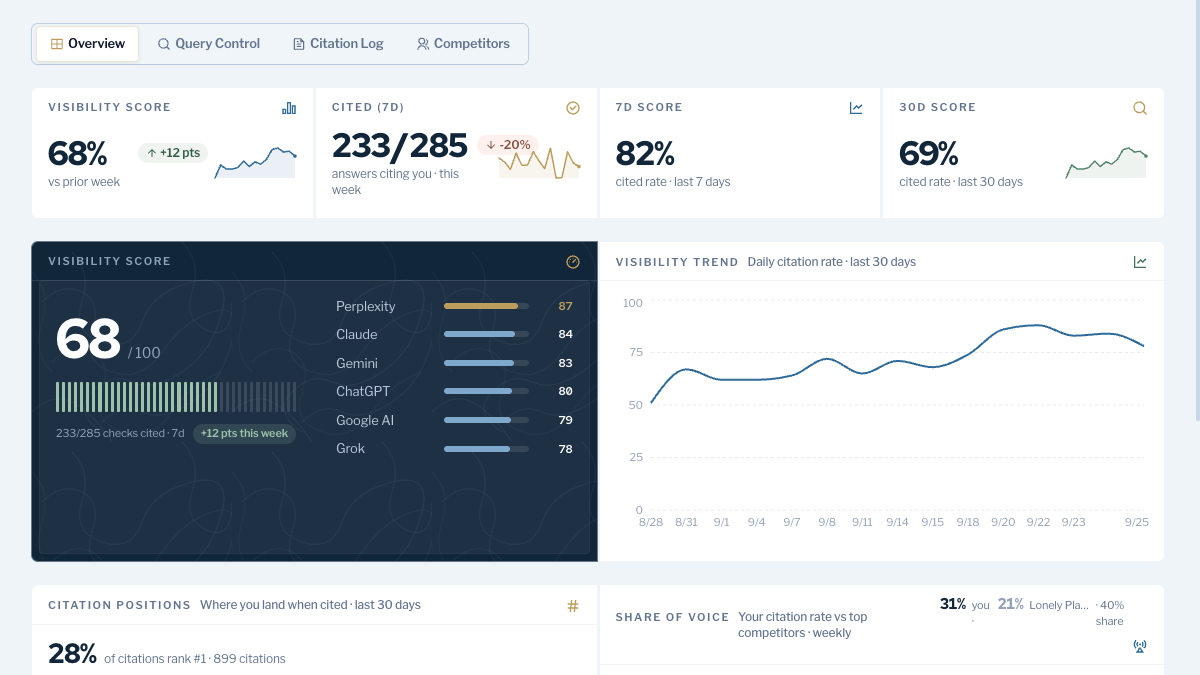
The prompts are the part to get right. If you tracked them in SE Ranking, you'll notice two new engines. RankControl's AI visibility tracking checks Claude and Grok, which SE Ranking's trackers don't cover yet, alongside ChatGPT, Gemini, Perplexity and Google AI Mode. Rewrite any keyword-style prompts as the full questions buyers ask before you add them.
The other change is cadence. SE Visible says its data is "refreshed daily across all tracked prompts," and RankControl checks weekly. Daily checks catch more movement, but much of that movement is noise: in SparkToro's January study of nearly 3,000 runs, the same prompt almost never returned the same brand list twice. A weekly rate over a month or two is the number we'd put in front of anyone who asks whether the work is paying off.
Brand Control then reads your live site and drafts your voice, products, buyers and competitors, and you correct the draft. The content engine plans articles from your tracked queries and publishes them to your CMS once you approve, and Link Control looks for link prospects for each published article and drafts outreach from your own mailbox, which SE Ranking's backlink tools don't do.
AI search traffic grew 835% this year. Is your content ready?
RankControl generates 26 content formats optimized for ChatGPT, Claude, and Perplexity. Published on your domain, matched to your brand.

The switch from SE Ranking, step by step
- Note your renewal date on the Billing page and check the Invoices page for separately billed add-ons: 10 minutes.
- Export rank history for each project as CSV with target URLs included: 20 to 40 minutes.
- Export backlinks, pulling more through your included API credits if the sample isn't enough: 20 minutes.
- Save the latest audit PDFs, export content drafts and copy your AI prompts: 20 minutes.
- Start RankControl, correct the brand draft, and add tracked queries and competitors: about an hour.
- Connect your CMS through a publishing destination and scan your sitemap: 20 minutes.
- Cancel SE Ranking, complete the confirmation screen, and cancel any separately billed add-ons: 10 minutes.
That's about three hours, most of it exports. You can keep doing the AI search work by hand after the switch: someone turns tracked prompts into articles, publishes and pitches them, and re-asks six engines every week. Or RankControl can run that loop every month for $400, with a 7-day free trial, while your team keeps whatever rank tracker it trusts.

Built by the team that got cited in 48 hours.
Content generation, backlink building, AI visibility tracking, and Google rankings. One platform, zero guesswork.