
Nightwatch's help doc on reports ends one of its sections with a note in bold: reports come in three formats, PDF, CSV and HTML. That covers the ranking side of a move. The AI side is thinner. Its help doc for LLM Tracking walks through prompts, brand entities, citations and a source matrix, and we found no mention of an export in it.
So switching from Nightwatch comes down to two jobs. Export your ranking history the documented way, then capture your AI prompt and citation data by hand before the account closes. This guide covers both, how to cancel, and where each Nightwatch feature lands in RankControl. If you're still comparing, our RankControl vs Nightwatch breakdown covers engines, publishing and the verdict. Nightwatch's pricing page, help docs and terms were checked on September 26, 2026.
Why teams move off Nightwatch
Nightwatch started as a rank tracker, and its plans are still sized around keywords. Starter costs €79 a month for 500 keywords and 50 AI prompts, Professional costs €159 for 2,500 keywords and 150 prompts, and Agency costs €399 for 7,500 keywords and 500 prompts. Teams whose main question has become "are we in the AI answer?" end up paying for a keyword allowance they don't use.
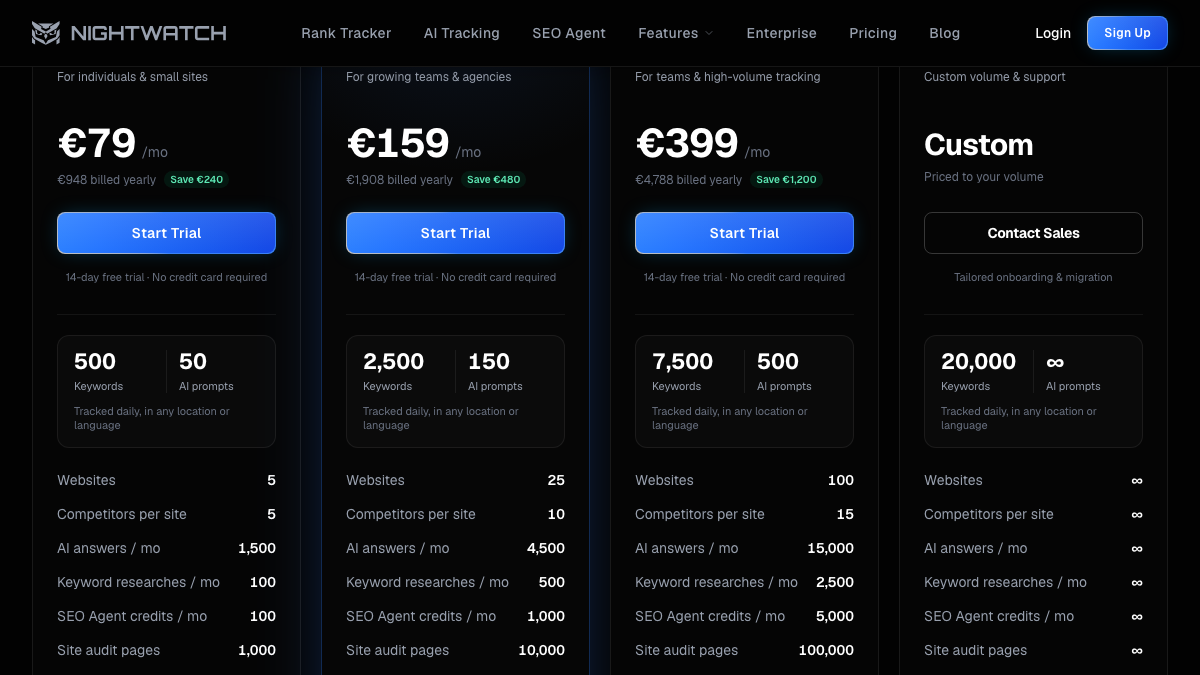
The AI allowance is also tighter than the prompt count suggests. Each plan's monthly AI answers equal its prompt count times 30: 1,500 on Starter, 4,500 on Professional and 15,000 on Agency. That covers one check per prompt per day, so spreading the same prompts across several AI platforms uses the budget faster. The pricing page lists ChatGPT, Claude, Gemini, Perplexity, AI Mode and AI Overview on every plan. Nightwatch's LLM Tracking help doc says Gemini needs a plan with 300 or more prompts, so confirm which applies to yours. Grok isn't on either list.
Then there's the work after the report. Nightwatch's pitch is that it shows which ranking change moved your citations. A team still has to write and publish the page that fixes the gap, and that part stays on your side of the table.
What comes with you when you switch from Nightwatch
Most of what matters can leave with you, if you pull it before you cancel:
- Keyword ranking history for each site, as CSV reports
- Saved Views and Global Views, exported as reports
- Your LLM Tracking prompt list and the citations behind it
- Site audit reports
- Competitor lists for each site
Your Google Analytics and Search Console data were never Nightwatch's to keep. Disconnect the integrations after you leave.
How to export your data from Nightwatch
Nightwatch documents exports for rankings and audits. For AI tracking, plan on doing it by hand.
Rankings and Views
Nightwatch's help doc describes the report builder:
- Click the Reports icon at the top of your Nightwatch page.
- Click Add Report and pick a URL, a View or a Global View.
- Set the date range, template and elements.
- Click Download report and choose CSV for data you can reuse, or PDF for a record.
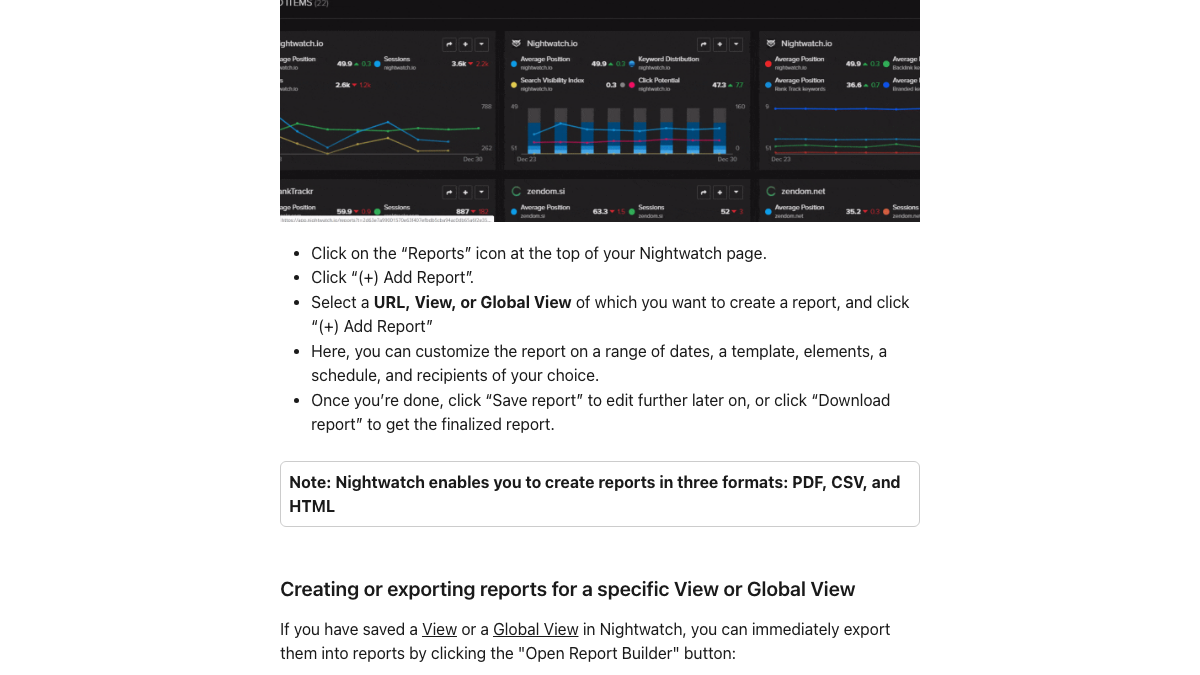
Set the widest date range you have, and add the Keyword List element so every tracked keyword lands in the file. If you track several sites, a Global View exports all of them in one report. Graphs on a site page also have a Download as CSV option for the trend lines.
LLM Tracking prompts and citations
We found no export in Nightwatch's LLM Tracking help doc, so capture it manually:
- Copy your tracked prompt list into a spreadsheet, one prompt per row.
- For each prompt, note whether your brand appeared and which competitors showed up, with positions.
- Screenshot the Citations dashboard and the source matrix, with the date range visible.
- Record the top cited domains, since they show which sites the engines trusted.
On Starter that's 50 prompts, so budget two to three hours. There may be a faster route: Nightwatch's SEO MCP server, listed on every plan, says it exposes AI visibility data, so you can ask Claude to pull your prompt results into a table before you cancel. Check the output against the dashboard for a few prompts.
Site audits and competitors
Site audit results can go into the same report builder as a PDF. Copy your competitor list for each site into the spreadsheet, since you'll name competitors again during setup.
Keep the history useful
Store the CSVs somewhere your team will find them, named by site and date range. They're your baseline. When RankControl publishes a page for a keyword you used to track in Nightwatch, you can compare its new Google position with where the site stood before, and see whether the published page moved the number. The prompt spreadsheet does the same job for AI answers, because it shows which questions named you before the switch.
15 hours a week manually. Or 15 minutes with RankControl.
Track citations, monitor competitors, and fix content gaps across every AI search engine. Automatically.

Cancel on the right day
Nightwatch's terms of service say it is not obligated to provide a refund at any time. Plans have no long-term commitment, so the date matters more than the click. Finish your exports, then cancel before the next billing date.
On current plans billed through Stripe, the steps from Nightwatch's help doc are: click the three-dot icon at the top right of the navigation, open Settings, go to Billing, click Manage Stripe Billing, then click Cancel plan. Older legacy plans cancel from the Upgrade option in the same three-dot menu.
What changes when you move
Nightwatch is a full rank tracker and RankControl isn't. Nightwatch tracks thousands of keywords daily across Google, Bing, YouTube and Google Maps in 107,000+ locations, while RankControl tracks Google and Bing positions only for the pages it publishes.
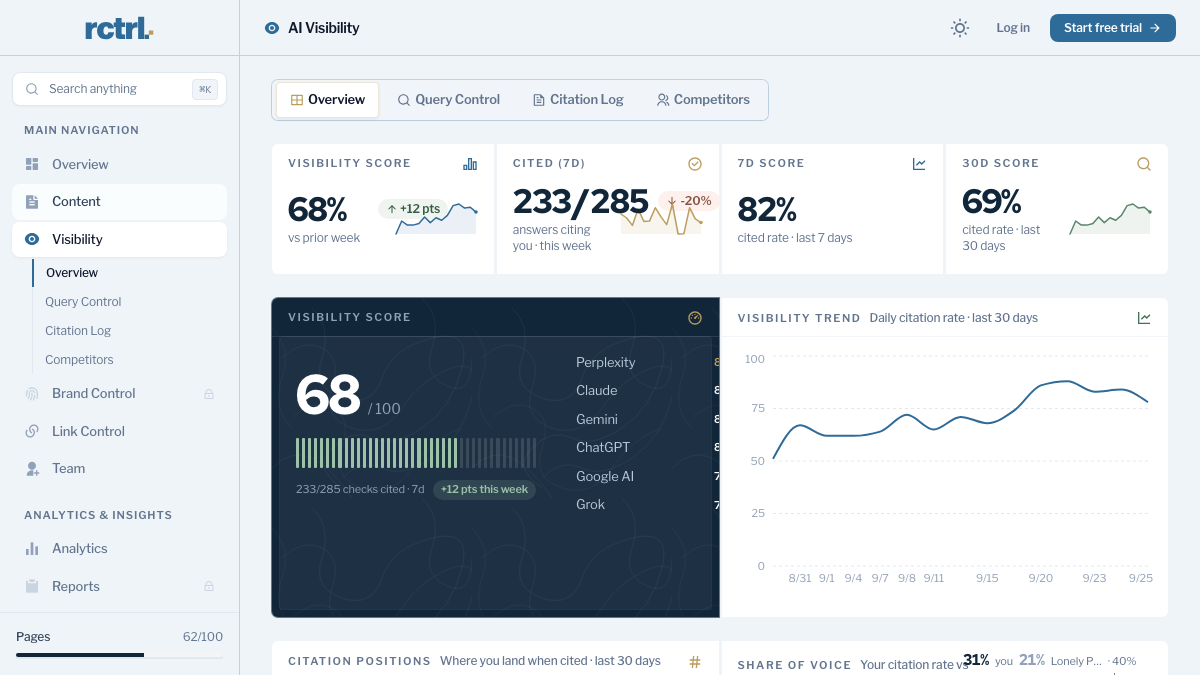
The bigger shift is from watching to publishing. RankControl's content engine plans titles from the questions your buyers ask, writes each article against the pages already ranking for its keyword, and publishes it as a native post through the CMS you connect. Then AI visibility tracking checks 50 queries every week across six engines, Grok included, to show which pages started getting cited.
Where everything lands in RankControl
| In Nightwatch | In RankControl |
|---|---|
| LLM Tracking prompts | 50 queries checked weekly on ChatGPT, Perplexity, Claude, Gemini, Grok and Google AI Mode |
| Citations dashboard and source matrix | Citation history per engine, with the sources AI answers cite |
| Competitors per site | Up to 10 competitors, with share of voice in AI answers |
| Keyword rank tracking | Google and Bing positions for each page RankControl publishes |
| Content Studio and SEO Agent | Articles planned, written and published, up to 100 pages a month |
| Reports and white-label reports | The Reports screen and a weekly email with new citations and ranking gains |
| SEO MCP server | RankControl's MCP server in Claude, Cursor or Codex, 80+ tools, included |
| Google Analytics integration | An AI crawler log and AI referral traffic for the pages RankControl publishes |
AI search traffic grew 835% this year. Is your content ready?
RankControl generates 26 content formats optimized for ChatGPT, Claude, and Perplexity. Published on your domain, matched to your brand.

Daily checks against weekly checks
Moving from daily to weekly AI checks sounds like a downgrade, but AI answers shift from run to run, so one day's result says little on its own. An agency marketer in r/AISearchLab described tracking AI answers by hand for 20 clients week after week, and one reply suggested a small set of recurring prompts reviewed weekly rather than daily. The value, that reply said, is in consistent changes in citations and sources over time.
Is there a practical tool for ai seo tools and software that is not just a classic rank tracker?
Someone tell me how I can make this more practical and actionable. The agency im working at is running content for like 20 clients. So a good chunk of my work week is all about me manually tracking if/how the different brands are showing up...
That changes how you choose what to track. From your Nightwatch prompt list and keyword export, keep the 50 buyer questions closest to revenue. A fixed set checked every week gives you a trend you can act on.
The switch from Nightwatch, step by step
- Find your next billing date and put it on the calendar.
- Export ranking reports as CSV for every site, or once through a Global View.
- Capture LLM Tracking prompts, positions and citations by hand.
- Save site audit reports and copy your competitor lists.
- Start RankControl's 7-day trial. Connect your CMS, let it build your brand profile from your site, and name up to 10 competitors.
- Add your 50 queries. The CLI's
query-addtakes one query per call, so a short loop over your shortlist adds them all. - Cancel Nightwatch through Stripe billing before the renewal date, then disconnect Google Analytics and Search Console.
Running both for a week gives you Nightwatch's last readings next to RankControl's first weekly check on the same questions.
What your month looks like afterwards
The work moves from reading dashboards to approving pages. Titles land on a calendar and articles arrive for review. Approved ones publish to your site as native posts, and auto-publish stays off until you switch it on.
Done by hand, that side of the month is heavy. Researching, writing, linking and publishing 20 articles takes 40 to 60 hours, and checking 50 questions on six engines takes about five hours a week. Those are rough estimates, and with a tracker alone the publishing hours stay with your team.
You can keep running that loop yourself with your exports as the map. Or RankControl's agents can run it every month while your team approves the pages.

Built by the team that got cited in 48 hours.
Content generation, backlink building, AI visibility tracking, and Google rankings. One platform, zero guesswork.