
On September 26 we checked Google's AI Overviews for seven pricing searches about well-known SaaS products, and compared them with the live pricing pages. The headline prices were mostly right. The overview for "how much does Help Scout cost" said its Pro plan includes 25 shared inboxes. Help Scout's own pricing page says 10.
| Search | What the overview got right | What it got wrong or left out |
|---|---|---|
| help scout pricing | Plan prices of $25, $45 and $75 per user | Didn't say those are annual prices; monthly billing costs more |
| how much does help scout cost | Annual and monthly prices, user limits per plan | Said Pro includes 25 shared inboxes; the pricing page says 10 |
| notion pricing | Plus and Business annual prices | No errors in the prices we checked |
| asana pricing, how much does asana cost per user | Starter and Advanced annual prices | No errors in the prices we checked |
| calendly pricing | Standard and Teams annual prices, Enterprise starting point | No errors in the prices we checked |
| monday.com pricing | Basic and Standard annual prices | We couldn't verify the monthly prices it listed |
The overview cited 12 sources, and only three were Help Scout's own pages. Seven were pages from other software companies, mostly blog posts about Help Scout's pricing. We opened every one, and the only page containing that "25 inboxes" figure was a third-party comparison site. The error didn't come from Help Scout, and it didn't come from nowhere. It came from a source.
That's the most useful thing to know when an AI Overview gets your brand wrong. This guide walks through how to find where an error comes from, fix it at the source, report it to Google and check that the correction sticks. Sources were checked on September 27, 2026.
Why AI Overviews get facts wrong
AI Overviews are right most of the time, and wrong often enough to matter. In April, The New York Times published an analysis that found AI Overviews answered about 91% of benchmark questions correctly, up from about 85% with an earlier model. At Google's scale, the remaining one in ten is a lot of wrong answers.
It's live: @trippmickle & a few other authors from @nytimes published new research about how frequently Google's AI Overviews are wrong. It includes a quote from both @thomasgermain and me about listicles influencing AI responses. Check it out - https://t.co/cIouYjP8kt https://t.co/jMhk3MH27F
 Lily Ray 😏@lilyraynycApr 8, 2026

Google's own explanation of early errors, published by its head of Search in May 2024, named two causes: data voids, where little good content exists on a question, and satirical or low-quality content being read at face value. For brands, the common cause is simpler. An overview summarizes the pages it retrieves, so an outdated or ambiguous page about you becomes part of the answer.
Sometimes the overview also merges sources. Glenn Gabe highlighted a case from the recipe niche in July, where AI Overviews stitched steps and ingredients from separate recipes into one that no one had tested.
The recipe niche has been facing a unique AI situation that Adam from @inspiredtaste coined "Frankenstein Recipes". That's where Google's AI stitches together steps and ingredients from *separate* recipes and presents them in AI Overviews or AI Mode. They haven't been tested,
 Glenn Gabe@glenngabeJul 11, 2026
The same thing can happen with product plans, prices and locations, when details from different pages get combined into one confident sentence.
We'll show you exactly where your brand stands in AI search.
No commitment. $0 due today, cancel anytime. See how ChatGPT, Perplexity, Claude, Gemini, Grok, Google AI Mode, and Google AI Overviews talk about your brand today.
Step 1: Capture the error exactly
Before fixing anything, record what you saw. Take a screenshot, and note the exact search, the date, whether you were signed in and the country you searched from. Copy the wrong sentence word for word.
Then run close variations of the search, such as "[brand] pricing" and "how much does [brand] cost." In our check, "Help Scout pricing" and "how much does Help Scout cost" produced different overviews with different sources, and only one contained the inbox error. Knowing which searches carry the mistake tells you how widespread it is.
Step 2: Trace the claim to its source
This is the step most teams skip, and we call it the source trace. Open every source the overview cites and search each page for the wrong claim, using the specific number or phrase.
So where did the 25 come from? Usually one or two pages contain a claim like that, and those are your targets. In our case it was a comparison site that listed "25 inboxes" for the Pro plan, and none of the other 11 cited pages contained that figure. If no cited page contains the claim, the overview may have merged details from several sources, and the fix is to make your own page state the correct fact so clearly that it can't be misread.
Check your own pages too. An old blog post, a press release or a help article with outdated prices can be the source, and those are the easiest to fix. For coupon and review searches, our guide to protecting your brand from bad citations shows which outside sources turn up most.
Step 3: Fix it at the source
Start with your own site. State the facts buyers ask about in plain sentences on the pages that matter: current prices with billing terms, plan limits, locations and what your product does and doesn't do. Update or redirect old pages that carry outdated facts, and put a visible "last updated" date on pricing and plan pages.
Then contact the third-party sites. Comparison sites and review platforms usually accept correction requests, especially when you send the wrong claim and the correct figure, with a link to your official page as proof.
Local and location errors need the same treatment across more places. In June, a business owner posted in r/GoogleMyBusiness that Google's AI summary still placed them in their old area, nearly three years after they moved, despite repeated reports.
AI Summary has been wrong for months
Almost 3 years ago I relocated my business. My AI summary still says I work in the old area even though all my recent reviews, my description, and my updates mention the new area. Several months ago I had a friend click to report it was wro...
The most practical reply suggested auditing every place the old location still appeared, starting with the website's footer and service area pages. Directory listings on Yelp, Facebook, Apple and Bing came next, then old press pages. AI summaries tend to lag while old signals still exist around the web.
Step 4: Report it to Google
Reporting doesn't replace fixing the source, but it helps. Google's help page explains the process:
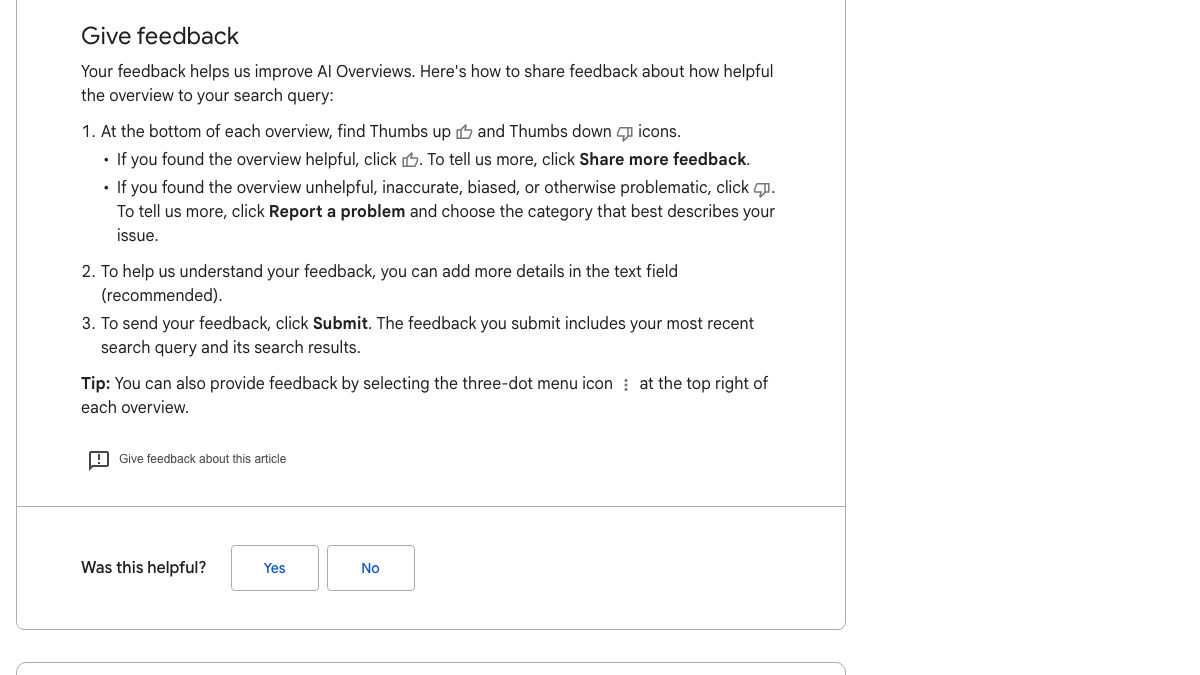
Click the thumbs-down icon, choose Report a problem and write a short, specific note stating the wrong claim and the correct fact, with a link to your official source. Google says the feedback includes your search and its results, so report from the search that shows the error.
Use Google's other tools where they fit. If the error sits in your business listing, suggest an edit in your Google Business Profile. If Google shows a knowledge panel for your company, claim it and use Suggest edits. And if an overview makes a defamatory or legally problematic claim, Google's legal removal request process is the separate route to take.
Know exactly what AI says about your competitors.
RankControl's Recon Agent monitors competitor citations across ChatGPT, Perplexity, Claude, Gemini, Grok, Google AI Mode, and Google AI Overviews. See where they show up and you don't.

Step 5: Recheck until it changes
Overviews change as Google recrawls the pages behind them. After fixing your own page, request indexing for it in Search Console's URL Inspection tool, then recheck the same searches every week and save a screenshot each time.
Check other engines as well. ChatGPT, Perplexity, Claude and AI Mode draw on many of the same third-party pages, so a wrong comparison site can spread the same error across several answers. Our guide on how to check your AI visibility includes a brand question designed to catch exactly this, and the pricing errors we found in AI answers about Help Scout.
When the summary is negative, not false
Some brand problems aren't errors. In July, a B2B software firm posted in r/smallbusiness that Google's AI summary of their brand led with a three-year-old review about a server migration that went badly. The complaint was real at the time, and fixed within 48 hours.
That isn't something Google will correct on request, because the source is accurate. The fix is to change what the sources say. Gather recent reviews from current customers, and reply publicly to the old review explaining what changed and what your record has been since. As newer, more representative content accumulates, the summary has better material to draw on.
Keeping watch
Errors about your brand tend to come back, because new comparison pages and directories keep copying old information. Checking the questions buyers ask about your price and fit every month catches them early. Our guide to an AI visibility dashboard includes description accuracy as a standing metric, and our explainer on why AI search engines cite the wrong sources covers the sourcing side in more depth.
Done by hand, checking 50 questions on seven engines takes about six hours a week, and publishing eight solid articles a month takes 16 to 24 hours more. Those are rough estimates.
RankControl's AI visibility tracking runs your 50 questions every week on seven engines, marks each one as mentioned, cited or both, and records which competitors and sources each engine used, so you can see which pages the answers about you rely on. The content engine writes each article against the pages already ranking for its keyword and publishes it on your own domain.
You can run the source trace yourself with a spreadsheet and a browser. Or RankControl's agents can watch the answers every week while your team fixes the sources.
26 content formats. Published on your domain. Matched to your brand.
Guides, comparisons, listicles, case studies, and more. RankControl generates content that gets cited by ChatGPT, Perplexity, Claude, Gemini, Grok, Google AI Mode, and Google AI Overviews.