
On September 26 we checked how visible one well-known B2B brand is in AI answers. We picked Help Scout, the customer support software company, and asked five questions its buyers might ask, such as the best help desk for a small support team and good alternatives to Zendesk. We ran them several times through OpenAI's API and Perplexity's API, and through Google's AI Overviews.
Help Scout was named in 24 of the 30 answers. Its own website was linked in just 4. For one question, about affordable help desk software with live chat, it didn't appear in any answer at all.
That's what an AI visibility check tells you, and most of it never shows up in your analytics. This guide walks through the same check step by step, so you can run it on your own brand in about an hour. Sources were checked on September 26, 2026.
What an AI visibility check measures
An AI visibility check asks the engines your buyers use the questions your buyers ask, then records how your brand comes out. Four things matter for each answer:
| What to record | What it tells you |
|---|---|
| Named | Whether the answer mentions your brand at all |
| Cited | Whether it links to one of your pages as a source |
| Accurate | Whether what it says about you, especially price and fit, is right |
| Who else | Which competitors and sources appear alongside you or instead of you |
Mentions and citations move separately, which is why they get their own columns. Our comparison of mention tracking and citation tracking explains the difference in detail.
A PR lead at a small manufacturer described the usual starting point in r/digital_marketing in August. The executive team wanted to know whether ChatGPT mentioned the brand, and manual checks felt slow and unreliable, especially since mentions often came without a link to the site.
How can I see brand mentions in ChatGPT? I have no official way to monitor this.
I’m in charge of PR and comms for a small manufacturing company in a niche market. Our executive team is currently obsessed with AI mentions. And they want to know if our brand is showing up when people ask chatGPT questions related to our...
A structured check fixes most of that. It won't make answers stable, but it turns a handful of screenshots into numbers you can compare next month.
Step 1: Write the questions your buyers ask
Start with five to ten questions, written the way a buyer would type them. Pull the wording from sales calls and support tickets. Leave your brand name out, since the point is to see whether engines bring you up on their own.
Mix broad questions with narrow ones. Our Help Scout set paired the best help desk for a small team with narrower questions, such as alternatives to Zendesk or affordable tools with live chat. Include at least one price question every time. In our check, the price question was the one where Help Scout vanished and a different set of sites took over.
Then add one brand question, such as "What is [your brand], how much does it cost, and who is it best for?" That one checks accuracy instead of presence.
Step 2: Run each question on several engines, more than once
Run every question on the engines your buyers use. For most B2B brands, start with ChatGPT and Google's AI answers, then add Perplexity, Claude, Gemini and Copilot as time allows. Use a logged-out or private window where you can, so your own history doesn't shape the answer.
Then run each question more than once. A single answer is one sample, and answers vary between runs. SparkToro found in January that ChatGPT and Google's AI gave the same list of brands in fewer than 1 in 100 repeated runs.
Our check showed how uneven that variation can be. OpenAI's API named Help Scout in all three runs of the four questions where it appeared, though its place in the list moved around on the first question. Google showed an AI Overview for four of our five searches in the first pull and for all five in a second pull shortly after.
How many runs is enough? For a first check, two or three per engine will do. In an r/SEO thread about free ways to check AI visibility, one reply suggested running five buyer questions ten times each and keeping a tally, which is what the paid tools automate.
How Can I Check AI Visibility for Free?
Is there any free tool that shows AI Visibility similar to Ahrefs or Semrush? I know both Ahrefs and Semrush have AI Visibility features, but they're behind a paid plan. Are there any reliable free alternatives, or even a workaround, to tra...
We'll show you exactly where your brand stands in AI search.
No commitment. $0 due today, cancel anytime. See how ChatGPT, Perplexity, Claude, Gemini, Grok, Google AI Mode, and Google AI Overviews talk about your brand today.
Step 3: Log four things for every answer
A spreadsheet with one row per answer is enough. Record the question and engine for each run, then the four columns from the table above. Paste the cited URLs in full, since the specific page matters as much as the domain.
Here's how Help Scout's category questions came out:
| Engine | Answers | Help Scout named | Help Scout's site cited |
|---|---|---|---|
| OpenAI's API (3 runs of 5 questions) | 15 | 12 | 0 |
| Perplexity's API (2 runs of 5 questions) | 10 | 8 | 4 |
| Google AI Overviews (5 searches) | 5 | 4 | 0 |
The citation gap stands out. Perplexity linked to Help Scout's site on only two questions, citing its guide to Zendesk alternatives and its piece on shared inboxes. Google's overviews described Help Scout as the email-first option on four searches while citing other sites, and Help Scout didn't rank in Google's top 10 for any of the five searches.
Step 4: Check what the answers say about you
Being named only helps if the description is right. Our brand question asked what Help Scout costs and who it's for. Both engines described the product correctly, as a shared inbox and help center for small and mid-sized support teams.
Pricing was messier. Help Scout's pricing page defaults to annual billing, at $25, $45 and $75 per user per month.
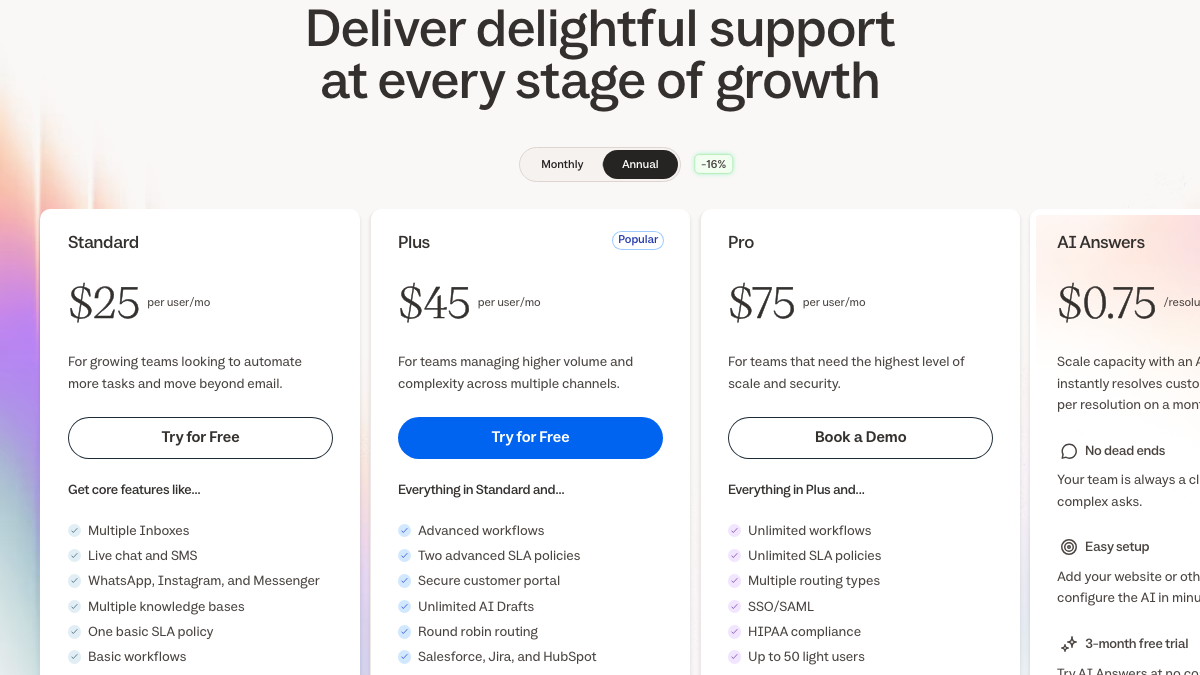
Switching the toggle to monthly billing shows $30, $54 and $90. OpenAI's API gave the annual prices without saying they were annual. Perplexity's API found both sets but treated the monthly prices as Shopify App Store listings, added review-site figures of around $55 a month, and settled on a starting price of roughly $25 to $55. A buyer comparing monthly costs could come away with the wrong figure from either answer.
Errors like this are usually fixed at the source. State billing terms next to every price on your own pages, then correct old prices on the review sites and marketplaces the engines quote. Our guide on correcting false information in Google AI Overviews walks through tracing an error to the page it came from.
Know exactly what AI says about your competitors.
RankControl's Recon Agent monitors competitor citations across ChatGPT, Perplexity, Claude, Gemini, Grok, Google AI Mode, and Google AI Overviews. See where they show up and you don't.

Step 5: Add the free data Bing and Google give you
Two platforms now report part of this directly, for free. Bing Webmaster Tools added an AI Performance report in February 2026, showing how often your pages are cited in Copilot and Bing's AI summaries, and which grounding queries led to those citations.
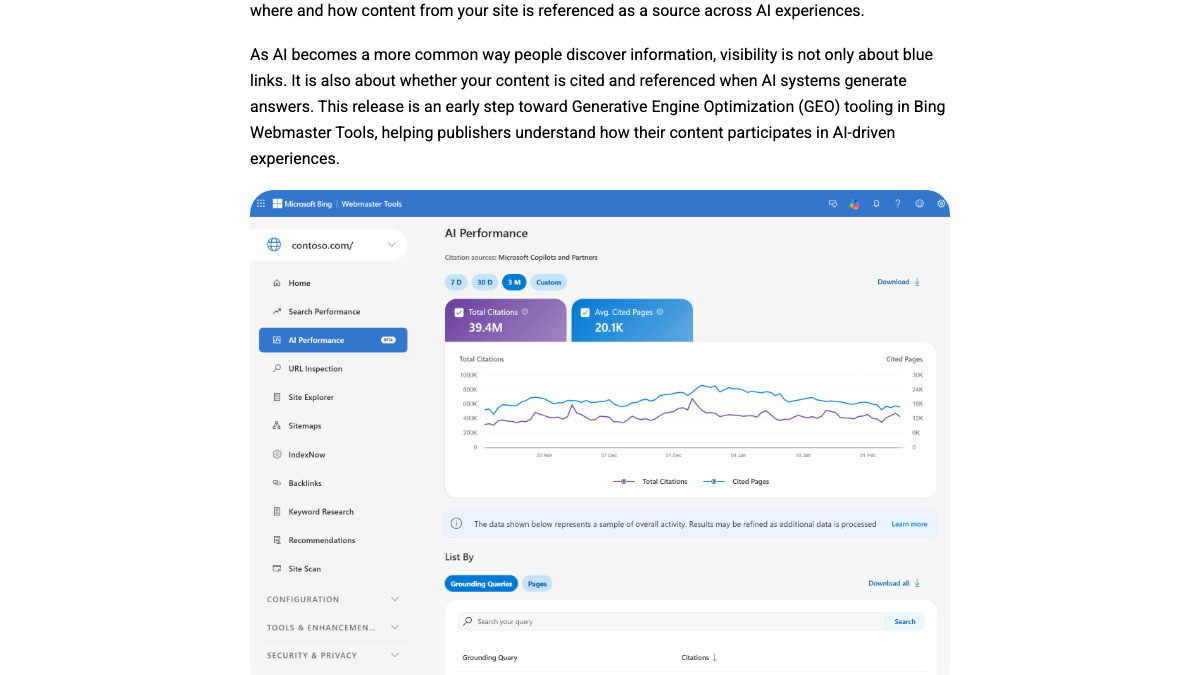
In June, Bing added intent and topic groupings and a citation share figure, which is your percentage of all citations shown for a grounding query.
Big news from Bing. And you can compare changes over time. This is what @kmadhavan77 shared in April and now it's rolling out -> New AI Visibility Insights in Bing Webmaster Tools: Intents, Topics, Citation Share, Compare "AI-generated answers are dynamic, contextual, and often https://t.co/r3rU0acluY
 Glenn Gabe@glenngabeJun 16, 2026

Google's Search Console began rolling out a generative AI performance report in June, and it had reached all sites by the start of September. It's narrower, with impressions from AI Overviews and AI Mode by page and no queries or clicks. Aleyda Solis suggested using it to track an AI exposure rate, the share of your total impressions that come from AI features.
I finally got access to the new Search Console Generative AI performance report… and: it's easy to feel underwhelmed, especially when compared to the one of Bing or Clarity AI Search dashboards 😅 It doesn't feature prompts, topics or clicks, just impressions and URLs with AI https://t.co/xVFJgUgROS
 Aleyda Solis 🕊️@aleydaJul 17, 2026

Add AI referrals from Google Analytics 4 as well, since visits from ChatGPT and Perplexity arrive with recognizable referrers. Our GA4 guide to AI referral tracking has the setup. For the free brand checkers from Semrush, Ahrefs and HubSpot, see our list of free AI visibility tools.
Reading the results: find your gap questions
The most useful output of a first check is a short list of what we call gap questions: buyer questions where you're missing from the answer, or named without a link. Each kind of gap points to a different fix.
Where you're absent, look at who is cited and what their pages have. For Help Scout, the live-chat price question was the clearest gap. The vendor cited most often there was LiveAgent, whose own pages appeared in three of the five API answers and in Google's overview. Those pages answered the question directly, with prices.
Where you're named but not cited, the engines know you but aren't using your pages. Perplexity cited Help Scout on only two questions, and both times it chose a Help Scout page written about that exact topic. That's a strong hint about which pages to write next.
Where you're named but always behind the same competitors, compare what the answers say about them with what they say about you. The difference usually shows which claims your own pages don't make clearly enough.
Where you're described wrongly, fix your pricing and product pages first, then the listings the answers quote.
Turning a one-off check into tracking
A first check gives you a baseline. Answers shift as engines update and competitors publish, so rerun the same questions on a schedule, weekly for your core set if you can. Our guide to tracking AI visibility across seven engines covers how to turn this into a standing system.
Done by hand, checking 50 questions on seven engines takes about six hours a week, and publishing eight solid articles a month to close the gaps takes 16 to 24 hours more. Those are rough estimates.
RankControl's free AI visibility checker shows who ChatGPT cites for three questions from your market, which is a quick way to start. AI visibility tracking then runs your 50 questions every week on seven engines, marks each one as mentioned, cited or both, and records which competitors and sources each engine used. The content engine writes each article against the pages already ranking for its keyword and publishes it on your own domain.
You can run this check yourself with a spreadsheet and an hour. Or RankControl's agents can run it every week while your team works through the gap questions.
26 content formats. Published on your domain. Matched to your brand.
Guides, comparisons, listicles, case studies, and more. RankControl generates content that gets cited by ChatGPT, Perplexity, Claude, Gemini, Grok, Google AI Mode, and Google AI Overviews.