A business owner posted in r/googlebusinessprofile last month that they'd been waiting months for verification. They'd done three video calls with Google, and each time were told to expect a result in five days. Another owner said the same thing happened to them, and what finally worked was opening a fresh support case that stated the video verification was already done.
Google profile verification waiting for 3 months
Ive been waiting for business verification for months, ive even joined a video call with them 3 times to proof things. Each time promised 5 days results, but well here we are. Is any1 experiencing the same issue?
Getting a Google Business Profile right the first time saves you that loop. It also matters more than it used to, because the same profile now feeds Google's AI answers. Below is the setup, step by step from Google's own help docs, plus what we saw when we asked AI engines local questions.
Why your profile matters for AI answers
On October 19, 2026, we asked Google AI Mode and ChatGPT 12 local questions, like "best plumber in Austin TX," "dog groomer in Seattle" and "bakery in Boston." Then we looked at where each answer got its business details.
| What we checked | Google AI Mode | ChatGPT |
|---|---|---|
| Answers with business listings | 10 of 12 | 9 of 12 |
| Listings shown | 47 place cards | 43 business cards |
| Where the details came from | Google Maps, with profile photos, hours and call, directions and website buttons | A mix, with ratings that mostly didn't match Google's |
| Other sources cited | Booking pages and review sites | Yelp in 4 of 12 answers |
AI Mode is your Business Profile, nearly word for word. Its cards showed the photos businesses had uploaded, the rating and review count from Google, whether the place was open, and the same three buttons you see in Maps.
ChatGPT was murkier. Its cards had a name, category, address, phone, rating and review count. Six of the 43 website links carried tracking tags like "utm_source=gmb," which businesses usually add only to the website field of their Google profile. So some of that data traces back to Google profiles, directly or through a data supplier.
But the ratings mostly came from somewhere else. For the 13 businesses that showed up in both engines, ChatGPT's rating and review count matched Google's for just 3. Pequod's Pizza in Chicago showed 3.9 stars from about 9,000 reviews in ChatGPT, and 4.4 stars from about 17,000 in AI Mode.
The lesson is simple. Your Google profile decides how you look in Google's AI answers, and your details on other sites, especially Yelp, shape ChatGPT's. Our earlier look at Google Business Profile signals in AI answers covers the fields one by one.
You're getting AI traffic. But do you know where it comes from?
RankControl credits every visit to the assistant that sent it: ChatGPT, Perplexity, Claude, Gemini, Copilot, or Grok. Full source attribution, next to your Google traffic.
Step 1: Create the profile
Google's help page lays out the steps.
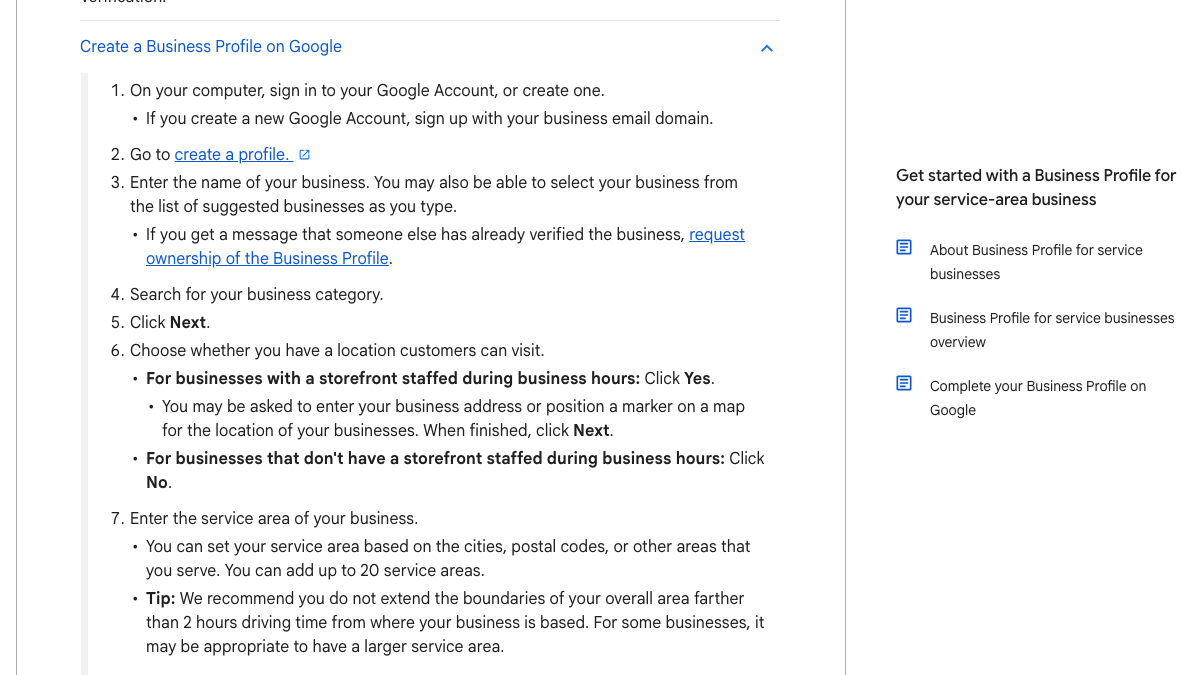
- Sign in to a Google Account. If you create a new one, Google suggests using your business email domain.
- Go to the create-a-profile page and type your business name. If it already exists, you can request ownership.
- Pick your business category.
- Say whether customers can visit you. If you have a storefront staffed during business hours, add the address. If you don't, say no and add a service area instead.
- Add a phone number and website. Google recommends each location's own number and store page, not a remote call center.
Use your real business name. Google's guidelines say it should match what's on your storefront, website and stationery, and extra details like your city or services belong in other fields. Stuffing keywords into the name goes against those guidelines.
Step 2: Choose your type and service area
This step trips up a lot of service businesses. Google's help center says a service-area business, like a plumber or cleaner, visits customers and doesn't serve them at its address. Those businesses should hide their address and set a service area.
You can add up to 20 service areas, by city or postal code. Google recommends keeping the whole area within about two hours' drive of your base, and it allows only one profile per business for each metropolitan area you serve. Edits to a service area can take up to 48 hours to show.
Hybrid businesses, like a restaurant that also delivers, can show both an address and a service area.
Step 3: Verify
Your profile won't appear publicly until you verify it. Google's verification page says the methods are chosen automatically, based on your business type, public information, region and hours, and you can't change them.
| Method | What to know |
|---|---|
| Phone or text | You must be able to answer the business line. Automated phone menus won't get the code. |
| You need access to the address shown on the screen. | |
| Video recording | Google recommends this if you're eligible. |
| Live video call | Only during your business hours, with an agent watching. |
Before a video check, Google's help page says to be ready to show three things. First, your location, through outside signs, nearby businesses or a street sign. Second, your products, branded equipment or tools. Third, proof you manage the place, like keys to open it or access to a staff-only area. If verification stalls, the Reddit thread above suggests opening a new support case that says clearly what you've already done.
Step 4: Fill in everything
Google's own ranking tips say businesses with complete, accurate information are more likely to show up in local results. Here's what to fill in.
- Hours, including special hours for holidays.
- Attributes, like parking, Wi-Fi or accessibility.
- A business description covering your services and history. Keep it honest and skip the links.
- Photos of your storefront, team and work. AI Mode used them in its cards.
- Products or services, with prices where you can.
Add a tracking tag to your website link, like the "utm_source=gmb" ones we saw. It lets you separate profile visits in your analytics, and in our test that same tagged link traveled into ChatGPT's business cards.
We'll show you exactly where your brand stands in AI search.
No commitment. $0 due today, cancel anytime. See how ChatGPT, Perplexity, Claude, Gemini, Grok, Google AI Mode, and Google AI Overviews talk about your brand today.
Step 5: Ask for reviews and answer them
Ratings showed up in every card in both engines, so reviews do double duty. Google says replying to reviews shows customers you value feedback. Ask happy customers for a review soon after the job, and reply to every review, including the bad ones.
Because ChatGPT leaned on other sites for ratings, it's worth asking some customers for a Yelp review too, especially if you're a restaurant or a home service business.
Step 6: Keep strangers from editing it
A post in r/GoogleMyBusiness in September warned that anyone with a Google account can suggest edits to your listing, and Google applies many of them without asking. Commenters described their hours, phone number and even business name being changed.
Your competitors can edit your Google Business Profile (and probably already have)
Most owners don't know this: anyone with a Google account can click "Suggest an edit" on your listing and change your hours, your phone number, even your business name. Google applies a lot of these without telling you. Here's how to check:...
Once a month, search your business name and city, open the listing and check every field. AI Mode copies whatever is there, so a wrong "closed" or an old phone number goes straight into AI answers. Our guide to cleaning up local citation errors covers fixing the same details on other sites.
Match your details everywhere else
Since ChatGPT drew on more than Google, your details need to match on the sites it reads. Make sure your name, address and phone number are the same on Yelp, your website, industry directories and social profiles.
Then check the AI answers themselves. Ask ChatGPT and Google AI Mode the questions your customers ask, with your city in them, and see whether you appear and whether the details are right. Our guide to local AEO shows how to build a set of city questions to check.
Limits of our test
We asked 12 questions once each, in 12 US cities, on one day. The data came from each engine's US results through a data provider. We matched businesses by name, so a few may have been missed when the two engines spelled them differently.
What this takes by hand
Here's a rough budget for setting up and running a Business Profile, by our estimate.
| Task | Hours |
|---|---|
| Creating and verifying the profile, first time | 1 to 3 |
| Filling every field and adding photos | 2 to 3 |
| Monthly check for edits and wrong details | 0.5 to 1 a month |
| Asking for and answering reviews | 1 to 2 a month |
| Checking local AI answers | 1 to 2 a month |
Doing it by hand or with help
You'll want to set up the profile yourself, since only the owner can verify it. Or RankControl can take on the steady part after that. Its content engine writes and publishes local pages and guides for your city, and its AI visibility tracking checks 50 of your customers' questions every week on ChatGPT, Perplexity, Claude, Gemini, Grok, Google AI Mode and Google AI Overviews. Our guide to the Google local pack covers how to climb in Maps once you're live.
Know exactly what AI says about your competitors.
RankControl's Recon Agent monitors competitor citations across ChatGPT, Perplexity, Claude, Gemini, Grok, Google AI Mode, and Google AI Overviews. See where they show up and you don't.