
A small Tottenham fan site called SpursWeb has been running since 1996. In September 2026 it asked its X followers to do one thing, which was click "Add to Preferred Sources" in Google, because changes to search were making it harder for independent sites to be seen. Plenty of news sites have made the same ask this year.
That button is Google Preferred Sources, and it has quietly grown from a Top Stories setting into something that also marks links inside AI Mode and AI Overviews. Here's what it is, how it works for readers and for site owners, and whether it matters if you don't run a news site.
🚨 A small favour to ask of our fellow #THFC fans. Changes to Google Search are making it much harder for independent fan sites like SpursWeb to be seen. If you enjoy our coverage, please visit the link below, click “Add to Preferred Sources” button near the top of the page and
 The Spurs Web@thespurswebSep 22, 2026
What Google Preferred Sources is
Google Preferred Sources is a setting that lets a signed-in person pick the sites they want to see more of in Search. Google's launch post from August 12, 2025, written by product manager Duncan Osborn, framed it as a way to "see more from your favorite sites within Top Stories."
Once you pick a site, its stories show up more often in Top Stories and carry a small "preferred" badge. You can pick as many as you like. Google said that over half of the people using it picked four or more sources, which tells you most people treat it like a short reading list, not a single favorite.
The feature is personal. Your choices change what you see, and nobody else's results move because of them.
How it grew from Top Stories to AI answers
The rollout came in steps, and each one widened the reach.
| Date | Change | Source |
|---|---|---|
| Aug 12, 2025 | Launch for users in the US and India | Google blog |
| Dec 16, 2025 | Open to English-language users worldwide | Google blog |
| Apr 30, 2026 | Open in every language Google Search supports | Google blog, Search Engine Land |
| By Sept 2026 | Preferred badge in AI Mode and AI Overviews | Google Search Central docs |
The December post put a number on demand, saying nearly 90,000 unique sources had been picked. It also said people click through to a site they've picked about twice as much on average. By the April expansion, Search Engine Land reported that more than 200,000 sites had been picked.
The last step is the one that matters for AI visibility. Google's publisher documentation now says that "in AI Mode and AI Overviews, your content can be highlighted with a 'preferred' badge for users who have selected your site as a preferred source." The same page was last updated on September 18, 2026.
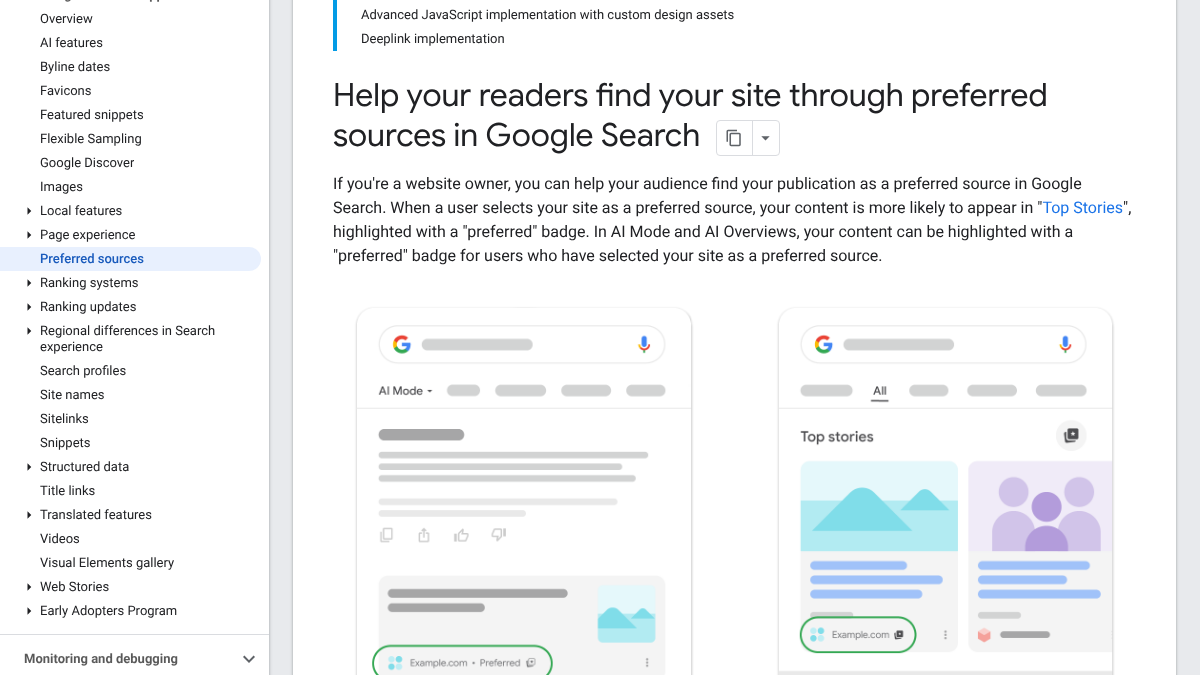
Google's mockups show the badge in both places. In AI Mode it sits next to the source name under the answer, and in Top Stories it sits on the story card.
How readers pick a source
The steps on Google's help page are short. You search for a topic that brings up Top Stories, then click the star icon to the right of the Top Stories header. You search for the site you want, tick its box and reload the results.
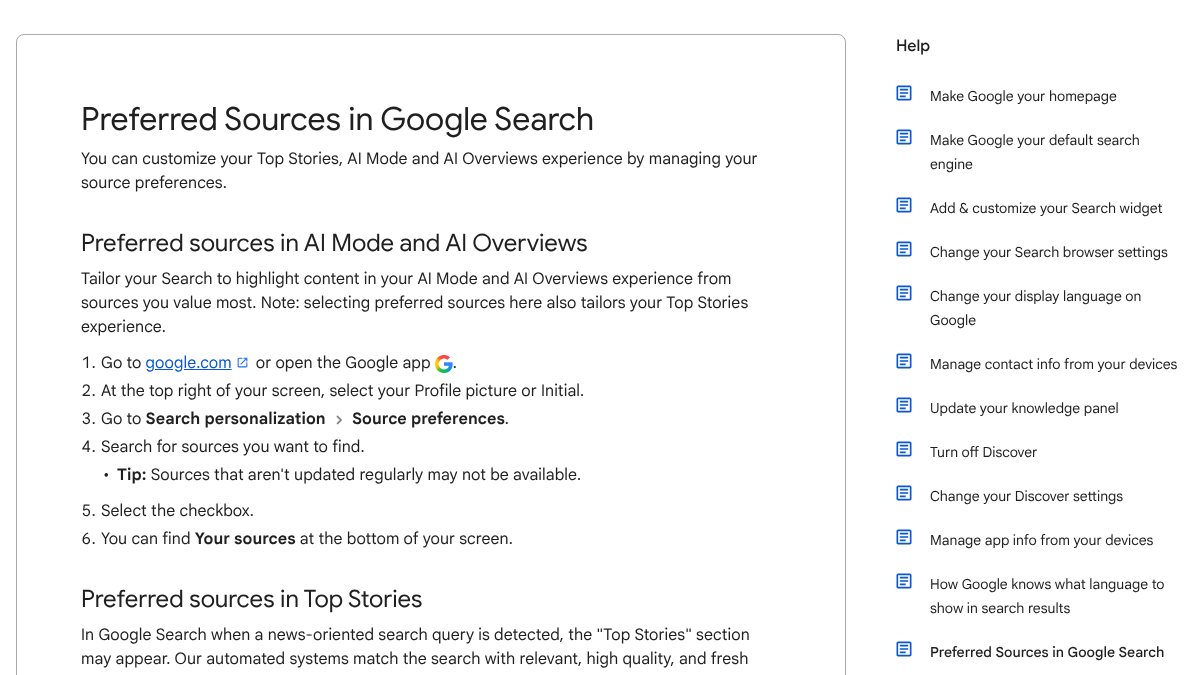
The help page adds one line that's easy to miss: "selecting preferred sources here also tailors your AI Mode and AI Overviews experience." So the reader makes one choice, in a Top Stories menu, and it carries into Google's AI answers too.
That's also the catch. Most people will only find the star if they search for news. Someone who only uses Google to look up software or recipes may never see it.
AI search traffic grew 835% this year. Is your content ready?
RankControl generates 26 content formats optimized for ChatGPT, Claude, and Perplexity. Published on your domain, matched to your brand.

How site owners ask readers to add them
Google gives site owners three ways to send readers to the setting. The simplest is a button made from two lines of code: a script from Google and an empty element where the button appears. There's a second option for sites that want their own button design, and a third that's a plain link.
The link is the one most sites can add today. It points to google.com/preferences/source?q= followed by your domain, and it opens the setting with your site already found. When we checked on October 18, 2026, both Google's button script and that link loaded for a test domain. You can put the link in a newsletter footer, an article sign-off or a social bio.
Google's rule on which addresses qualify is strict. Only domains and subdomains are eligible, so www.example.com and code.example.com work, but www.example.com/blog doesn't. If your blog lives in a folder, the reader adds your whole domain.
Reddit has noticed the button spreading. In an r/Agentic_SEO thread about it, the top reply pointed out that Google hasn't said Preferred Sources is a ranking signal. In that commenter's view, it's personal tuning that earns a "Preferred" label for one user at a time, not a boost for everyone.
Google's new Preferred Sources button on webpages
Google has added a button publishers can embed so readers can mark their site as a preferred source. If someone selects you, your content is more likely to appear in Top Stories for that person. In AI Overviews and AI Mode, it can receive a...
Is Preferred Sources a ranking factor?
Google hasn't called it one, and the way it works points the other way. A preference changes what one signed-in person sees. Your pages don't rank higher for strangers because some readers picked you.
What it does change is how often your loyal readers see you. Google's "twice as much" click figure is the useful number here. If a reader who already likes you clicks you twice as often once they've picked you, the button is a retention tool, a bit like asking someone to follow you on a platform where you don't control the feed.
There's a caveat in that number too. Google measured people who chose to pick a site. They probably liked it before they picked it, so some of the extra clicks would have happened anyway, and Google hasn't said how much.
What it means for AI visibility
For AI answers, the feature does two things for a site that's been picked. Its links in AI Mode and AI Overviews can carry the "preferred" badge for that reader, and the reader's setup is tailored toward it. Google doesn't spell out how much more often a picked site gets cited, so don't assume it guarantees a citation.
The rule for being eligible in AI answers is broader than many people think. Google's documentation says that "to make your site eligible for display as a preferred source in these features, you must make sure your site is included in Search generative AI features in Search Console." Nothing on that page limits the AI side to news sites. Our guide to Search Console's generative AI report covers where those settings and numbers live.
So a software company, a store or a local service can, in principle, be picked and get the badge in an AI answer. The hard part is getting readers to pick you, because the menu lives under Top Stories. Our comparison of AI Mode and AI Overviews explains how the two AI surfaces differ.
We call this the reader-built shelf. Google lets each reader build a small shelf of sites they trust, and the shelf follows them from news results into AI answers. A brand gets onto the shelf by being worth reading, then by asking.

Built by the team that got cited in 48 hours.
Content generation, backlink building, AI visibility tracking, and Google rankings. One platform, zero guesswork.
What non-news brands should do
Most B2B and ecommerce sites will never show up in Top Stories, so don't rebuild your site around this. There are still a few cheap moves worth making.
- Check in Search Console that your site is included in generative AI features, since that's the eligibility rule for AI answers.
- Make sure your main content sits on a domain or subdomain rather than a folder if you want readers to be able to pick it.
- Add the plain preference link to your newsletter and article footers, worded as a small favor, not a pitch.
- Ask the readers who already open your emails. They're the ones most likely to click, and the setting stays with them.
The r/Android thread on the global rollout raised a fair worry about all this. Its top comment argued that picking your own sources just moves the algorithm's control around and can narrow what people see to outlets they already agree with. That's a real limit, and it's one more reason to see this as a way to keep readers rather than a way to win new ones.
Google expands "Preferred Sources" to everyone so you actually see your favorite sites
What we found when we searched for it
We pulled Google's US results for "google preferred sources" on October 18, 2026. The top results were Google's own pages: the Search Central doc, two Google blog posts and the help page. The rest were Search Engine Journal, the BBC, a Reddit thread and one marketing agency's blog.
No SEO platform or AI-visibility tool ranked in the top ten. That fits what the feature is. It's a Google setting with Google's own documentation, and there's no tool that can switch it on for you.
It also means a tracking tool won't see it. Checks run as a neutral searcher with no preferences, so a badge that only one reader sees won't show up in anyone's tracking report. How AI engines choose sources for everyone else is a separate question, and our guide to how AI engines choose sources to cite covers it.
Doing it yourself or handing it off
Setting up Preferred Sources takes about an hour, covering one Search Console check, one link added to your footers and a line in your next newsletter. After that, the work is the same as always, which is publishing pages readers want to come back to.
That part RankControl can take on. It writes articles against the pages already ranking for each keyword and publishes them on your own domain, so there's more on your site worth picking. Its AI visibility tracking checks up to 50 buyer questions every week across seven AI engines, including Google AI Mode and Google AI Overviews, and records every source each answer uses. Traffic from Google and AI search comes first, and citations tend to follow more slowly as other sites link to and mention you.
See your first AI citation report in under 5 minutes.
No setup calls. No onboarding meetings. Connect your domain and see where AI mentions your brand right now.