
WordPress runs 39.6% of all websites, according to W3Techs on October 18, 2026, and 58.4% of the sites whose CMS it can detect. No wonder so much SEO advice is written with WordPress in mind. A lot of it also ignores what WordPress already does by itself. People end up fixing things that were never broken, and they miss the settings that quietly hide a site from Google or AI crawlers.
This WordPress SEO checklist separates what core already handles from what's left to you. Each item points to the source it rests on, and I read every one of those sources on October 19, 2026. The AI search items move fastest, so they carry dates.
Start the WordPress SEO checklist with what core does
Before you install anything, look at what WordPress core already does. Five things need a quick check and no plugin.
| Item | What core does |
|---|---|
| Robots.txt | Serves a virtual file when no real one sits in your root folder. The do_robots() reference shows it blocks /wp-admin/ and allows admin-ajax.php, as it has since version 2.1 |
| Sitemap | Serves one at /wp-sitemap.xml, added in WordPress 5.5 in 2020 |
| Title tag | Adds one to every page, as long as your theme supports it |
| Image formats | Takes WebP uploads since 5.8 and AVIF since 6.5 |
| Comment links | Marks them as user content. Since 5.3, the core source code adds rel="ugc" next to external nofollow on links in commenters' names |
What core doesn't do matters just as much. It writes no meta descriptions and no schema markup, and it leaves thin tag pages open to search engines. Those jobs fall to you or a plugin, and they make up most of the list below.
The Reading setting that hides whole sites
One tick box can take a whole site out of Google, and it's usually a leftover from staging. Go to Settings, then Reading, and look at the last box on the screen. "Discourage search engines from indexing this site" is meant for sites still being built. It's also the box most often left ticked when a staging copy goes live.
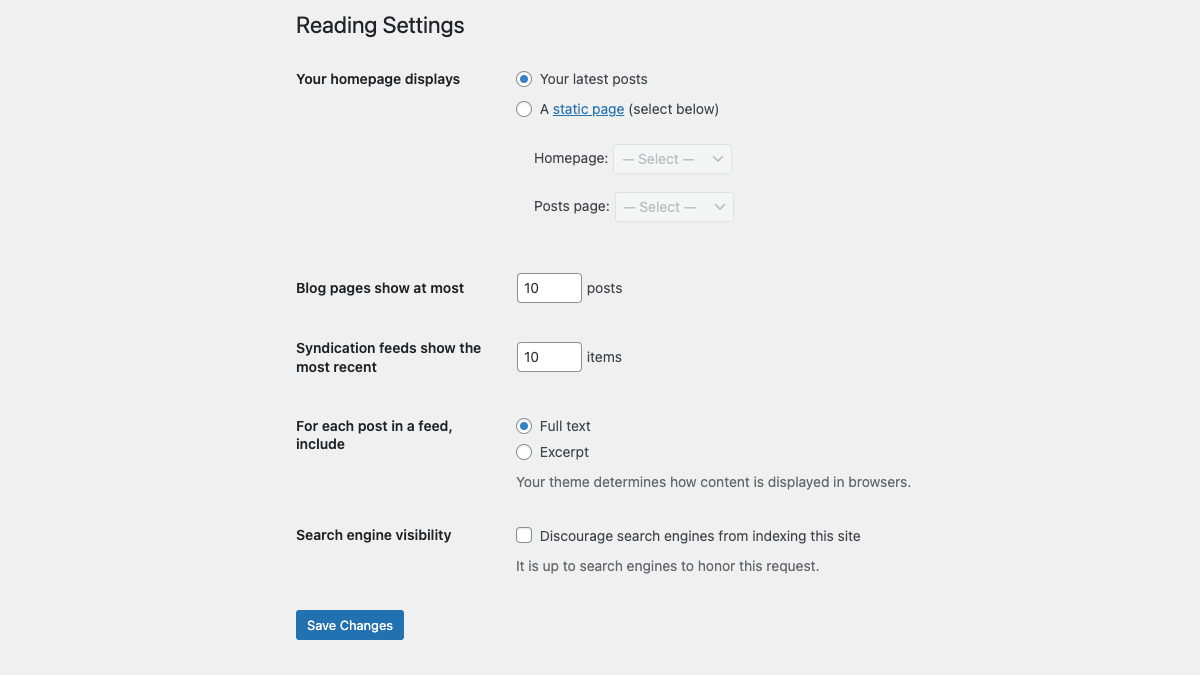
WordPress's Reading settings doc, last updated in June 2024, says what the box does. Since version 5.3 it adds a noindex,nofollow robots meta tag to every page, where before 5.3 it changed robots.txt instead. The same page adds that "it is up to search engines to honor your request," and Google does honor it. So a ticked box on a live site can drop the whole site from search results.
Untick it on the live site. After any migration, view a page's source and search for noindex.
Permalinks, set once and left alone
Settings, then Permalinks, controls what every post URL looks like. WordPress's own screen says the %postname% tag "makes links easy to understand" and can help posts rank.
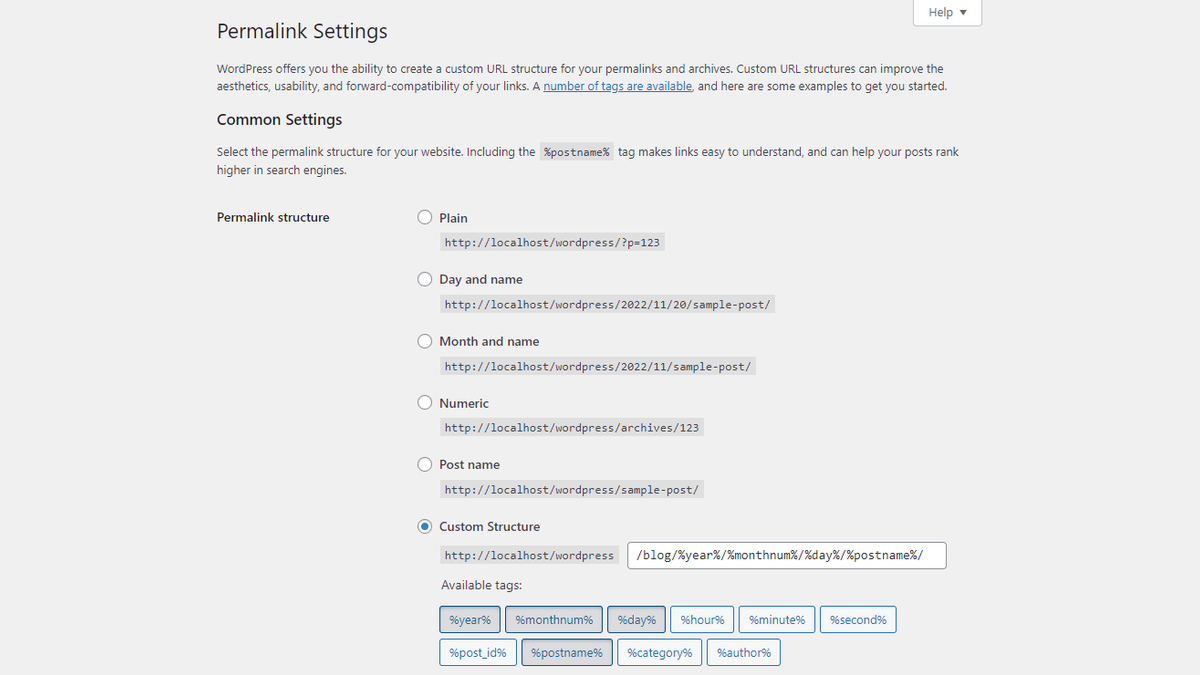
The Permalinks settings doc lists six choices and says WordPress uses day and name URLs by default. For a new site, Post name is the simpler pick. The slug carries the topic, and there's no date in the URL to make older posts look stale.
An older site needs more care. The same doc says a post's URL "should be permanent and never change," and changing the structure changes every post URL at once. Links from other sites then point at old addresses. If you must change it, map each old URL to its new one with a 301 redirect before you save.
Know exactly what AI says about your competitors.
RankControl's Recon Agent monitors competitor citations across ChatGPT, Perplexity, Claude, Gemini, Grok, Google AI Mode, and Google AI Overviews. See where they show up and you don't.

Sitemaps, robots.txt and AI crawlers
Open yoursite.com/robots.txt first. A plain WordPress install only blocks the admin area, so AI crawlers are allowed by default. Blocks come from rules you or a plugin added, and a real robots.txt file in your root folder replaces the virtual one completely.
The Sitemap: line in that file should point at the sitemap that actually loads, and core isn't the only thing that makes one. Core serves /wp-sitemap.xml, but Yoast SEO and Rank Math swap in their own at /sitemap_index.xml. If you run one of those plugins, submit the plugin's file. Our WordPress sitemap guide covers how to find the live one and submit it to Google and Bing.
Each AI bot in that file should be a choice you made. OpenAI, for one, uses GPTBot for training and OAI-SearchBot for search, so you can refuse one and allow the other. Whether to block any of them is a business call, and our piece on whether to block AI crawlers weighs it site by site.
The open door with a locked gate
Robots.txt can't show you this trap. Your file says "allow," but a firewall, security plugin or CDN bot setting blocks the same bot before it reaches the page. Several replies in an r/SEO thread on AI crawlers and robots.txt made this point on their own. Cloudflare and other bot protection can block AI crawlers that robots.txt allows, and a rushed "block AI training" switch can take out the same company's search bot too.
I call this the open door with a locked gate. You only catch it by testing from outside, with the bot's user agent, and seeing whether the page or a challenge comes back. Our guide to publishing AI-ready content on WordPress walks through that test.
Titles, meta and schema with one SEO plugin
This is the plugin part of the WordPress SEO checklist. According to WordPress.org's plugin pages on October 19, 2026, three SEO plugins lead the field. Those counts are WordPress.org's rounded bands, not exact figures.
| Plugin | Active installs |
|---|---|
| Yoast SEO | 10+ million |
| Rank Math | 4+ million |
| All in One SEO | 2+ million |
Any of the three handles titles, meta descriptions and basic schema, so the rule that matters is to run only one. Two SEO plugins can print two title tags, two sets of schema and two sitemaps on the same page. Write a title and meta description for every page that earns search traffic, and check schema with Google's Rich Results Test to make sure your theme isn't adding a second copy.
Keep plugins few and updated. That advice got a real example in October 2026. Rank Math reported on its own incident page that copies of Rank Math PRO 3.0.123 downloaded between 20:02 UTC on October 15, 2026 and 07:12 UTC on October 16 contained malware, and that 3.0.124 is the clean build.
Images and Core Web Vitals
Speed is where WordPress lags. The 2025 Web Almanac found that 45% of WordPress sites passed Core Web Vitals on mobile, up from 40% in the 2024 edition. That still puts it near the bottom of the chart, well behind Wix at 74%.
The Almanac only measures sites with enough Chrome traffic to score, so small sites aren't in that 45%. Your own number is in Search Console's Core Web Vitals report. Our look at Core Web Vitals and rankings covers how much a pass really moves things.
Images are the easier fix. WordPress has accepted WebP uploads since version 5.8 in 2021, and AVIF since version 6.5 in April 2024. One catch is your host. Lossless WebP needs the Imagick library, and hosts that only run GD won't make it. Upload WebP or AVIF, set the alt text in the media library, and size images to the width they show at, not the camera's.
26 content formats. Published on your domain. Matched to your brand.
Guides, comparisons, listicles, case studies, and more. RankControl generates content that gets cited by ChatGPT, Perplexity, Claude, Gemini, Grok, Google AI Mode, and Google AI Overviews.

Tag archives and comment links
Every tag you make creates a page. If a site has 300 tags and most are used once, that's 300 thin pages that copy bits of other posts, and the core sitemap lists them all. Delete or merge tags used on only one or two posts. If the archives left over add nothing, set them to noindex in your SEO plugin, but keep category pages that carry a real intro.
This kind of thin page drags on a site in ways that are hard to spot, which our post on thin content versus authority explains.
Comments need less work. Since WordPress 5.3, links in commenters' names carry rel="ugc" by default, which tells Google you don't vouch for them. Your job is the spam. Hold first-time comments for review, and delete link-only ones before they go live.
llms.txt, with Google's answer on the record
Google has already answered whether llms.txt helps. According to its AI optimization guide, last updated July 10, 2026, Google Search ignores llms.txt and similar files, so making one "will neither harm nor help" your visibility. Our post on why Google says llms.txt won't help citations has the full record.
An llms.txt file is a plain text list of your key pages for AI tools. WordPress.org has a dozen or so plugins that make one, and when I searched on October 19, 2026, the biggest showed 50,000+ installs.
Users on r/SEO treat it as optional too. A thread titled "97% of llms.txt files never get read" drew replies calling the file dead, alongside a few who keep one because it takes five minutes. That's a fair way to treat it. Add it if you like, then spend the real time on the items above.
How long this WordPress SEO checklist takes
By rough estimate, the first pass takes three to five hours on a site with a few hundred posts. Most of that goes on titles, meta descriptions and tag cleanup. After that, an hour a month covers plugin updates, a robots.txt and firewall check, and Search Console.
The harder part is noticing later when rankings or AI answers slip, since nothing inside WordPress tells you.
RankControl covers the content and tracking end. Our WordPress plugin publishes articles as native posts on your own site, and also works on any paid WordPress.com plan. WordPress is one of several publishing destinations, and auto-publish is off by default. Then we check your buyer questions weekly on seven AI engines and track your Google and Bing rankings. Our plan is $400/mo with a 7-day free trial.
You can work through this WordPress SEO checklist yourself, a section a week. Or RankControl's agents can handle the articles and the weekly checks while you keep the site itself in shape.

Your competitors are getting cited by AI. You're not.
Every day without citation tracking is a day your competitors pull ahead in ChatGPT, Perplexity, and Claude.