Leaving Writesonic puts you on a timer, and it starts running the day your plan ends. Its terms, updated in May 2026, allow 30 days after termination for you to export your own data, and then it's deleted.
For articles, that's plenty of time. It does nothing for your writing styles or your Chatsonic history, because Writesonic doesn't export either in any form. I call the styles the voice you can't export, since they're often where a team put the most tuning hours.
Don't go hunting for help articles, either. The old help center, where the cancellation and refund articles used to live, now shows "This company' site is not public." Everything below comes from Writesonic's current product docs and terms of service as of September 26, 2026, and it assumes your content and AI search work is heading to RankControl.
What moves when you switch from Writesonic
The product looks very different from a year ago, so it matters which Writesonic you were using. It started life as an AI writer with Chatsonic as a side product. Today the site sells it as an AI search visibility platform, built from prompt tracking, an Action Center and an article writer.
Opinions on that newer version split. A March thread on r/AskMarketing put Writesonic up against Profound and a smaller tracker; one user thought Writesonic's tracking felt scattered beside the more focused tool, and another had used it for a full year with no complaints.
Where each thing lives decides whether it can leave. Articles sit in the AI Document Editor's project folders, and whatever went out through the WordPress plugin is now simply a post on your site. Tracked prompts and answers, the AI visibility history and site audits stay inside Writesonic. So do writing styles and Chatsonic conversations, the two things that never come out.
Writesonic does beat RankControl on one point: every plan gets its tracked prompts refreshed daily, while RankControl checks weekly. On the plans with published prices, those daily checks run on ChatGPT, Gemini and Google AI Overviews, and the other engines, Claude and Perplexity among them, are held back for Enterprise.
How to export your data from Writesonic
Articles leave one by one, and I found no bulk export for an existing library, so sort before downloading. Published pieces already live in WordPress, and if the library runs into the hundreds, grab the unpublished ones first.
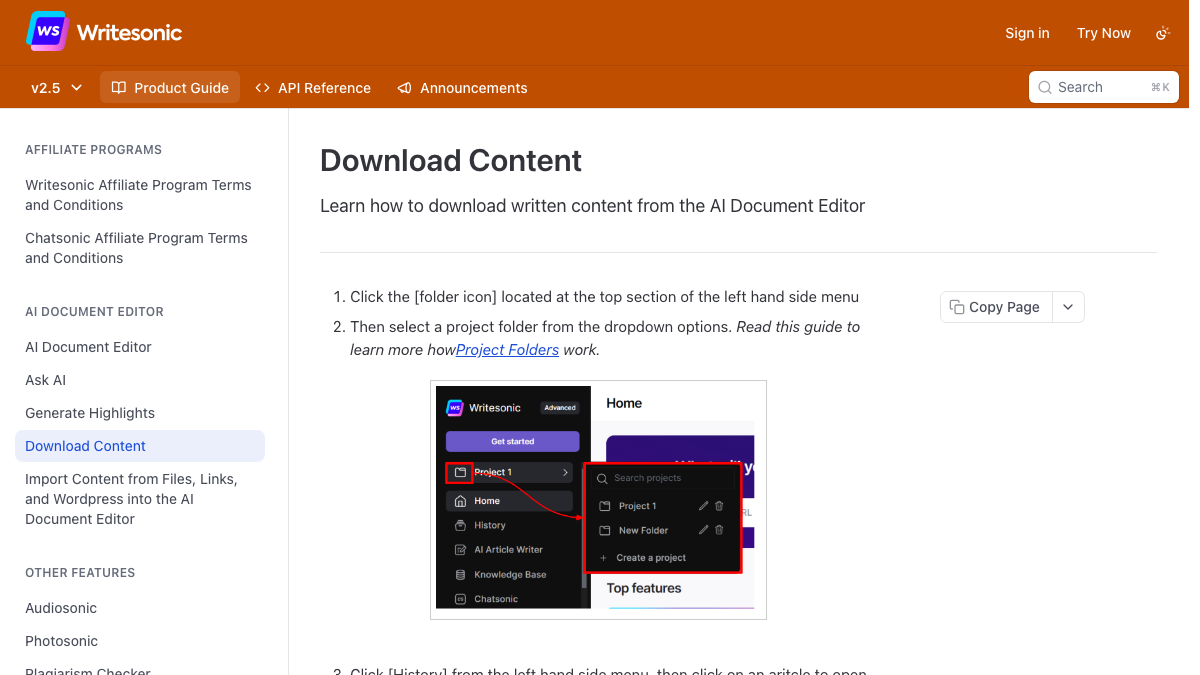
Each article sits in History inside its project folder (the folder icon is at the top of the left-hand menu), and Share offers Microsoft Word, PDF or HTML. The docs list no Markdown or Google Docs option.
The prompt list matters more than its size suggests, since those prompts become your first RankControl tracked queries. Writesonic's Prompts and Answers table "can be exported for offline analysis or reporting," so keep a copy. Deeper history comes through a Looker Studio connector or an API with JSON or CSV output. The connector needs a Business API key, and your site URL has to match the dashboard exactly, "including whether or not it has a trailing slash."
Check engine coverage before comparing that history with anything. The Looker Studio doc lists data from ChatGPT, Perplexity, Claude and Gemini, yet the pricing page puts Claude and Perplexity in Enterprise, so a Starter or Growth file may hold less than the doc implies.
The SEO AI Agent's tables come out as CSV or XLSX, but nothing in the docs exports a site audit, so screenshot or print any findings you still mean to act on.

Built by the team that got cited in 48 hours.
Content generation, backlink building, AI visibility tracking, and Google rankings. One platform, zero guesswork.
The voice you can't export
Writing styles have to be saved by hand. The docs walk through making a style under Writing Styles, and after that you can edit it or delete it, but there's no way to export, duplicate or share one. Starter includes one style and Growth ten, and teams often put months into tuning theirs.
Open each one and copy the description, plus any sample text, into a doc of your own. Do the same for Chatsonic conversations you'd miss, since you can search chat history but can't export it.
RankControl builds the voice from the other end. Brand Control drafts it from your website, along with your products, buyers and competitors, and you fix that draft rather than starting from an empty form. The text you saved from Writesonic makes a natural first style reference (you can add up to three) to check it against.
Cancel, refunds and the 30-day window
Line the policies up and the safe order is clear:
| Question | What Writesonic's terms and docs say |
|---|---|
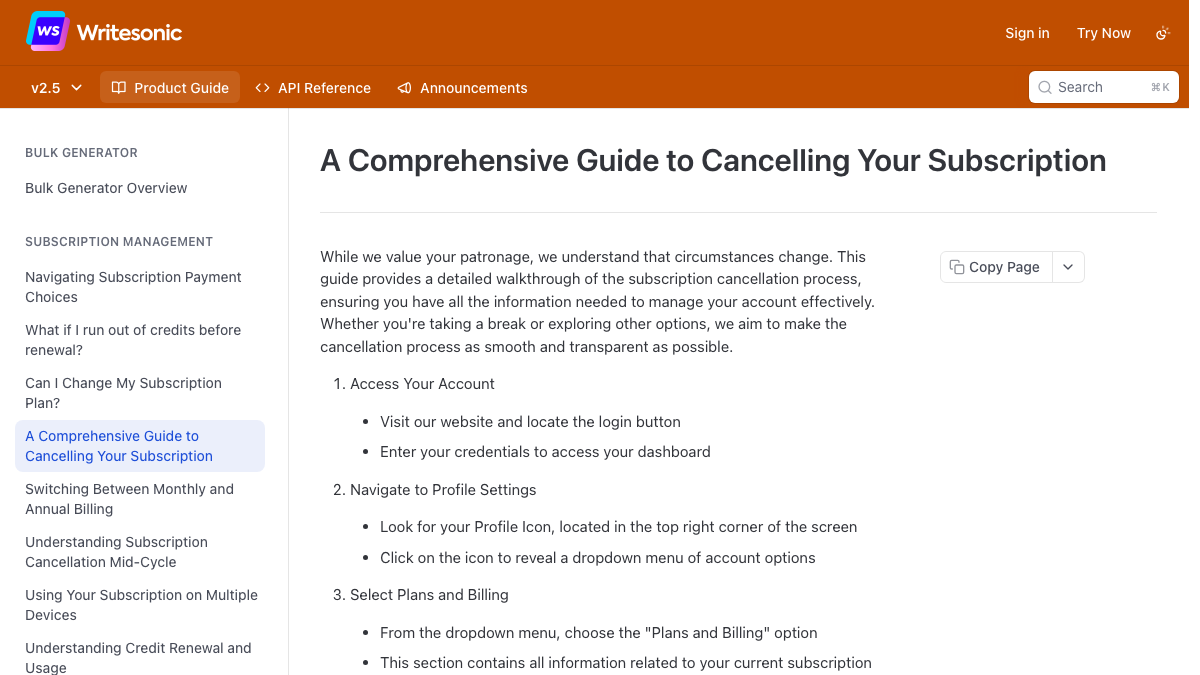
| Where do I cancel? | Profile icon (top right), then Plans and Billing, then Cancel Subscription |
| When does it take effect? | At the end of the current billing cycle, with no proration |
| Anything short of cancelling? | Pausing or downgrading; there's no free plan to fall back to |
| Can I get a refund? | A full refund within 7 days of your first purchase, requested by email; nothing after that |
| Enterprise or agency plan? | Not refundable except where the law requires it |
| What happens to my data? | 30 days after termination to export it yourself, then it's deleted |
| Who owns my content? | You keep all rights to your inputs and outputs |
Because cancellation "will be effective at the end of the current billing cycle," you keep full access until that date, which is when I'd do the real exporting. Treat the 30 days after termination as a backup for anything you missed.
The refund rule only helps if you're new. A week from your first purchase goes fast, so if you signed up recently and already know it isn't working, email support before the window closes.
What stays on your site
Posts the Writesonic WordPress plugin sent to your site are ordinary posts, complete with title, meta description and cover photo, and they stay after you leave. The plugin shouldn't. When the exports are finished, deactivate it on every site so none of them stays hooked to an account you've shut down. One Writesonic account can connect up to 10 WordPress sites, so it's easy to miss one. Anything you fixed through the Action Center belongs to your site now as well.
The dashboard is another matter. Prompt history, citation trends and audit results only ever lived there, so export whatever you'd need to compare before and after.
Where things land in RankControl
RankControl has no import tool, so nothing gets loaded in. Your exports become reference material:
| From Writesonic | Into RankControl |
|---|---|
| Unpublished articles (Word, PDF or HTML) | Your archive; publish the best ones yourself or rewrite them |
| Published WordPress posts | Stay on your site |
| Tracked prompts | Up to 50 tracked queries, checked weekly on six AI engines |
| Writing styles (copied by hand) | A reference for correcting the Brand Control draft |
| AI visibility history (CSV or JSON) | Your before-picture |
| Competitors | Up to 10 competitors in your share of voice |
AI visibility tracking on RankControl's single plan spans six engines, with Claude, Grok and Perplexity among them. The content engine turns your tracked queries into planned articles, written in the voice you corrected, and approved articles go out through one of nine destinations, WordPress included via its plugin. Link Control looks for link prospects around each article and drafts the pitch from your own mailbox.
See your first AI citation report in under 5 minutes.
No setup calls. No onboarding meetings. Connect your domain and see where AI mentions your brand right now.

What the budget looks like
Writesonic's pricing page defaults to yearly billing, so its headline numbers sit below what month-to-month costs. Here's Starter and Growth next to RankControl's single plan:
| Plan | Billed yearly | Month to month | What you get |
|---|---|---|---|
| Writesonic Starter | $79 a month | About $99 a month | 50 prompts tracked daily, 15 articles |
| Writesonic Growth, its most popular plan | $399 a month | About $499 a month | 200 prompts, 50 articles, three users, and an Action Center trial capped at five off-page and five on-page actions a month |
| RankControl | $4,000 a year | $400 a month | 50 queries checked weekly on six engines, 100 pages a month written and published, outreach drafted for each article, five seats |
You're weighing tracking against output. Writesonic follows more prompts and checks them more often, while RankControl produces twice the articles and includes the engines Writesonic reserves for Enterprise.
The switch from Writesonic, step by step
Here's the order I'd follow, with rough times. The refund check goes first because its window is the shortest:
| Step | Time |
|---|---|
| 1. Check your renewal date and whether you're inside the 7-day refund window | 10 minutes |
| 2. Download unpublished articles as Word or HTML from each project folder | 30 minutes to a few hours, depending on the library |
| 3. Export the Prompts and Answers table and any SEO AI Agent tables, and pull deeper history through Looker Studio or the API if you use them | 30 minutes |
| 4. Copy every writing style and any Chatsonic conversations you'd miss into a document | 20 minutes |
| 5. Start RankControl, correct the brand draft against your saved styles, and add tracked queries and competitors | About an hour |
| 6. Connect WordPress or your CMS in RankControl | 10 minutes |
| 7. Cancel under Plans and Billing, keeping the 30-day window as a backup | Once the exports are done |
It adds up to about three to five hours, most of it exports. Doing the ongoing work by hand after that means someone turns each gap into an article, publishes and pitches it, and checks six engines every week. RankControl runs the same loop monthly for $400, there's a 7-day free trial, and your team reviews what goes live.
Still shopping around? Our Writesonic alternatives list covers seven of them.
Your competitors are building backlinks while you read this.
Organic outreach, social mentions, and link exchanges, with managed backlinks available as an add-on. Grow your domain authority without running the campaign yourself.