
There's one clause worth reading before you leave MarketMuse. It's section 8(c) of the Siteimprove agreement. Siteimprove took over MarketMuse subscriptions on June 30, 2026, and this clause makes exporting your data your job before the subscription ends.
The same clause says Siteimprove doesn't guarantee "a unified or comprehensive export," and it warns that what you can export "may vary by module and format." MarketMuse spreads your work across modules that each export differently, and your access stops when the term ends.
None of that makes the move from MarketMuse to RankControl hard, but it does decide the order you do things in. Every MarketMuse detail here comes from its help center and terms, which we checked on September 26, 2026.
What comes with you when you switch from MarketMuse
Before you export anything, it helps to see everything in one place. Each thing you built in MarketMuse leaves in its own way:
| In MarketMuse | How it exports | Where it lands in RankControl |
|---|---|---|
| Topic Navigator topic models | Excel, whole view or selected topics | Your pillar topics and tracked questions |
| SERP X-Ray analyses | Excel | Reference for competitors and gaps |
| Content Briefs | Google Docs or a shareable link | Reference while you set up topics |
| Plans and Content Strategy docs | "In their entirety," format not documented | Your list of up to 20 pillar topics |
| Optimize drafts | Excel export, or Copy for Publishing one article at a time | Publish them, or keep as reference |
| Heatmap and Connect (Strategy plan and up) | Excel | Internal-link reference |
| Inventory | No dedicated inventory export documented | Your before-picture |
Whatever else you skip, keep the research exports. MarketMuse scores topics against your own site with Personalized Difficulty and Topic Authority, and RankControl doesn't produce that kind of site-level research report.
How to export your data from MarketMuse
The mechanics are in MarketMuse's "Data Exports and Reports" FAQ. In the research modules you click Export and choose between everything on screen and just the rows you've selected, while Optimize has its own Export button with an Excel option. Each file comes named with the date, the module and the topic.
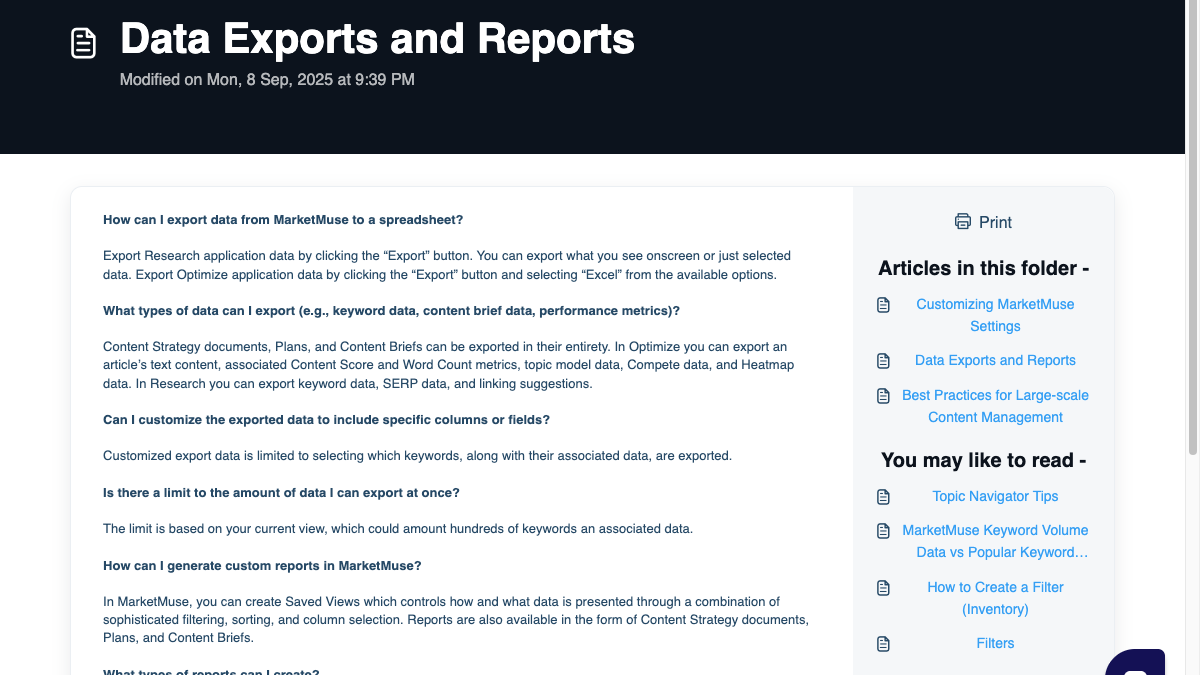
What slows you down is the cap. Exports are limited to "your current view," which the FAQ puts at hundreds of keywords, and no single button grabs everything. So you go module by module:
- In Topic Navigator, open each topic you've researched and export its topic model, either the whole view or selected topics.
- In SERP X-Ray, export the analysis for every priority keyword.
- On the Strategy plan, export the site-level views and linking suggestions from Heatmap and Connect.
- Export each Plan and Content Strategy document. The FAQ says these export in their entirety.
- Open every Content Brief and send it to Google Docs.
- Export each Optimize draft you care about to Excel, which gives you the text, the Content Score and the word count.
For a well-used account, set aside two to three hours. It also helps to make one folder per module before you begin, since the files pile up quickly.
Briefs and drafts are the easy things to lose
Briefs and drafts break the pattern. A Content Brief never goes to Excel: the help center offers a shareable link or an export to Google Docs, and it lists Microsoft Word as "coming soon." The share link disappears along with your account, which leaves Google Docs as the only copy that lasts.
Optimize drafts aren't files at all. They sit inside the app as Documents in the left side panel, and MarketMuse's own route to your site is Copy for Publishing, which gives you clean HTML to paste into your CMS one article at a time.
Any finished draft that never went live should be published before you cancel. Once it's on your site, RankControl's sitemap scan finds it as an existing page that new articles can link to.
Cancel last, and read the terms first
Save cancelling for the very end, because MarketMuse gives you no grace period. The Siteimprove agreement ends access when the subscription term ends, and the default term is one month unless your order says otherwise. Check the order before you assume you're on an annual contract.
The exit itself has two routes. Downgrading to Free is something you can do on your own, through the gear icon, Settings, the Subscription tab and then Manage Subscription. A full cancellation has no button, so the help center tells you to click the question mark in the top right and choose real-time support with an agent. All fees are non-refundable, with one narrow exception: the service fails to work as documented and Siteimprove can't fix it.
If there's a chance you'll want to look something up later, downgrade instead of cancelling outright. The Free plan keeps your login and gives you 10 queries a month, though it holds no tracked topics or briefs.
While you're in Settings, leave inventories alone. According to the help center, removing an inventory "deletes all data and cannot be reversed," so export first. MarketMuse doesn't publish how long your content data survives after cancellation, and Siteimprove's privacy policy only says it keeps personal data "as long as you are using our Services."

Your competitors are getting cited by AI. You're not.
Every day without citation tracking is a day your competitors pull ahead in ChatGPT, Perplexity, and Claude.
Where everything lands in RankControl
Nothing gets imported. There's no import tool, and your MarketMuse files are more useful as inputs you read than as data you load.
Topics come first. Go through your Plans and Topic Navigator exports and choose up to 20 pillar topics you want to own. Under those pillars, RankControl keeps a scored backlog of content ideas drawn from the questions your buyers search and puts titles on a calendar.
Next, decide which questions you want to be the answer to. MarketMuse tracks topics by keyword, but AI answers respond to full questions, so rewrite your top topics the way a buyer would ask them. Up to 50 of those become tracked queries, which AI visibility tracking checks every week across seven AI engines. Your SERP X-Ray exports can supply up to 10 competitors as well.
Your MarketMuse research still counts, and Google explains why. Its guide to AI features says there are "no additional requirements to appear in AI Overviews or AI Mode," and that both run a query fan-out across related subtopics. The topic coverage you built in MarketMuse still feeds that fan-out. The difference now is that you can see the answers themselves.
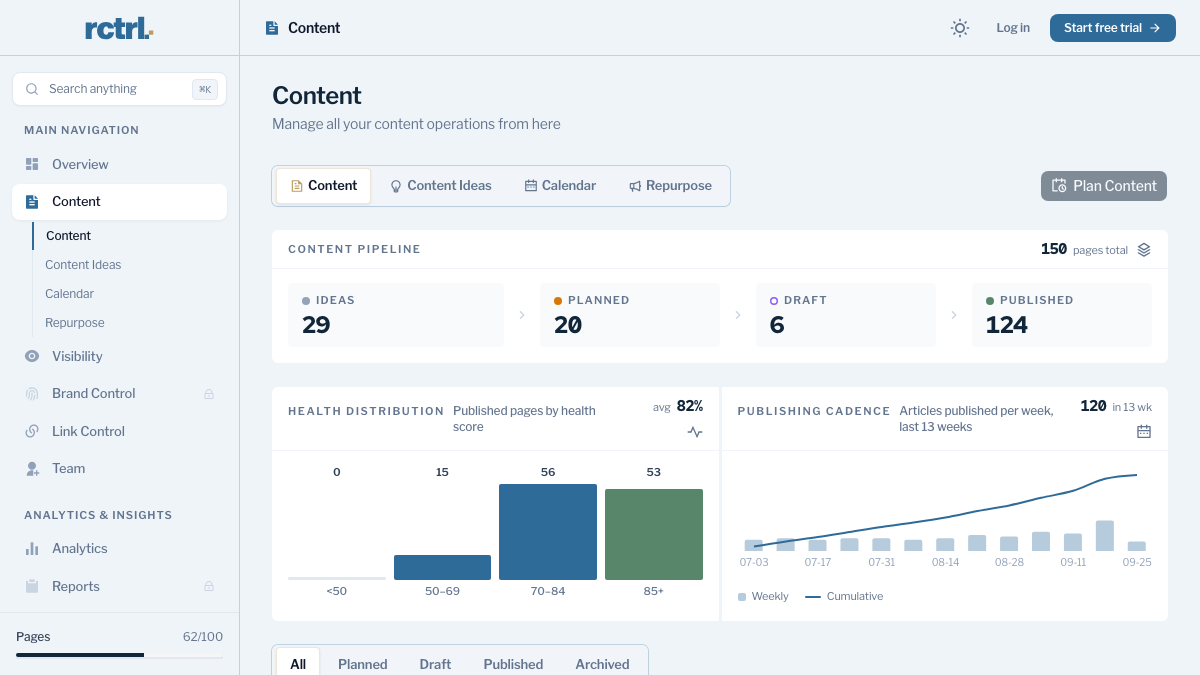
Brand Control comes after that. It reads your live site and drafts your voice, products, buyers and competitors, and you correct what it got wrong. You can upload up to three of your best articles as style references.
Last, connect your CMS through a publishing destination and run the sitemap scan so new articles can link to your existing pages. The content engine writes each article against the pages already ranking and scores it for how easily AI engines can quote it, which is the step MarketMuse always left to your writers. Auto-publish is off by default, so every article waits for your approval until you change that.
200+ SaaS teams already track their AI citations.
They know exactly when ChatGPT mentions their brand, and when it stops. Do you?

The switch from MarketMuse, step by step
Here's the full switch, with a time estimate for each step:
| Step | What to do | Time |
|---|---|---|
| 1 | Export every module to Excel, and every brief to Google Docs | Two to three hours |
| 2 | Start RankControl's 7-day free trial and let setup read your site | About 15 minutes |
| 3 | Correct the brand draft and add style references | 30 to 45 minutes |
| 4 | Choose up to 20 pillar topics from your Plans and topic models | About 30 minutes |
| 5 | Rewrite your top topics as buyer questions and add up to 50 as tracked queries | 30 to 45 minutes |
| 6 | Connect your CMS and scan your sitemap | About 20 minutes |
| 7 | Review the first planned titles | 20 to 30 minutes |
| 8 | Downgrade to Free or cancel through MarketMuse support once every export is saved |
Altogether that's five to seven hours, and you only do it once. Judge the results over months, because specific queries tend to earn citations within weeks while broader ones take longer. If you're still weighing it up, our RankControl vs MarketMuse comparison puts the two side by side.
What changes after the switch
MarketMuse told your team what to write and how thoroughly to cover it, and somebody still had to write it, publish it and find out whether it worked. After the switch, the brief and the article show up together. Pages go live on your domain, and every week you see which tracked questions each engine answered with your pages. A new citation triggers a notification, while a lost one shows up in the dashboard's citation history.
We couldn't find a single Reddit thread or post on X about cancelling MarketMuse. People leave it quietly, so the exports above are the only map you'll get. If you're still comparing options, our MarketMuse alternatives roundup covers seven of them.
RankControl is one plan, at $400 a month or $4,000 a year. The plan includes five seats, 100 pages a month and seven-engine tracking. You can keep doing all of this by hand, which means researching the topic, writing and publishing the page, and checking the answers every week. Or RankControl's agents can do it every month while you focus on your product.
Want to know where you stand in AI answers today? Run a free check of your brand before you start the trial, and keep the result as your before-picture.
How often does ChatGPT mention your brand?
Most founders have no idea. The answer might surprise you.