
You're about to cancel NeuralText, and the first thing you want to know is whether your published articles go with it. They don't. NeuralText never posted anything to your site, so every live article got into your CMS because someone on your team pasted it there. What you can lose is whatever you left sitting in NeuralText's editor.
In case you inherited the account: NeuralText is made by Atmos Media, a company in Turin, Italy, and it costs $19 to $119 a month. You're paying for content briefs built from the top Google results, and the same login covers keyword research and clustering, an AI writing assistant and reports on your Search Console data.
I read NeuralText's site, docs, API reference and terms on September 27, 2026 before writing this.
Why teams look past NeuralText
If you need to know whether ChatGPT or Perplexity mentions your brand, NeuralText can't tell you. It was built for Google's results page. A brief reads the top 20 results for up to three keywords, and the content score shows how well you cover the topics found there. Search its site and docs for ChatGPT, Perplexity or AI Overviews and you'll come up empty.
You may also be tired of doing the writing. The docs say a bulk article generator is coming "in the near-future", and the guide to documents still has an AI Article Generator marked "coming soon." Until one of them ships, you get a brief and a writing assistant, and someone on your team still has to write each article, then edit it and publish it.
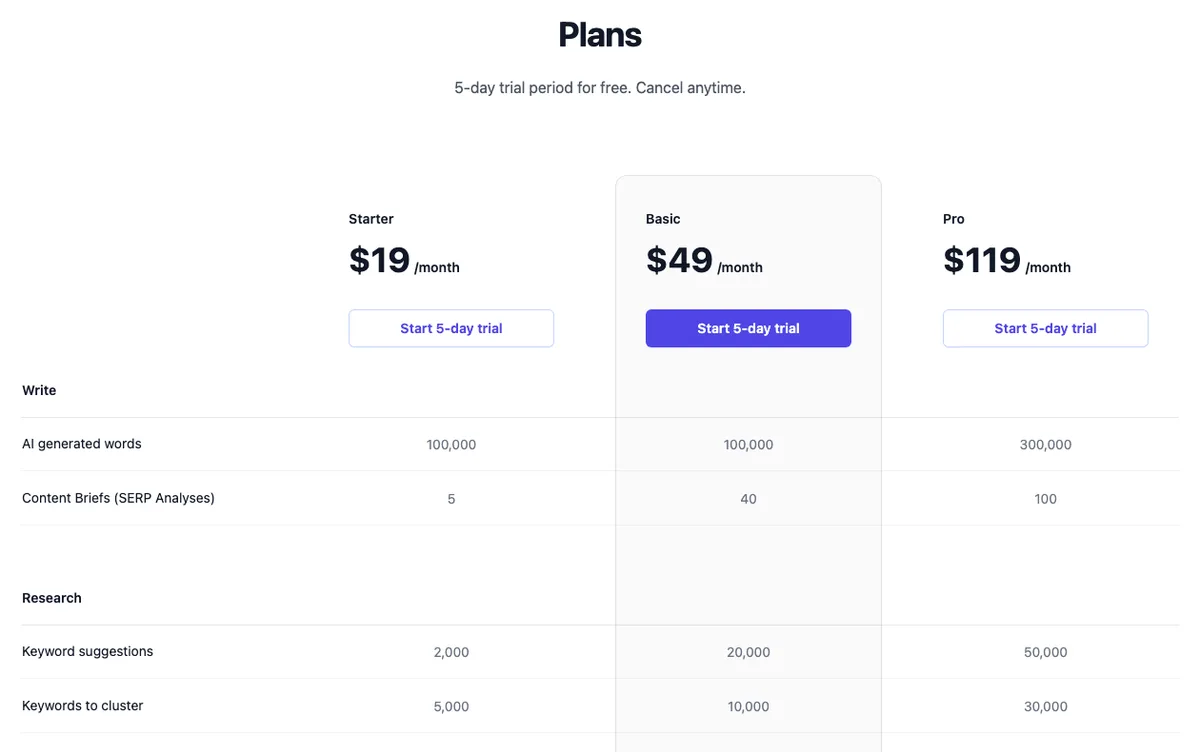
If you've been a customer for a while, the prices won't surprise you, because snapshots of the site from mid-2024 show the same ones:
| Starter | Basic | Pro | |
|---|---|---|---|
| Price a month | $19 | $49 | $119 |
| Briefs a month | 5 | 40 | 100 |
| Seats | 1 | 1 | 3 |
Look at the homepage and you'll see a counter reading "16,428 Happy Customers". It has shown that number since at least June 2023, and the blog's one and only post is from April 2024. The product itself is up, and the status page listed all services online on September 26, 2026. Still, when the public side hasn't moved in a while, you're better off getting your drafts out while everything runs.
The way people build briefs is shifting as well. When someone in r/content_marketing asked this April how people research and outline briefs every week, one reply described swapping Ahrefs, Frase and Google Docs for a home-built tool on DataForSEO and Claude. That tool writes a brief in under three minutes.
How do you actually research and outline content briefs each week? (looking for real workflows)
I’m curious how people here approach content brief creation, especially when you have to do it regularly. Do you have a set process for researching competitors, finding talking points, and structuring outlines? Or is it more ad hoc each tim...
See your first AI citation report in under 5 minutes.
No setup calls. No onboarding meetings. Connect your domain and see where AI mentions your brand right now.

What stays when you switch from NeuralText
Your WordPress, Webflow or Shopify posts stay exactly as they are. NeuralText doesn't document any plugin or CMS connection, and its docs give just two ways to get content out, an HTML download and a public read-only link. The posts on your site are ordinary posts, and no NeuralText account has any control over them.
Your Search Console data stays too, since it lives in Google. When you disconnect, you lose the Performance views NeuralText built on top of it, like pages ranking 3 to 20 and queries ranking 21 to 100, and the data itself doesn't move.
If you leaned on those views, keep in mind that they filter by position rather than by relevance. In September, SEO consultant Suganthan Mohanadasan posted that most Search Console data is full of irrelevant queries. He also shared a free tool that sorts up to 10,000 of them by what the business sells.
Your Google Search Console data is probably full of irrelevant queries. I built a free tool that filters them based on what your business actually does, not just keyword similarity. Up to 10,000 queries free. No signup. Read the article 👇 https://t.co/XoJvTB0qGl
 Suganthan Mohanadasan@suganthanSep 23, 2026
The draft drawer
Think of the last post you kept polishing in NeuralText after an earlier version was already live in your CMS. The newer copy of that post exists only in NeuralText, which makes it the easiest document to lose in a switch. It sits in your draft drawer, with every other document that only ever lived in the editor.
That drawer is often fuller than you'd guess. Blank documents cost no credits, so teams draft in NeuralText freely and paste the finished version somewhere else. Next to the posts you kept editing, you'll find briefs that never became articles and articles left unfinished when a project stalled.
Before you export, open the Documents list and mark each document live, stale on the site, or never published. You'll know which files matter, and the list doubles as your first content backlog once you've switched.
How to export your data from NeuralText
You'll be doing this one document or report at a time. NeuralText doesn't document a bulk export, and its API covers writing, summarizing and content analysis rather than your documents or projects. These are the buttons you'll use:
| Data | Where it lives | How to get it out |
|---|---|---|
| Documents and briefs | Documents, in the editor | Download (HTML) icon in the toolbar, per document |
| A brief to keep viewable | Share button, beside the right sidebar | Public read-only link |
| Keyword research | Keyword Discovery report | Export button, top right |
| Keyword clusters | Keyword Clustering results | The output file |
| AI Prompt outputs | Saved page | Copy icon on each output |
| Invoices | Settings, Billing, Invoice History | Click each invoice |
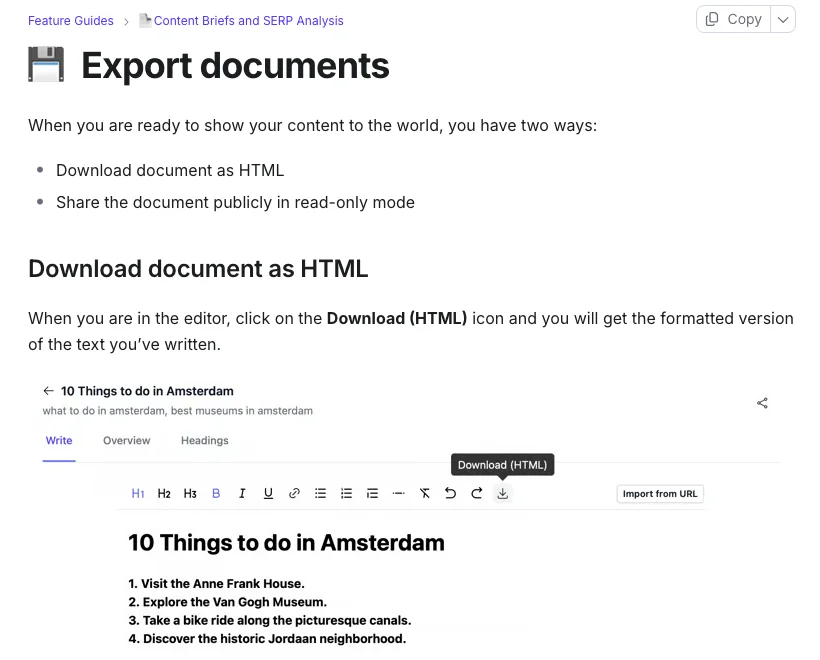
The HTML download, per the docs, gives you "the formatted version of the text you've written". Expect the research behind a brief, like its topics and questions, to stay behind in NeuralText. If a brief's data still matters to you, screenshot its panels while you can still log in.
As each file downloads, name it after its target keyword. For keyword reports, export what you already have instead of rerunning anything, since generating a report uses credits.
Lifetime deal owners
Did you buy lifetime access on AppSumo? Then your list is shorter. The deal, now shown as sold out, came in two license tiers and promised all future Pro Plan updates. If you added the optional $19 monthly add-on for unlimited copy runs, that's the only thing you need to cancel, though your draft drawer still needs emptying like everyone else's.
If you're hunting AppSumo for the next deal, the mood there has cooled on lifetime SEO apps. In r/appsumo this July, one member said a new SEO app lands every month, most of them promising the same things. A reply suggested connecting DataForSEO or Ahrefs to Claude instead.
SEO Apps
Seems like every month, there's always a new SEO app on Appsumo. Many promising the same stuff. Curious to know if you guys have one you prefer? For context, I'm a performance marketing agency. I'm only intending to do SEO for myself and ma...
Cancel NeuralText and read the renewal terms
When your files are out, go to Settings, then Billing, and click Cancel Plan under Current Plan. You keep access until the paid period ends. If you're still inside the 5-day trial, the terms say you won't be charged at all.
Before you click, read these four lines in the terms:
| What the terms say | What it means for you |
|---|---|
| The subscription amount isn't refundable; a refund is only possible if NeuralText couldn't provide the service | Don't count on money back |
| Cancelling removes discounts and coupon codes | They aren't applied again if you resubscribe |
| Plans renew for the same period unless either side requests termination at least 30 days before the term ends | On a yearly plan, cancel in writing a month or more before renewal |
| After termination, your data stays available for electronic retrieval for 30 days | After that, NeuralText may delete it |
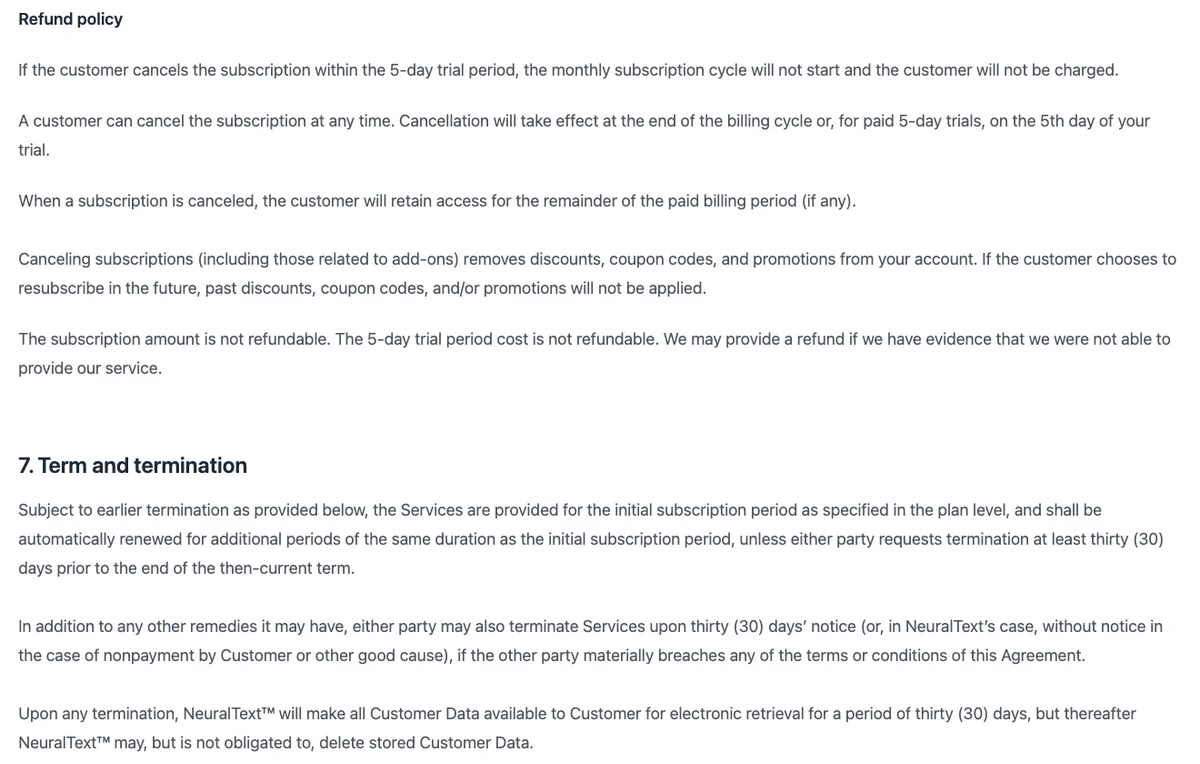
If you pay yearly, the renewal line is the one that can catch you out. NeuralText sets annual plans up by email, so send your cancellation in writing a month or more before the renewal date. And don't treat the 30-day retrieval window as a safety net; export first and cancel second.
One surprise in the terms: they're governed by Texas law, although the company sits in Turin. Delete the account at the very end. Click your profile at the bottom left, open Account Settings and choose Delete Account.
Disconnect NeuralText
Search Console is the connection you'll want to remove. If a NeuralText project holds a Search Console property under its Performance section, go to your Google account's third-party connections and take away NeuralText's access. If you used the API, stop any scripts that call it with your token. Then delete your projects under All Projects before you delete the account.
Where things land in RankControl
You won't import anything, because RankControl has no import tool. Your posts stay put, and your NeuralText files serve as reference material.
| From NeuralText | Into RankControl |
|---|---|
| Published posts | Stay in your CMS as internal link targets |
| Drafts from the drawer | A backlog to finish yourself, or titles for the planner |
| Keyword exports and clusters | Reference while the planner builds your calendar |
| Search Console views | Daily Search Console sync in RankControl's analytics |
| No AI tracking | Up to 50 tracked questions, checked weekly on six engines |
What changes most for you is the writing. With NeuralText, you got a brief and the article was your job. RankControl's content engine plans titles from the questions you're losing, researches the pages already ranking for each keyword and writes the full article. It publishes native posts through one of nine destinations, and auto-publish stays off until you switch it on.
You also get AI visibility tracking, which checks ChatGPT, Claude and four more engines every week and shows which sources each answer quoted. Link Control finds prospects for every article you publish and sends the pitch from your own mailbox once you approve it. Our RankControl vs NeuralText comparison puts the two tools side by side.
Your competitors are building backlinks while you read this.
Organic outreach, social mentions, and citations from Editorial Circle member sites, with managed backlinks available as an add-on. Grow your domain authority without running the campaign yourself.

The switch from NeuralText, step by step
You want every file out before you touch Billing, so begin with the Documents list. Mark what's live, stale or never published, download each document you need as HTML, and export your keyword reports, cluster files and invoices. Screenshot any brief data or Performance views you still use.
While NeuralText is still active, start the RankControl trial, connect your CMS and add up to 50 tracked questions and 10 competitors. Then cancel in Billing, and if you're on an annual plan, send the request at least 30 days before renewal. Removing NeuralText's Search Console access, deleting your projects and deleting the account come last.
Expect the export to take an afternoon. The slower part is what comes after it: publishing pages that answer your buyers' questions and getting other sites to mention them. You can run that yourself after the switch, or RankControl's agents can run it every month for $400, with a 7-day free trial. To see where you stand first, the free AI visibility check shows who ChatGPT cites for three questions from your market.

You're getting AI traffic. But do you know where it comes from?
RankControl credits every visit to the assistant that sent it: ChatGPT, Perplexity, Claude, Gemini, Copilot, or Grok. Full source attribution, next to your Google traffic.