
Frase and RankControl cover a lot of the same ground, since Frase also plans articles, writes and publishes them, and tracks AI citations. What a switch really asks is moving your work across without breaking a page that's already ranking or being cited.
Most of that work needs no help. If Frase published to WordPress, Webflow, Sanity or Wix, those articles are ordinary posts in your own CMS, and they'll still be there after you cancel. Two things deserve a plan. The AI Visibility history can't be downloaded, as far as Frase's docs go, and FraseCMS content keeps coming from Frase's servers even when the browser shows your domain.
Everything about Frase below comes from its help docs, pricing page and Terms of Service, which I read through on September 26, 2026. Full disclosure: we make RankControl, and the product differences are in our RankControl vs Frase comparison.
Why teams move off Frase
Start with the pricing page, because it explains most departures by itself. A Starter account gets AI Visibility for ChatGPT and Google AI and nothing else. You need Scale, at $299 a month, before Claude and Gemini show up, and no plan includes Grok. Outreach is capped as well: an outreach draft "must be copied and sent outside of Frase," according to its Backlinks docs. And a FraseCMS blog is a blog you rent.
The lifetime-deal crowd has a sharper reason, and it dates from January. Frase's new platform launched then, AppSumo lifetime-deal buyers were kept on the old version, which has fewer features, and multi-domain access on the new platform came in at $129 a month. People in the r/appsumo thread described similar squeezes after earlier feature launches. Support, they said, replied that the old deal didn't cover the new Frase, and some accounts abruptly started asking for payment.
Frase launched a new platform and lkeeps the LTDs on the old one... bye bye LTD users.
2025 was a bad year for LTDs, and 2026 is not looking good for LTD buyers. Frase decided to repackaged its plaform and called v2, dropped some features, added another and created a new workflow based on AI (that was present in V1. And like...

Built by the team that got cited in 48 hours.
Content generation, backlink building, AI visibility tracking, and Google rankings. One platform, zero guesswork.
What moves when you switch from Frase
Your CMS already holds everything Frase published there, so none of it moves. Backlink prospects and referring domains export as files, and drafts download individually.
Planning goes into three things: the AI Visibility history, whatever sits on FraseCMS, and settings like content rules and Brand Voice. Of those, Brand Voice takes the least effort, because RankControl's Brand Control builds a new profile from your site and you just fix what it gets wrong.
How to export your data from Frase
Here's the full list of exports in Frase's docs as of September 2026:
| What | How | Format |
|---|---|---|
| An article | Editor → Share tab → Export | HTML, PDF, Markdown or plain text |
| An article to a cloud tool | Editor → Share tab | Notion or Google Docs |
| Backlink prospects | Export from the Backlinks module's prospect list | CSV or HTML |
| Referring domains | Export from the Backlinks module's referring domains list | CSV or HTML |
| FraseCMS posts in bulk | Frase's REST API | JSON |
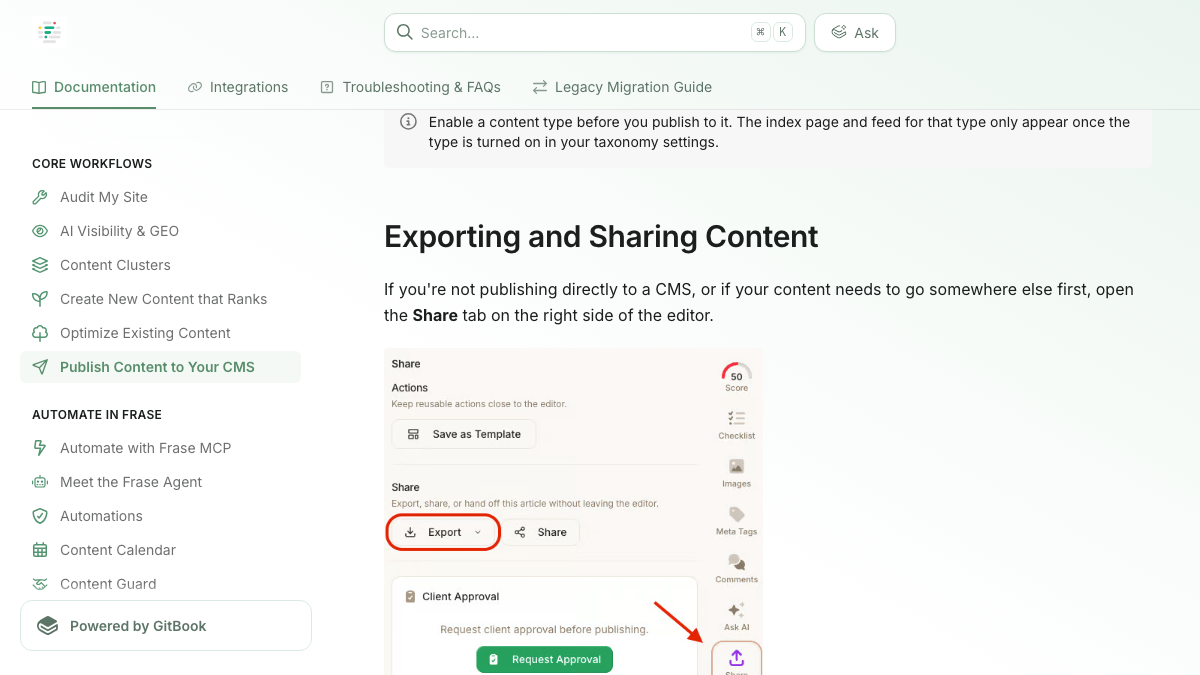
Individual downloads stay manageable up to a few dozen drafts. Beyond that, the API is the better route. The FraseCMS docs say it can "retrieve blog posts" and "migrate content from other platforms," and every plan has API access, with 5,000 requests a month on Starter.
AI Visibility is where you'll work by hand. Neither the tracked prompts nor their citations and trend history have a documented download, so before the plan ends, copy the prompt list and jot down where you stand on the prompts that matter to you. If you'd rather script it, the API and the MCP server both reach AI search visibility data.
Still on legacy Frase? Check the new platform before you export. The migration guide says every live and archived Legacy Frase document was moved over, which makes the new platform your export source. Personal data in a portable format is a separate request to [email protected], per the Privacy Policy.
The proxy unwind
FraseCMS is the part I'd handle with the most care. Pages that look like they're on your domain are really being fetched from Frase: in subdirectory mode, the docs say the setup "uses a reverse proxy connection between your website and Frase CMS," and that connection exists because a rewrite rule on your host forwards yoursite.com/blog to FraseCMS. The docs are silent on what those URLs do once you cancel.
My name for the fix is the proxy unwind. The posts go back onto your own site at their current addresses before Frase leaves the path, which keeps every URL that search results and AI engines already link to working.
- Get every FraseCMS post out, as HTML or Markdown one at a time or all at once through the API.
- Recreate each post in your own CMS under exactly the same path; yoursite.com/blog/post-name should still be yoursite.com/blog/post-name.
- Open a handful of the rebuilt pages and check their titles, meta descriptions and images.
- Take the rewrite rule off your host, so /blog comes from your CMS rather than FraseCMS.
- Wait until the old URLs are loading from your own site, and only then cancel Frase.
Subdomains and custom domains work differently, because the posts can't keep their old address on your main site. Rebuild them there, then add a redirect from each old URL to its new page while the Frase plan is still active.
Cancel, refunds and renewal terms
No cancel button appears anywhere in Frase's public docs, and the renewal terms deserve a careful read. Here's what each page says:
| Topic | What Frase's pages say |
|---|---|
| Cancelling | You "may simply discontinue using the Services and cancel your subscription" (Terms of Service); plan and billing settings sit under Settings, then Billing & Usage |
| Refunds | "All fees paid are final, and we do not provide any refunds." |
| Renewal | A one-year initial term that renews unless either side gives notice "at least thirty (30) days before the end of the relevant term" |
| Switching billing | The pricing page talks about moving between monthly and yearly billing at any time |
| Downgrades | Wait for the next billing cycle |
| After you cancel | Account information is kept "for a reasonable period thereafter in case you decide to re-activate," with no number of days given (Privacy Policy) |
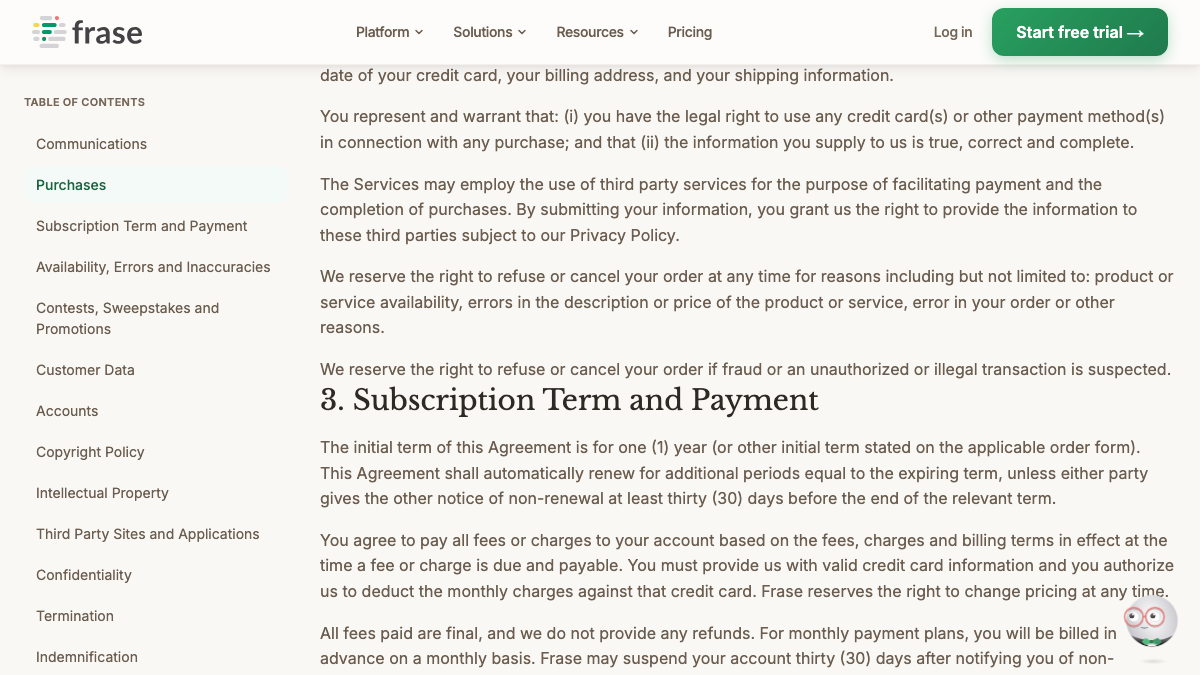
The terms and the pricing page describe your contract differently. One has a one-year term with 30 days' notice; the other lets you move between monthly and yearly billing whenever you like. Work out which applies to your account and get the notice date into your calendar, since without refunds a missed date means paying for another term.
No luck finding the cancel option under Billing & Usage? Email [email protected] too, and save whatever comes back. The Privacy Policy won't commit to a number of days for keeping your account, so I'd finish every export by your last paid day.
Make the before-and-after fair
Old Frase numbers only make a fair baseline if you line them up with matching RankControl numbers. Frase checks every day and RankControl every week, and an AI engine can answer the same question differently from one run to the next, so monthly rates are the sensible comparison.
Both tools watch ChatGPT and Perplexity, and if you were on Scale, Claude and Gemini overlap as well. Google is the tricky one. Frase reports a single Google AI figure covering Google's AI surfaces, whereas RankControl gives Google AI Mode its own line and also tracks Grok, so treat those readings as fresh ground rather than a change in your standing. Word your questions the way you did in Frase for the first month, then start refining once RankControl has its own baseline.
Where things land in RankControl
RankControl doesn't import anything. What you published stays put, and the Frase exports turn into reference material:
| From Frase | Into RankControl |
|---|---|
| Articles published to your CMS | Stay as they are; RankControl publishes new posts alongside them |
| FraseCMS posts, moved by the proxy unwind | Ordinary posts in your CMS, at the same URLs |
| AI Visibility prompts | Up to 50 tracked queries, rewritten as buyer questions, checked weekly on six engines |
| Competitors | Up to 10 in your share of voice |
| Backlink prospect CSV | A reference list for outreach |
| Brand Voice and content rules | A reference for correcting the Brand Control draft |
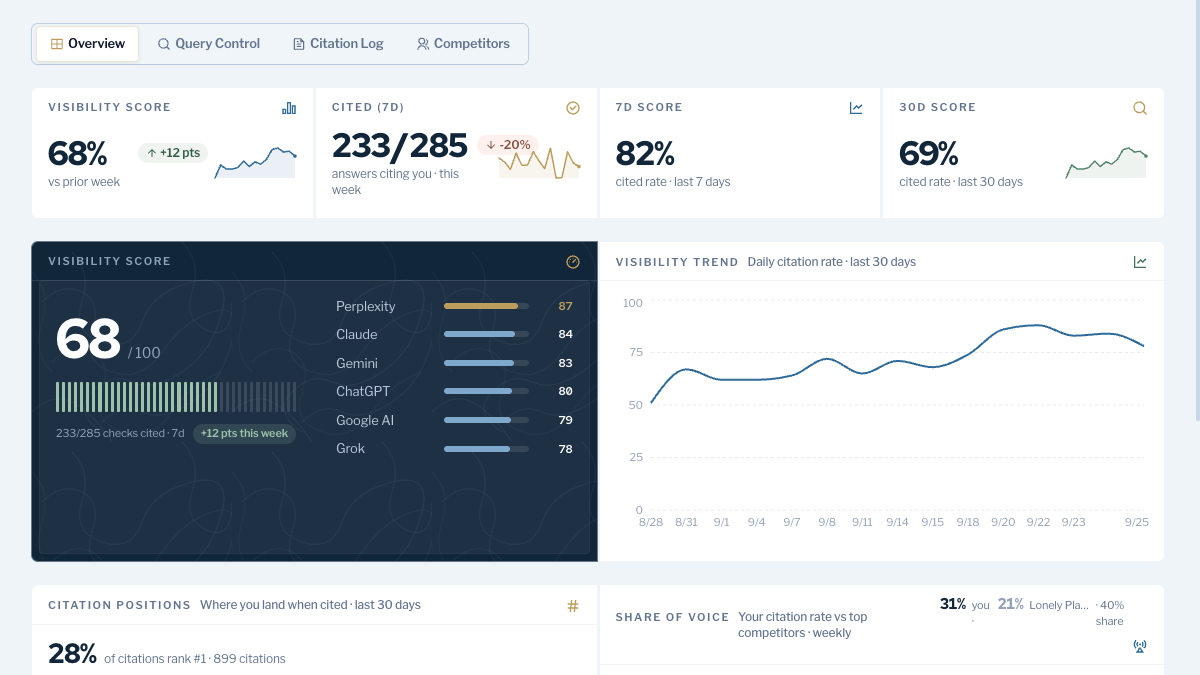
AI visibility tracking runs six engines on the one RankControl plan, Claude and Grok among them. The content engine plans articles around the questions you're currently losing and publishes each to one of nine destinations. After you approve, Link Control writes the outreach for every article and sends it from your own mailbox.
Used to driving Frase from Claude? You can keep doing that. RankControl's MCP server comes with the plan, has more than 80 tools, and holds the publish step as a dry run until you confirm.
See your first AI citation report in under 5 minutes.
No setup calls. No onboarding meetings. Connect your domain and see where AI mentions your brand right now.

The switch from Frase, step by step
I'd go in this order, dates first and cancellation last:
- Find the renewal date and notice deadline, checking Frase's billing settings against your order confirmation.
- Save the backlink prospect and referring domain exports, plus any drafts worth keeping.
- Capture the AI Visibility prompts with their current results by hand, or through the API.
- Run the proxy unwind if FraseCMS hosts any of your posts.
- Start your RankControl trial, connect the CMS and fix the Brand Control draft.
- Enter up to 50 tracked queries and up to 10 competitors, then cancel Frase.
Moving the pieces is only setup. After that comes publishing pages that answer what your buyers ask and earning mentions for them on other sites. You can keep doing that by hand after the switch. RankControl's agents will run it monthly for $400 instead, and the free trial lasts 7 days. For a starting point, the free AI visibility check runs three questions from your market through ChatGPT and shows who gets cited.
Your competitors are building backlinks while you read this.
Organic outreach, social mentions, and link exchanges, with managed backlinks available as an add-on. Grow your domain authority without running the campaign yourself.