
Dageno is an AI search data platform, so a switch from Dageno is about getting data out: your prompts, daily answer history, cited sources and the opportunity lists it built. How much you can take depends on your plan, because exports come with the most expensive self-serve tier.
Dageno is run by DINGX LLC, and its terms are governed by Delaware law. It tracks prompts daily across nine AI engines from $49 a month, with market research, shopping and ad data on higher plans.
This guide covers what to save, how cancelling works, what to disconnect, and where the work lands in RankControl. I read Dageno's pricing page, docs, terms and refund policy on September 27, 2026. For the two tools side by side, see our RankControl vs Dageno comparison.
Why teams look past Dageno
Dageno researches well, and it tells you plainly where it stops. Its pricing FAQ says of its MCP and API that "neither automatically modifies websites, publishes content, or performs optimizations." The Content Writer agent drafts articles, but editing, publishing and asking other sites for mentions stay with your team.
That's where many buyers of AI visibility tools get stuck. In r/SEO_for_AI in September, someone said most of the dashboards they'd tried felt "kinda useless." They didn't need another chart, only to know whether the brand shows up, gets cited or gets skipped.
AEO tools for tracking brand visibility in AI search 2026... what are people actually using?
Been trying to get a clean read on brand visibility in ChatGPT, Perplexity, AI Overviews etc and most of the dashboards feel kinda useless tbh. I do not need another pretty chart, I need to know if our brand is showing up, getting cited, or...
Two other reasons come up. Claude isn't among the nine engines on Dageno's pricing page. And prompt limits count each engine and region separately, so Starter's 50 prompts cover about five questions across all nine engines. Matching 50 questions on the five engines both tools share takes 250 slots, which is Dageno's Growth plan at $199.
How often does ChatGPT mention your brand?
Most founders have no idea. The answer might surprise you.

The export tier
I call it the export tier: the plan you need to be on before a tool lets you take your data out. On Dageno, that's Scale at $410 a month. The pricing table lists "API, batch configuration, and data exports" for Scale only. Growth at $199 includes MCP data access, and Starter at $49 includes neither.
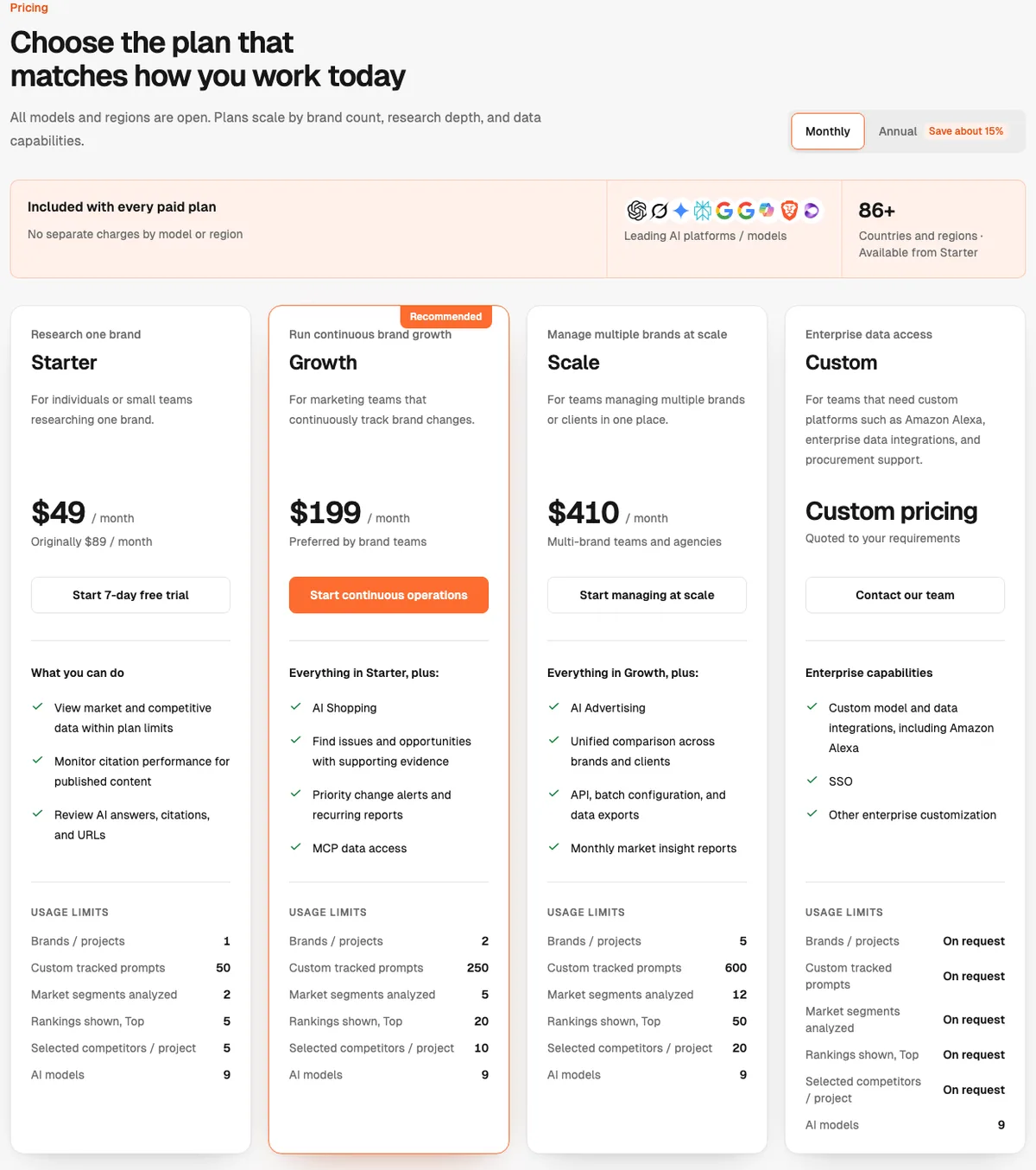
So the plan you're on decides how much history comes with you. The terms say "You retain ownership of your data." Owning it and being able to download it aren't the same thing, so plan the exit around your tier.
What stays when you switch from Dageno
Anything you published from Dageno's drafts lives on your own site, and it stays. So do the brand documents and product notes you uploaded as resources, since you have the originals. If you bulk-uploaded prompts from a CSV file, that file is still on your drive.
What lives only in Dageno is the history and the analysis. That covers the daily answers and positions for every prompt, and the cited sources behind them. It also covers the opportunity lists: the backlink targets, social posts and content gaps it found. Market reports, Content Writer drafts and agent tasks stay in Dageno too.
Dageno's founder, who posts as Tim, introduced the Content Writer in April. The post says it builds an evidence pack, shapes a brief and audits its own draft before publishing. Those drafts stay in Dageno, so copy the ones you want to keep.
https://t.co/MhVrcVrB13 👆 Dageno AI’s new 🚀 Content Writer 🚀 turns GEO data into high-quality articles automatically. Not just AI writing — it’s GEO data → real content → measurable results. In just 3–5 minutes, the agent: 🧠 builds the evidence pack first 📌 aligns the https://t.co/mkszSuUgON
 Tim@tim_geo_seoApr 30, 2026
How to export your data from Dageno
A Dageno export works differently on each plan, so start by checking which one you're on.
| What | Starter | Growth | Scale |
|---|---|---|---|
| Prompts and topics | Copy the list | Query through MCP | Export |
| Visibility, positions, sentiment | Screenshot the key views | Query through MCP | Export or API |
| Cited sources and backlink targets | Copy the top domains | Query through MCP | Export or API |
| Content Writer drafts | Copy each one | Copy each one | Copy each one |
| Anything else | Email support | Email support | Email support |
On Growth, connect Dageno's MCP to Claude or another AI tool and ask for what you need in tables. Start with your prompt list, then visibility and position by engine over your full history, then cited domains and backlink opportunities. Paste each answer into a spreadsheet and date the file. AI tools sometimes summarize or cut long results, so check the totals against the dashboard before you rely on them.
On Starter, copy your prompts and the top cited domains by hand, and screenshot the trend views you report on. Then email [email protected] before you cancel and ask whether it can export your history. If there's a lot of it, ask whether a month on Scale would unlock exports for the full date range.
The backlink opportunities list is the one to save first. It shows the domains AI engines cite that don't link to you yet, and it's the most useful thing to carry into outreach.
Cancel Dageno and the refund policy
Dageno's refund policy gives two ways to cancel. Go to Settings, then Subscription, then Cancel Plan, or email [email protected] with the subject "Cancel Subscription" and your account email. Cancelling takes effect at the end of your billing period.
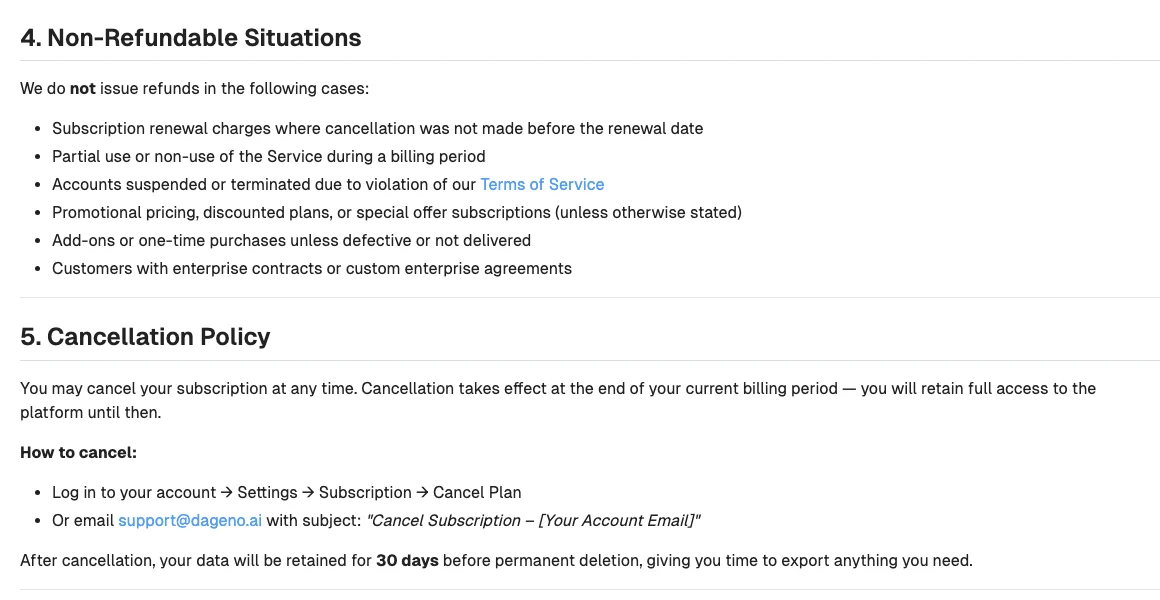
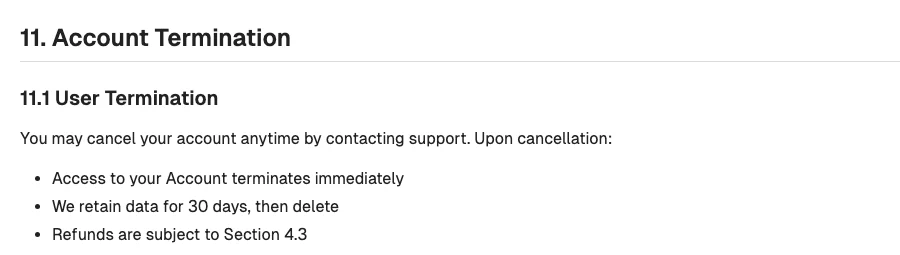
The terms describe cancelling differently. Section 11.1 says that on cancellation, "Access to your Account terminates immediately," and data is kept for 30 days and then deleted. The refund policy was updated more recently, but don't test which one applies. Finish your exports before you press cancel.
Refunds are narrow. Renewals you didn't cancel in time, partial months and "promotional pricing, discounted plans, or special offer subscriptions" aren't refunded. Starter's $49 price is marked down from $89, so it likely falls under that last line. Yearly subscribers can contact support about a refund. If the platform drops below 99% uptime in a month, you can claim service credits within 30 days, but not cash.
After cancellation, your data is kept for 30 days and then permanently deleted. The terms also say backups aren't guaranteed.
Take back access
Once your exports are safe, remove Dageno's access to your other tools. Stop any server or CDN log feeds you set up for its AI crawler reports, and disconnect Search Console and Google Analytics if you linked them. Remove its MCP connection from Claude or any other AI tool, delete any API keys, and remove teammates you invited.
Where things land in RankControl
RankControl has no import tool, so your Dageno exports become the baseline while RankControl starts its own history. It checks weekly rather than daily, so expect fewer data points per question than Dageno's daily runs gave you.
| From Dageno | Into RankControl |
|---|---|
| Tracked prompts | Up to 50 tracked questions, re-added by hand |
| Competitors | Up to 10 competitors |
| Daily history | Keep as a baseline; weekly history starts at the first check |
| Backlink opportunities | Link Control prospects for each published article |
| Content Writer drafts and gaps | Titles for the planner, written and published by the content engine |
| Market research, shopping and ads | Not covered |
| AI crawler reports | AI crawler visits in analytics, plus a daily check that AI crawlers can reach your site |
AI visibility tracking checks your questions every week on six engines, including Claude, and shows which sources each answer quoted. The content engine publishes up to 100 articles a month through one of nine destinations, with auto-publish off until you turn it on. Link Control pitches the sites those answers cite from your own mailbox after you approve each email.
15 hours a week manually. Or 15 minutes with RankControl.
Track citations, monitor competitors, and fix content gaps across every AI search engine. Automatically.

The switch from Dageno, step by step
- Check your plan: Scale can export, Growth can query through MCP, Starter copies by hand.
- Save your prompts, cited domains and backlink opportunities first.
- Save visibility history and any Content Writer drafts you want.
- Start the RankControl trial, add your questions and competitors, and connect your CMS.
- Cancel in Settings or by email, after your exports are done.
- Remove log feeds, analytics connections, MCP and API access.
The export takes an afternoon. The slower work is publishing pages that answer your buyers' questions and getting other sites to mention them. You can run that by hand after the switch, or RankControl's agents can run it every month for $400, with a 7-day free trial. Before you start, the free AI visibility check shows who ChatGPT cites for three questions from your market.
AI search traffic grew 835% this year. Is your content ready?
RankControl generates 26 content formats optimized for ChatGPT, Claude, and Perplexity. Published on your domain, matched to your brand.