
Leaving Indexly takes several small decisions rather than one. The name points at indexing, but the site now calls Indexly an AI search visibility platform, and one subscription covers a lot of ground. It submits your URLs to Google, Bing and Yandex and tracks how AI engines mention you, and it also writes articles and reports on keywords, backlinks and traffic. So you go feature by feature and decide what comes to RankControl and what you keep running yourself.
The calendar matters more than usual here. Indexly documents no way to export your whole account: its help pages say reports export as PDF or CSV without naming the plans, and the API, which sits on the $499 Scale plan, returns 30 days of history at a time. The cancellation policy also calls every payment non-refundable, so it makes sense to finish the export before your renewal date.
I read Indexly's pricing page, feature pages, API docs and cancellation policy on September 26, 2026. For the product differences, see our RankControl vs Indexly comparison.
Why teams look past Indexly
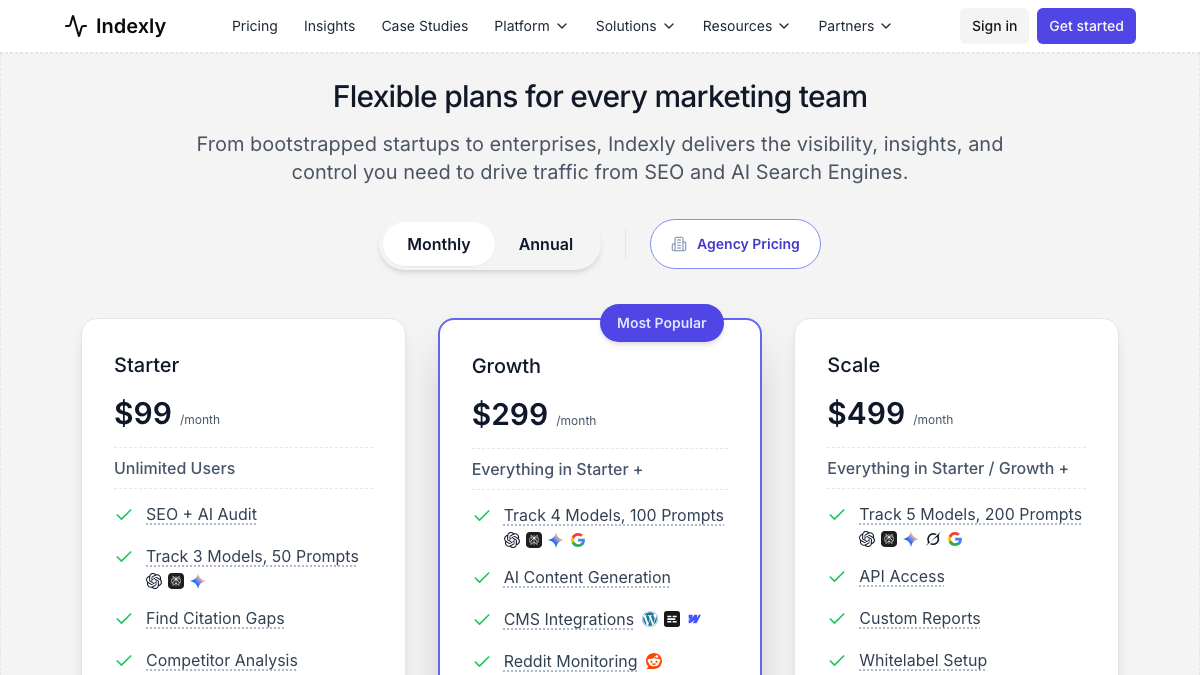
Start with the engine counts, because they don't agree with each other. Indexly's plan cards promise three, four and five engines as you move up the tiers, yet the tooltips and the comparison table on the same pricing page list fewer, and Grok appears only on Scale.
Here are the prices and prompt limits from that page:
| Plan | Price a month | Prompts tracked | Engines on the plan card |
|---|---|---|---|
| Starter | $99 | 50 | Three |
| Growth | $299 | 100 | Four |
| Scale | $499 | 200 | Five |
The Starter plan bothers me more. The comparison table gives it 10 AI-written articles a month, but it marks CMS integrations as missing until Growth, which means those articles don't publish to your CMS for you. Growth is also where team access, AI referral traffic and Indexly's autopilot agent begin, and the API only arrives on Scale.
15 hours a week manually. Or 15 minutes with RankControl.
Track citations, monitor competitors, and fix content gaps across every AI search engine. Automatically.

What moves when you switch from Indexly
I'd worry less about your site than about Indexly's own records. Pages that are indexed stay indexed, because Google and Bing hold that index, not Indexly. Articles Indexly published to WordPress, Webflow, Ghost or Shopify are posts in your own CMS and stay there, and your Search Console data never left Search Console.
The records are a different story. Your prompt list exists only inside Indexly, and so does the visibility and citation history built on it. The same goes for your backlink profile and indexing logs, and for any articles still sitting in Indexly's writer. The IndexNow pings belong in the plan too, because those stop the day the account does.
How to export your data from Indexly
Expect to piece this together yourself. There's no help center with export guides, the feature pages only mention the export buttons in passing, and just two menu paths appear anywhere on the site: Settings → API Access and Settings → Team. For everything else, the table quotes Indexly's own wording.
| What | How Indexly describes it | Format |
|---|---|---|
| Indexing submission logs | "Filterable by date, surface, status · export CSV" | CSV |
| AI referral traffic (Growth and Scale) | "export as CSV" on the AI visibility traffic table | CSV |
| Analytics | "Export everything to CSV or the API" | CSV |
| Backlink profile | "Sort, filter and export the whole profile" | Not stated |
| Disavow file | One-click download in Google's format | disavow.txt |
| Articles in the writer | "Bulk export as HTML or Markdown" | HTML, Markdown |
| Visibility, citations, sentiment, tracked prompts | Report export (PDF, CSV) per Indexly's help pages; REST API with a key from Settings → API Access (Scale only) | JSON |
The API deserves a slower read, because the history it promises and the history it returns don't match. Indexly's AI search visibility page says historical visibility, citation, sentiment and referral data are "stored indefinitely," yet the one history endpoint in its API docs takes a day count, default 7 and "maximum 30," with no start date. As documented, nothing older than the last 30 days comes out.
Starter and Growth have no API at all. On those plans, export whichever reports your plan allows, screenshot the trend charts, and write down where you stand on the prompts you care about.
If you're on Scale, the tracked-prompts endpoint is the single most useful pull, since it returns up to 100 prompts a page along with the AI responses. For a copy of your personal data, the Privacy Policy lets you request portability by email and gives Indexly up to one month to respond, so send that request early.
The ping gap
This is the one I'd fix before cancelling. Your pages stay in Google and Bing after you leave. What gets worse is the ping gap, the delay between publishing a new page and a search engine hearing about it, and it grows the day Indexly stops submitting your new URLs. The fix is to move each kind of ping somewhere you control.
Bing and Yandex hear from Indexly through IndexNow, and plenty of sites can send those pings themselves. Rank Math, Yoast and AIOSEO all support IndexNow, and so does Cloudflare's Crawler Hints. For Google, keep your sitemap submitted in Search Console, which is the job Indexly was doing for you.
I wouldn't mourn the Google Indexing API. Indexly pings it "where eligible," and Google only supports that API for job postings and livestream video pages. On r/TechSEO, a developer found that even eligible job URLs came back with a success code while Search Console never changed. A reply pointed out that a 200 response only means Google accepted the request, and says nothing about whether it will crawl the page.
Help with the Google Indexing API
I am trying to use the official Google Indexing API to index some job postings. I can successfully make the indexing requests and the API returns a 200 status code, but when I check the URLs in Google Search Console, their status never chan...
AI citations follow different rules again. In an r/SEO thread, a site owner found ChatGPT citing a brand-new site that was barely indexed, and one reply explained that OpenAI runs separate crawlers for training, for its search index and for live fetches. Your server logs show which of them visit you, as our guide to auditing AI crawlers in your logs explains.
Chat GPT no longer uses Bing.
I have a new website that I created for testing purposes. Currently, only a small number of pages are indexed by Google, but they are not ranked. Since it is new, naturally, search engines other than Bing do not know about it. When I search...
Remove Indexly's access on the way out
Indexly doesn't document offboarding, so this part is manual. Search Console comes first: open Settings, then Users and permissions, and remove any access you granted for Indexly. For the CMS side, Indexly's own integration docs say a WordPress.com connection can be revoked from WordPress.com's security settings and a Webflow token regenerated in Webflow. A Shopify connection runs on API credentials, which you can delete in Shopify. If you used the API, look under Settings → API Access for keys you created.
Cancel, refunds and the free tier
You have two ways out, and neither gets you money back. Open the Subscriptions section in the app and click Cancel Subscription, or email a cancellation notice to [email protected]. After that you keep Indexly's free features, though no page describes what they are, and point 4 of the policy says you can keep using the service "till the end of next billing period."
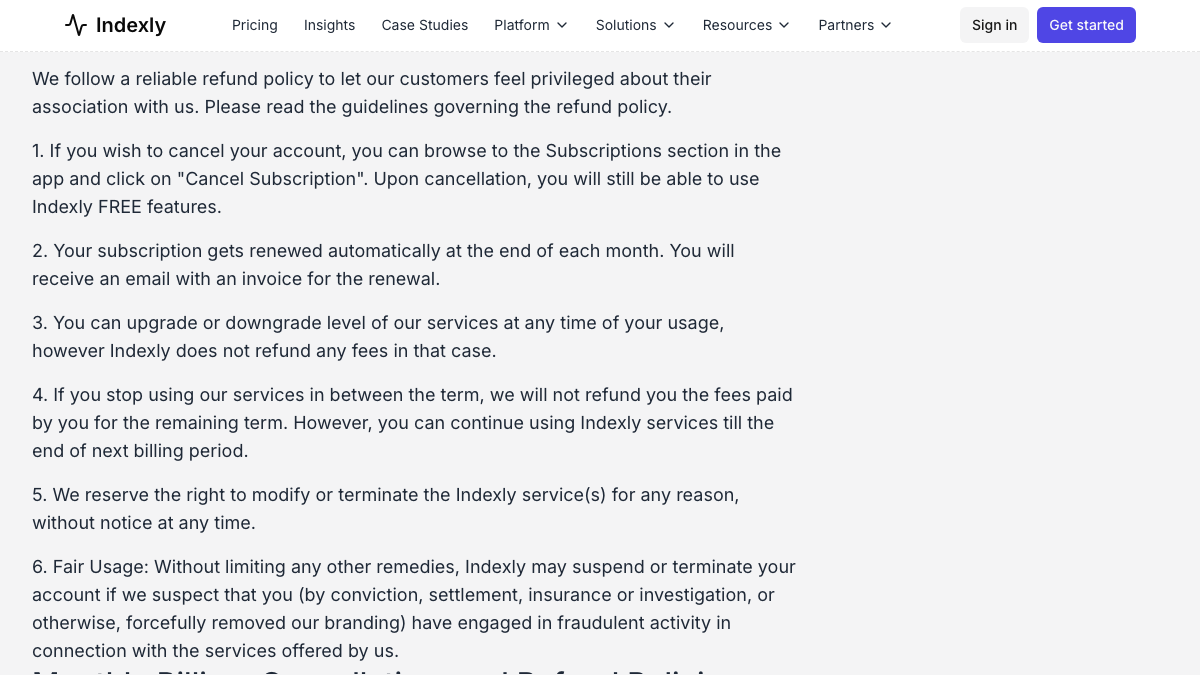
The refund line is as firm as they come. According to the policy, "all services rendered are non-refundable," with no credit for partial months, quarters or years and nothing back if you upgrade or downgrade. The one exception is when Indexly refuses your subscription, and even then you get a prorated refund minus a $4.99 charge.
The legal pages surprised me. The Terms of Service and the Privacy Policy are both dated June 15, 2024, and they name the company as Pivelabs Pvt Ltd. The governing-law sentence stops mid-phrase, at "prevailing law of in", without ever naming a jurisdiction. Neither page says when your data gets deleted after you cancel, so I'd treat your last paid day as the export deadline.
Make the before-and-after fair
Judge the switch on monthly citation rates. Indexly checks prompts daily and RankControl checks queries weekly, and AI answers change between runs of the same question, so a single day tells you little either way.
The engines only partly line up. Both tools cover ChatGPT, Perplexity and Gemini. Indexly's plan cards put Google AI Overviews on Growth while its comparison table lists it on Scale, and RankControl doesn't track AI Overviews at all. RankControl reports Google AI Mode on its own and covers Claude and Grok on its one plan, where Indexly keeps Grok for Scale. For the first month, keep your questions worded the way they were in Indexly, then refine them.
Where things land in RankControl
Nothing imports, since RankControl has no import tool. Treat your exports as reference material, while your published work stays where it is.
| From Indexly | Into RankControl |
|---|---|
| Tracked prompts | Up to 50 tracked queries, rewritten as buyer questions, checked weekly on six engines |
| Competitors | Up to 10 in your share of voice |
| Articles already in your CMS | Stay as they are; new articles publish alongside them |
| Content calendar | Titles planned from the questions you're losing |
| Keyword rankings | Google and Bing positions for each page RankControl publishes |
| Backlink profile and disavow file | Your archive; the disavow file stays in Search Console |
| IndexNow and sitemap pings | Your SEO plugin, Cloudflare and Search Console |
| AI referral traffic | Traffic, AI crawler visits and Search Console data in RankControl's analytics |
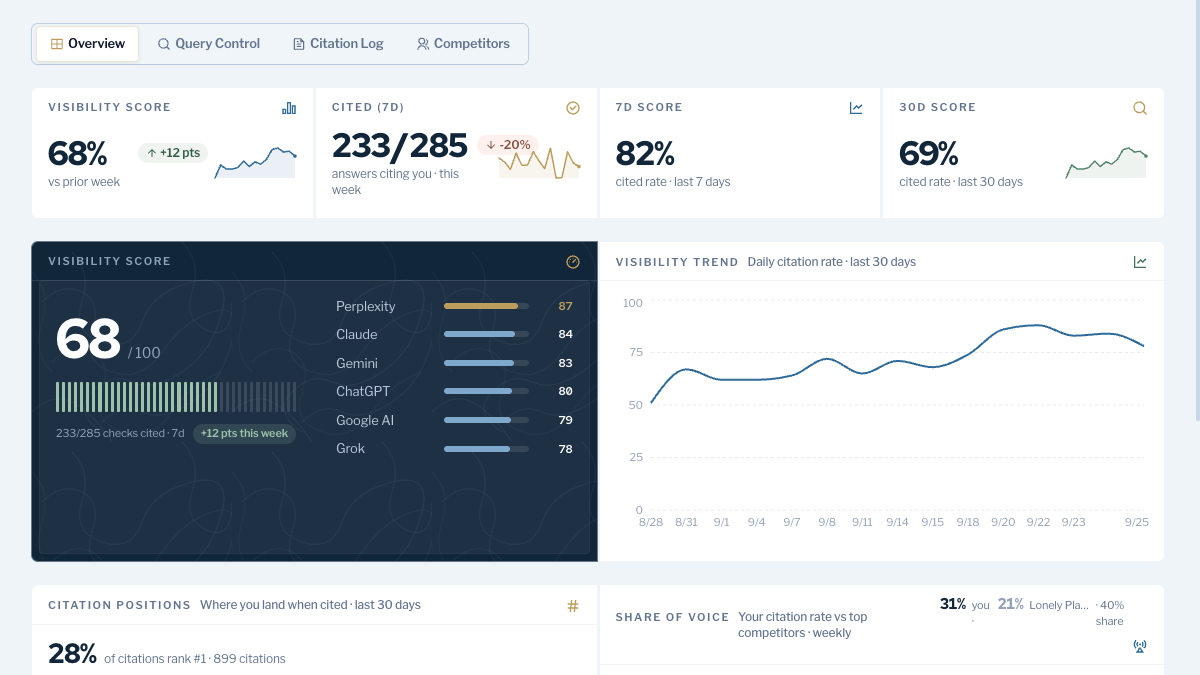
On the tracking side, RankControl's AI visibility tracking runs 50 queries weekly on six engines and notifies you about new citations. The content engine plans and writes up to 100 pages a month, then publishes them to your CMS as native posts, with auto-publish off by default.
Link Control finds prospects for each article you publish and sends outreach from your own mailbox once you've approved it. For traffic, RankControl's analytics logs AI crawler visits such as GPTBot and ClaudeBot as they happen, and it syncs Search Console daily.
AI search traffic grew 835% this year. Is your content ready?
RankControl generates 26 content formats optimized for ChatGPT, Claude, and Perplexity. Published on your domain, matched to your brand.

The switch from Indexly, step by step
The order puts your renewal date first, since nothing you've paid comes back, and leaves cancelling until the pings and exports are handled:
| Step | What to do |
|---|---|
| 1 | Note your renewal date, since nothing you've paid comes back |
| 2 | Export indexing logs, the backlink profile, the disavow file and your articles, and pull the API data if you're on Scale |
| 3 | Screenshot your visibility trends and write down where you stand on your key prompts |
| 4 | Turn on IndexNow in your SEO plugin or Cloudflare and confirm your sitemap in Search Console |
| 5 | Start the RankControl trial, connect your CMS, and add up to 50 queries and 10 competitors |
| 6 | Cancel Indexly, then remove its Search Console, CMS and API access |
Moving the data takes an afternoon. Getting cited takes longer, because it depends on pages that answer your buyers' questions and on other sites mentioning them. You can do that work by hand after the switch, or RankControl's agents can run it every month for $400, with a 7-day free trial. Before you start, the free AI visibility check shows who ChatGPT cites for three questions from your market.

Built by the team that got cited in 48 hours.
Content generation, backlink building, AI visibility tracking, and Google rankings. One platform, zero guesswork.