
Lumar's AI Visibility page says it keeps up to two years of stored data for your AI Visibility Score. That history is the most valuable thing to carry out of Lumar when you switch, and it's also the least documented part of the export. The crawl side is the opposite. Lumar's API docs open their download guide with one plain line: "Report downloads are CSV or XML files generated from the report."
So a move off Lumar, the platform that used to be Deepcrawl, has two halves. Pull your crawl reports out the documented way, in the app or through the API. Then capture your AI Visibility prompts, scores and cited URLs before the contract ends. This guide covers both halves, how to handle the contract, and where each Lumar feature lands in RankControl. Lumar's site and API docs were checked on September 26, 2026.
Why teams move off Lumar
Lumar is built for enterprise technical SEO. It crawls large sites, tracks site speed, tests accessibility against WCAG 2.2, and now adds GEO reporting and AI Visibility tracking. Pricing comes through a form and a sales call, packaged to the features you pick. Teams whose main question has shifted to "are we in the AI answer?" can end up paying for crawl depth they rarely open.
The second reason is what happens after the report. Lumar finds issues and has a tool that writes developer tickets for them, but someone still implements the fixes and writes the pages. For some teams, the gap turns out to be content. A marketer in r/SEO_for_AI described pages that ranked well but barely showed up in AI answers. The fix turned out to be moving the answer higher and making each section stand on its own, rather than any technical change.
Our SEO pages weren't getting cited
I went through a few pages that rank pretty well and assumed they'd be the easy ones for AI search too. Nope some barely showed up at all while weaker pages were getting picked for questions I didn't expect I spent way too long looking for...
The third reason is coverage. Lumar tracks six AI platforms, and Grok isn't one of them.
What comes with you when you switch from Lumar
Most of your Lumar data can leave with you if you schedule it:
- Crawl reports and their history, as CSV files
- Custom extraction results
- Health score trends for each project
- Your AI Visibility prompts, topics, scores and cited URLs
- Any data already synced to BigQuery or Looker Studio
Tickets you created in Jira stay in Jira, and your Google Analytics and Search Console data were never Lumar's to keep.
How to export your data from Lumar
Lumar documents its crawl exports. The AI Visibility side needs more hands-on work.
Crawl reports in the app
Lumar's help docs describe an Export option on its reports that generates a CSV file or an XML sitemap, for standard and custom reports alike. Apply a segment first if you only want part of the site. Custom extractions export from the Extraction menu, and crawl comparisons and health score trend charts each have their own CSV download. Start with the reports your team actually used, such as all pages, indexability, broken links and any custom extractions.
Crawl history in bulk through the API
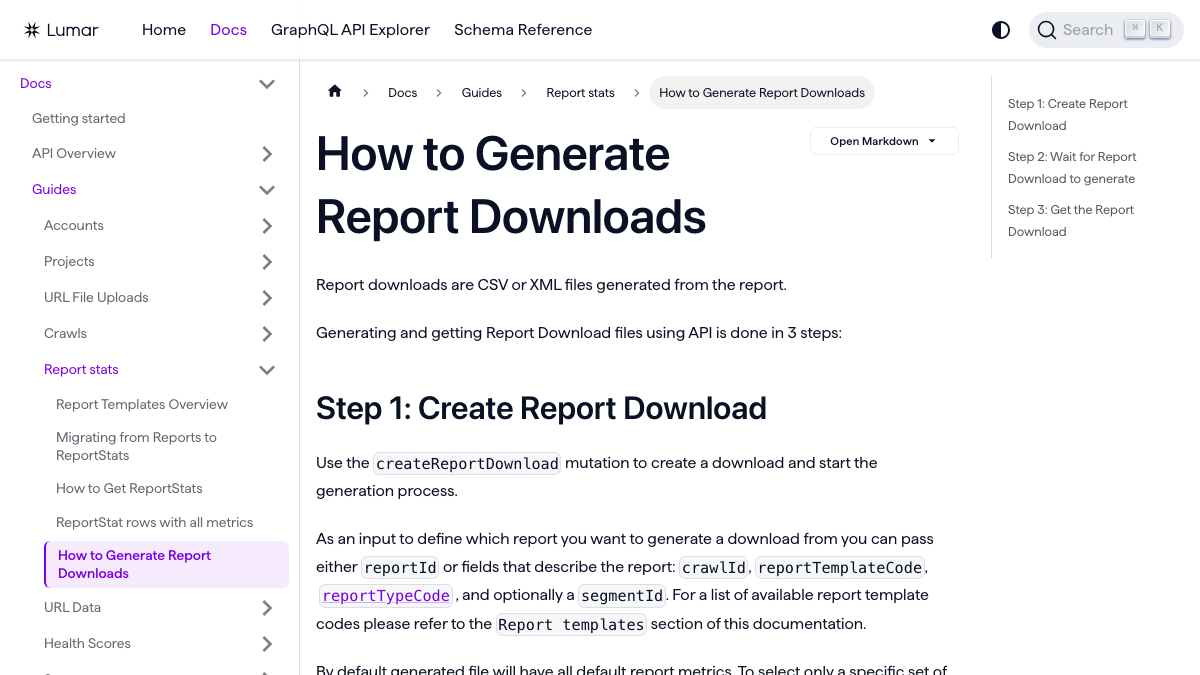
For more than a handful of reports, the GraphQL API is faster. Its docs describe three steps: create a report download with the createReportDownload mutation, wait for it to generate, then fetch the file. Each download takes a crawl, a report template and optional filters and metrics, so a short script can loop over your crawls and save every report you care about.
AI Visibility prompts and citations
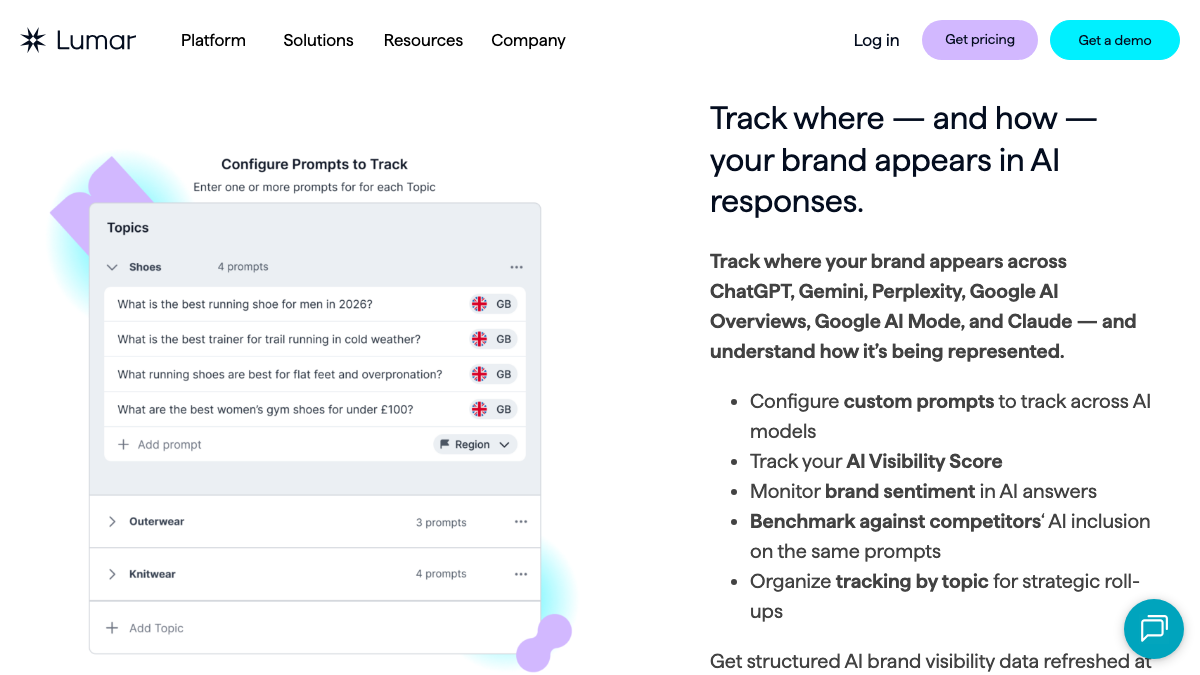
We found no documented CSV export for AI Visibility in Lumar's public pages. If your account has Lumar's MCP server add-on, that's the fastest route. Its AI Visibility skills can trend your score over 90 days and show what ChatGPT said for a given prompt, so you can ask Claude to put your prompts, scores and cited URLs into a table. Check a few rows against the dashboard.
Without the add-on, capture it by hand:
- Copy your prompts into a spreadsheet, grouped by topic.
- Record each prompt's latest score and which competitors appeared.
- List the URLs cited for your brand, since they show which pages AI engines trust.
- Screenshot the AI Visibility Score trend with the full date range visible.
BI connections
If you've connected BigQuery or Looker Studio, the data already synced there stays in your own warehouse. Confirm which tables exist and run one last sync near the end of the term.
15 hours a week manually. Or 15 minutes with RankControl.
Track citations, monitor competitors, and fix content gaps across every AI search engine. Automatically.

Before the contract ends
Lumar sells through custom quotes, and we found no public cancellation guide. Treat it like any enterprise software contract. Find the renewal date and notice terms in your order form, tell your account team in writing that you won't renew, and keep the reply. Your access should run to the end of the term, so schedule the final crawl and AI Visibility exports for the last few weeks, when the data is most complete.
What changes when you move
Lumar does work RankControl doesn't. It runs full technical crawls of large sites and tests site speed and accessibility at enterprise scale, and RankControl has no crawler for that job. If you still need full crawls, a desktop crawler covers most audits at a fraction of the cost.
The shift is toward content. Practitioners in r/Agent_SEO debating whether AI visibility is a technical problem or a content problem mostly landed on both: fix access first, then publish pages that answer questions clearly.
Is AI search visibility becoming a technical SEO problem more than a content problem?
I keep seeing people talk about GEO like it’s mostly about rewriting content for ChatGPT, but I’m starting to think the bigger issue is whether AI systems can actually understand the site properly in the first place. Things like structured...
RankControl covers the access check and then does the publishing. Its content engine plans titles from the questions your buyers ask, writes each article against the pages already ranking, and publishes it as a native post through the CMS you connect. Our RankControl vs Lumar comparison sets the two side by side on cost, AI engines and MCP access.
Where everything lands in RankControl
| In Lumar | In RankControl |
|---|---|
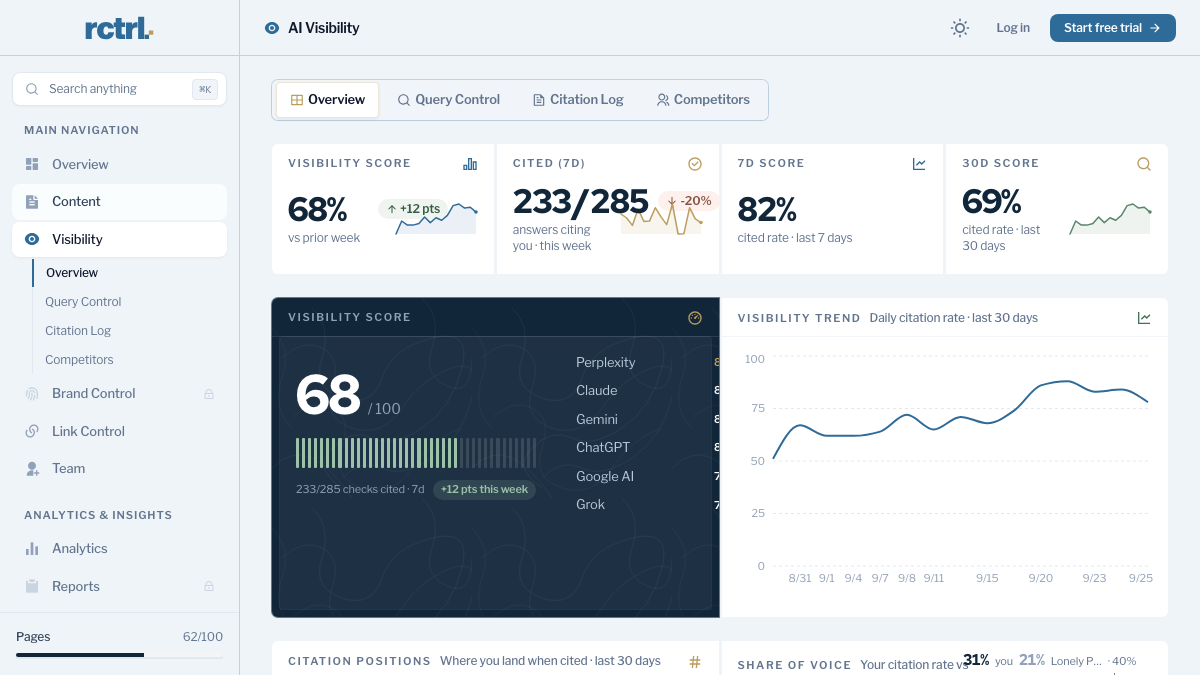
| AI Visibility prompts on 6 platforms | AI visibility tracking: 50 queries checked weekly on ChatGPT, Perplexity, Claude, Gemini, Grok and Google AI Mode |
| Citation tracking by URL | Citation history per engine, with the sources AI answers cite |
| Competitor AI benchmarks | Up to 10 competitors, with share of voice in AI answers |
| GEO content evaluation | A citability score and fix list for every article RankControl writes |
| AI bot interaction reports | An AI crawler log and a crawler access check |
| GraphQL API and MCP add-on | API, CLI and an MCP server with 80+ tools, included |
| Dashboards and BI connectors | The Reports screen and a weekly email with new citations and ranking gains |
AI search traffic grew 835% this year. Is your content ready?
RankControl generates 26 content formats optimized for ChatGPT, Claude, and Perplexity. Published on your domain, matched to your brand.

Choosing your 50 queries
Lumar organizes AI Visibility prompts into topics, and that structure helps here. From each topic, keep the prompts a buyer would ask right before choosing a product, such as comparisons and "best X for Y" questions. Drop prompts that only check your brand name, because those tell you little about whether you're winning new buyers.
Fifty weekly queries across six engines is a smaller set than an enterprise prompt list, and that's usually a gain. A fixed set checked every week gives you a clean trend, and each query can map to an article RankControl plans and publishes. Our guide to tracking AI visibility across six engines covers how to pick them.
The switch from Lumar, step by step
- Find the renewal date and notice terms in your order form, and send your non-renewal notice in writing.
- Export the crawl reports you use from the app, or loop through them with the API.
- Save custom extractions and health score trends.
- Capture AI Visibility prompts, scores and cited URLs, through the MCP server if you have it.
- Start RankControl's 7-day trial. Connect your CMS, let it build your brand profile from your site, and name up to 10 competitors.
- Pick your 50 queries from the Lumar prompt list and add them. The CLI's
query-addtakes one query per call, so a short loop adds them all. - Run a final sync to BigQuery or Looker Studio before the term ends.
Running both for a couple of weeks gives you Lumar's last AI Visibility readings next to RankControl's first weekly check on the same questions.
What your month looks like afterwards
The work moves from diagnosing to publishing. Titles land on a calendar and articles arrive for review. Approved ones publish to your site as native posts, and auto-publish stays off until you switch it on.
Done by hand, that month is heavy. Researching, writing, linking and publishing 20 articles takes 40 to 60 hours, and checking 50 questions on six engines takes about five hours a week. Those are rough estimates, and a diagnostics platform leaves both jobs with your team.
You can keep running that loop yourself with your Lumar exports as the map. Or RankControl's agents can run it every month while your team approves the pages.

Built by the team that got cited in 48 hours.
Content generation, backlink building, AI visibility tracking, and Google rankings. One platform, zero guesswork.