
Trakkr is an AI visibility tracker that also writes articles, so a switch from Trakkr.ai has more moving parts than one export button. Getting the data out is simple, since it all comes out as CSV. The care goes into the code Trakkr may have running in front of your site and its connections to your CMS, and the trend line you've built up won't survive the move either.
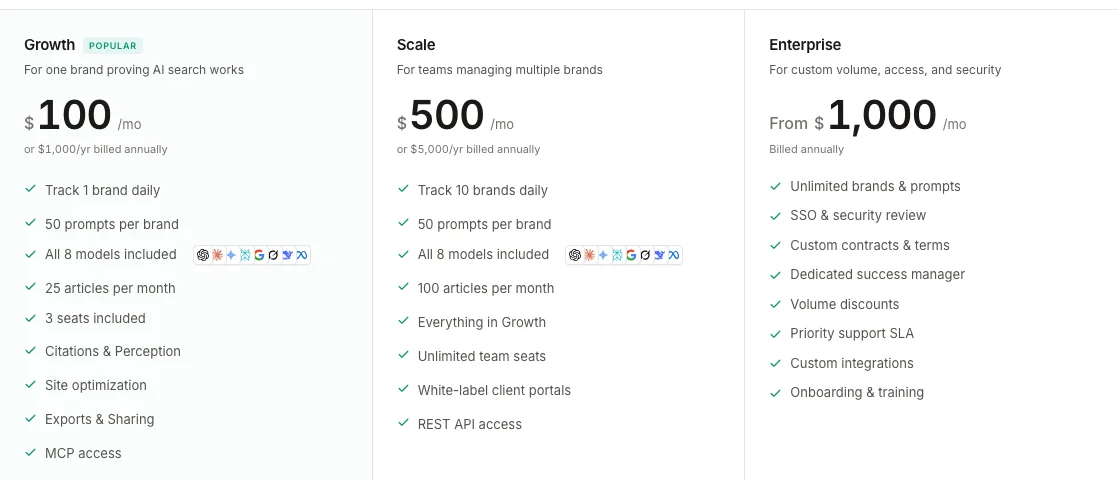
Mack Grenfell founded Trakkr in London in 2025. On its $100 Growth plan, one brand gets 50 prompts checked every day across eight AI models. The same plan includes 25 articles a month. Scale costs $500 and stretches to ten brands and 100 articles, with API access added. Everything below is based on Trakkr's pricing page, docs and terms, which I read on September 27, 2026.
Why teams look past Trakkr
If your team is leaving Trakkr, the tracking probably isn't why. Trakkr checks eight models every day, DeepSeek and Meta AI among them, and adds perception scores, citation maps and a crawler-optimization layer, which is more tracking than we offer and plenty for $100 a month.
What tends to send people elsewhere is the publishing side. Trakkr sends every article to your CMS as a draft and stops there, so somebody on your team has to open each draft and put it live by hand.
| On Growth | What it costs |
|---|---|
| Articles | 25 credits a month, reset monthly, no rollover |
| More articles for one brand | Credit top-ups, or Scale at $500, priced for ten brands |
| Extra prompts | $39 to $99 per brand per month |
| Seats past the third | $20 each |
Scale is a strange way to buy more articles for one brand, since its price assumes ten. And price out the last two rows before comparing Trakkr with anything else, us included: a fourth seat or a longer prompt list takes the bill past the $100 on the pricing card.

Your competitors are getting cited by AI. You're not.
Every day without citation tracking is a day your competitors pull ahead in ChatGPT, Perplexity, and Claude.
What stays when you switch from Trakkr
Articles you published stay in your CMS as ordinary posts, and so do the drafts. Since Trakkr pushes drafts, check your CMS for any that nobody published, because those are finished articles sitting one click from live.
The same goes for fixes Trakkr applied through a site connection. According to its docs, disconnecting removes Trakkr's access and leaves anything already applied on your site, so revert any change you want undone from History before you disconnect.
Everything Trakkr measured stays behind, though: daily rankings per prompt and model, citation sources, perception scores and crawler logs. Growth keeps one year of that history, so export it before you cancel.
The baseline reset
The baseline reset is what I call the day a new tracker starts your trend line from zero. Trakkr's own pricing page warns switchers who bring their prompts over that "Historical scores start fresh." The same thing happens when you leave.
Don't expect scores from two tools to line up, even for the same brand. Someone running a large site posted in r/seogrowth this September that two tools reported 512,000 and 62,000 citations for the same domain. The gap was about 8x, and one reply suggested comparing the trend within one tool rather than raw totals across tools.
Two AI visibility tools, 8x apart — 512k citations vs 62k for the same domain. What am I actually measuring?
Running a large YMYL content site (~790k organic/mo). Trying to get serious about AI visibility tracking and immediately hit this: Clarity dashboard (screenshot): 512k total citations across tracked queries, 16.45% "share of authority" — ap...
Part of that gap comes from the prompt sets. Daniel Forero said as much about a Trakkr lender ranking this September, pointing out that rankings on a few dozen prompts can look very different at a few thousand and shift a lot by model.
@Ashton_1nvests How many prompts did Trakkr sample per lender? Rankings on a few dozen prompts can look very different at a few thousand, and they shift a lot by model.
 Daniel Forero@danielforerojSep 24, 2026
The practical answer is to start a new baseline on purpose. Write down Trakkr's last 30-day average for each engine before you cancel, then run the same questions in both tools for a week and compare the direction of travel instead of the numbers. Because Trakkr checks daily and RankControl weekly, use Trakkr's weekly averages for the comparison.
How to export your data from Trakkr
Trakkr documents its exports well, and its terms let you export at any time. Most of it runs through the export page at /exports/csv, where you pick a dataset and a shape.
| Data | Where | Format |
|---|---|---|
| Prompts and tags | Prompts tab, Export | CSV of the rows on screen |
| Ranking history | /exports/csv, Rankings: Summary, Detailed or Raw | CSV |
| Citations | /exports/csv, Citations: Sources, Pages, Queries or Detailed | CSV |
| Report runs | Reports page, export menu | CSV, JSON, Markdown or PDF |
| Articles | Each article's Publish menu, Export | Markdown or HTML |
| Agent documents | Each document's download | PDF, Word or Markdown |
| Invoices | Settings, Billing, Invoices and receipts |
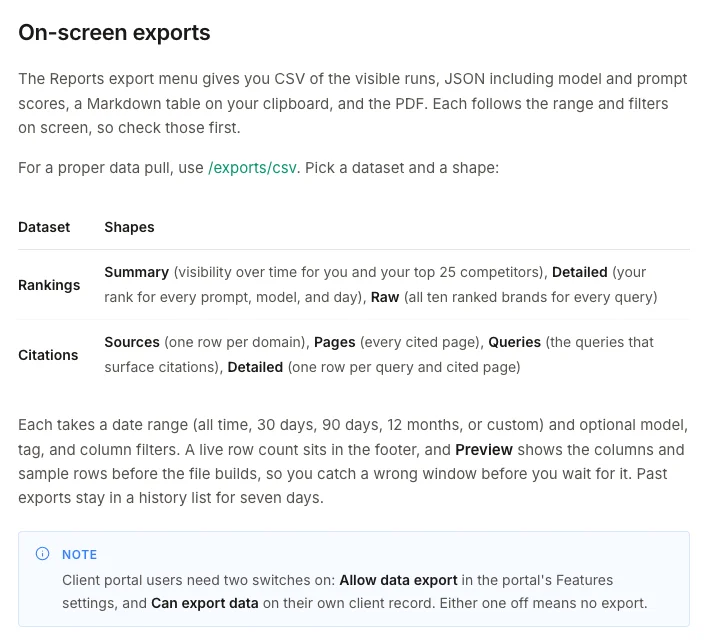
You can avoid a second pass by getting a few settings right the first time. Choose all time as the date range, since the other presets stop at 12 months, and clear the filters on the Prompts tab before exporting, because that export only takes the rows on screen. Download each file as soon as it's done, too. Finished exports stay in the history list for seven days.
On Scale, the REST API adds a bulk export endpoint for JSON or CSV, and the MCP server is available on any paid plan. Synced Google Sheets keep their data after you disconnect.
Remove what Trakkr put in front of your site
Because it runs on your side rather than Trakkr's, AI Pages is the easiest part to forget. The middleware sits in front of your site and serves AI crawlers an optimized copy of each page, running as a Cloudflare Worker, an edge function on Vercel or Netlify, or a WordPress plugin, depending on your setup. Next.js, CloudFront, Node and Nginx have versions of their own.
Nothing breaks on the day your plan ends, because the docs say it fails open: a timeout or a bad key serves your original page. It still needs to come out. The generated code holds your Trakkr API key as a constant and keeps intercepting crawler requests until you delete the file and redeploy. And if you moved your nameservers to Cloudflare only for AI Pages, decide whether they should stay there.
Then clear the rest, in Trakkr and in every tool it touched:
| What to clear | Where |
|---|---|
| Crawler tracking sources | Traffic, then Crawlers; the WordPress plugin also adds a "Trakkr Crawler Sync" user role, so remove both |
| Site connections | Revoke the WordPress application password, the Webflow API token, the Shopify custom app or the GitHub App |
| Google Sheets access | The Trakkr service account's editor access on any sheet you synced |
| Automations and credentials | Slack, webhook and Zapier automations, plus API and MCP credentials under Settings, Developer |
Cancel Trakkr and the refund window
Find out who owns the Trakkr subscription before anything else, since nobody else on the account can cancel it. The rest of the terms fit in a table:
| Question | Trakkr's answer |
|---|---|
| Who cancels, and where | The subscription owner, from Billing in Settings |
| When the plan stops | At the close of the current billing period, with no further charge |
| The offer in the cancel flow | A pause of one to three months; paid features stop while your brands run out the period you paid for |
| Refunds | 14-day money-back guarantee for new subscribers, then Trakkr's discretion |
| Annual plans | Billed upfront, renewed automatically, reminder email before each renewal |
| After you cancel | 30 days to export, then the account and its data are deleted |
| Deleting sooner | Delete account under Danger zone in Settings; it asks for your account email |
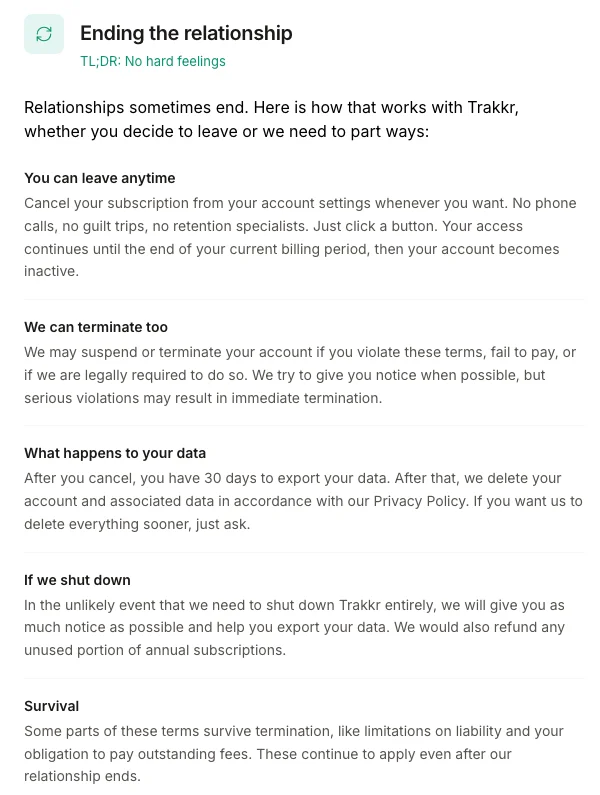
The refund row is what sets your timing. If you signed up recently, get the cancellation in before day 14 and the guarantee covers you. Past that, a refund is Trakkr's call, so I'd use up the period you've paid for, and on an annual plan I'd act when the renewal reminder shows up.
Skip the pause unless you're still undecided, and don't lean on the 30-day window after cancelling. Finish your downloads while the plan is live, then use Delete account if you'd rather not wait out the month.
Where things land in RankControl
RankControl has no import tool, so your Trakkr exports double as the checklist, and the posts already in your CMS stay where they are.
| From Trakkr | Into RankControl |
|---|---|
| Prompt list | Up to 50 tracked questions, re-added by hand |
| Competitors | Up to 10 competitors |
| Ranking and citation history | Your record; RankControl's trend starts at its first check |
| Published articles and drafts | Stay in your CMS as internal link targets |
| Outreach queue | Link Control finds prospects for each new article |
| Crawler tracking | AI crawler visits in RankControl's analytics |
Start with the prompt export, since a Growth list of 50 prompts fits RankControl's 50 tracked questions as it is. AI visibility tracking runs them weekly on six engines, Grok and Google AI Mode among them, and for each one you see which competitors got named and which sources the answer quoted. That's fewer engines than Trakkr, checked less often, with no DeepSeek or Meta AI.
Publishing works the other way round. Instead of drafts waiting in your CMS, the content engine plans titles around the questions you're losing and publishes the articles itself, up to 100 pages a month, as native posts through one of nine destinations. You decide when that starts, because auto-publish is off until you turn it on. Outreach runs on the same rule: Link Control sends a pitch from your mailbox only after you've approved it, and stops the follow-ups when someone replies. Our RankControl vs Trakkr comparison has the full side-by-side.
200+ SaaS teams already track their AI citations.
They know exactly when ChatGPT mentions their brand, and when it stops. Do you?

The switch from Trakkr, step by step
Keep to this order, because each later step takes away something an earlier one needs. Reverting a site fix, for example, only works before you disconnect:
- Export prompts, rankings and citations for all time.
- Revert unwanted site fixes, then disconnect your sites.
- Remove the AI Pages code, crawler tracking and old credentials.
- Start the RankControl trial and run both tools side by side for a week.
- Cancel as the owner, within 14 days if you want the refund.
- Delete the account once the exports are safe.
The export fits in an hour. The slow part, publishing pages that answer your buyers' questions and getting other sites to mention them, carries on long after the switch. You can do that by hand, or RankControl's agents can run it every month for $400, with a 7-day free trial. Want to see where you stand first? The free AI visibility check shows who ChatGPT cites for three questions from your market.
How often does ChatGPT mention your brand?
Most founders have no idea. The answer might surprise you.