
Contentpen's FAQ doesn't soften what happens to unfinished work when you leave. Your published content "stays live on your site." Drafts get the opposite treatment: "once you cancel, your workspace is deleted, and any articles in draft state that weren't published on your site are deleted along with it."
That makes the drafts your first job. We're covering a move from Contentpen, the AI writing and AI visibility platform at contentpen.ai, to RankControl. Every Contentpen detail here was checked against its site, pricing page, FAQ, terms and changelog on September 26, 2026. For the product differences themselves, see our RankControl vs Contentpen comparison.
What comes with you when you switch from Contentpen
Finished articles aren't the worry, because Contentpen publishes them into your CMS and they already belong to you. What you could lose is everything that's still unpublished when you cancel.
| In Contentpen | Can you take it? | Where it lands in RankControl |
|---|---|---|
| Articles published to WordPress, Shopify, Webflow or another CMS | Already native posts on your site | Link targets, found by a sitemap scan |
| Drafts and unpublished articles | Deleted on cancel; publish or copy first | Reference while you plan titles |
| Keyword lists and topic clusters | Export keywords to CSV | Tracked queries and title planning |
| Brand voice and knowledge base | Copy by hand | Brand Control |
| AI visibility prompts and reports | Copy prompts; export reports as PDF | Tracked queries (up to 50) |
| Unused monthly articles | Reset each cycle | Nothing to carry |
Know which Contentpen products you pay for
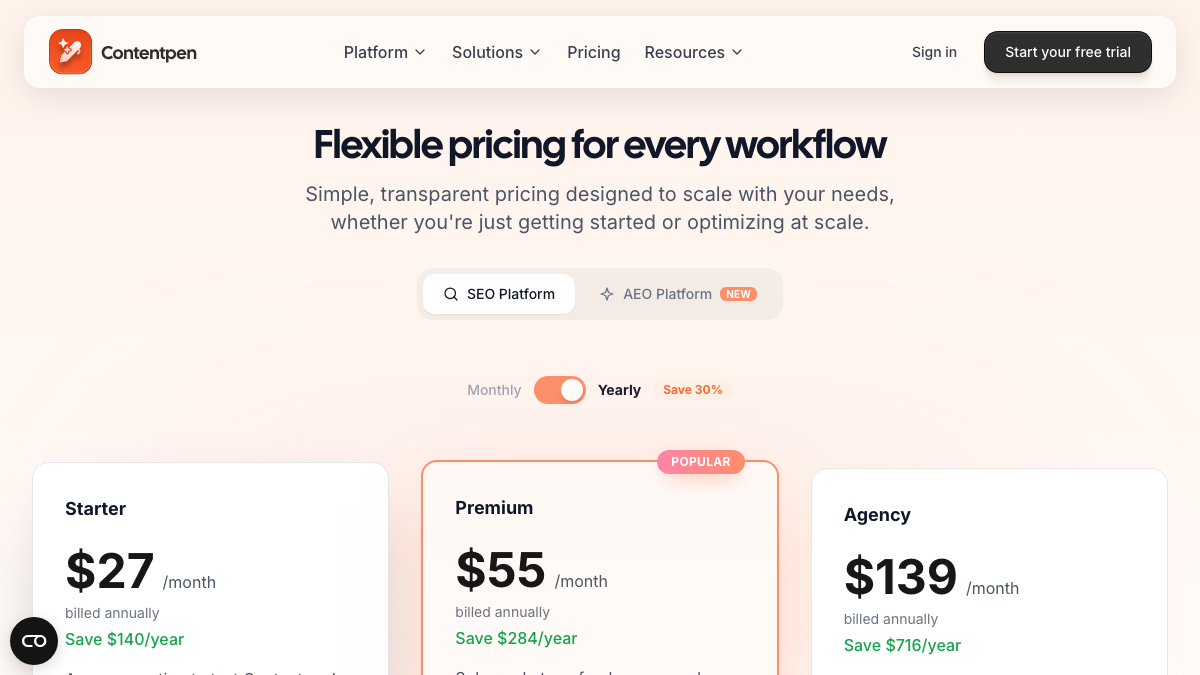
Contentpen is really two products with separate prices, and you may be paying for both. The SEO Platform is the article writer. The AEO Platform, which launched on June 3, 2026, tracks AI visibility. Here's how the tiers line up:
| Tier | SEO Platform (writing) | AEO Platform (AI visibility) |
|---|---|---|
| First | Starter, $27 | Essential, $27: ChatGPT and Grok, weekly |
| Second | Premium, $55 | Growth, $69: adds Google AI |
| Third | Agency, $139 | Business, $139: adds Perplexity and Copilot |
The SEO Platform prices are per month billed annually, and so is Essential's. Monthly billing costs more, and Contentpen says paying annually saves 30%.
Paying for both products means cancelling twice, since each one has its own renewal date. Put both dates in your calendar before you do anything else.
Time it around your allowance and renewal
Your monthly article allowance is use it or lose it. In Contentpen's words, allowances "reset at the start of each billing cycle and do not roll over." Extra credit packs are different, since they start at $29 for ten articles and don't expire. They do live in the workspace that gets deleted when you cancel, though, so spend them first.
Refunds are narrow as well. Contentpen won't refund non-use after the 7-day trial. If you simply forgot to cancel, it may refund the latest cycle, as long as you ask "within 7 days following the most recent charge." Annual plans get nothing back for unused months. Put together, the cheapest moment to cancel is just before renewal, once your allowance is used up.
Save your work before you cancel
Get through this list while your plan is still active:
- Open your content calendar and pull up every article marked Draft, In Progress or Scheduled.
- Publish the drafts you want live, or copy each one into a document.
- Export your keyword lists to CSV with the one-click keyword export Contentpen added in March 2026.
- Copy your brand voice settings, custom instructions and knowledge base entries.
- Copy your AI visibility prompts, then export your latest visibility report as a PDF.
- Download your invoices for your records.
The scheduled posts deserve the most attention. Contentpen doesn't say what happens to a post that's scheduled but not yet published when you cancel, and we wouldn't wait to find out. Publish it early or copy it.
The FAQ also promises that "you can export your data before leaving," but it doesn't name a format. If you're sitting on a large pile of drafts, ask support how it works before your last billing period runs out.
How often does ChatGPT mention your brand?
Most founders have no idea. The answer might surprise you.

Check your site and disconnect Contentpen
Contentpen adds internal and external links on its own as it writes, and once you leave, those links are yours to maintain. Your published articles stay where they are, so open a few of them before you go and make sure the links point where you want.
Then unplug the integrations. According to the FAQ, you can "disconnect or revoke any integration at any time" from account settings. On WordPress, that means deactivating and deleting the Contentpen plugin. For Shopify, Webflow, Ghost or Wix, remove its access, and switch off any webhooks you set up for Autopilot. Contentpen's Google access comes out through your Google account's security settings.
Take stock of the articles Contentpen wrote
Cancelling doesn't touch your published articles, which makes this a good time to find out which ones pull their weight. Export clicks and impressions from Search Console for every URL Contentpen published in the last three months, sort by impressions and mark the top 20.
Then read those articles with fresh eyes. An Ahrefs study from July looked at pages in Google's top 10 and found that fully AI-written pages can rank. Pages that were less than half AI-written, though, held 82.2% of the top three spots. That's a good reason to give your top 20 a human edit: add examples, first-hand detail and current numbers, and cut anything a reader could find on every other page.
Take a baseline before you switch
If you were on the AEO Platform, save your last visibility readings before anything else. They won't cover much, since Essential tracks two engines and Growth three. Fill in the rest yourself by running your ten most important buyer questions in ChatGPT, Perplexity, Gemini and Claude from a logged-out session. Write down who gets named and which pages get cited, and you have a before-picture on the engines Contentpen didn't cover for you.
Cancel, then decide about deletion
Cancelling happens in your account settings, and it's worth screenshotting the confirmation. You keep access until the end of the paid period, but do the steps above before you cancel anyway.
Whether to delete the account is a separate decision. The FAQ says deletion "permanently removes your associated content" and can't be undone, and if you're unsure, it offers deactivation for up to 90 days instead. When you want the account gone right away, Contentpen's contact form handles deletion requests within 72 hours.
Where everything lands in RankControl
Brand Control is the first stop. It reads your live site and drafts your voice, products, buyers and competitors for you to correct. Your Contentpen brand voice and custom instructions go in as guideline rules, and up to three of your best articles can serve as style references.
After that, connect a publishing destination. RankControl publishes natively to nine, WordPress, Shopify, Webflow and Wix among them. A sitemap scan then lets new articles link into the ones Contentpen already published.
The content engine plans titles from your buyers' questions and writes each article against the pages already ranking for it, and your exported keywords and saved drafts make a good starting list. It covers 26 content formats. Auto-publish stays off until you turn it on.
You can add up to 50 tracked queries. AI visibility tracking checks each one weekly on ChatGPT, Perplexity and Claude. Gemini, Grok and Google AI Mode are in the weekly check too, and it all comes in the same plan as the writing. You see which competitors got named instead of you and which sources were quoted.
For links, Link Control finds prospects for each published article and drafts outreach from your own mailbox. If you'd rather have links built for you, Managed Backlinks adds five a month from DR 25+ sites for $350.
Contentpen does go further on article tooling and on entry price. It writes in 50+ languages and edits images in place, it flags content decay and keyword cannibalization, and it starts at $27 a month.
15 hours a week manually. Or 15 minutes with RankControl.
Track citations, monitor competitors, and fix content gaps across every AI search engine. Automatically.

The switch from Contentpen, step by step
Here's the sequence, with how long each step takes:
| Step | What to do | Time |
|---|---|---|
| 1 | Note both renewal dates and use your remaining articles and credits | |
| 2 | Publish or copy every draft and scheduled post | 30 to 60 minutes |
| 3 | Export keywords and reports, and copy brand settings | About 30 minutes |
| 4 | Start RankControl's 7-day free trial and let setup read your site | About 15 minutes |
| 5 | Correct the brand draft and add guideline rules | 30 to 45 minutes |
| 6 | Add tracked queries and competitors, then connect your CMS | About 45 minutes |
| 7 | Disconnect Contentpen's plugin and integrations, then cancel both products |
Plan on three to four hours in total, spread around your renewal dates.
What changes after the switch
The pricing model is the first thing that changes. With Contentpen, writing and AI visibility are two subscriptions, each with its own tiers, allowances and engine counts. RankControl is one plan, at $400 a month or $4,000 a year. It covers 100 pages and five seats, plus 50 tracked queries on six engines, and outreach drafts are included.
What you measure changes as well. A weekly email sums up new citations, ranking moves and visits from AI answers, which tells you whether the articles you publish change what engines say.
You could run the whole loop by hand, writing the pages, publishing them, pitching the links and checking six engines every week. Or RankControl's agents can run it every month while you focus on your product.
For a baseline before you start, run a free check of your brand in AI answers.
AI search traffic grew 835% this year. Is your content ready?
RankControl generates 26 content formats optimized for ChatGPT, Claude, and Perplexity. Published on your domain, matched to your brand.