
Search Google for "llmrefs" and, when we checked on September 26, the second result was a Reddit thread titled "any body using llmrefs com ??? not able to cancel subscription." It had 26 comments.
The answer turned up in the replies. One user found the cancel button under the "Organization" screen, not in billing. Another said they had to block their card at the bank before a payment-failed email led them to a cancellation page. This guide covers moving from LLMrefs, the AI search rank tracker, to RankControl without losing your data, and without the scramble. Every LLMrefs detail below comes from its site, terms, privacy policy and API docs, checked on September 26, 2026.
any body using llmrefs.com ??? not able to cancel subscription
Hello everybody! Is anybody using llmrefs com ??? I am not able to cancel my subscription? dashboard has no billing options neither billing history? No replies last 2 days on their chat window neither email adress?
What comes with you when you switch from LLMrefs
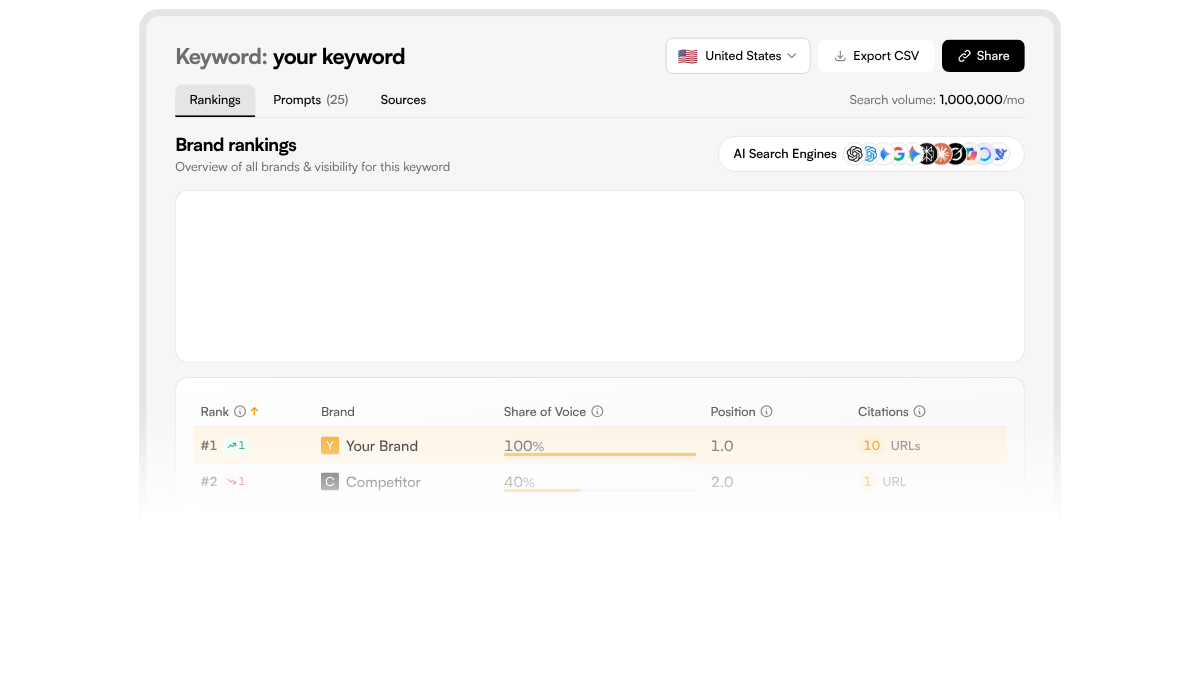
LLMrefs tracks keywords and generates the AI prompts behind each one, then reports share of voice, position and citations per brand. Here's what you can take.
| In LLMrefs | Can you take it? | Where it lands in RankControl |
|---|---|---|
| Your keyword list | Copy it out | The starting point for tracked queries |
| Generated prompts per keyword | Visible in the Prompts tab; copy the ones you want | Tracked queries, written as buyers ask |
| Brand rankings (share of voice, position, citations) | Export CSV per keyword | Your before-picture |
| Sources cited per keyword | Visible in the Sources tab | Reference for pages to earn links from |
| Competitor list | Copy it out | Up to 10 competitors |
| Trend history | Unclear; the API returns the current period | Screenshot the trends you care about |
The CSV export is the reliable part. The history is the part to watch, because nothing on LLMrefs' site says how far back an export goes.
How to export your data from LLMrefs
LLMrefs has no help center, so there's no official guide to follow. Work through each project like this:
- Open each keyword and click Export CSV to save the brand rankings.
- Open the Prompts tab and copy the prompts you want to keep tracking.
- Open the Sources tab and note the domains AI engines cited for that keyword.
- Screenshot the trend view for your most important keywords, since the history may not export.
- Copy your keyword and competitor lists into a document.
If someone on your team writes code, the API can pull the same data. It's read-only, limited to 10 requests a minute, and its docs describe the keyword detail endpoint as returning "the current period," so treat it as a snapshot tool rather than a history export. At 10 requests a minute, pulling 50 keyword breakdowns takes about five minutes, so the limit only bites on large accounts.
200+ SaaS teams already track their AI citations.
They know exactly when ChatGPT mentions their brand, and when it stops. Do you?

Cancel, and check the next statement
LLMrefs' terms say "You may cancel your subscription at any time," but they don't say how. Based on the Reddit thread, look for the cancel option under the Organization settings screen. Take a screenshot of the confirmation. If you only ever used a free LLMrefs account, there's nothing to cancel: export what you need and stop logging in.
Refund requests go by email to [email protected], and the terms don't set a refund window. Check your card statement after the next billing date to make sure no charge went through.
Support has been hard to reach for some users. In August, one customer asked on X whether LLMrefs had shut down, saying nothing had been tracked for a week and support wasn't answering. Send your cancellation from the app, and email [email protected] as well so there's a written record.
Did @LLMrefs shut down? It's been a week, and nothing has been tracked; support doesn't answer any requests, and the founder @jlalmes doesn't respond to DMs. I'm not angry or anything, just trying to figure out if I should just move on.
 Travis Jamison@Travis_JamisonAug 18, 2026
On data, the terms say that "upon termination, account data will be anonymized after fulfilling all legal requirements," with no timeframe. If you want it deleted sooner, the privacy policy says you can request deletion by contacting the company.
Keep your before-picture comparable
LLMrefs and RankControl measure from different starting points. LLMrefs takes a keyword and generates prompts from it, then weights the results into share of voice and position. RankControl tracks up to 50 questions you write, the way buyers ask them, and checks each one on six engines every week.
So build your query list from the Prompts tab, not the keyword list. Pick the prompts that read like a buyer comparing options, such as "What's the best tool for tracking AI citations for a small agency?" For each one, note from your export whether your brand appeared and which pages were cited. That yes-or-no record lines up with RankControl's first check better than a share-of-voice percentage does. Keep the share-of-voice figures anyway. They won't match RankControl's numbers, but they show which direction you were heading.
Expect movement either way in the first few weeks. SparkToro's research with Gumshoe found that AI engines rarely return the same brand list twice for the same question, so compare trends across several weeks rather than single readings.
Put the sources list to work
The Sources tab is the most useful thing to take from LLMrefs, and it's easy to skip. For each keyword, it lists the domains AI engines cited when they answered. In most categories that list is a mix of Reddit threads, review sites, YouTube videos, a few industry blogs and your competitors' own pages.
Save it as a spreadsheet with one row per domain, so you can see which sites come up across many keywords. Then read it as a map of where the engines look. If review sites dominate, your listings there matter. If competitors' comparison pages keep showing up, you need your own. If Reddit threads keep appearing, a helpful reply in the right thread can do real work.
That last one is something RankControl handles directly. Its Social agent finds live Reddit and X threads where one of your articles answers the question, checks the subreddit's rules and drafts a reply for you to post.
Why teams move on from a tracker
A tracker tells you where you stand. It doesn't change the answer. Once the readings are in, someone still has to write the pages that answer your buyers' questions, publish them and earn links to them, or the next month's chart looks the same.
That's the gap a switch to RankControl closes. The tracking carries over, and the work that moves the numbers gets done every month.
Where everything lands in RankControl
Start with Brand Control. It reads your live site and drafts your voice, products, buyers and competitors, and you correct what it got wrong. Up to three of your best articles can go in as style references.
Next, add your tracked queries and up to 10 competitors. AI visibility tracking checks each query weekly on all six engines, Grok and Google AI Mode included. It also shows which sources the engines pulled from.
LLMrefs covers more engines than that. It lists 11, including Copilot, Meta AI and DeepSeek, and RankControl checks six.
Then connect a publishing destination. This is the part LLMrefs never did. The content engine plans titles from your buyers' questions, writes each article against the pages already ranking and publishes it on your domain, up to 100 pages a month. Link Control finds prospects for each published article and drafts outreach from your own mailbox. The sources list you saved from LLMrefs shows which sites the engines trust in your category, which is useful context while you review those drafts.
How often does ChatGPT mention your brand?
Most founders have no idea. The answer might surprise you.

The switch from LLMrefs, step by step
- Export CSVs and copy prompts, sources and lists for each keyword: 45 to 90 minutes.
- Screenshot trends for your most important keywords: about 15 minutes.
- Start RankControl's 7-day free trial and let setup read your site: about 15 minutes.
- Correct the brand draft and add style references: 30 to 45 minutes.
- Add tracked queries and competitors, then connect your CMS: about 45 minutes.
- Cancel LLMrefs from the Organization screen and email [email protected].
- Check your next card statement.
That's three to four hours, done once.
What changes after the switch
The price goes up, and so does what you get. LLMrefs is one plan at $79 a month for 500 prompts, tracking only. RankControl is one plan at $400 a month, or $4,000 a year, and it writes, publishes and tracks: 100 pages a month and 50 tracked queries on six engines.
The job changes too. With LLMrefs, you read the numbers and someone on your team decides what to write. With RankControl, the articles are planned from the same questions, then written, published and checked each week. A weekly email sums up new citations, ranking moves and visits from AI answers.
You can run this by hand: write the pages, publish them, pitch the links and check six engines every week. Or RankControl's agents can run it every month while you focus on your product. For a head-to-head look, see RankControl vs LLMrefs.
Want a baseline before you start? Run a free check of your brand in AI answers.
15 hours a week manually. Or 15 minutes with RankControl.
Track citations, monitor competitors, and fix content gaps across every AI search engine. Automatically.