
Otterly is where a lot of teams start tracking AI search, since its Lite plan costs $29 a month for 15 prompts. Teams that switch from Otterly usually want more than a report. Claude costs extra on every plan, Grok isn't offered at all, and nothing in Otterly writes the page that would change an answer.
The good news for anyone leaving is that Otterly exports almost everything, on every plan. The risk is timing. One option on Otterly's billing page cuts your limits faster than cancelling does, and I'll call that the downgrade trap below.
This guide covers what to export and where each export lives, how to cancel, and where your data lands in RankControl. It's based on Otterly's help center and its Terms of Use dated April 24, 2026, checked on September 26, 2026. We make RankControl. If you're still comparing tools, our list of Otterly.AI alternatives covers the field.
Why teams move off Otterly
Prompt limits come first. Lite tracks 15 prompts and Standard, at $189 a month, tracks 100. Lite can't buy extra prompts at all, and on Standard and Premium another 100 costs $99 a month.
Engines come second. Every plan covers ChatGPT, Google AI Overviews, Perplexity and Microsoft Copilot. Google AI Mode, Gemini and Claude are add-ons priced per plan, with Claude at $109 a month on Standard, and no Otterly plan lists Grok.
The third reason is what happens after the data. Otterly's audits and recommendations point at problems, and a person still has to write the page, publish it and ask other sites to cite it. A poster on r/automation who ran AI visibility tracking for B2B clients across Otterly, Peec and Profound for four months called Otterly the cheapest of the three, with decent monitoring and a clean interface, and said the part about what to do next was thin.
Peec vs Otterly vs Profound after 4 months of client work
I’ve been running AI visibility tracking for a couple of B2B clients and have rotated through the three tools I keep seeing people ask about. Short version: • Peec: best for research, IMO. It shows which questions people actually ask around...
Otterly does make leaving easy in one respect. Every export in its help center is available on every plan, Lite included, and its API and MCP server can even create prompts and tags as well as read them.
200+ SaaS teams already track their AI citations.
They know exactly when ChatGPT mentions their brand, and when it stops. Do you?
What moves when you switch from Otterly
Most of your data leaves as files. Your prompts, citations and raw AI answers export as CSV, and the brand report and GEO audits download as PDFs.
Download the GEO audits even if you rarely opened them. A marketer who spent a month testing six AI marketing tools singled out Otterly's audit, which scans URLs for citation readiness, as the part worth using.
i spent a month testing Agentic Marketing Tools (Profound, Peec, Otterly, Search Atlas, HubSpot AEO, Semrush) and found this out
The market basically splits into monitoring tools and execution tools and almost nobody is doing both. On the monitoring side, Profound is the clear enterprise benchmark. Their panel-based prompt volume data with demographic segmentation is...
What doesn't leave cleanly is the setup. Otterly has no documented way to export your prompt configuration, tag structure or workspaces for loading into another tool, and GEO audits come out one PDF at a time. The prompts CSV does include each prompt's country and tags, which is enough to rebuild the list by hand.
How to export your data from Otterly
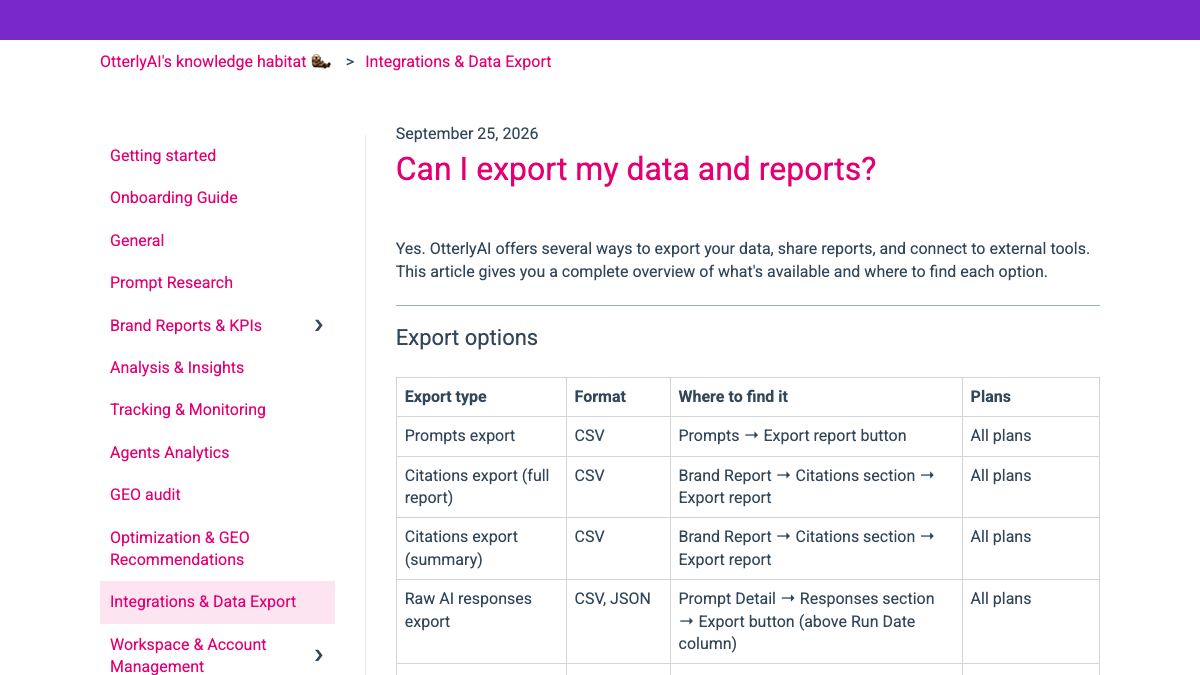
Otterly's help center has a single article listing every export, updated on September 25, 2026. All of these work on every plan.
| Export | Format | Where to find it |
|---|---|---|
| Prompts | CSV | Prompts → Export report |
| Citations, full report or summary | CSV | Brand Report → Citations section → Export report |
| Raw AI responses | CSV, JSON | Prompt Detail → Responses section → Export (above the Run Date column) |
| GEO audit report | GEO Audit → Download Report (upper right) | |
| Brand report overview | Brand Report → Export (upper right) | |
| Recommendations | CSV | Recommendations → Export (next to the search bar) |
The prompts file carries more than the question itself. Next to each prompt it records whether your brand was mentioned and at what rank, and which competitors were mentioned or cited. That makes it a snapshot of where you stood on the day you left.
The raw AI responses export is the one to keep if you care about history. It holds what each engine actually said, run by run, and the help center lists no row or date limits on it. The full citations report adds every cited URL with its position, date and domain category.
On Standard and above there are three live options as well. The Looker Studio connector sits under Profile Settings, then Integrations. The REST API and the MCP server at data.otterly.ai/mcp both return brand coverage, citations, share of voice and prompt-level results, with 2,000 requests a month on Standard. The connector needs Standard or above, so a Looker Studio dashboard built on it won't keep updating once the account drops to the free plan.
If an export fails or you've already lost access, Otterly's help center gives a fallback. Email [email protected] with a GDPR data export request, and it will provide your data in a machine-readable format such as JSON or CSV within 30 days.
The downgrade trap
Otterly handles cancelling and downgrading very differently, and the difference matters in the middle of a move.
Cancelling keeps your plan active until the end of the billing cycle. Downgrading "takes effect immediately," according to Otterly's help center, and any usage above the new plan's limits is reset at once. Before you can downgrade, you also have to delete every prompt above the smaller plan's limit, and the Terms of Use rule out refunds for the unused part of the term.
So a team that downgrades from Standard to Lite to save money during a migration has to delete 85 of its 100 prompts first, and the lower limits apply the moment it confirms. Cancel instead, keep the full plan until the cycle ends, and run your exports while everything is still there.
Cancel, refunds and the 30-day window
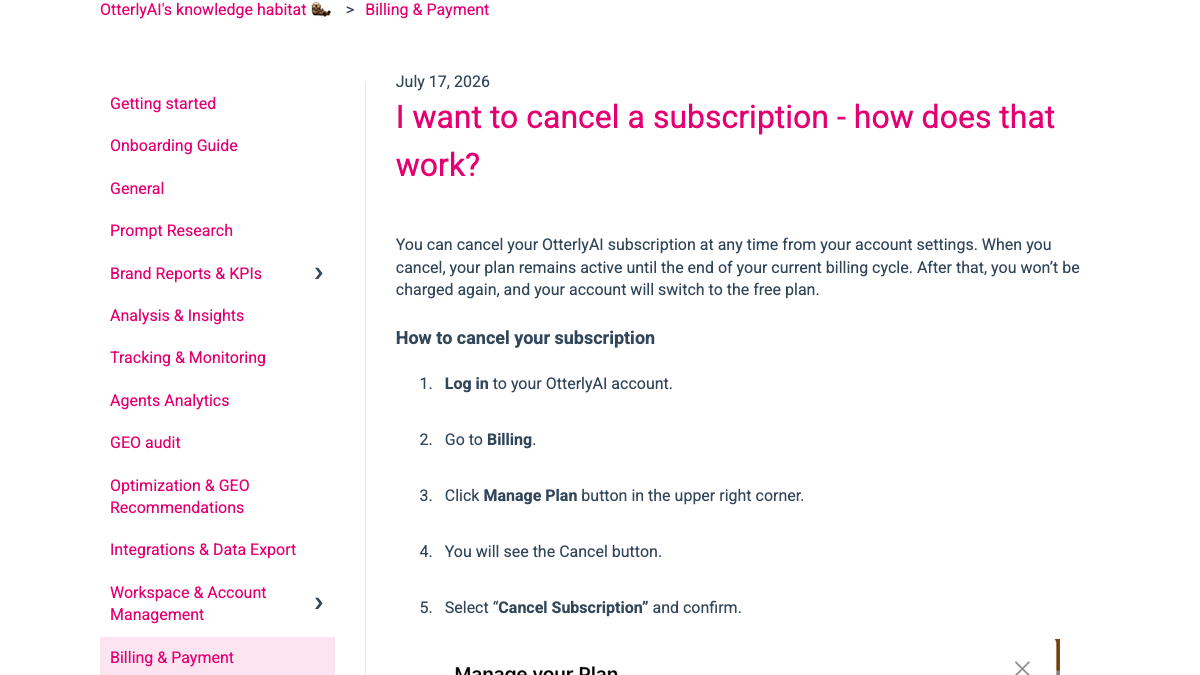
Cancelling is self-service. Log in, open Billing, click Manage Plan in the upper right, then choose Cancel Subscription and confirm. Your paid features stay on until the cycle ends, and the account then drops to Otterly's free plan.
Refunds are unlikely. Section 5.1 of the Terms of Use says charges are billed in advance and "are nonrefundable" unless stated otherwise. The only refund the terms describe is a pro-rata one if Otterly breaches its service warranty and can't fix it. Annual plans must be cancelled before the renewal date, according to section 6.1.
The deletion timeline is less clear. The cancellation article says historical data "will be deleted after your account is cancelled," without a number of days. Section 6.3 of the terms says data stays downloadable for 30 days after termination. Treat the end of your billing cycle as the real deadline and finish every export before it. OtterlyAI GmbH is based in Austria, and its terms are governed by Austrian law.
Make the before-and-after fair
Your Otterly history is only a useful baseline if you compare like with like. Otterly checks prompts daily and RankControl checks queries weekly, so compare monthly rates rather than single days. AI answers move between runs of the same question, and a monthly rate evens that out.
The engines overlap only partly. Compare ChatGPT and Perplexity, which both tools track, plus Gemini, Claude or Google AI Mode if you paid for them as Otterly add-ons. RankControl doesn't track Google AI Overviews or Copilot, and it adds Grok, which Otterly never covered.
Keep the questions as close as you can for the first month. The advice in an r/GrowthHacking thread on baselines was to lock the prompt set first and re-run it weekly on the same models, since no tool imports another's run history. Change the wording once you have a RankControl baseline of your own.
Where things land in RankControl
RankControl has no import tool, so your Otterly exports become reference material rather than data to load.
| From Otterly | Into RankControl |
|---|---|
| Prompts CSV | Up to 50 tracked queries, rewritten as buyer questions, checked weekly on six engines |
| Competitors in the prompts CSV | Up to 10 competitors in your share of voice |
| Raw AI responses and citations | Your archive of what each engine said and cited |
| Recommendations and GEO audits | A list of fixes to check against RankControl's own findings |
If you work in Claude, the fastest way to move the prompt list is through RankControl's MCP server. Paste the prompts CSV into a chat, ask Claude to pick the questions that matter most, and have it add them as tracked queries. The server has more than 80 tools and comes with the plan.
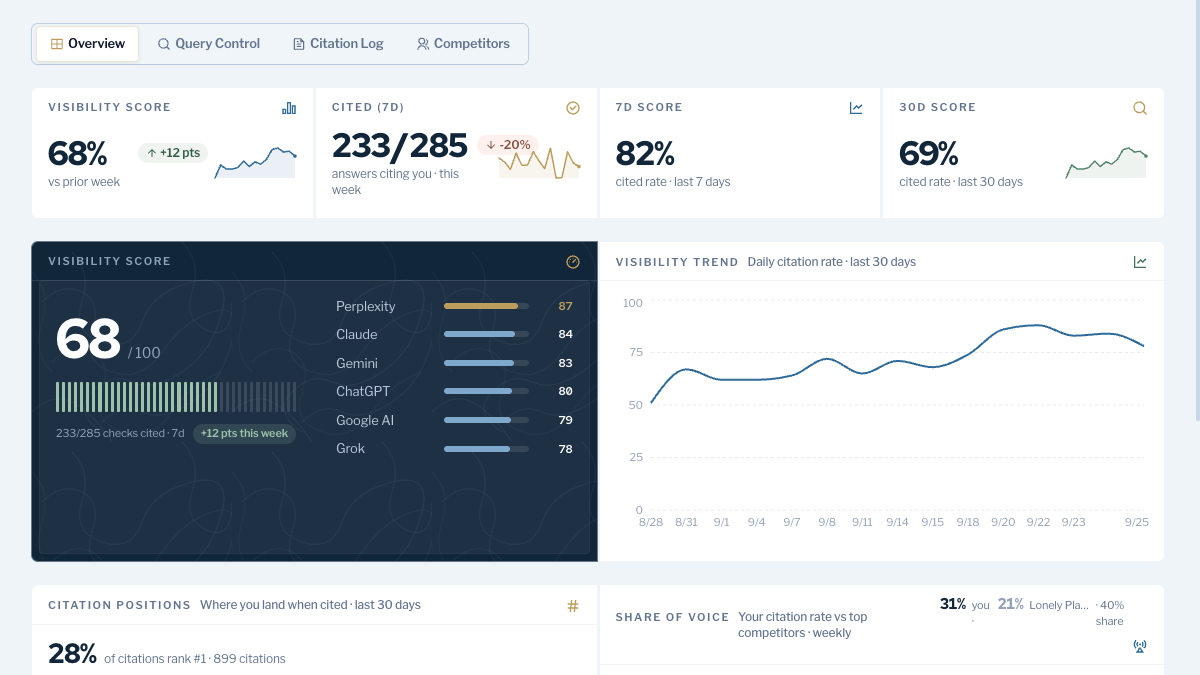
AI visibility tracking covers six engines on RankControl's one plan, Claude and Grok among them. Brand Control reads your site and drafts your voice, products, buyers and competitors, and you correct that draft.
The larger change comes after a gap shows up. The content engine plans an article for each question you're losing, writes it in your brand's voice and publishes it to your CMS once you approve it. For every published article, Link Control drafts outreach to sites worth pitching, sent from your own mailbox after you approve it.
How often does ChatGPT mention your brand?
Most founders have no idea. The answer might surprise you.

The switch from Otterly, step by step
- Note your billing cycle end date in Otterly's Billing page, and don't downgrade.
- Export the prompts CSV, the full citations report and the raw AI responses, and download the brand report and GEO audit PDFs.
- On Standard or above, pull any history you want through the API or MCP while you still have requests left.
- Start the RankControl trial, connect your CMS and correct the Brand Control draft.
- Add up to 50 tracked queries and up to 10 competitors from your Otterly exports.
- Cancel Otterly through Billing, then Manage Plan, and let the plan run to the end of the cycle.
Moving tracked questions from one dashboard to another is the easy part. The work that changes AI answers is writing and publishing the pages those engines can cite, then getting other sites to mention them.
You can do that by hand after the switch: read the report, brief a writer, publish, pitch and check again each week. Or RankControl's agents can run that loop every month for $400, with a 7-day free trial. Before you start, the free AI visibility check shows who ChatGPT cites for three questions from your market.
15 hours a week manually. Or 15 minutes with RankControl.
Track citations, monitor competitors, and fix content gaps across every AI search engine. Automatically.