
Switching away from LLM Pulse, an AI visibility tracker, mostly means holding on to your history. The prompts you tuned are part of it, and so are the weekly answers and the reports built from them. Its export options beat most trackers', with CSV and Excel on every plan and a switching route under EU law. What trips people up is timing, since that history only becomes yours once you've exported it.
Behind the product is LLM PULSE SL, a company in Barcelona. Prompts are tracked weekly across five AI engines from €49 a month, with Claude, Grok and several other engines sold as paid add-ons. I read LLM Pulse's pricing page, terms and refund policy on September 27, 2026. If you want the two tools side by side first, see our RankControl vs LLM Pulse comparison.
Why teams look past LLM Pulse
LLM Pulse measures well, and cheaply, so the usual reason for leaving is what happens after the report. Its GEO Writer drafts briefs and articles from your data, but the monthly allowance is 3 tasks on Starter and 15 on Scale. The editing and publishing stay with your team, as does asking other sites for mentions.
In September, someone testing AI visibility tools posted a checklist in r/SaaS that included help with what to fix. Most of these tools, the post said, turn out to be "a mention count with a nicer label." One reply agreed that cited sources were the useful part, and added that the fix is mostly getting mentioned on the pages engines already cite, which no dashboard does for you.
What are actually the best AI visibility tools right now?
Been testing a few AI visibility tools lately and honestly most of them feel the same. They all claim to track everything, then you open the dashboard and it's basically just a mention count with a nicer label.From what i can tell, the good...
Engine coverage costs extra, too. Claude and Grok are add-ons priced per plan, so matching six engines on Scale costs €275 a month on top of €299.
26 content formats. Published on your domain. Matched to your brand.
Guides, comparisons, listicles, case studies, and more. RankControl generates content that gets cited by ChatGPT, Perplexity, Claude, Gemini, Grok, and Google AI Mode.

The keep window
The keep window is my name for the stretch between deciding to leave and the end of your paid period, when every export you make is yours to keep. It matters because LLM Pulse's terms split your data in two. Customer Data stays yours, and that covers your prompts, your brand and competitor settings, your uploads and the accounts you connect.
Everything else is platform data, and it belongs to LLM Pulse: the stored answer archive, the mentions, citations and sentiment pulled from it, and the metrics built on top. You're licensed to use it while you subscribe. After you leave, you "may keep and continue to use exports and reports you created during it." Anything you didn't export goes when your access does.
There's a short grace period after termination. For 30 days, LLM Pulse will make "a reasonable export" of your Customer Data and reports available on request, and it deletes Customer Data within 90 days. I wouldn't plan around it. Export while the dashboard is still yours, ideally a few days before renewal and after the last weekly run, so the final data point lands in the file.
How to export your data from LLM Pulse
Data exports to CSV, Excel and PDF come with every LLM Pulse plan, and its FAQ says every report supports them, so the export starts in the app and the API handles anything deeper.
| What | Where it lives | How to keep it |
|---|---|---|
| Prompts, tags and collections | Prompt tracking | Export or copy the list; note countries and languages |
| Visibility, share of voice, positions | Reports | Export CSV or Excel for the full date range |
| Citations and source domains | Citation sources | Export to CSV |
| Sentiment and reputation history | Sentiment, Reputation | Export CSV or PDF |
| GEO Writer briefs and articles | GEO Writer | Export as Markdown or PDF |
| Answer-level data and time series | API or CLI, Scale and up | Pull with output=csv |
Begin with the prompt list and the citation sources, because those are the hardest to rebuild. Your visibility and share-of-voice reports come next, exported across your whole history rather than the default date range. On Scale or above, the REST API and the command-line tool can return time series and answers as CSV, which gives you a raw copy of the weekly runs. Keep every file in one folder with the export date in its name, so the baseline is easy to compare against later.
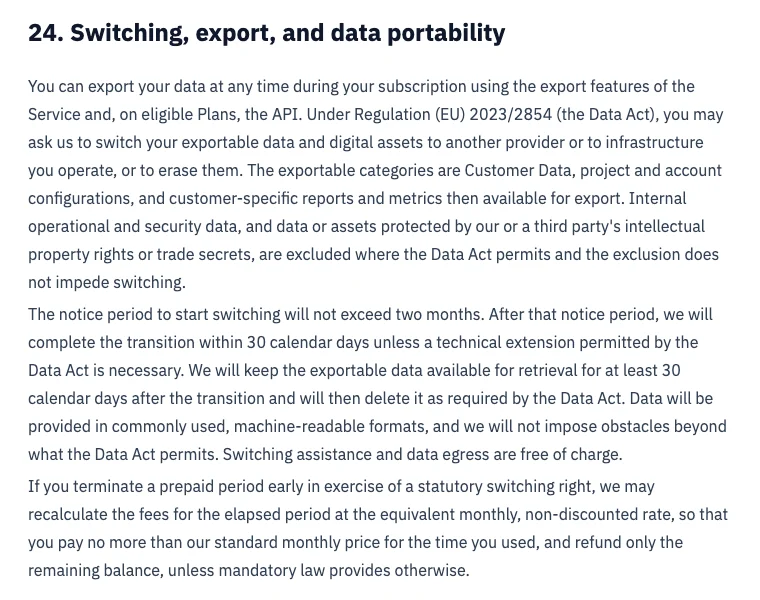
There's also a formal route in Section 24 of the terms. It lets you ask LLM Pulse, under the EU Data Act, to switch your exportable data to another provider or to erase it, and it works like this:
| Part of the request | Details |
|---|---|
| What's covered | Customer Data, project and account settings, and reports and metrics available for export |
| Notice period | Up to two months |
| Transition | 30 days after the notice period |
| Cost | Switching help and data egress are free |
| Where to send it | [email protected], in writing |
The in-app exports cover most of the same ground. Where the formal route really matters is a yearly plan you want to leave early, because of the refund rule below.
Cancel LLM Pulse and the refund policy
Cancelling happens in the account menu at the bottom left of the app, where you choose Plans & Billing and then Manage subscription. It takes effect at the end of the current billing period, and you keep access until then. On the 14-day trial, cancel before it ends or the first period is charged.
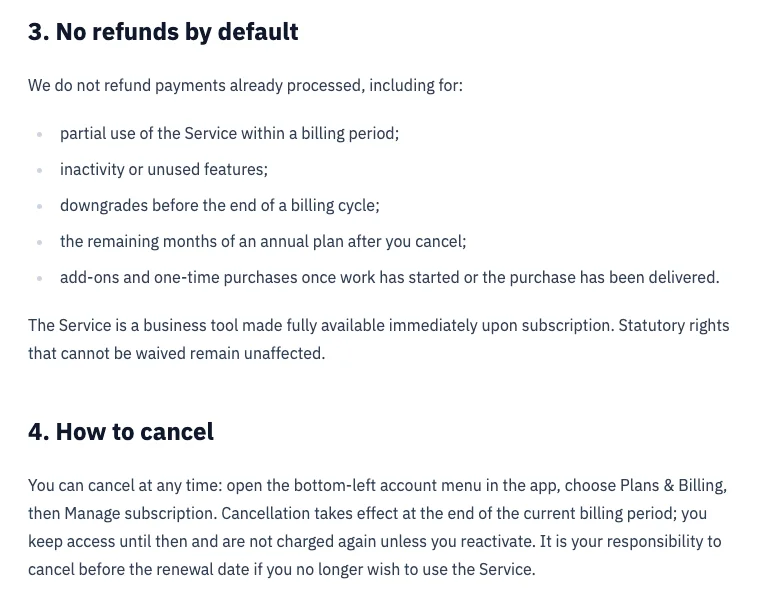
LLM Pulse's refund policy is "no refunds by default." Partial months and unused features aren't refunded, and neither are downgrades before the cycle ends or the rest of a yearly plan after you cancel. Add-ons can be removed, though only from your next renewal.
The exception matters if you paid yearly. Leave early through a Data Act switching request, and LLM Pulse may recalculate the time you used at its standard monthly rate and refund the balance.
Take back access
Once your exports are safe, remove LLM Pulse's access to your other tools. It may be connected in more places than you remember:
| Where LLM Pulse is connected | What to do |
|---|---|
| MCP connection in Claude, ChatGPT or Cursor | Revoke it |
| API keys you created | Delete them |
| Web analytics source (GA4, Plausible or Piano) | Disconnect it |
| Server or CDN log uploads for crawler analytics | Stop them |
| Looker Studio reports, webhooks, and Zapier, Make or n8n automations that call it | Remove them |
One more item sits in the terms. LLM Pulse can name you as a customer and use your logo, and you can opt out by emailing [email protected].
Where things land in RankControl
Since RankControl has no import tool, your LLM Pulse exports become the baseline while RankControl starts its own history.
| From LLM Pulse | Into RankControl |
|---|---|
| Tracked prompts | Up to 50 tracked questions, re-added by hand |
| Competitors | Up to 10 competitors |
| Answer history and reports | Keep as a baseline; weekly history starts at the first check |
| Citation sources | Link Control prospects for each published article |
| GEO Writer briefs | Titles for the planner, written and published by the content engine |
| Sentiment, shopping and ads tracking | Not covered |
| AI traffic | AI crawler visits and Search Console data in analytics |
Each week, AI visibility tracking checks your questions on six engines, Claude and Grok included, and shows which sources each answer quoted. The content engine publishes up to 100 articles a month through one of nine destinations, and auto-publish stays off until you turn it on. For the sites those answers cite, Link Control sends pitches from your own mailbox after you approve each email.
LLM Pulse's free AI visibility report keeps working after you leave, with no subscription needed, which makes it a handy outside check on your progress. Aleyda Solis flagged the report when it launched last November.
The awesome @DanielPeris and @estevecastells have created the Free AI Search Visibility & Reputation Report giving a sneak peak of what they offer in LLM Pulse 👀👇 including: * Brand Reputation * Top Competitors * Citations and Sources * Quick Wins * Sample search prompts * https://t.co/WBIAi5wVKT
 Aleyda Solis 🕊️@aleydaNov 28, 2025

Your competitors are getting cited by AI. You're not.
Every day without citation tracking is a day your competitors pull ahead in ChatGPT, Perplexity, and Claude.
The switch from LLM Pulse, step by step
Do the exports first, so nothing is lost when your access ends:
- Export your prompts, tags and citation sources to CSV.
- Export visibility, share of voice and sentiment reports for your full history.
- Save GEO Writer output as Markdown, and on Scale, pull raw data through the API.
- Start the RankControl trial, add your questions and competitors, and connect your CMS.
- Cancel in Plans & Billing before your renewal date.
- Revoke MCP, API and analytics access.
Give the export an afternoon. The longer job is the one after it: publishing pages that answer your buyers' questions and getting other sites to mention them. You can do that by hand after the switch, or RankControl's agents can run it every month for $400, with a 7-day free trial. Before you start, the free AI visibility check shows who ChatGPT cites for three questions from your market.
200+ SaaS teams already track their AI citations.
They know exactly when ChatGPT mentions their brand, and when it stops. Do you?