
On price alone, this one looks settled. SurgeGraph's top plan costs $129 a month, and RankControl costs $400. An agency owner could stop reading there, and plenty probably do.
The RankControl vs SurgeGraph comparison gets more interesting once you read how the credits work. You also have to check which AI engines each plan actually checks, and which features ask you to bring your own OpenAI key. SurgeGraph sells an agency AEO toolkit. RankControl runs the whole loop for one brand, from planning to publishing to weekly citation checks, at one price. Every SurgeGraph detail below was checked on its site and help center on September 26, 2026.
RankControl vs SurgeGraph: the short answer
SurgeGraph is a rebranded LSIGraph that now calls itself "the AEO ranking engine for agencies." It writes articles and maps topic coverage, and it scores content for AEO and SEO. It tracks brands in AI answers on a schedule that depends on your plan, and it publishes to WordPress. Most of that runs on a monthly credit balance.
RankControl plans and writes articles from the questions your buyers search and publishes them natively to your CMS. Every week we check 50 queries across seven AI engines, along with Google and Bing positions. We draft backlink outreach too, all in one plan at $400 a month.
For a single brand trying to win AI search, we'd pick RankControl. The reasons are in the fine print below.
Side by side
| SurgeGraph | RankControl | |
|---|---|---|
| What it is | Agency AEO toolkit on credits | Pipeline for AI search visibility and Google rankings |
| Price | $39, $79 or $129/mo | $400/mo or $4,000/yr, one plan |
| AI engines | 2 to 5 depending on plan | ChatGPT, Perplexity, Claude, Gemini, Grok, Google AI Mode, Google AI Overviews |
| Check frequency | Every 5 days, 3 days or daily, by plan | Weekly, 50 queries |
| Google and Bing rankings | Not tracked | Weekly positions, plus AI Overview presence |
| Articles | About 150 to 750 a month in credits | 100 pages/mo across 26 formats |
| Publishing | WordPress only; file export for other sites | 9 destinations, native posts |
| Your own AI key | Required for bulk generation, Flex and Knowledge | Never needed |
| Backlink outreach | Not offered | Drafted from your own mailbox |
| Seats | 2, 5 or 10 | 5 |
| Trial | None; 14-day money-back on new subscriptions | 7-day free trial |
What SurgeGraph is now
SurgeGraph's help center puts it plainly: "SurgeGraph is LSIGraph," rebranded and revamped. The old keyword tool is still in there, but the pitch has moved to agencies running AEO for clients, with per-client workspaces and white-label reports on Scale and above.
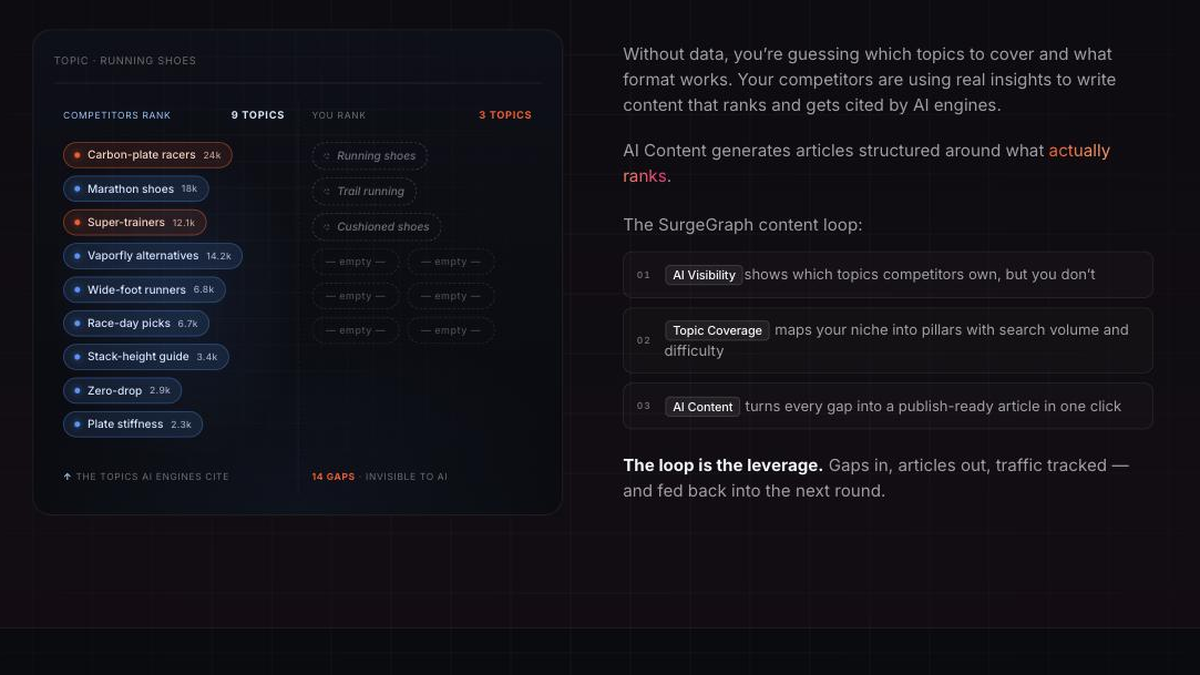
The content side is the Vertex writer, Topic Coverage maps and bulk generation from a CSV of up to 50 keywords. There's also Author Voice, trained on your writing samples. A Content Optimizer pulls existing pages from WordPress, scores them for AEO and SEO, and pushes fixes back. There's even a Product AI mode that builds Amazon affiliate roundups, which says something about the audience the tool grew up serving.
That optimizer is where SurgeGraph does something RankControl doesn't. It will rework pages you already have, while we work only on the articles we write. Agencies also get more room for the money, with up to 50 projects on Signature.
Your competitors are building backlinks while you read this.
Organic outreach, social mentions, and citations from Editorial Circle member sites, with managed backlinks available as an add-on. Grow your domain authority without running the campaign yourself.

The engine tax: read the plan gates first
We call it the engine tax: on most AEO tools, every extra AI engine you want to see costs a plan upgrade. SurgeGraph's pricing page gates engines like this:
| Plan | Price | Engines checked | How often |
|---|---|---|---|
| Spark | $39/mo | ChatGPT, Google AI Overviews | Every 5 days |
| Scale | $79/mo | Adds Perplexity | Every 3 days |
| Signature | $129/mo | Adds Gemini, Google AI Mode | Daily |
The list itself is a moving target. The pricing FAQ names five answer engines, and another answer on the same FAQ says it tracks "four AI engines directly." The AEO feature page names Claude, which the plan list doesn't include. We found four different engine lists across SurgeGraph's own pages, so ask support which engines your plan covers before you pay.
Credits are the other thing to model. The pricing page works out to about 20 credits per article, roughly 9 per AI visibility prompt check and 25 per research action. On Spark's 3,000 credits, a month of 100 articles would use 2,000, leaving about 110 prompt checks for everything else.
Then there's the API key. SurgeGraph's feature page is direct about it: "Bulk generation requires your own OpenAI API key." Flex and Knowledge need one too. If you've connected an OpenAI or Gemini key, the Vertex writer uses plan credits first, and then "your API key will be used for the rest of the content generation." So part of the real cost lands on your OpenAI bill, not SurgeGraph's.
What happens after the draft
SurgeGraph publishes to WordPress through a WordPress application password, and that's the only CMS it pushes to. For any other site, including Webflow and Shopify, you download the article as a file and upload it yourself. Word, PDF, Markdown and HTML are the formats on offer. It doesn't track Google or Bing positions, and it has no backlink or outreach product.
RankControl's content engine plans titles from the questions your buyers search and writes each article in your brand's voice against the pages already ranking. The content engine scores every piece for how easily AI engines can quote it, with a fix list, and publishes it as a native post through the destination you connect. Nine are supported, WordPress, Webflow and Shopify among them. Auto-publish is off by default.

Link Control finds prospects and contacts for each published article and drafts outreach from your own mailbox. The weekly rankings check records Google and Bing positions for your tracked queries and every page RankControl publishes. The rankings check also notes whether an AI Overview showed and whether it cited you.
If you're not on WordPress, the manual path per article looks like this:
- Export the draft and paste it into your CMS: 15 to 20 minutes.
- Add images, internal links and meta tags: about 45 minutes.
- Pitch two or three relevant sites for a link: two to three hours.
- Check Google positions in a separate rank tracker: another tool and another bill.
That's three to four hours per article once the draft exists. At 20 articles a month, you're looking at 60 to 80 hours on top of the subscription. These are our estimates, and yours will differ.

You're getting AI traffic. But do you know where it comes from?
RankControl credits every visit to the assistant that sent it: ChatGPT, Perplexity, Claude, Gemini, Copilot, or Grok. Full source attribution, next to your Google traffic.
What the changelog shows
SurgeGraph ships fast and publishes its release notes, which makes it easy to see where the product is going. The July 28 release added a Topics tab that breaks AI visibility down by topic and engine. On August 3, version 7.15 added Claude Opus 5 as a writing model and let you track up to 20 spellings of a brand name.
The August 14 release is the interesting one. It added an Ads tab that shows which competitors are paying to appear inside AI answers in ChatGPT and Google's AI features, along with support for OpenAI's GPT-5.6 Luna as a writing model. That's a useful view now that ChatGPT ads are live.
We found no release notes dated after August 14, about six weeks before we checked. That's not unusual for a small team, but it's worth asking support about if a specific feature matters to you.
Why depth and repeat checks matter
Kevin Indig analyzed 1.2 million ChatGPT responses and published the headline in March: the top 30 domains take 67% of the AI citations for a given topic. Getting one of those seats is hard, and keeping it is its own job.
The same analysis found that 58% of cited URLs showed up for only one prompt and then disappeared, while the most-cited 5% of pages answered ten or more prompts. Seen together, those numbers make the case for checking the same questions on a steady schedule and watching the trend. A single report can't show you whether a page is holding its seat.
A thread on r/Agentic_SEO about topical authority made a related point. One reply argued that people overestimate topical coverage and underestimate consistency, and that a clear point of view and genuine product expertise beat a hundred "supporting" articles written to fill out a cluster.
Topical Authority Questions
RankControl's AI visibility tracking checks the same 50 queries every week across seven engines and keeps a citation history per engine. You get a notification when a new citation lands, and a lost one shows up in that history on the dashboard. That's how you can tell whether a seat you won in week two is still yours in week nine.
RankControl vs SurgeGraph on price
Here's what one brand pays for comparable coverage.
| For one brand | SurgeGraph | RankControl |
|---|---|---|
| Plan for all its tracked engines, daily | Signature, $129/mo ($107.50 yearly) | $400/mo ($4,000/yr), seven engines weekly |
| Claude and Grok tracking | Not on the plan list | Included |
| Bulk article generation | Needs your own OpenAI key and spend | Included, 100 pages/mo |
| Publishing | WordPress, or files by hand | 9 destinations |
| Google and Bing rankings | Separate tool needed | Included |
| Backlink outreach | Separate tool or agency needed | Drafts included; Managed Backlinks add-on $350/mo |
SurgeGraph is cheaper on the invoice. For a brand that wants articles live on any CMS, rankings tracked and links pitched, the invoice leaves out the separate rank tracker and the OpenAI bill. It also leaves out the hours.
There's no free trial at SurgeGraph. Its help center says the 14-day money-back guarantee "essentially works like a trial," and it covers new subscriptions only, not renewals. To cancel, you go to Account Settings, then Billing Information, then Update Payment Method, which opens the billing portal. RankControl's 7-day free trial runs on the full plan with $0 charged today.
What people say about SurgeGraph
Very little, as it turns out. We searched Reddit for SurgeGraph and its Vertex writer and found no real discussion, only medical and biotech threads that happen to match the name. On X, almost every mention was the same templated "27 AI tools" list, reposted as recently as September 25.
Google's results for "surgegraph review" skew older too. Two of the top four are reviews of SurgeGraph's AI detector, not its AEO product. For a tool repositioned around AI search, the public conversation hasn't caught up yet.
Which wins AI search visibility?
For AI search visibility on your own brand, the verdict is RankControl.
SurgeGraph is an inexpensive toolkit built around agency reporting. But the engines you see depend on your plan, bulk writing runs on your own OpenAI key, publishing stops at WordPress, and rankings and outreach need other tools.
RankControl runs the whole thing for one price. We plan the questions, write and publish the articles on any of nine destinations, draft the outreach, and check seven engines every week, Claude and Grok included. In the first month you get a calendar of planned titles, articles going live on your schedule and four weekly readings of where you stand.
You can piece it together yourself: a credit-based writer, your own API key, a rank tracker, an outreach tool and a spreadsheet of AI answers. Or RankControl's agents can run it every month while you focus on your product. Already on SurgeGraph? Our guide to switching from SurgeGraph covers what to export first.
Not sure where you stand in AI answers today? Start with a free check of your brand.
We'll show you exactly where your brand stands in AI search.
No commitment. $0 due today, cancel anytime. See how ChatGPT, Perplexity, Claude, Gemini, Grok, Google AI Mode, and Google AI Overviews talk about your brand today.