
A Webflow user on Reddit set up a scheduled task in Claude to add posts to their blog collection every week. It worked the first few runs. Then the CMS tool dropped out of the connector's tool list, and reconnecting didn't bring it back. Their conclusion was blunt: this is why they don't fully trust AI with the site yet.
Publishing to Webflow from Claude with MCP is real and useful in 2026, but there are two different ways to do it, and they solve different problems. Webflow's own MCP server gives Claude direct access to your site. RankControl's MCP server gives Claude a content pipeline that writes the article, publishes it to your Webflow collection, and then checks whether AI engines cite it. This guide covers the setup for both, what each one writes, and how they work together.
Two ways to publish to Webflow from Claude
The short version: Webflow's server is for working on your site, and RankControl's server is for running your content.
| Webflow MCP server | RankControl MCP server | |
|---|---|---|
| What Claude gets | Direct access to your Webflow site | A content pipeline connected to your Webflow collection |
| Who writes the post | You and Claude, in the chat | RankControl, from a planned title, in your brand's voice |
| CMS access | Create and update collections and items | Publishes each approved article as one item |
| After publishing | Site traffic through Webflow's analytics; no AI citation tracking | Weekly citation checks on seven AI engines, plus Google and Bing positions |
| Safety rail | Your Webflow roles, branches on Enterprise | Dry run first, publish only on your confirm |
| Cost | Part of your Webflow account | Included in the RankControl plan |
Neither route replaces the other, and plenty of teams will want both connected.
Route 1: Webflow's own MCP server
Webflow partnered with Anthropic and shipped a Webflow connector for Claude on February 9, 2026. In July it released MCP 2.0, which added full CMS and design-system support plus stored Agent Instructions for voice and design rules. It also brought branch-based building and a log of every MCP action in the site's activity history.
Build fast. Build with control. Build for what’s next. Webflow MCP 2.0 is live — prompt @ClaudeAI, @Cursor, or @ChatGPTapp to build, manage, and analyze your site without leaving your chat. Check out the full launch blog to learn more: https://t.co/nsPp5lc1jq https://t.co/HgG15xZq2j
 Webflow@webflowJul 21, 2026

Setup takes about five minutes, per Webflow's docs:
- In a Claude chat, click the plus button and choose Add connectors.
- Search for Webflow. You may need to switch from Featured to All to find it.
- Click Connect, sign in to Webflow, and grant access.
- Pick the sites and Workspaces Claude may use, then click Authorize App.
For Claude Code, add the server by URL with claude mcp add, pointing at https://mcp.webflow.com/mcp. A Webflow engineer who works on the MCP said in r/webflow that Claude Code tests best as the harness "by a good margin". The same reply named bulk CMS work, content migrations and structured edits as the server's strongest jobs today.
Practitioners report three rough edges. The first is token cost, and one r/webflow review that rated each task type said repeated fixes on a stuck layout burn tokens quickly. The second is workspace scope: one Webflow developer on X found the connector authorizes the Workspace chosen at install, so switching between clients meant disconnecting and reconnecting for weeks. The third is the CMS tool itself, which several users saw disappear from the Claude connector in July, with mixed reports since on whether the fix held.
My Honest Breakdown of Claude's Webflow MCP After Weeks of Testing
Fixing layout issues: 7/10. Often works really, really well, but the MCP sometimes gets extremely stuck on the same issues and doesn't nail it right away if you don't explain it perfectly. The longer you spend on it, the more tokens get bur...
The larger gap sits outside the tool. With Webflow's server, Claude writes whatever you ask for in the chat. The research behind the post, the choice of topic, and any check on whether ChatGPT or Perplexity later cite the page are still your job.
We'll show you exactly where your brand stands in AI search.
No commitment. $0 due today, cancel anytime. See how ChatGPT, Perplexity, Claude, Gemini, Grok, Google AI Mode, and Google AI Overviews talk about your brand today.

Route 2: RankControl's MCP server
RankControl's MCP server works one level up. Claude doesn't touch your Webflow design at all. The server asks RankControl to plan, write and publish articles, and each one goes into your blog collection as a native item.
Step 1: Connect Webflow as a destination
Destinations connect in the RankControl dashboard, once. In Webflow, open Site settings, go to Apps & Integrations, scroll to API access, and generate a site API token with CMS set to read and write and Sites set to read. Leave every other scope at no access.
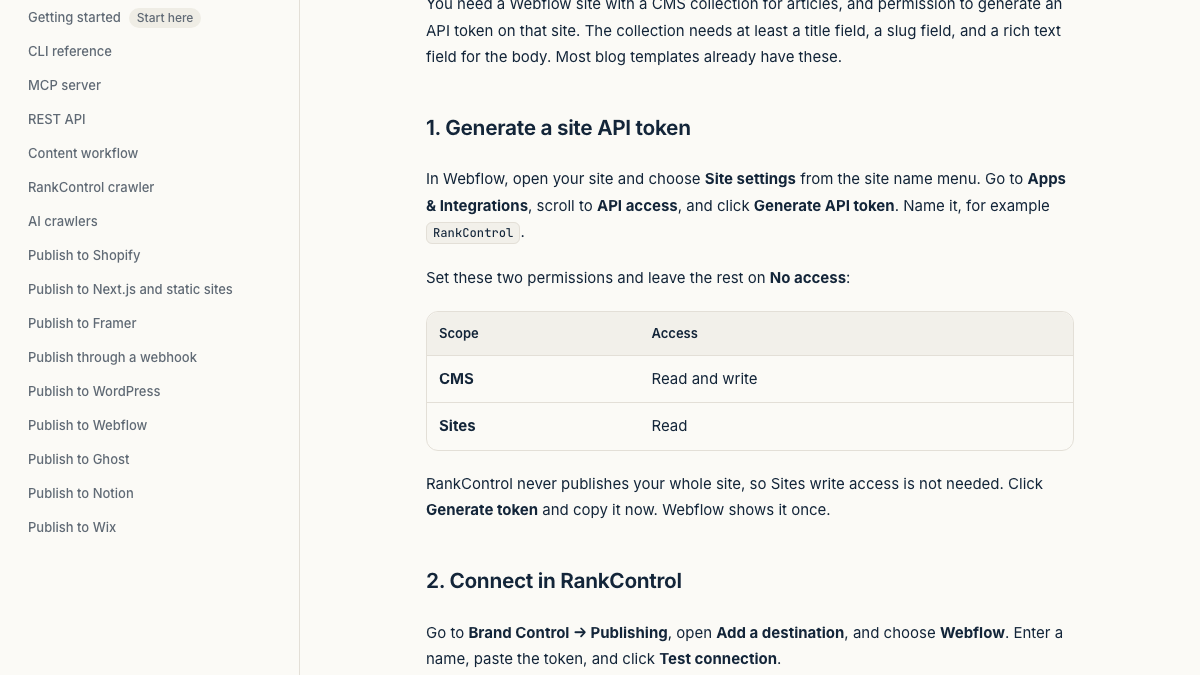
Then go to Brand Kit → Publishing, add Webflow as a destination, paste the token, and test the connection. Choose the site and the blog collection, and pick Published post or Draft for review. Draft mode leaves items unpublished in your Webflow CMS for an editor to check.
Step 2: Add RankControl to Claude
In Claude, open Settings → Connectors, click Add custom connector, name the connector RankControl, and paste https://api.rctrl.com/mcp. Click Connect, sign in on rctrl.com, review the access list and approve. Only the workspace owner can approve.
In Claude Code it's one command: claude mcp add --transport http rankcontrol https://api.rctrl.com/mcp. The same server works in Claude Desktop, Cursor and Codex, and there's an npm package for running the server locally with an API key.
Step 3: Publish from the chat
Now you can talk to it the way you'd brief an editor. Ask what's planned this week, and Claude lists the articles on your calendar. Ask it to write the one on a given topic, and RankControl's content engine drafts it against the pages already ranking for its keyword, in the voice of your brand profile. Ask it to publish, and you get a dry run first: the title, slug and destination that would go live.
Say yes, and RankControl creates the item in your Webflow collection and publishes that item alone. We never publish your whole site. A couple of minutes later we load the live URL to make sure the page renders, and an unreachable page is marked Not live yet and rechecked automatically.
From then on, AI visibility tracking checks your 50 tracked queries every week across ChatGPT, Perplexity, Claude, Gemini, Grok, Google AI Mode and Google AI Overviews. You can ask Claude in the same chat which engines cited the new article.
Know exactly what AI says about your competitors.
RankControl's Recon Agent monitors competitor citations across ChatGPT, Perplexity, Claude, Gemini, Grok, Google AI Mode, and Google AI Overviews. See where they show up and you don't.

What lands in your Webflow collection
RankControl matches your collection's fields by name first, then by type, so most blog templates work without changes.
| RankControl fills | Webflow field type | Field names we look for |
|---|---|---|
| Title | Plain text | name, title, post-title |
| Slug | Plain text | slug, url-slug |
| Body | Rich text (required) | post-body, body, content, article-body |
| Summary | Plain text | summary, excerpt, description, meta-description |
| Main image | Image | main-image, featured-image, cover-image, hero-image |
| Thumbnail | Image | thumbnail-image, thumbnail, thumb |
The hero image becomes a real asset in your Webflow library, and updates to an article revise the same item instead of creating a new one. The publish date is the one field RankControl leaves empty, so fill your template's Date field in Webflow if it shows one.
Prompts to try with each server
Plain requests work better than clever ones, because both servers expose tools with clear names and Claude picks the right one from your wording.
With RankControl connected, try these:
- "What's on my content calendar for the next two weeks?"
- "Write the article planned for Thursday, then show me the dry run for publishing it to Webflow."
- "Which of my published pages have the lowest citability score, and what do the fixes say?"
- "Did any AI engine cite last week's Webflow posts?"
With Webflow's connector, Webflow's own docs suggest starting with a collection audit, such as "List all my collections and show me their field structures." After RankControl publishes, a request like "Set the Date field on the three newest blog items to today" fills the one field RankControl leaves blank.
Using both servers together
The two servers split the work cleanly. RankControl owns the articles, and Webflow's server owns the site around them.
A few combinations work well. Use Webflow's connector to build or fix the blog template, add a summary field the collection is missing, or set the Date field on items RankControl published. Use RankControl for the recurring loop of planning, writing, publishing and tracking. Keep one rule: don't let both agents edit the body of the same item, or the next RankControl update will overwrite hand edits.
For visit tracking on Webflow, RankControl also needs one site-wide script. You can install it from the Analytics screen with a token that has CMS and Custom code permissions, and it goes live with your next Webflow site publish. Our roundup of MCP servers for SEO covers the data servers you might connect alongside these two.
When a publish doesn't show up
Most Webflow publishing problems come from the site, not the connection.
- If the site was never published, Webflow won't put items live. Publish it once in the Designer, then republish the article.
- An item marked queued to publish means your site has unpublished design changes. Publish the site in Webflow and the item goes out with it.
- A live link on webflow.io means the custom domain isn't published yet. Connect and publish it, and the link follows.
- When the connection test fails, check the site. Tokens belong to one site, so generate yours on the site that holds your blog collection.
How much time each route saves
Route 1 saves you the clicking. A post drafted in chat still needs research, internal links, images and a pass for accuracy, which runs two to three hours per article before Claude pastes it into the CMS. At 20 posts a month that's 40 to 60 hours, plus whatever you spend checking AI answers by hand.
Route 2 moves that work into the pipeline. Your time goes to reviewing each dry run and deciding what gets confirmed, usually a few minutes per article, and the Webflow destination handles the rest.
You can run the whole thing by hand from Claude with Webflow's connector and a spreadsheet of prompts to check. Or RankControl's agents can plan, write, publish and track every month, with Claude as the place you steer them from.
26 content formats. Published on your domain. Matched to your brand.
Guides, comparisons, listicles, case studies, and more. RankControl generates content that gets cited by ChatGPT, Perplexity, Claude, Gemini, Grok, Google AI Mode, and Google AI Overviews.