
Ask Google "how to increase website traffic" and its own AI Overview won't bring up AI search at all. When we checked on October 19, 2026, it stuck to SEO, content and social media, plus email and paid ads. Twelve of the links it cited were YouTube videos.
It's not a quiet search, either. Advertisers bid about $40 a click on "increase website traffic," per Google Ads data, so plenty of people are paying to answer it.
This guide covers both kinds of search, Google's results and the AI answers, and it starts from one question. When someone searches, which of your pages does each engine actually send them to?
Google still sends most of the visits
Get the scale right before you plan anything. Statcounter tracks Google and ChatGPT head to head, as a share of the visits each one sends to websites. In September 2026, ChatGPT had 0.39% worldwide. Put another way, Google sent roughly 250 visits for every one from ChatGPT.
AI search still matters, since the people who do click from it have often made up their minds already. But a plan that drops Google to chase AI answers will lose most of the traffic it could have had.
What we tested
On October 19 we asked 30 buyer questions about small business software. Each went to ChatGPT and to Google with the AI Overview loaded, twice each. A third were "best X for Y" questions and a third were how-to questions. The rest were "X vs Y" or "alternatives" searches. We then sorted every link each engine showed or cited by page type, going by the URL. The full method is in our SE Ranking comparison.
| Page type | Google top 10 | AI Overview citations | ChatGPT citations |
|---|---|---|---|
| Articles and guides | 71% | 59% | 39% |
| Homepages | 1% | 1% | 36% |
| Product, pricing and feature pages | 9% | 10% | 25% |
| Videos | 4% | 22% | 0% |
| Forums like Reddit and Quora | 12% | 7% | 0% |
Going by URL alone is a rough way to sort pages, so take the shares as a direction and don't lean on the decimals. The direction is clear enough to plan around. Google and AI Overviews mostly send people to articles, and AI Overviews lean on video as well. ChatGPT is the odd one out, sending people straight to company sites.

Built by the team that got cited in 48 hours.
Content generation, backlink building, AI visibility tracking, and Google rankings. One platform, zero guesswork.
Step 1: Fix the pages Google already shows
Your quickest traffic will come from pages Google already ranks. In Search Console, open Performance and sort by impressions. You're looking for two kinds of page.
Pages at positions 8 to 20 are the first kind. They're close to page one, and a missing section, a better example or a clearer answer near the top can be enough to move them. The second kind is already on page one but gets few clicks. Usually its title and meta description are vague, so rewrite them to use the words in the query.
A brand-new site owner got the same advice from a commenter in an October r/SEO thread. Ignore sessions, look at the queries in Search Console and build out the pages that match what you actually offer.
Step 2: Write the articles buyers search for
Articles made up about 7 in 10 of Google's top 10 results in our test, and most of the AI Overview citations too. If you want one page type that can win both kinds of traffic, it's the article.
Go for specific questions over broad ones. "Best payroll software for small business" beats "payroll" as a target, and for a newer site "how to choose a payroll provider" is better still. Our guide to long tail keywords shows how to find searches like these and judge which ones you can win.
Answer the question in the first few lines. Then back it with something concrete, like a price, a step or a number. AI Overviews pull short passages, which makes an answer buried under 300 words of setup easy to skip.
Already running a blog? Our guide to increasing blog traffic covers refreshes, internal links and email for the posts you have.
Step 3: Make your product pages answer questions
Nothing in the test surprised us more than this. About 6 in 10 links ChatGPT cited pointed at a company's own homepage or product page.
| Answers that linked a company's own homepage or product page | Per run, out of 30 |
|---|---|
| ChatGPT | 26 or 27 |
| Google AI Overviews | 12 to 15 |
Nearly every ChatGPT answer linked one, and no more than half of Google's AI Overviews did. ChatGPT also cited pricing pages directly, including HubSpot's CRM pricing and monday.com's pricing page. A buyer who asks it for the best tool can end up on your pricing page without reading a single article.
So make sure those pages stand on their own. Say who the product is for and what it costs. Say what it replaces and how it compares with the obvious alternatives, in plain text rather than inside images or tabs. Any answer a buyer can't find on the page is one an AI engine can't find there either.
Step 4: Put a video next to your key articles
YouTube showed up in 48 of the 59 AI Overviews we collected, and video made up about a fifth of all their citations. ChatGPT never cited YouTube once.
If Google traffic matters to you, a short video that answers the same question as your best article is worth making. Production quality matters less than whether it answers the question. Put it inside the article, and use the video's description to link back to the article.
Step 5: Get mentioned where engines read
Forums carry real weight on Google. Reddit and Quora made up 12% of Google's top 10 in our test, and Reddit appeared in 29 of the 59 AI Overviews. One helpful answer in the right thread can send visits on its own and also shape what Google's AI says.
Don't count on forums for ChatGPT traffic, though. It cited no Reddit threads at all in our 60 answers. Our Reddit marketing guide covers how to take part without breaking subreddit rules, which is where most brands get banned.
Step 6: Keep your Business Profile current if you're local
A local business has one more traffic source, its Google Business Profile. The profile shows in the map results, and its "website" button sends people straight to your site.
Google's AI features guide puts checking that "Business Profile information is up-to-date" among the basics for AI Overviews too. In an October r/growmybusiness thread, a new owner asked how people got their first visitors. Several replies said any local business should start with a Business Profile.
Keep its categories, hours, services and photos current, and answer your reviews. Then check that the page the profile links to matches what the profile promises. A visitor who clicks should land on the right service, not a generic homepage.
Step 7: Skip the AI-only tricks
A whole market has grown up selling special files and markup for AI search. Google's own guide to AI features says you don't need any of it.
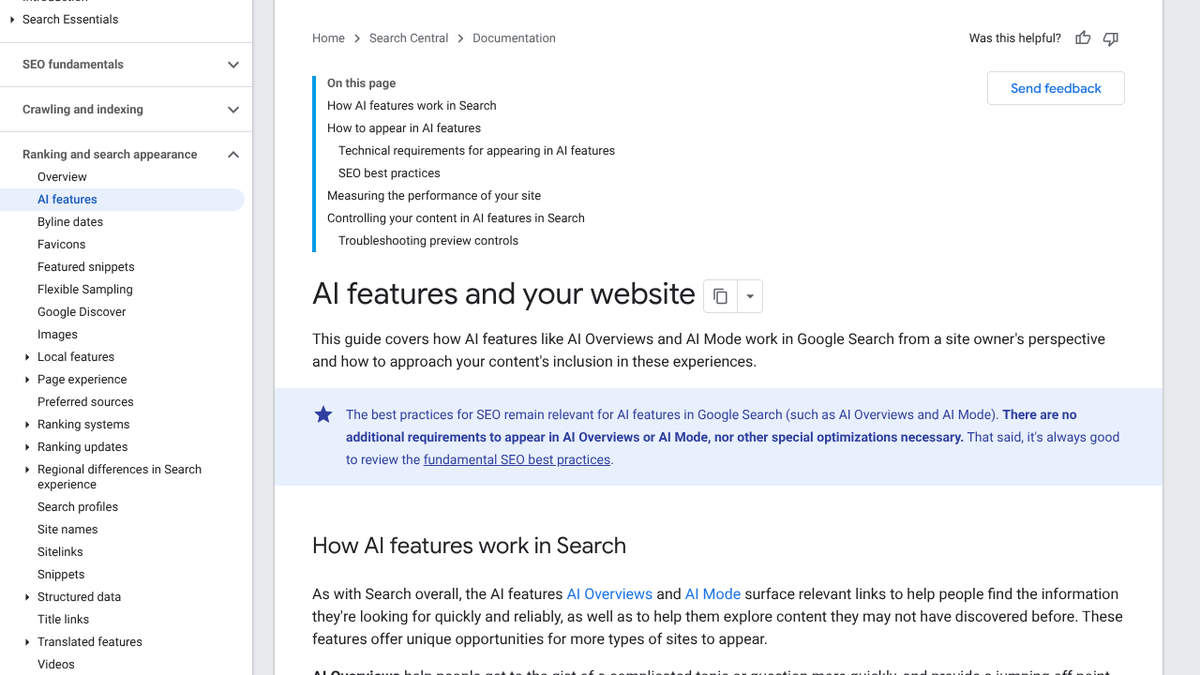
To appear in AI Overviews or AI Mode, the guide says, a page has to be indexed and eligible for a snippet. It adds that you "don't need to create new machine readable files, AI text files, or markup." No special schema is required either. What it lists instead is plain enough. Allow crawling, write clear text, link your pages well and keep your Business Profile details up to date.
See your first AI citation report in under 5 minutes.
No setup calls. No onboarding meetings. Connect your domain and see where AI mentions your brand right now.

Step 8: Measure AI traffic properly
It's easy to undercount ChatGPT traffic. In our test, ChatGPT added utm_source=chatgpt.com to 203 of its 435 cited links. It tagged none of the 158 links that went to a homepage.
GA4 is where that hurts. An October thread in r/SEO_for_AI laid out the two ways it goes wrong. Clicks that arrive without a referrer get counted as Direct. Clicks whose link carries a source tag but no medium can end up in Unassigned. A separate r/Agentic_SEO thread that month described a short bug where iPhone clicks from ChatGPT lost both the tag and the referrer and showed up as Direct.
So if Direct and Unassigned grow at the same time, some of that may be AI traffic. Our guide to tracking AI traffic with missing referrers shows how to set up a custom channel for it. RankControl's analytics count AI crawler visits and visits from AI answers separately, so you can see which engines bring people as well as bots.
What this takes each month
These are my estimates of the hours a small site needs each month to do all eight steps by hand.
| Task | Hours a month |
|---|---|
| Review Search Console and update 4 pages | 6 to 8 |
| Write 4 new articles | 16 to 24 |
| Tighten product and pricing pages | 2 to 4 |
| Record 2 short videos | 4 to 6 |
| Take part in forums | 4 |
| Update your Business Profile and reply to reviews | 1 to 2 |
| Check rankings and AI answers | 3 to 4 |
| Total | 36 to 52 |
Expect the first month to run longer, because you're also setting up tracking and fixing old pages.
Where to start this week
If you only have a few hours, start with Steps 1 and 3. Pages that already rank are the quickest Google win, and ChatGPT sends buyers to your homepage and product pages more than anywhere else.
You can do all of this by hand every month. Or RankControl can take much of it off your plate. We plan and write articles for your buyers' questions and publish them to your site after you approve. We also track your Google and Bing rankings and check seven AI engines every week, while you focus on your product.
Your competitors are building backlinks while you read this.
Organic outreach, social mentions, and citations from Editorial Circle member sites, with managed backlinks available as an add-on. Grow your domain authority without running the campaign yourself.