
On October 19, 2026, we took 49 small businesses that rank on Google's first page for 12 everyday searches. They included plumbers in Austin, dentists in Denver, soap shops, tea sellers and salon booking apps. Then we asked ChatGPT the same 12 questions. It named one of the 49.
Ranking on Google and showing up in AI answers turned out to be different jobs. So before writing the audit steps, we ran the fast technical checks on all 49 sites to see what was actually in the way. The plan below is built around what we found, so you spend an afternoon on the checks that turn up problems.
What 49 page-one businesses showed us
The sample was 27 local businesses, 14 online shops and 8 software companies. Each ranked on Google's first page for the search we picked. We then checked their sites the way an AI crawler would see them.
| Check | Result |
|---|---|
| Named by ChatGPT for the search they rank for | 1 of 49 |
| Cited by Google's AI Overview (shown on 5 of 12 searches) | 1 of 49 |
| robots.txt blocking an AI crawler | 0 of 41 readable files |
| Served a browser but refused a request naming an AI crawler | 4 of 42 |
| Refused every scripted request, whatever it called itself | 7 of 49 |
| No Organization, LocalBusiness or Product markup | 14 of 42 |
The one business ChatGPT named was ABC Home & Commercial Services, for "plumber austin tx." For the other local searches, it drew on directories and review sites, such as Angi and Expertise.com for roofers and ConsumerAffairs for Phoenix HVAC. For Portland bakeries it used Eater and Travel Portland.
A caveat on the crawler tests. Our requests came from one machine with the bot's name typed in, so a CDN that checks where real bots come from may treat genuine crawlers differently. Read those rows as warning signs to confirm, not proof.
Why page one wasn't enough
The sources ChatGPT used explain most of the gap. For the Austin plumber and Denver dentist questions, it named businesses without citing any source, so it answered from what it already knew. For the other local questions it searched, and the pages it cited were directories, review sites, city guides and public bodies. The San Diego family law answer cited the Legal Aid Society of San Diego, the State Bar of California and the county court.
Not one local answer cited a business's own website. Online shops fared a little better, since ChatGPT cited seller sites like Adagio, Harney & Sons and Rishi for loose leaf tea. Those were simply different sellers from the ones ranking on Google.
Owners see the same pattern. In an r/smallbusiness thread this autumn, a home inspector said several clients this year found them through ChatGPT, and credited the reviews they'd built on Google, Yelp and HomeAdvisor. Another owner said reviews were what sent AI to their site.
We'll show you exactly where your brand stands in AI search.
No commitment. $0 due today, cancel anytime. See how ChatGPT, Perplexity, Claude, Gemini, Grok, and Google AI Mode talk about your brand today.
1:00 Write your questions (30 minutes)
Write 10 to 15 questions a buyer would type, without your brand name. Mix "best [service] in [city]" with specific problems, like "who fixes a slab leak in Austin," and one or two comparisons.
Keep the list fixed so you can rerun it next month. Our guide to checking your AI visibility has more on picking questions.
1:30 Ask the engines (60 minutes)
Run each question on ChatGPT, Perplexity, Gemini and Google's AI Mode. Use a fresh private window or a logged-out session. In an r/SEO thread on checking how ChatGPT describes a company, one reply made the point well, that you should keep memory off or you're measuring your own chat history.
For every answer, write down four things. Note whether you're named, whether your site is cited, which competitors appear and which other sites the answer relied on. Then ask "what is [your business]" on each engine and check the facts it gives back.
Another reply in that thread suggested asking ChatGPT where it got its information. That's worth a try, but treat the reply loosely, since the model may guess at its sources.
2:30 Check that the doors are open (30 minutes)
This is the hour most people spend on robots.txt, and in our sample robots.txt was never the problem. Do read it, but read the version your server actually returns. Open yourdomain.com/robots.txt in a browser, not the file in your code.
One r/SEO poster spent a morning on exactly this. Their robots.txt allowed every AI crawler, yet the live file carried a Cloudflare block for GPTBot and ClaudeBot that they hadn't written.
Cloudflare has been quietly blocking GPTBot and PerplexityBot on my site for months. Here's how to check yours.
Spent the morning debugging why my site wasn’t showing up in any AI search tools like ChatGPT, Perplexity, or AI Overviews. Everything looked fine on my end. My robots.txt in Next.js explicitly allowed every AI crawler. Then I ran a curl on...
The bigger risk sits in your CDN or firewall. Four sites in our sample served a normal browser but refused requests that named an AI crawler, and seven refused every scripted request. Cloudflare also changed its defaults for new domains on September 15, 2026, blocking bots it classes as Training or Agent on pages that show ads.
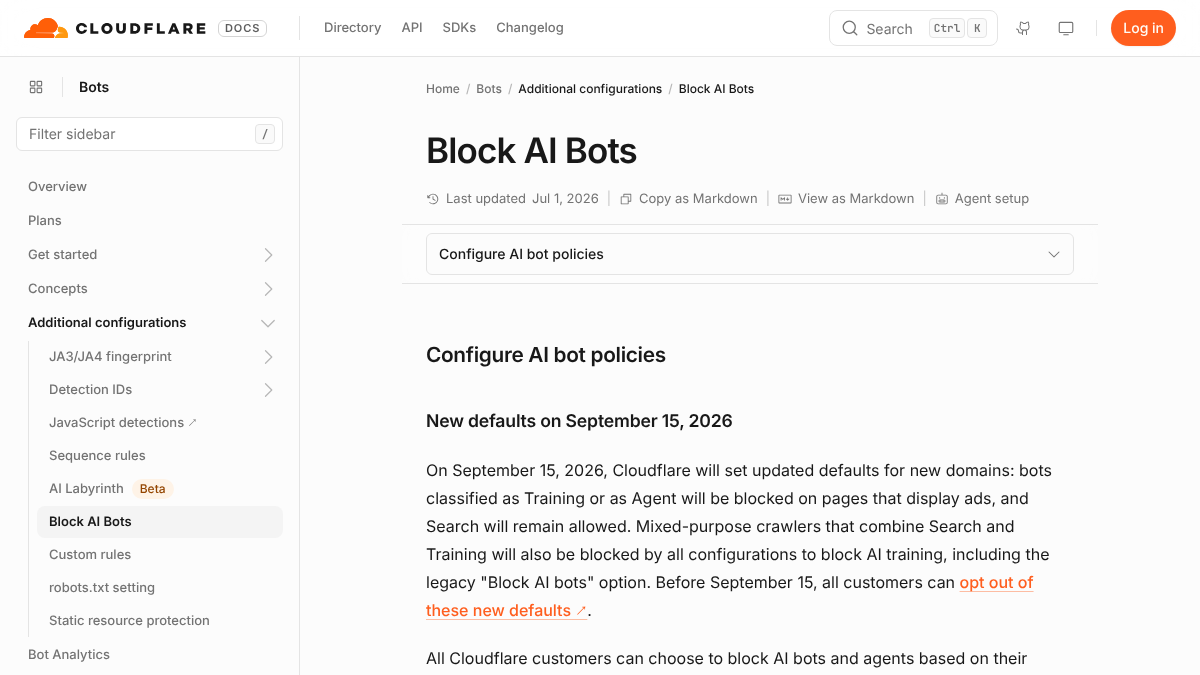
So open your CDN's bot settings and note what's switched on. If you can read your server logs, look for visits from GPTBot, OAI-SearchBot, ClaudeBot and PerplexityBot. Our guide to auditing AI crawlers in server logs shows how.
3:00 Check the facts machines read (30 minutes)
Look at your homepage's structured data with Google's Rich Results Test. Fourteen of the 42 sites we could read had no business markup at all, which leaves an engine to guess your name, address and hours from the page text.
Then compare the basics across your site, your Google Business Profile and the directories that showed up in step two. The name, address, phone number, hours and prices should match everywhere. A mismatch is the kind of error an engine repeats back to buyers.
3:30 Find who AI trusts instead of you (45 minutes)
Go back to your notes from step two and list every site the answers relied on. For local searches in our test, that meant directories, review sites, city guides and the Arizona contractor licensing board. For software, it meant review sites and comparison posts.
This list is your to-do list. Claim and fix your profiles on the directories, ask happy customers for reviews on the sites engines read and pitch the guides and comparison posts. Our post on local AEO for ChatGPT and Claude covers the local side in more depth.
Know exactly what AI says about your competitors.
RankControl's Recon Agent monitors competitor citations across ChatGPT, Perplexity, Claude, Gemini, Grok, and Google AI Mode. See where they show up and you don't.

4:15 Add the free data from Bing and Google (15 minutes)
Two free reports fill in what manual checks miss. Bing Webmaster Tools has an AI Performance report showing how often your pages are cited in Copilot and Bing's AI answers. Google Search Console's generative AI report shows impressions from AI Overviews and AI Mode by page.
Neither tells the whole story, and Google's report doesn't show the queries behind the impressions. They're still the only first-party numbers you can get, so note this month's figures in your report.
4:30 Write a one-page report (30 minutes)
Keep the result to one page. That makes it something you'll actually rerun, and something a boss or client will read.
| Section | What goes in it |
|---|---|
| Questions checked | Your 10 to 15 questions and the date |
| Named or cited | Per engine, how many answers named you and how many cited your site |
| Who appears instead | The competitors and the third-party sites engines relied on |
| Blocks found | robots.txt, CDN and firewall settings, with what you changed |
| Fact errors | Anything an engine got wrong about you, and where it likely came from |
| First three fixes | The three changes you'll make this month |
For a fuller version with a scoring system, our AEO audit scorecard grades six areas out of 25. And our worked five-layer audit of a SaaS site shows what a deeper pass looks like.
What to skip in one afternoon
A rendering test is a fair thing to cut. Every site we could read in our sample showed its main text in the raw page without running scripts, which is common for sites built on WordPress, Shopify and similar platforms. If your site is a single-page app, though, test rendering before anything else.
Skip rewriting content and rebuilding your schema too. Those are fixes, and the afternoon is for finding what to fix. The report's "first three fixes" row is where they go.
After the afternoon
An audit is a snapshot. AI answers change week to week, so a business that's missing in October can appear in November, and the reverse. Rerun your questions monthly, which takes about two hours once the list exists.
You can do all of this by hand. Or RankControl can keep it running for you. It checks 50 of your buyer questions every week on ChatGPT, Perplexity, Claude, Gemini, Grok and Google AI Mode, records who gets named and cited, and its analytics count AI crawler visits and AI-referred visitors separately. For a quick first look, the free AI visibility checker shows whether ChatGPT cites your site or your competitors on real buyer questions.
26 content formats. Published on your domain. Matched to your brand.
Guides, comparisons, listicles, case studies, and more. RankControl generates content that gets cited by ChatGPT, Perplexity, Claude, Gemini, Grok, and Google AI Mode.