If you plan to switch from Peec AI, the export button won't give you what you'd expect. Peec's docs describe one export: from the Projects tab, you download "all chats for a project as a CSV." That file holds the raw AI answers. It doesn't hold the charts you actually checked each week, such as visibility, position, sentiment and share of voice over time.
We call that the chart gap, and it's the one real risk in leaving Peec. The good news is that Peec includes an MCP server on every plan, Starter included, and it's the easiest way to pull that history out before you go.
This guide covers what to export, how to cancel under Peec's terms and where everything lands in RankControl. It's based on Peec's docs, pricing page and terms of use, all checked on September 26, 2026.
Why teams move off Peec AI
Most of the reasons come back to the three-model ceiling. Starter, Pro and Advanced each let you choose three models from a base list of six. Every extra model costs $30, $70 or $140 a month, depending on the plan. Claude, Grok and Perplexity aren't on the base list at all, since they sit with Peec's Enterprise plan.
The other reason came up in a September r/automation thread. A Peec user wanted a tool that helps them act on the data rather than only watch it. Peec's dashboards show where you're missing, and someone on your team still has to write, publish and promote the page that fixes it.
What moves when you switch from Peec AI
Peec AI is a Berlin company that raised a $21 million Series A last November, and its product is tracking. Everything you've built lives inside it. That includes your prompts and the tags and topics you sorted them into, plus your competitor lists. Brand perception attributes, AI Shopping data and any brand facts you set up for fact-checking live there too.
Peec's own docs flag the catch with tags and topics, saying they "don't transfer to external systems." So the setup is the part to save by hand, and the history is the part to pull out through a tool.
One thing Peec does that RankControl doesn't: it checks prompts daily on every plan and lets you choose which three of its base models to track. RankControl checks weekly, on a fixed list of six engines.
How to export your data from Peec AI
Start with the chats. Peec's docs give the steps: open the Projects tab, click the three dots in the right column of a project, click Export chats, then Generate export, and download the file when it's ready. The export works per project, so repeat it for each one.
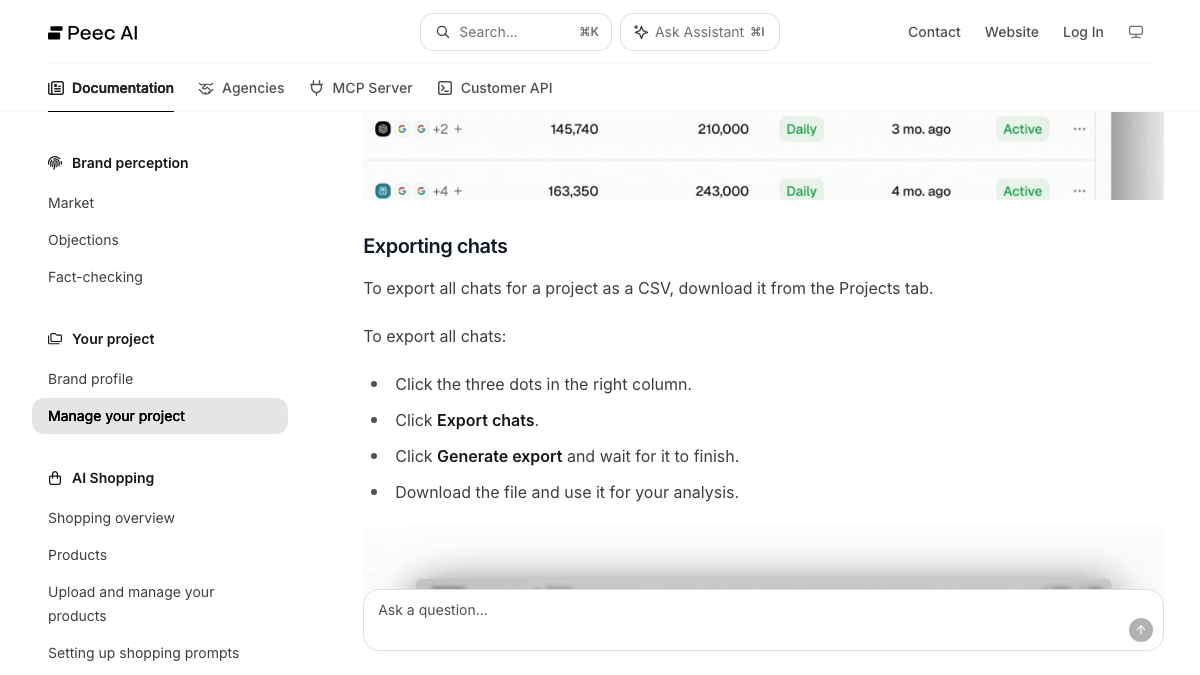
The CSV is what the AI engines said. For the trends, use the MCP server, which is included on every plan. Its tools include a chats report bucketed by day, week or month, and a URL report with citation rates over a date range.
Peec's docs give the Claude Code command, which adds the server at api.peec.ai/mcp and signs in with OAuth, and Claude Desktop connects the same way. Once it's connected, ask Claude for your visibility and citation history by month and by engine, and save the tables it returns.
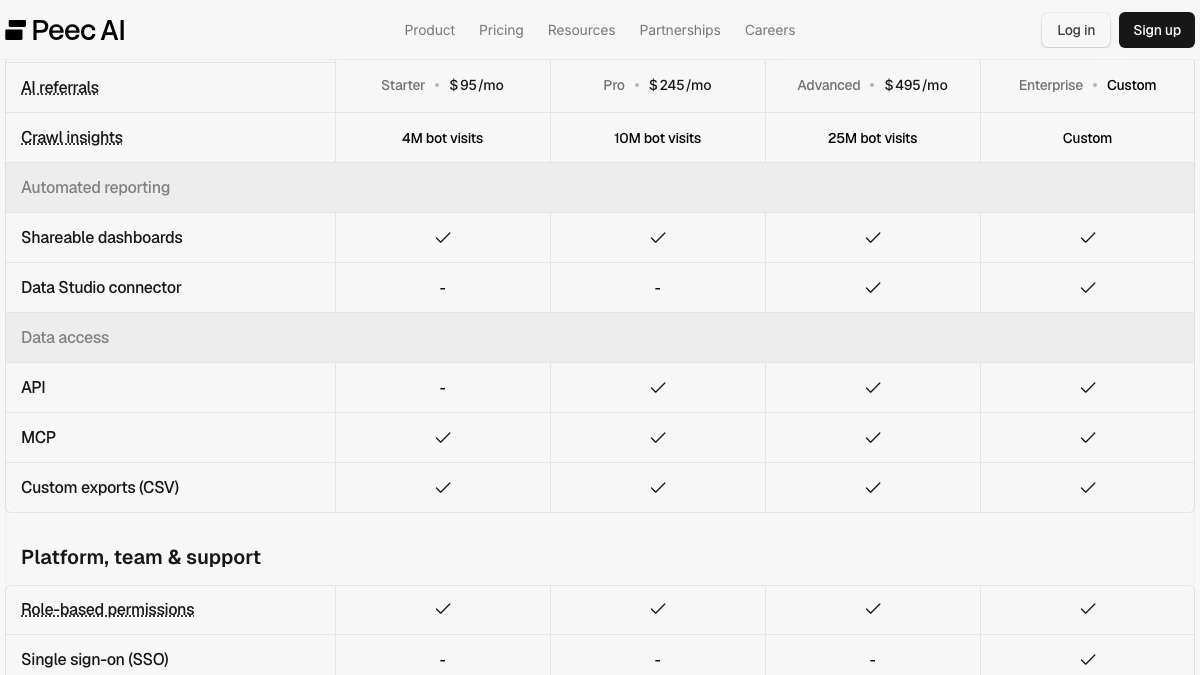
If you're on Advanced or Enterprise, the Looker Studio connector is another route. It exposes visibility, position and sentiment as metrics, along with share of voice. One inconsistency to know about: the pricing table shows the API from Pro upward, while Peec's API docs say "access to this API is currently limited to Enterprise customers." Ask support which applies to your account before you plan around it.

You're getting AI traffic. But do you know where it comes from?
RankControl credits every visit to the assistant that sent it: ChatGPT, Perplexity, Claude, Gemini, Copilot, or Grok. Full source attribution, next to your Google traffic.
Save your setup by hand
The setup is quick to copy and slow to rebuild from memory. Before you cancel, save these into a document or spreadsheet:
- Every prompt, with its tags and topic
- Your competitor list for each project
- Brand facts and perception attributes you defined
- The three models you chose, so later comparisons are fair
The prompts matter most, because they become your tracked queries in RankControl. Peec's prompts are often short and keyword-like. Rewrite them as the full questions your buyers ask while you copy them over, since that's how RankControl tracks them.
Cancel with written notice
Peec's terms describe cancellation as a notice, not a button. They say that "notice of termination must be given at least in text form (e.g. by email)," so send an email and keep the reply. Your dashboard may have a billing option too, but the email is what the terms count.
A monthly plan can be ended "at any time, effective at the end of the current payment cycle." A 12-month plan needs 30 days' notice before the end of its term, so check your renewal date before anything else.
Refunds are narrow. The terms refund prepaid fees pro rata only if the termination was "due to a fault of Peec AI" or an uncured breach, and otherwise "there is no automatic refund for early termination." There's one carve-out that's easy to miss. The terms include a refund for switching providers under the EU Data Act, calculated as your annual fees minus usage up to the termination date. If you're on an annual plan and moving to another tool, ask Peec in writing whether it applies to you.
After the plan ends, Peec "may delete Customer Data associated with the account after a short retention period." The terms don't say how short, so finish every export before your last day.
Make the before-and-after fair
Your Peec history is only useful as a baseline if you compare like with like. Peec checks daily and RankControl checks weekly, so compare monthly rates rather than single days. AI answers move a lot from one ask to the next, and a monthly rate smooths that out.
The engines differ too. Peec's base list includes Google AI Overviews, Copilot and Naver AI, which RankControl doesn't track, and RankControl covers Claude, Grok and Perplexity, which your Peec plan may not have. Compare the engines you had in both places, usually ChatGPT, Gemini and Google AI Mode, and treat the rest as new ground.
Keep the prompts as close as you can for the first month, even after rewriting them as full questions. Change the wording later, once you have a RankControl baseline of your own.
Where things land in RankControl
RankControl has no import tool, so your exports become reference material rather than data to load.
| From Peec AI | Into RankControl |
|---|---|
| Prompts (rewritten as buyer questions) | Up to 50 tracked queries, checked weekly on six AI engines |
| Competitor lists | Up to 10 competitors in your share of voice |
| Chats CSV | Your archive of what each engine said |
| Visibility and citation history (via MCP) | Your before-picture for the first months |
| Tags and topics | A guide for grouping queries and planning content |
| Brand facts | A reference for correcting the Brand Control draft |
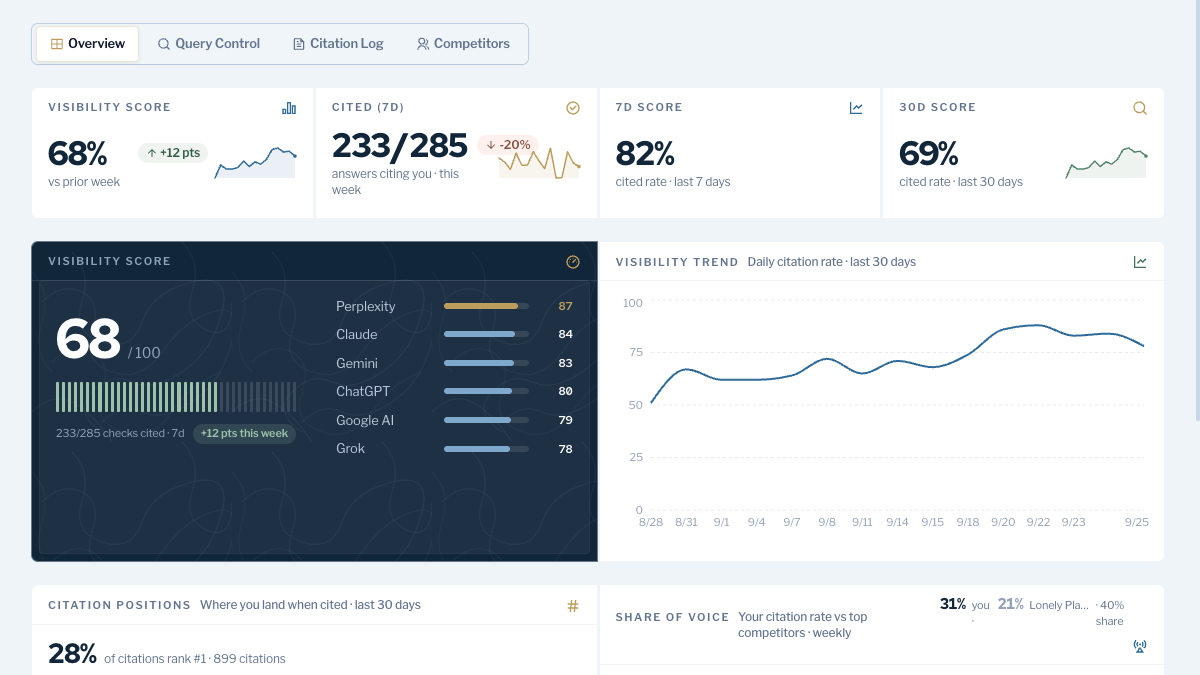
RankControl's AI visibility tracking covers six engines on its one plan, with Claude, Grok and Perplexity included. On Peec those three are Enterprise-only. Brand Control reads your site and drafts your voice, products, buyers and competitors, and you correct the draft against the brand facts you saved.
The bigger change is what happens after a gap shows up. The content engine plans an article for it, writes it against the pages already ranking and publishes it through one of nine destinations once you approve it. Link Control then drafts outreach for each article from your own mailbox. If you liked working with Peec through Claude, RankControl's MCP server works the same way and can publish too, as a dry run until you confirm.
We'll show you exactly where your brand stands in AI search.
No commitment. $0 due today, cancel anytime. See how ChatGPT, Perplexity, Claude, Gemini, Grok, and Google AI Mode talk about your brand today.

The switch from Peec AI, step by step
- Check your renewal date and whether you're on a monthly or 12-month plan: 10 minutes.
- Export the chats CSV for each project from the Projects tab: 15 minutes.
- Connect Peec's MCP server to Claude and save your visibility, citation and URL history by month and engine: 30 to 60 minutes.
- Copy prompts, tags, topics, competitors and brand facts into a spreadsheet: 30 minutes.
- Start RankControl, correct the brand draft, and add tracked queries and competitors: about an hour.
- Connect your CMS in RankControl: 10 minutes.
- Email Peec your notice of termination, and ask about the EU Data Act clause if you're on an annual plan.
That's about three hours. After the switch, the tracking still has to turn into pages: someone picks the gaps, writes and publishes an article for each, pitches it and checks six engines every week. You can run that by hand. Or RankControl can run it every month for $400, with a 7-day free trial, while you approve what goes live.
For the other tools worth comparing, see our list of Peec AI alternatives.
Know exactly what AI says about your competitors.
RankControl's Recon Agent monitors competitor citations across ChatGPT, Perplexity, Claude, Gemini, Grok, and Google AI Mode. See where they show up and you don't.