
Outranking is an SEO content editor, so a switch from Outranking is mostly about the documents inside it. Your published articles already sit in your CMS. The drafts, briefs, outlines and keyword clusters that never left the editor are the part to save, and Outranking doesn't document a way to export them.
Outranking is run by Outranking LLC, registered in Delaware. It scores drafts against the pages ranking on Google, generates titles and outlines, writes AI first drafts with an add-on, and suggests internal links. Plans now start at $1,500 a month.
This guide covers what to save, how cancelling and refunds work, what to disconnect, and where the work lands in RankControl. I read Outranking's pricing page, onboarding guides and terms on September 27, 2026. For the two tools side by side, see our RankControl vs Outranking comparison.
Why teams look past Outranking
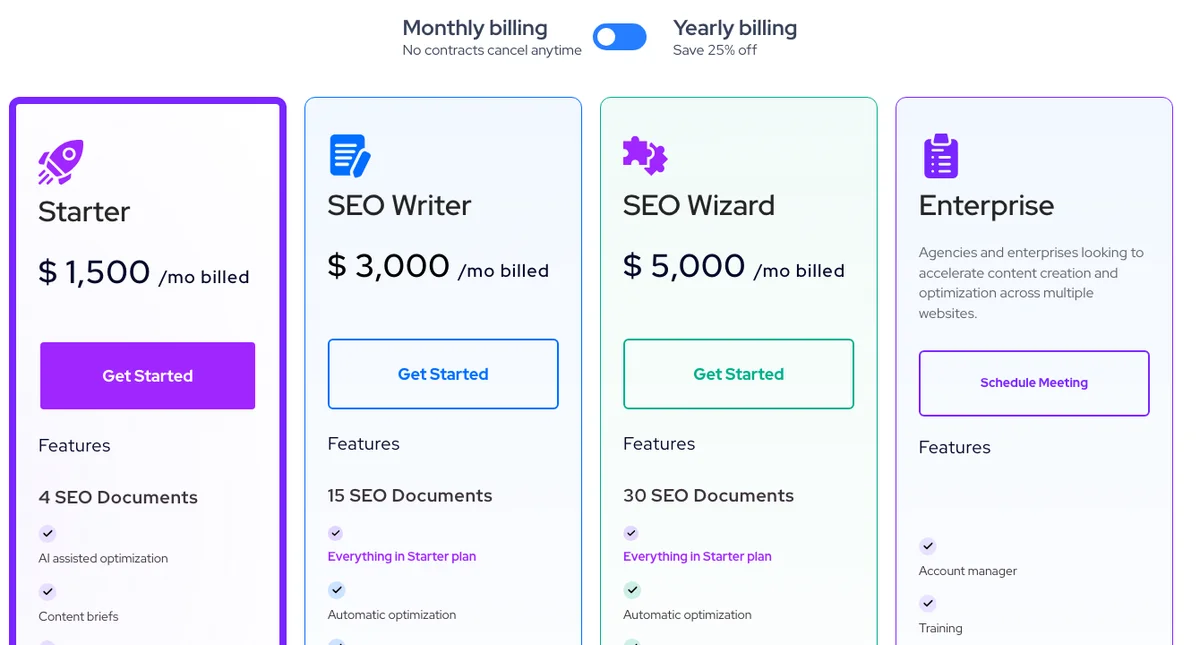
The first reason is price. Outranking's pricing page shows Starter at $1,500 a month for 4 SEO documents, SEO Writer at $3,000 for 15 and SEO Wizard at $5,000 for 30. Yearly billing saves 25%. There's also a pay-as-you-go path: AI credit packs from $49 and a one-time $79 Strategist add-on for keyword clustering and content planning.
The second is AI search. Outranking optimizes for Google's results page, and nothing on its site tracks whether ChatGPT, Perplexity or Google's AI answers name you.
The third is that the editor work is getting cheaper everywhere. Nick Zviadadze, who runs an SEO agency, posted a cost comparison in September. In it, a $99-a-month content optimizer and a $79 AI writer give way to a $20 Claude Pro plan and about $100 a month in API credits. Teams comparing that to a four-figure plan start asking what they're paying for.
SEO in 2025: 💲 $129/mo keyword tool 💲 $99/mo content optimizer 💲 $79/mo AI writer 💲 $99/mo rank tracker 💲 $149/mo site auditor SEO Now: ✅ $20/mo Claude Pro ✅ ~$100/mo in API credits Here's how you can stop wasting cash money on tools you don't need👇 Most people don't https://t.co/nHD6NVjBAs
 Nick Zviadadze 🇺🇦@Nick_zv_Sep 24, 2026
Know exactly what AI says about your competitors.
RankControl's Recon Agent monitors competitor citations across ChatGPT, Perplexity, Claude, Gemini, Grok, and Google AI Mode. See where they show up and you don't.

The document meter
I call it the document meter: the price of one optimized article, once you divide the plan by what it includes. On Outranking's Starter plan, $1,500 buys 4 SEO documents, which is $375 a document. SEO Writer brings it to $200 and SEO Wizard to about $167.
The meter runs on credits underneath. Its FAQ says every new SEO document uses one document credit and one assessment credit. Adding a domain costs 20 assessment credits per 1,000 ranking keywords, and each internal linking analysis costs 5.
AI drafts are billed by the characters in the input, output and prompt, and unused credits reset each billing cycle instead of rolling over. First drafts and advanced AI functions need the AI characters add-on on top of the plan. The $49 pack writes 8 to 10 AI drafts and the $79 pack 16 to 18, and the plan comparison table lists AI writing at $25 per article.
For comparison, RankControl's $400 covers up to 100 articles a month, written and published, which is $4 an article if you use them all. The two aren't the same job, since Outranking's documents come with a person doing the writing. But the meter explains most switching decisions.
What stays when you switch from Outranking
Articles you published are posts in your CMS, and they stay. Internal links you added from Outranking's suggestions stay in those posts too, since they're part of the page.
What lives only in Outranking is the working layer. That's every SEO document you drafted there, with its outline, brief, headings and score. It also includes the keyword clusters and content inventory from the Strategist add-on, and any drafts that never reached your CMS.
Outranking's terms put the backup on you. They say you're "solely responsible for all data that you transmit" through the service, even though Outranking keeps routine backups.
How to export your data from Outranking
Outranking's public site and onboarding guides don't document an export feature. So an Outranking export is a manual job, done before your paid term ends.
| What | Where it lives | How to keep it |
|---|---|---|
| Final article text | Each SEO document | Copy into your CMS or a shared drive |
| Outlines and briefs | Each SEO document | Copy the brief and headings with the article |
| Keyword clusters and content plan | Strategist add-on | Copy or screenshot the clusters and priorities |
| Drafts never published | Your document list | Copy each one out, or finish it first |
| Anything else | Outranking support | Ask [email protected] in writing |
Start with the documents you haven't published. Go through the document list, open each one and copy the text, outline and brief into a folder named by target keyword. Then save the clusters and the content plan, since those took the most research to build.
If you have a lot of documents, email support before you cancel and ask whether they can send an export. Put the request in writing, and keep the reply. Outranking also runs live training, a weekly webinar and a Facebook community of over 4,000 users, which are good places to ask how others moved their documents out.
Cancel Outranking and the refund rule
Outranking's terms say you can cancel any time by logging into your account or contacting the company. The cancellation takes effect at the end of your current paid term. The pricing page describes monthly billing as "No contracts cancel anytime."
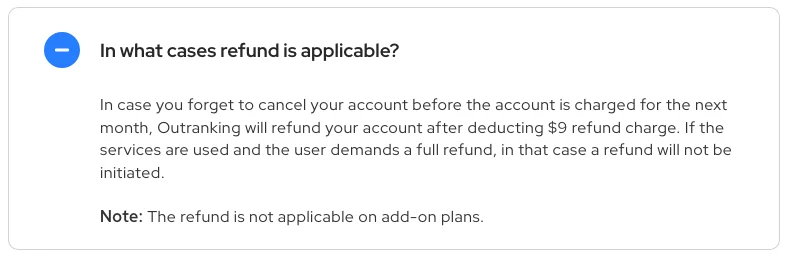
Refunds are narrow. If you forget to cancel before the next monthly charge, Outranking refunds it after deducting a $9 refund charge. If you've used the service and ask for a full refund, it won't give one, and add-on plans aren't refundable at all. So cancel a few days before your renewal date, and use your remaining document credits first, since they don't carry over.
If you need more time to save everything, downgrading is an option. The FAQ says you can scale a plan up or down in the app at any time. Dropping to Starter for a final month keeps your account open at the lowest plan price.
Cutting tool costs is a common reason for switching right now. In r/localseo this August, a freelancer went through their subscriptions and found they were spending far more than they'd realized. Replies described moving from several tools to one cheaper suite. One reply said three subscriptions had been replaced with about $10 a month in data API calls made through Claude.
Anyone else trying to cut back on SEO tool subscriptions?
Spent some time going through my monthly subscriptions today and it was a bit of a shock. Between SEMrush, LocalFalcon, reporting software and a couple of other bits and pieces, I'm spending way more than I realised. Most of my clients are...
The terms are governed by Delaware law, and they were last updated in January 2021.
Disconnect Outranking
Outranking's internal linking works by crawling your WordPress site, and its onboarding materials include a WordPress integration. Remove that connection in WordPress, and delete any application password or API key you created for it. If you connected Google Search Console for internal linking or reporting, remove Outranking's access from your Google account as well.
Where things land in RankControl
RankControl has no import tool, so your Outranking material becomes the starting point while your posts stay put.
| From Outranking | Into RankControl |
|---|---|
| Published articles | Stay in your CMS as internal link targets |
| Unpublished drafts | A backlog to finish yourself, or titles for the planner |
| Keyword clusters and content plan | Reference while the planner builds your calendar |
| Internal link suggestions | New articles link into your existing pages automatically |
| No AI tracking | Up to 50 tracked questions, checked weekly on six engines |
The content engine plans titles from the questions you're losing, researches the pages already ranking for each keyword and writes the full article. It publishes native posts through one of nine destinations, and auto-publish stays off until you turn it on, so you can read everything first.
AI visibility tracking checks ChatGPT, Claude and four more engines every week and shows which sources each answer quoted. Link Control finds prospects for each article and sends the pitch from your own mailbox after you approve it.
26 content formats. Published on your domain. Matched to your brand.
Guides, comparisons, listicles, case studies, and more. RankControl generates content that gets cited by ChatGPT, Perplexity, Claude, Gemini, Grok, and Google AI Mode.

The switch from Outranking, step by step
- Use your remaining document credits on the articles you still need.
- Copy every unpublished document, outline and brief into a shared folder.
- Save your keyword clusters and content plan.
- Start the RankControl trial and connect your CMS.
- Cancel a few days before your renewal date.
- Remove the WordPress and Search Console connections.
The saving takes an afternoon. The slower work is publishing pages that answer your buyers' questions and getting other sites to mention them. You can run that by hand after the switch, or RankControl's agents can run it every month for $400, with a 7-day free trial. Before you start, the free AI visibility check shows who ChatGPT cites for three questions from your market.

Your competitors are getting cited by AI. You're not.
Every day without citation tracking is a day your competitors pull ahead in ChatGPT, Perplexity, and Claude.