
RankAI keeps working on pages after it publishes them. On its Growth plan, any page that hasn't ranked after three weeks gets rewritten, so a switch from RankAI starts with making sure the pages stop changing before you hand them to anything else.
RankAI is a Y Combinator company run by LineUpp, Corp. It writes pages into your CMS, fixes technical SEO and tracks how AI answers cite you. It calls itself software that grows your website on autopilot on its homepage, and an AI-native agency in its llms.txt file. Either way, the pages live on your site, which makes leaving simpler than it could be.
This guide covers the freeze, what RankAI lets you take, how cancelling and refunds work, and where the work lands in RankControl. I read RankAI's pricing, product pages, terms and privacy policy on September 26, 2026.
Why teams look past RankAI
RankAI's pricing page opens on annual billing, so the first numbers you see are the discounted ones. Starter shows $49 a month for 8 pages, and Growth shows $199 for at least 20 pages plus the rewrites. On monthly billing they're $69 and $279. A Human-Curated tier with a dedicated strategist is priced on request, and backlinks only appear on the Enterprise tier.
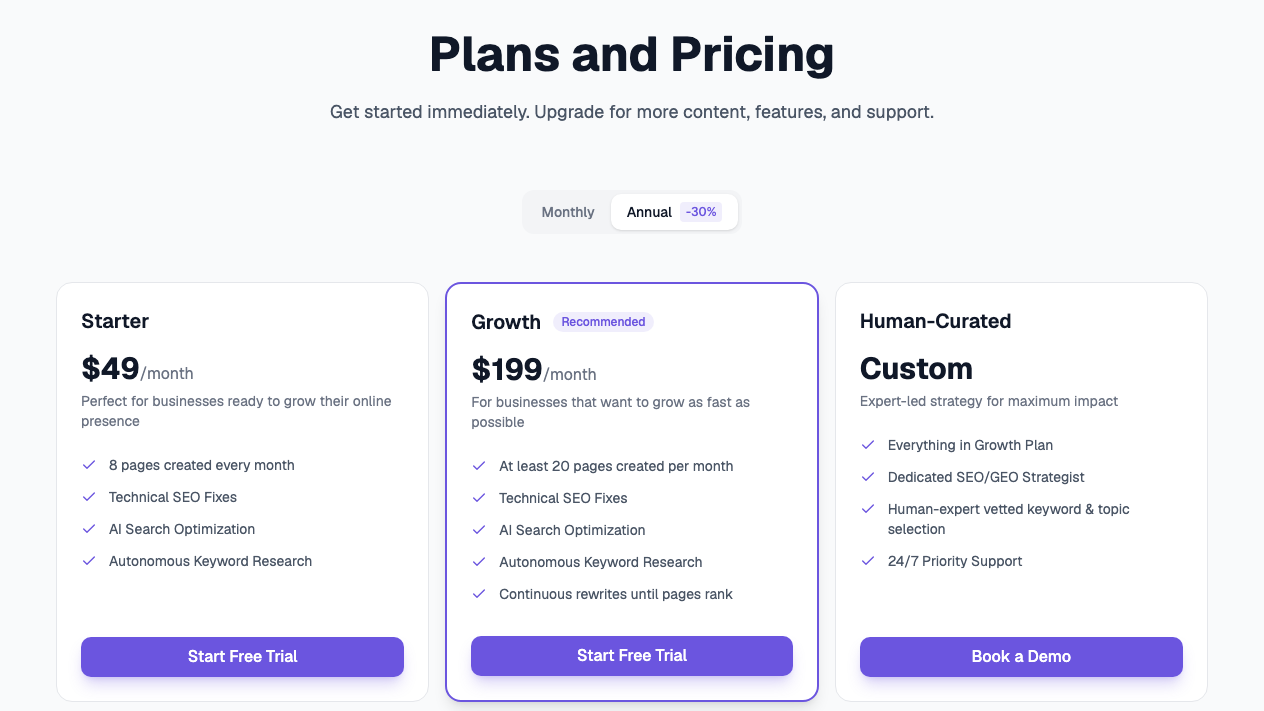
The offer has moved a lot this year. In January the homepage sold one plan at $499 a month. By March it had the tiered ladder above, and over the summer it was repositioned around growing your website on autopilot, with the price page no longer linked from the homepage. Teams that signed up under one version sometimes find the product has become another.
Switching providers has its own risk. A one-person marketing team posted in r/SEO in April that a new SEO and GEO agency was disappointing, and asked whether an AI tool could replace it. The most practical reply warned that hopping between providers can dent rankings, because each one changes the site and Google has to recrawl it. That's the reason to switch in stages.
Disappointed in new SEO agency, should I fire them?
Hello, We recently hired a new SEO agency to help us with SEO/GEO. Before that, we were with a decent agency for over 5 years that were doing a good job, but felt like their work had started to go down hill a bit. This new agency hasn't imp...
See your first AI citation report in under 5 minutes.
No setup calls. No onboarding meetings. Connect your domain and see where AI mentions your brand right now.

What stays when you switch from RankAI
RankAI's product pages say it layers onto the site you already have and publishes on your own domain, with your CMS, hosting and analytics staying where they are. It works with the common CMSs, from WordPress and Shopify to Webflow and Wix. On one public customer I checked, a Wix site, the pages RankAI's report lists are ordinary Wix blog posts under the company's own author name.
Spot-check a few of your own before you leave. On that Wix site, the report printed each page address without the blog's /post/ folder, so the links in the PDF led nowhere even though the pages were live. Match the report against your CMS rather than trusting its URLs.
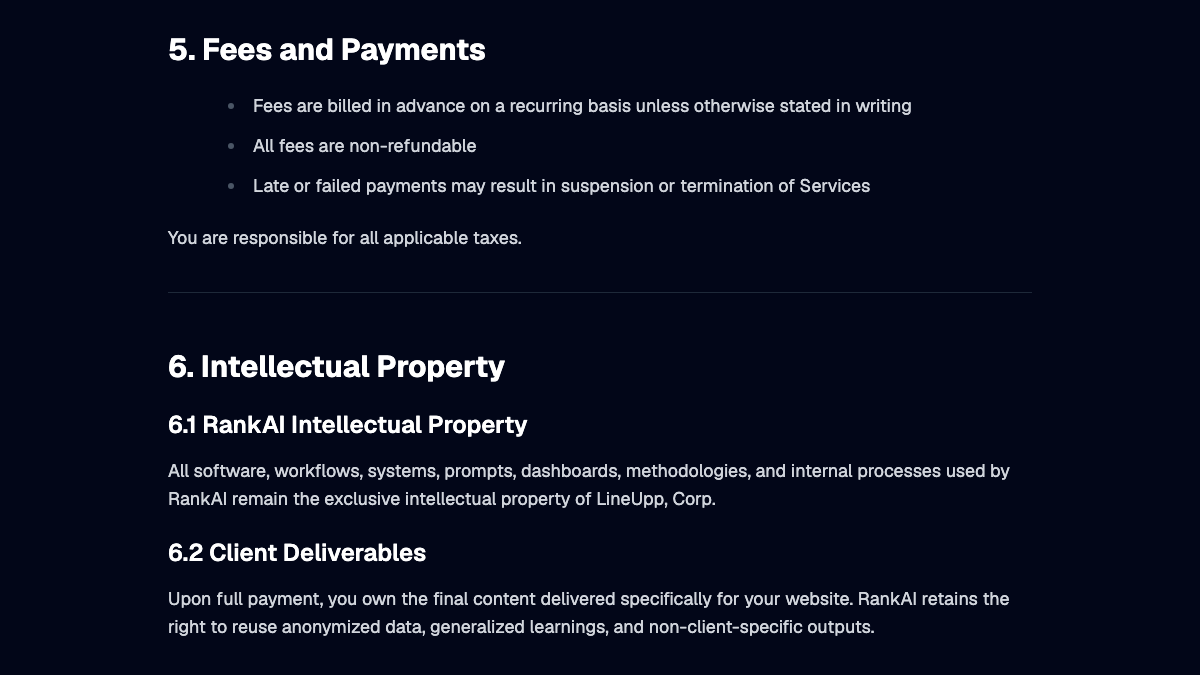
Ownership is written into the terms with one condition. Section 6.2 says that "upon full payment, you own the final content delivered specifically for your website." Technical fixes and schema sit in your CMS too. RankAI's sample report counts 2,351 technical fixes and 177 schema additions for one customer over six months.
The rewrite freeze
Growth's "continuous rewrites until pages rank" is the part that complicates leaving. RankAI's conversion page says every change is logged with a before and after, that any page can be rolled back, and that you can require approval before a rewrite goes live or let it ship on its own.
I call the step before cancelling the rewrite freeze. Switch rewrites to approval-only, which RankAI says you can set for each site, and let any rewrite already in progress finish or roll it back. Then save the current version of each RankAI page from your CMS's revision history. Once your access ends, the change log goes with it, and a page that was halfway through a rewrite stays that way.
Freezing also makes your baseline honest. If pages keep changing during the handover, you can't tell whether a ranking drop came from the switch or from RankAI's last rewrite.
How to export your data from RankAI
RankAI has no help center, API or published export feature. The one documented RankAI export is a PDF analytics report, which its homepage offers as a downloadable sample. The sample covers pages created, technical fixes and traffic over time. It also has keyword movers, AI citation tracking and a table of tracked prompts.
The keyword table has a limit worth knowing. The sample says it is "showing the top 100 keywords of 35,911 total," so most of your keyword data won't be in the file. Search Console holds the full record, and it stays yours after you leave.
| What | Where it lives | How to get it |
|---|---|---|
| Published pages and fixes | Your CMS | Already yours; save revisions |
| Performance and citation summary | RankAI's PDF report | Download the latest one |
| Keywords beyond the top 100 | Search Console | Export from Search Console |
| Tracked prompts | RankAI dashboard and report | Copy the full list |
| Brand context document and assets | RankAI onboarding | Save copies |
RankAI's own guide for customers leaving another tool gives the right advice: don't cancel before exporting your citation history, because you lose the baseline. Apply the same rule to RankAI.
Cancel and refunds
RankAI doesn't publish cancellation steps. Section 9 of its terms says "either party may terminate the Services in accordance with the applicable plan or agreement," that access may be revoked on termination, and that "any unused service time is forfeited." Fees are billed in advance, so cancel before your renewal date.
Refunds are off the table. Section 5 says "All fees are non-refundable." An earlier version of the terms promised a full refund within 7 days of purchase, and the version dated January 29 replaced it. The terms are governed by California law, and the privacy policy says personal data is kept only as long as necessary, with requests handled by email to RankAI's legal team.
Take back access
RankAI's terms ask you to grant access to your CMS, analytics and Search Console, so each one needs cleaning up. In your CMS, remove RankAI's user, app install or API key. In Search Console, remove its user under Settings, then check your Google account's list of third-party apps. Do the same for GA4 and PostHog if you connected them.
If you're an agency running RankAI under your own brand, repeat this on every client site, and close the white-label dashboards and the shared Slack channel. RankAI doesn't document a tracking script, but it's worth checking your site's code for schema it added.
Keep your AI visibility baseline
RankAI's answer engine page lists five engines, including Claude and Google AI Overviews, refreshed "on a regular cadence" without saying how often. RankControl checks six engines every week, including Grok and Google AI Mode, but not AI Overviews. Screenshot your last AI Overviews reading from RankAI, since you won't get that number from us.
Carry your tracked prompts over word for word and leave the scores behind. Give them four weekly checks in RankControl before you publish anything new, and compare each engine against itself.
Where things land in RankControl
RankControl has no import tool, so your RankAI material becomes the starting point while your pages stay put.
| From RankAI | Into RankControl |
|---|---|
| Published pages | Stay in your CMS as internal link targets |
| Tracked prompts | Up to 50 tracked questions, checked weekly on six engines |
| Competitors | Up to 10 in your share of voice |
| Keyword data from Search Console | Reference while the planner builds your calendar |
| Brand context document | Your brand profile in Brand Control |
The content engine plans titles from the questions you're losing and writes each article against the pages already ranking for it. It publishes native posts through one of nine destinations, including Wix, Shopify, Webflow and Framer. Auto-publish stays off until you turn it on, and nothing gets rewritten behind your back.
AI visibility tracking shows which competitors got named instead of you and which sources each answer quoted. Link Control finds prospects for each article and sends outreach from your own mailbox after you approve it, which covers the links that RankAI keeps on its Enterprise tier. Managed Backlinks adds five links a month from DR 25+ sites for $350.
Your competitors are building backlinks while you read this.
Organic outreach, social mentions, and citations from Editorial Circle member sites, with managed backlinks available as an add-on. Grow your domain authority without running the campaign yourself.

The switch from RankAI, step by step
- Check your renewal date and whether you're billed monthly or annually.
- Set rewrites to approval-only and approve nothing new.
- Save the current version of every RankAI page from your CMS revision history.
- Download the PDF report and export your full query data from Search Console.
- Start the RankControl trial, connect your CMS and add up to 50 tracked questions.
- Cancel RankAI before renewal, then remove its access from your CMS, Google and analytics.
The export is the quick part. The slower work is publishing pages that answer your buyers' questions and getting other sites to mention them. You can run that by hand after the switch, or RankControl's agents can run it every month for $400, with a 7-day free trial. Before you start, the free AI visibility check shows who ChatGPT cites for three questions from your market.

You're getting AI traffic. But do you know where it comes from?
RankControl credits every visit to the assistant that sent it: ChatGPT, Perplexity, Claude, Gemini, Copilot, or Grok. Full source attribution, next to your Google traffic.