
A post in r/google this summer complained that filtering results by date had stopped working for weeks. The thread drew dozens of replies from people who'd hit the same wall. The workaround they shared was older than the bug, which was typing after: and a date straight into the search box.
Searching for recent results on Google has ceased functioning
This has been a complete fiasco for weeks now. Google literally doesn't care at all. There should be absolutely no results at all for this search query - I'm showing it just for fun.
That's the case for learning search operators in 2026. Menus change and filters break, but a few typed commands still give you precise control over what Google, and now some AI tools, show you. The catch is that several old operators no longer do anything, so we tested them.
Which search operators still work
On October 19, 2026, we ran 19 operator searches on Google from the US. For the ones that match words, like quotes and intitle:, we opened the result pages and checked whether the match was really there.
| Operator | Example | Google result in our test | In Google's help docs |
|---|---|---|---|
| site: | site:reddit.com crm for small business | Worked, 10 of 10 results on Reddit | Yes |
| filetype: | filetype:pdf content marketing report 2026 | Worked, 10 of 10 were PDFs | Yes |
| "quotes" | "roofing crm software" | Mostly worked, 5 of 7 pages had the phrase | Yes |
| - (minus) | roofing crm -jobnimbus | Leaky, 4 of 9 pages still mentioned it | Yes |
| after: | ai overviews clicks after:2026-09-01 | Worked, every dated result was from October | Yes |
| before: | ai overviews clicks before:2024-01-01 | No results for this query | Yes |
| OR | (pipedrive OR copper) crm pricing | Worked, 6 of 6 | No |
| intitle: | intitle:"roofing crm" | Worked, 7 of 7 titles | No |
| allintitle: | allintitle:roofing crm pricing | Mixed across two tests | No |
| inurl: | inurl:pricing crm software | Leaky, 2 of 9 URLs had the word | No |
| AROUND(3) | crm AROUND(3) roofers | Mostly worked, 6 of 7 | No |
| * (wildcard) | "best * for roofing companies" | Didn't hold in our checks | No |
| cache: | cache:hubspot.com | Gone, no results | No |
| related:, info:, link: | related:hubspot.com | Treated as plain words | No |
The pattern is simple. The operators Google documents still mostly work. The undocumented ones range from reliable, like OR and intitle:, to leaky, like inurl:. A few are effectively dead.
The six operators Google documents
Google's own help page on refining searches lists six operators. They're the safest ones to build a habit around.
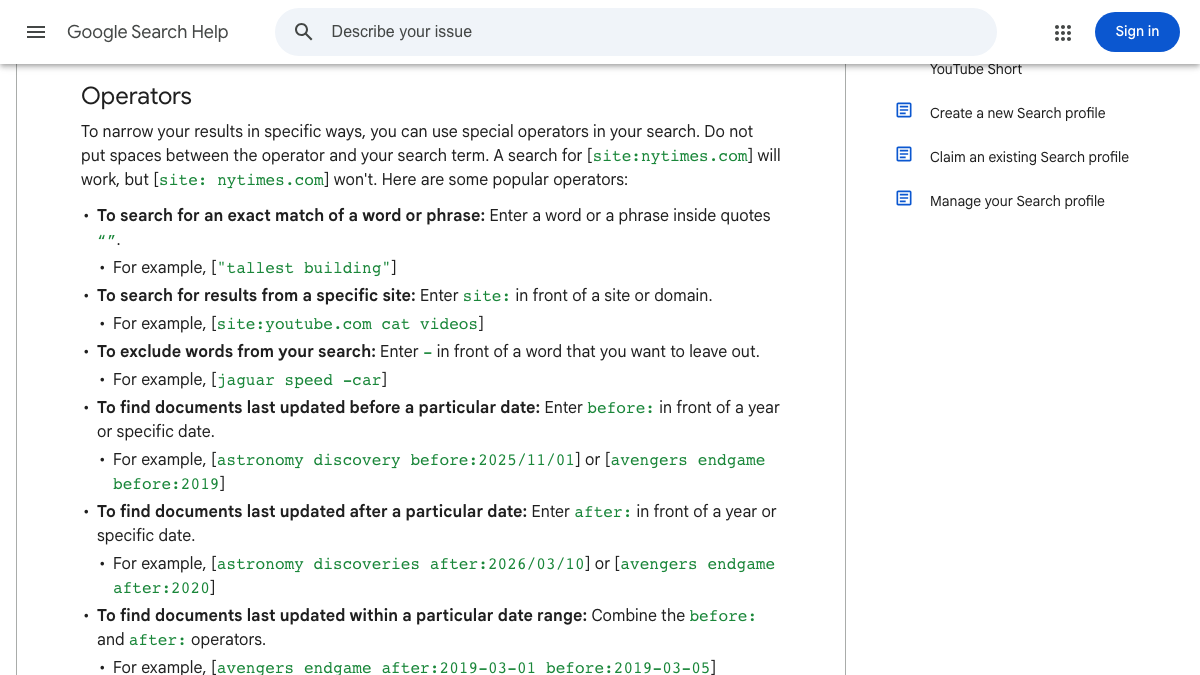
Quotes match an exact word or phrase, site: limits results to one domain, and the minus sign removes a word. before: and after: filter by when a page was last updated, and you can combine them for a date range. filetype: finds PDFs, spreadsheets and other documents.
Google adds one rule worth remembering. There's no space between the operator and the term, so site:nytimes.com works and site: nytimes.com doesn't.
Operators that work but aren't documented
Several popular operators aren't on Google's help page but still did their job in our test. OR returned results with either term, and intitle: put the phrase in every result's title.
Others behaved more like hints. inurl:pricing returned only two of nine URLs containing "pricing," which matches what a user in r/searchengines described. Searching for a reason, they found that Google treats some operators as a hint rather than a rule.
The minus sign was leaky too. It's documented, but four of nine result pages for "roofing crm -jobnimbus" still mentioned JobNimbus in their text. Google seems to use it to push results down rather than remove every mention.
Operators that are gone
Some old favorites don't do anything now. Google retired cache: in 2024, and our cache:hubspot.com search came back empty.
related:, info: and link: still return results, but not the ones they used to. In our test, each one returned ordinary pages about HubSpot, the same as searching its name. link: stopped showing linking pages years ago, which is why SEO tools took over that job.
See your first AI citation report in under 5 minutes.
No setup calls. No onboarding meetings. Connect your domain and see where AI mentions your brand right now.

Search operator recipes for SEO
The value of operators is in combining them. These are the searches we'd keep handy.
| Goal | Search |
|---|---|
| Spot-check which of your pages are indexed | site:yourdomain.com |
| Find a competitor's comparison pages | site:competitor.com intitle:vs |
| Find mentions of your brand on other sites | "your brand" -site:yourdomain.com |
| Find recent Reddit threads in your niche | site:reddit.com "your category" after:2026-07-01 |
| Find reports and studies to cite | filetype:pdf "your industry" report 2026 |
| Find guest post openings | intitle:"write for us" your topic |
| Find resource pages for link building | intitle:resources inurl:links your topic |
Stacking three operators, a site, a quoted phrase and a date, narrows a busy category down to a handful of fresh threads in seconds. That's the search the r/google posters were trying to rebuild after the date filter broke.
Treat the site: count as rough. It shows pages Google can find, not an exact index count, so use Search Console for the real number.
The mentions search is the one most teams skip. It finds unlinked brand mentions you can ask to turn into links, and our guide to tracking media mentions shows how to do it every month.
For link building, the intitle: searches find pages that already invite contributions or list resources. Our post on resource page link building covers what to do with the pages you find.
Search operators in AI search
We also tried operators in ChatGPT, which now searches the web for many questions. We asked four questions on the same day and looked at the sources it cited.
| Question typed into ChatGPT | What happened |
|---|---|
| site:reddit.com best crm for small business | All 8 sources were Reddit threads |
| best crm for small business | 10 sources, none from Reddit |
| filetype:pdf content marketing report 2026 | 4 of 13 sources were PDFs |
| "crm for roofers" pricing | Quotes dropped when ChatGPT rewrote the search |
The site: result was the clearest. ChatGPT passed the operator straight into its own searches, with queries like "site:reddit.com/r/smallbusiness best CRM for small business recommendations." Without it, the same question pulled no Reddit sources at all.
filetype: half worked. ChatGPT ran the search as typed and also a looser version without the operator, so PDFs made up about a third of what it cited. Quotes didn't survive, because ChatGPT rewrote the question into a longer search of its own. Our walk-through of how ChatGPT searches the web explains that rewriting step. Our semantic search test caught it swapping rare phrasings for common ones in the same way.
So for AI research, site: is the operator worth typing. It's a quick way to see what a community says about your category, or what a single publisher has written, inside an AI answer.
Your competitors are building backlinks while you read this.
Organic outreach, social mentions, and citations from Editorial Circle member sites, with managed backlinks available as an add-on. Grow your domain authority without running the campaign yourself.

A warning for SEO tools
One finding surprised us, and it matters if you use tools to run these searches. Our search data provider has two ways to fetch Google results. One of them returned non-Reddit results for site:reddit.com, so the operator was quietly dropped. The other passed it through correctly.
If a tool or script shows you results for an operator search, open one search in a normal browser and compare. A tool that strips operators will hand you plain results while looking like it worked.
Limits of our test
We ran each search once, from one US location, on one day. Google changes results all the time, and operators that act as hints can behave differently on another query.
Bing supports its own set of operators, such as site: and filetype:, but our automated Bing checks returned unreliable results, so we haven't reported them. Check Bing in a normal browser before relying on any operator there.
What this takes by hand
Here's a rough monthly budget for using operators in SEO research, by our estimate.
| Task | Hours a month |
|---|---|
| Brand mention searches and outreach | 2 to 3 |
| Competitor page checks | 1 to 2 |
| Reddit and forum research | 2 to 3 |
| Link prospecting with intitle: searches | 2 to 4 |
| Checking AI answers by hand | 2 to 3 |
| Total | 9 to 15 |
Doing it by hand or with help
You can run all of these searches yourself. Or RankControl can take on the repeatable parts. It checks 50 of your buyer questions every week on ChatGPT, Perplexity, Claude, Gemini, Grok and Google AI Mode, and its AI visibility tracking shows which sites each engine cites, so you don't have to rebuild those searches every week.

You're getting AI traffic. But do you know where it comes from?
RankControl credits every visit to the assistant that sent it: ChatGPT, Perplexity, Claude, Gemini, Copilot, or Grok. Full source attribution, next to your Google traffic.