
Buffer did something this year that most SEO tools haven't. It published a plain-text pricing file at buffer.com/pricing.md, labeled in its own words as being "for AI agents," so assistants can read its plans without parsing a web page. It also opened an MCP server, so Claude or ChatGPT can draft and schedule Buffer posts from a chat.
That's Buffer taking AI seriously for its own product. For customers, Buffer AI means the AI Assistant, which writes and rewrites social posts, and nothing in Buffer checks whether ChatGPT mentions you. So RankControl vs Buffer AI is a comparison of two different jobs, and the tools happen to connect: RankControl can push its social drafts straight into a Buffer queue.
RankControl vs Buffer AI: the short answer
Buffer is where social posts get scheduled, published and answered. Its AI helps you write the posts faster, and its analytics tell you how they performed on each network.
RankControl is where the pages that AI engines cite get planned, written and published, on your own site. It checks six AI engines every week to see whether you show up, then turns each published article into social drafts for eight platforms that you can send to Buffer. For AI search visibility, the pages do the work, which is why the verdict below lands where it does.
Side by side
| Buffer AI | RankControl | |
|---|---|---|
| Main job | Scheduling and publishing social posts | Getting your brand cited by AI engines and ranked on Google |
| AI | AI Assistant for posts (unlimited on every plan), AI comment replies | Plans, writes and scores articles; drafts social posts and outreach |
| Publishes to | 12 social networks, including Substack Notes since September | Your website through WordPress, Webflow, Shopify and 6 more destinations |
| AI search tracking | None | 50 queries weekly on 6 AI engines |
| Price | Free for 3 channels; $5 to $12 per channel a month | $400 a month flat, 5 seats |
| Trial | 14 days | 7 days |
| Connects to the other | Receives RankControl drafts through its API | Pushes drafts to Buffer (now, scheduled, queue or draft) |
What Buffer AI actually is
The AI Assistant sits inside Buffer's post composer. It brainstorms ideas, rewrites a post in a different tone, shortens or expands it, and reshapes one post for another network. Buffer's pricing table lists it with "Unlimited credits" on Free, Essentials and Team alike, and its help center says it runs on OpenAI's GPT-4.

Two other AI features sit around it. AI replies suggest answers to comments in your voice, with 5 a week on Free and unlimited on paid plans. The newer piece is the MCP server, now in public beta. It lets assistants like Claude, ChatGPT and Cursor list your channels, create posts and check your queue.
On Reddit, Buffer's AI barely comes up. The people who like Buffer praise reliability and the queue, and one user said they liked that Buffer doesn't force AI captions on them.
What Buffer costs
Buffer charges per social channel, not per seat. Free covers up to three channels with 10 scheduled posts per channel at a time. Essentials costs $6 a month per channel billed monthly or $5 billed yearly, and Team costs $12 or $10, adding collaboration and approval workflows. Both paid plans have a 14-day trial. The rate per channel drops once you pass ten channels, to roughly $4 from 11 channels and about $3 from 26, according to Buffer's pricing file for AI agents.
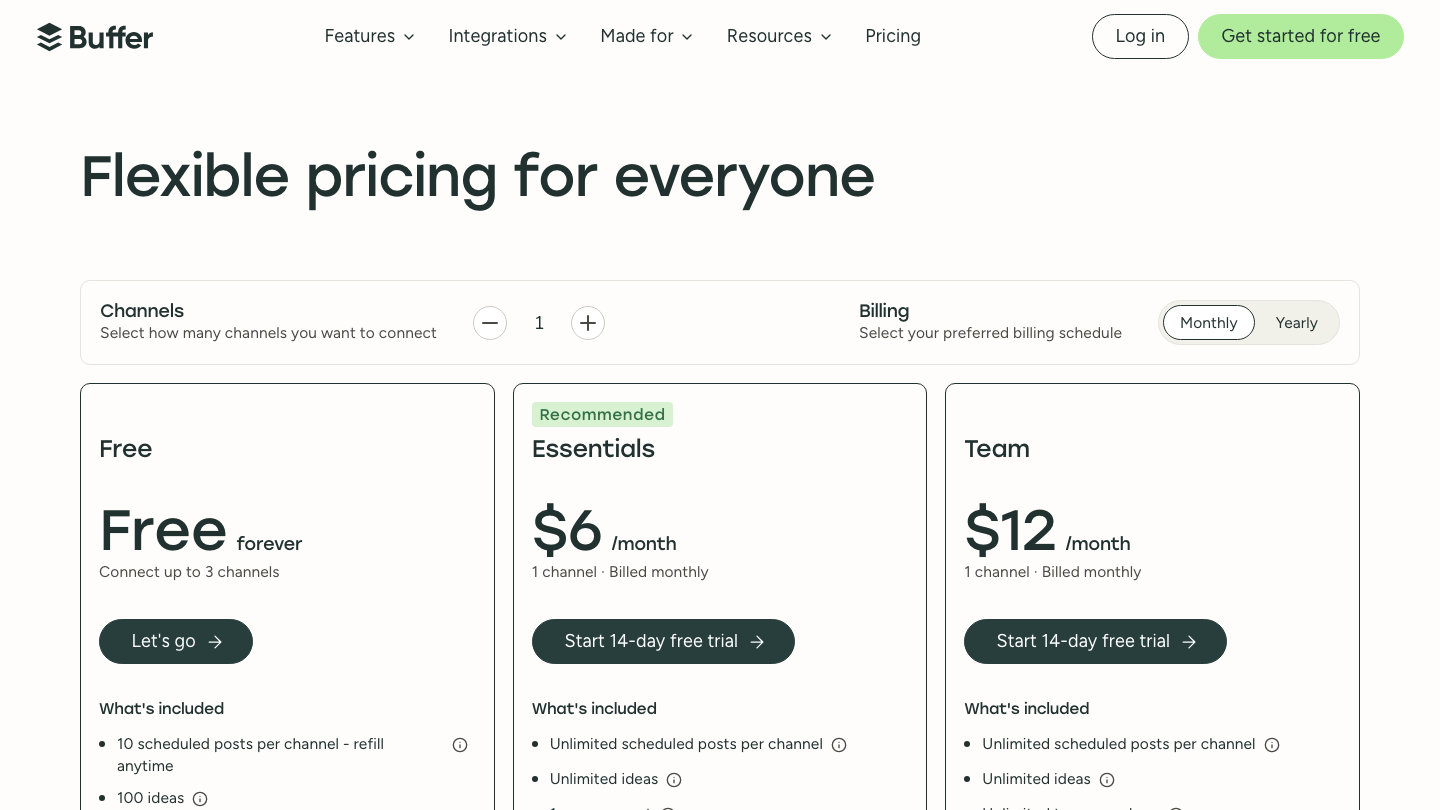
For a company posting to five networks, that's $30 a month on Essentials or $60 on Team, billed monthly. The per-channel model is the complaint we saw most from agencies; one r/socialmedia user managing more than 20 clients called it outdated and extremely costly at that scale. At RankControl's $400 flat you're paying for a different job, so the useful comparison is what each one produces for AI search.
Where Buffer stops
The limits people mention on Reddit are about what Buffer is built for rather than bugs. One user who ran Buffer for a year and a half said it was solid for scheduling but that the analytics were backward-looking, telling you what worked last month and not what to post this week. Another found that Buffer, like other schedulers, can only post to Facebook Pages you own, not to groups you belong to.
For AI search, the bigger limit sits upstream. Buffer's AI Assistant rewrites the post in front of it. It doesn't know which questions your buyers ask ChatGPT, which of your pages the engines already cite, or which competitor they name instead of you, so it can't aim a post at any of those gaps.
The last-hop problem
A builder on r/nocode described running a pipeline where captions, images and schedules were generated upstream and Buffer posted them to four networks. When they moved one network off Buffer, they noted that Buffer never held anything they couldn't rebuild. In their words, "Buffer's just the last hop."
That describes every scheduler, and it's why we call this the last-hop problem. A scheduler controls when and where a post goes out. Whether an AI engine later cites anything is decided earlier, by what was written and where it lives.
The data we found points the same way. An AEO researcher on r/aeo analyzed about 1.3 million LinkedIn URLs cited by AI engines in the first half of 2026 and found likes and comments had essentially no relationship to being cited, with a correlation near zero. Long-form LinkedIn articles under a named person drew more citations per URL than ordinary feed posts.
Semrush's own analysis of 325,000 prompts, shared on X in September, reported that original posts made up about 95% of the LinkedIn content cited in AI answers. The two findings don't fully agree, and they may be measuring different things. Neither suggests that posting more often, or more reliably, is what gets you cited.
What to post if you want citations
If social posts are going to help with AI search at all, the format matters more than the schedule. The LinkedIn study above found long-form articles published under a person's name drew more citations per URL than feed posts, and text-only posts out-cited posts with images or video. Our LinkedIn citation framework goes deeper on what to write there.
Video is the other surprise. A study of 4,500 AI answers across 50 companies, shared on r/content_marketing in August, found YouTube was the single biggest cited source, at about a third of all citations. Commenters put that down to transcripts, which hand an engine clean, timestamped text to quote.
Both findings come from practitioners sharing their own research, not peer-reviewed studies, so treat them as direction rather than law. They agree on one thing that matters for this comparison: the posts most likely to be cited are the ones with the most substance behind them, which usually means an article, a talk or a detailed thread, not a quick update.
Know exactly what AI says about your competitors.
RankControl's Recon Agent monitors competitor citations across ChatGPT, Perplexity, Claude, Gemini, Grok, and Google AI Mode. See where they show up and you don't.

Where RankControl's social drafts come from
RankControl starts from the questions buyers ask, and the social side follows the articles. Each published article can be turned into drafts for eight platforms, from LinkedIn and X to TikTok and YouTube. Each draft is shaped for its platform and links back to the article.
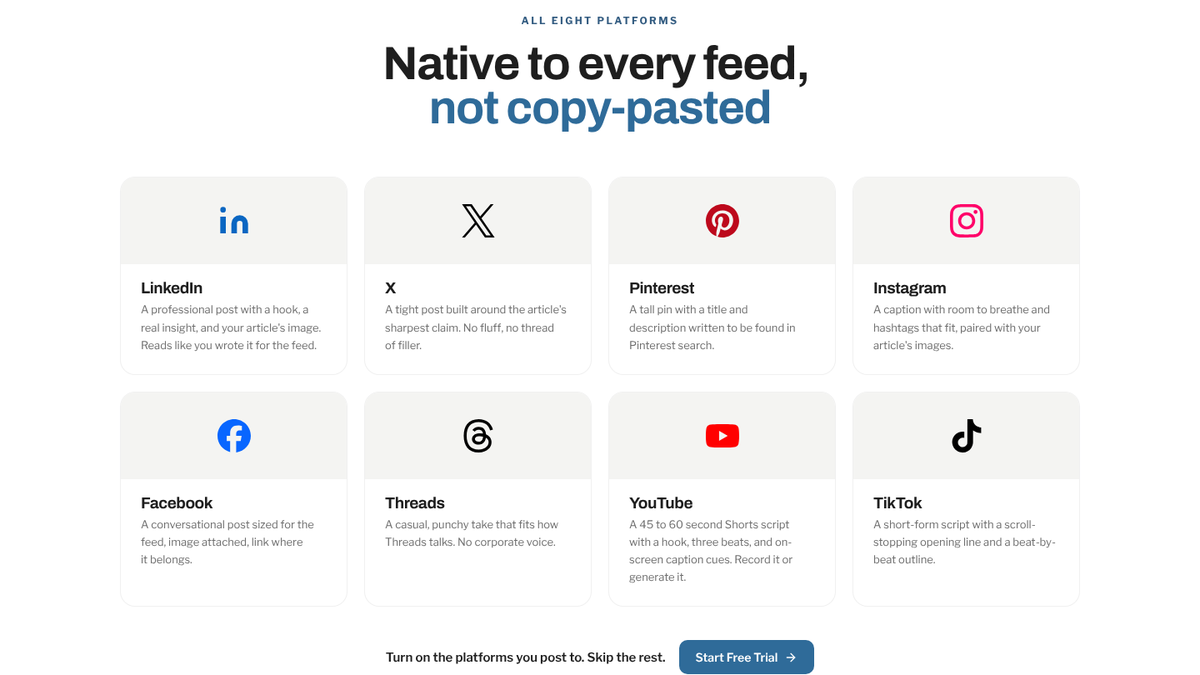
If you already use Buffer, you keep it. Once you paste a Buffer API key into RankControl's integrations settings, repurposing can push each draft to the channels you pick. A draft can go out now, at a set time, into Buffer's own queue, or into Buffer as a draft for someone to review. RankControl checks the status every few hours, so a sent post shows as posted and a failed one comes back with a note.
That's the practical answer to "vs" here. Buffer stays the last hop, and RankControl writes the article the posts point to.
Both tools now talk to Claude
Buffer's MCP server runs at mcp.buffer.com/mcp and authenticates with a Buffer API key, which every plan gets, including Free with one key and 3,000 requests every 30 days. Through it, Claude or ChatGPT can list your channels, create and edit posts, capture ideas and pull aggregated analytics. It works when someone asks; nothing runs on its own schedule.
RankControl's MCP server covers the other side of the loop, with 80+ tools for visibility checks, content planning and publishing, and a publish step that stays a dry run until you confirm. With both connected, one conversation can ask RankControl which articles went live this week and ask Buffer to queue the posts that point to them.
A week with both tools
In practice, a small team's week looks like this. RankControl publishes an article on Monday after someone approves it, and its eight social drafts are ready the same day. Someone edits the two or three that matter most, usually LinkedIn and X, and pushes them into Buffer's queue, which spreads them across the week at the times Buffer already uses.
By Friday, Buffer shows how the posts did on each network and RankControl shows whether the article's questions are getting cited on any of the six engines. Those are two different numbers, and a team that reads both learns which topics earn attention on social and which earn citations, which aren't always the same.
Tracking whether any of it worked
Buffer measures social performance: follower growth, engagement, impressions and post results, with 30 days of history on Free and unlimited on paid plans. Buffer's older analytics product, Analyze, retires on October 7, 2026. Buffer is giving users a 90-day window to request data that won't move to the new Insights. If you rely on Analyze reports, export them now. On paid plans, Insights exports as a zip of CSV files, with a summary, a post-level file and a time series, or as a PDF or Markdown report.
None of Buffer's numbers say whether ChatGPT recommends you. RankControl's AI visibility tracking asks up to 50 buyer questions every week on six engines, including Claude, Grok and Google AI Mode. It keeps a history per engine, so you can see whether the articles and the posts pointing to them moved anything.
Where Buffer is stronger
For social publishing itself, Buffer does far more than RankControl. It posts to 12 networks with first comments, reminders for Instagram and TikTok, a comment inbox across ten networks and per-channel analytics, and RankControl doesn't try to be any of that.
Which one wins AI search visibility?
RankControl, because AI search visibility is decided by the pages engines can find and quote, and Buffer doesn't make or measure those pages. The content engine plans articles from the questions your buyers ask, writes each one against what already ranks, publishes it to your CMS once you approve, and checks every week whether the engines cite it. Auto-publish is off by default.
Buffer doesn't lose anything in that setup. It keeps doing the last hop for the social drafts RankControl hands it, and your social team keeps the tool it knows. It's $400 a month for RankControl, with five seats and a 7-day free trial.
26 content formats. Published on your domain. Matched to your brand.
Guides, comparisons, listicles, case studies, and more. RankControl generates content that gets cited by ChatGPT, Perplexity, Claude, Gemini, Grok, and Google AI Mode.

You can run all of this by hand. Someone plans articles from buyer questions and publishes them, someone cuts each one into posts for Buffer, and every week someone asks six AI engines the same questions to see what changed. Or RankControl's agents can do the planning, writing, drafting and checking every month, with Buffer still posting to your channels.

Your competitors are getting cited by AI. You're not.
Every day without citation tracking is a day your competitors pull ahead in ChatGPT, Perplexity, and Claude.