When a site loses 90% of its traffic right after a few hours of downtime, the outage looks guilty. A new local events site's owner made that case in r/SEO in August. For two weeks the site had been climbing, up to almost 500 clicks and 15,000 impressions a day. Then on July 12 a database problem caused a few hours of timeouts while Googlebot was crawling. Traffic fell, and weeks later it still hadn't come back.
90% traffic drop after Googlebot failed crawling because of timeouts
I have to be honest, I decided to ask here since SEO is still some magic (or may I say sourcery) for me. I created a site that works as a theater film screenings aggregator in my city (for me it's a real local gap). I was having essentially...
Commenters were skeptical, and several said a few hours of errors rarely cause a lasting collapse by themselves. The poster had also mentioned that Bing traffic held up, and one reply pointed out that Bing crawled the same site through the same outage.
I think that thread shows why timeouts are awkward to diagnose. A timeout sometimes does the damage itself, but often it only coincides with the drop, or leaves something behind that does. I'll start with Google's rules for timeouts, then show you how to check what Googlebot received and how to pull the outage apart from everything else. We checked every source on September 27, 2026.
What Google does when your server times out
Google's crawling documentation doesn't hedge here. Network timeouts get handled the same way as 5xx server errors, and so do connection resets and DNS errors. Crawling slows down as soon as they show up, and if an indexed URL stays unreachable, Google removes it from the index within days.
Here are its rules for server errors:
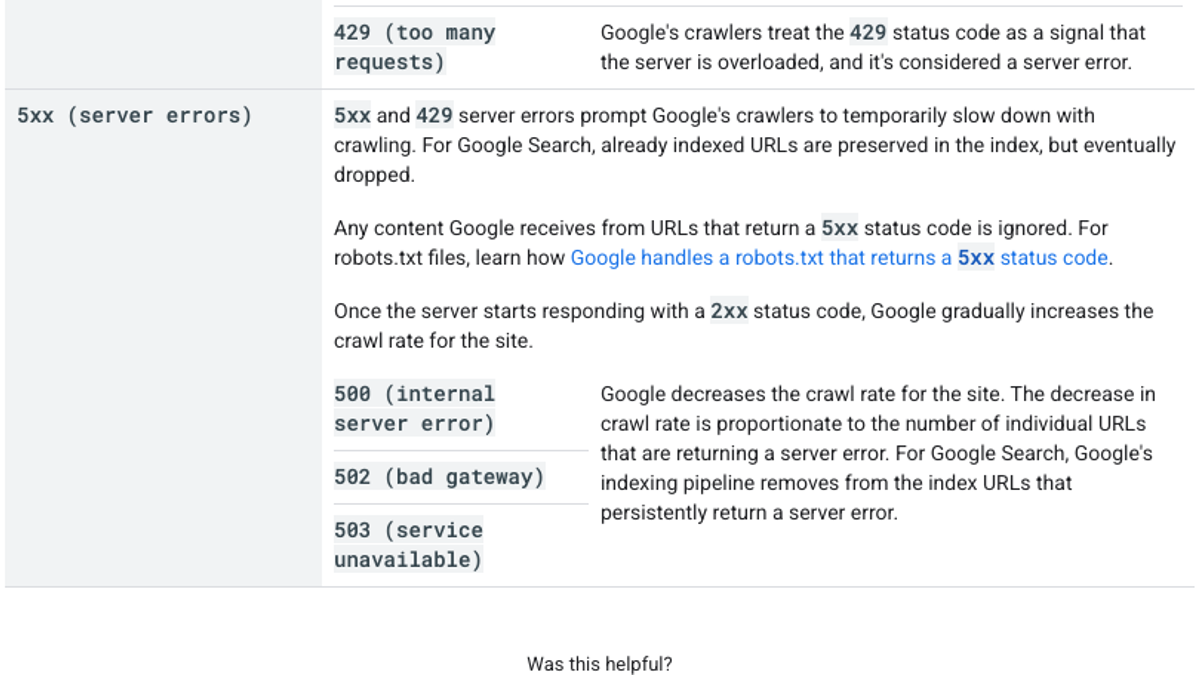
If you're diagnosing a drop, two lines in there matter most. The slowdown scales with how many URLs are failing, so a handful of broken pages makes a smaller dent than your whole site going down. And the way back is gradual, because Google steps the crawl rate up bit by bit once your server answers normally again.
Your robots.txt file gets a harsher rule of its own. When a server error or a timeout stops Google from fetching it, Google pauses crawling across the entire site for the first 12 hours. From there it works from the last good copy for up to 30 days, retrying the whole time.
| What failed | What Google does | How recovery works |
|---|---|---|
| Pages time out or return 5xx | Slows crawling; persistently failing URLs leave the index | Crawl rate rises gradually after normal responses return |
| DNS errors or connection resets | Treated like 5xx; unreachable indexed URLs can drop within days | Same as above, once Google can connect |
| robots.txt times out or returns 5xx | Stops crawling for 12 hours, then uses the last good copy | Normal once robots.txt is fetchable again |
See your first AI citation report in under 5 minutes.
No setup calls. No onboarding meetings. Connect your domain and see where AI mentions your brand right now.

Step 1: Confirm Google actually saw the errors
Your uptime monitor shows what your server did. The errors that count here are the ones Googlebot received. (If your clicks fell to almost nothing, our near-zero drop checklist runs through the other causes worth ruling out first.)
Begin with Search Console's Crawl Stats report. Its Host status section keeps track of robots.txt fetching and DNS resolution, along with server connectivity. A red status there means Google ran into a significant availability problem within the past week. Yellow means the problem is older than a week but still inside the last 90 days.
Scroll down to the charts under it, because that's where your evidence will be if there is any. You're looking for crawl requests dipping, or server errors jumping, on the day your traffic fell. Often you'll see average response time spike at the same moment.
Then go to your server logs. Pull the Googlebot requests from around the outage and see which status codes and response times they got back. Plenty of bots pretend to be Googlebot, so confirm the requests really came from Google with a reverse DNS lookup. Last, put a few important URLs through the live test in URL Inspection to make sure Google can fetch them today.
Step 2: Look for what the outage left behind
A lot of lasting damage starts here, after the server is already fixed. We call it the outage footprint, meaning whatever the outage changed on your site that's still there once the downtime is over.
The r/SEO replies named the usual culprits. Your robots.txt can get regenerated with a blanket disallow, or a maintenance-mode plugin can leave its noindex tags on. Caches sometimes keep serving empty or error pages. A broken database can also spin up new URL variations, which Google treats as separate pages.
Be thorough with robots.txt, since every hostname has its own file. In August, Glenn Gabe posted about finding a client whose www version was blocking all bots, which is something Search Console doesn't flag:
By *subdomain and protocol* -> I have written several posts about the importance of understanding that robots.txt files are handled by *subdomain and protocol*. In other words, sites can unknowingly have different robots.txt files for www, non-www, http, and/or https. And that https://t.co/GxXFpIwvDz
 Glenn Gabe@glenngabeAug 11, 2026

So fetch robots.txt on every version of your site, with www and without it. Next, run your top pages through URL Inspection and look at the canonical Google picked for each. If that field shows a parameter URL or an error page, you've found a footprint.
Step 3: Rule out bot protection and geo rules
Not every error means your server broke. Sometimes a rule meant for other visitors blocks Googlebot without anyone intending it. A site owner in r/TechSEO hit exactly that in August: Google had dropped all but three of their roughly 50 indexed pages, while Search Console reported server errors they couldn't reproduce.
Google suddently removed indexes on my entire site around July 25 while GSC shows Server Error (5xx), while there is no such errors
Hi everyone, I'm trying to figure out what happened to my website. Just noticed that around a month ago Google suddenly removed all of my pages except 3 from the index, before it I had around 50 pages indexed everything was working normally...
It turned out to be a country-based restriction on their cloud application gateway. Googlebot crawls from the US, so the rule caught it, and the gateway sent back an unusual error before the request ever reached the site. Anyone browsing the site normally saw nothing wrong.
Our own check on September 27 ran into this kind of protection too. Of 161 sites that AI engines cited or Google ranked for 12 B2B software questions, seven refused or reset our scripted requests for robots.txt. That's bot protection working as designed against an unknown script. Set the same kind of rule too broadly and it blocks Googlebot, and Google's documentation lists firewall rules as the first thing to check when timeouts appear.
AI crawlers can pile on load as well. In July, the founder of a European property portal posted in r/ArtificialInteligence that AI crawlers made up 80% of their traffic, about 8 million requests in a week. At that volume, every visitor can get slower responses, and that includes Googlebot. Our guide to Cloudflare Bot Fight Mode and SEO covers the protection settings, and the one on auditing AI crawlers in server logs shows you how to measure that load.
Your competitors are building backlinks while you read this.
Organic outreach, social mentions, and citations from Editorial Circle member sites, with managed backlinks available as an add-on. Grow your domain authority without running the campaign yourself.

Step 4: Match the timeline
Once you have the evidence, put the dates side by side:
| What you see | The likely cause |
|---|---|
| Host status problems and fewer crawl requests on the drop date, then pages leaving the index | The outage itself |
| Crawl requests back to normal within days, but traffic still falling | Something else, such as an update or lower demand |
| Bing traffic steady while Google traffic fell | A Google reassessment of the site |
| Errors only on some URLs | Those pages and their templates |
| No host status problems at all | Not a crawl problem |
The r/SEO poster needed that third row. If Bing held steady through the very outage Google supposedly punished, the outage probably isn't what caused your drop. Google's update calendar is the next place to look, and our guide to traffic that drops and then suddenly recovers walks you through it.
Step 5: Speed up the recovery
Fix whatever broke in the first place, whether that was the database or a firewall rule. After that, clean up the footprint: put robots.txt back the way it was, take off any stray noindex tags, purge the cache, and redirect or remove the broken URL variations.
The next time you plan maintenance, serve a 503 status with a Retry-After header. Google comes back to check 503 responses fairly often. If you serve an error page with a 200 status instead, that error page can end up indexed in place of your content.
Keep robots.txt fast and dependable too, since it controls crawling for your whole site. The same 161 sites showed how much that varies:
| robots.txt on the 161 sites we checked | Result |
|---|---|
| Median response time | 0.37 seconds |
| Took more than a second | 9 sites |
| Returned an HTML page instead of a plain-text file | 3 sites |
That last row is worse than it looks. Google ignores any line it can't read as a robots.txt rule, so unless those HTML pages happen to contain valid rules, those sites are effectively publishing none.
Once your fixes are live, resubmit the sitemap and request indexing for the pages that matter most. Then keep checking Crawl Stats until the crawl request count is back where it was. If crawling recovers but traffic doesn't, it's time to look at content and competition, and our guide to separating SEO loss from AI search shifts is where I'd go next.
By hand, checking 50 questions on seven engines runs about six hours a week. Publishing eight solid articles a month adds another 16 to 24 hours, and both of those are rough estimates.
RankControl watches the other side of a drop. AI visibility tracking puts your 50 questions to seven engines every week and marks each one as mentioned, cited or both. It tracks your Google and Bing rankings too, so a crawl problem shows up as position changes with dates on them. The content engine writes each article against whatever already ranks for its keyword and publishes it on your own domain.
Search Console, your server logs and a spreadsheet are enough to run this diagnosis yourself. Or you can let RankControl's agents track your rankings and citations every week while your team keeps the servers healthy.

You're getting AI traffic. But do you know where it comes from?
RankControl credits every visit to the assistant that sent it: ChatGPT, Perplexity, Claude, Gemini, Copilot, or Grok. Full source attribution, next to your Google traffic.