
On November 4, I fetched a VPN comparison page built with WordPress's own Table block, the way AI crawlers fetch pages, with no JavaScript. As a normal browser, the server sent all 49 table cells. As OAI-SearchBot, the crawler behind ChatGPT search, it sent the same 49. As PerplexityBot, ClaudeBot or GPTBot, it sent a 403 error and nothing else.
The table wasn't the problem there. The Table block saves plain HTML that any crawler can read. The server just turned some crawlers away at the door. Those are the two things that decide whether Google and AI engines can read a WordPress table. The first is whether the rows are in the HTML when the page loads, and the second is whether the crawler is allowed to load it at all.
What do AI crawlers see when they read a table?
They see the HTML your server sends, and nothing that JavaScript adds later. In December 2024, Vercel and MERJ looked at how AI crawlers moved across Vercel's network and found that none of the major AI crawlers ran JavaScript. That covered OpenAI's three crawlers, Anthropic's ClaudeBot, PerplexityBot, Meta's crawler and ByteDance's Bytespider. GPTBot downloaded JavaScript files in about 12% of its requests and ClaudeBot in about 24%, but neither one ran them.
Google is different. Its crawler queues pages and renders them in headless Chrome, and its JavaScript SEO guide still recommends rendering on the server because not all bots can run JavaScript. So a table whose rows load by script can show up on Google and still look empty to ChatGPT.
ChatGPT's crawler doesn't run your JavaScript. So if your pricing only renders in the browser, it never sees it. Vercel watched the AI bots crawling their network. GPTBot, ClaudeBot and PerplexityBot? NONE of them ran it. GPTBot and ClaudeBot even downloaded the JS files.
 Nick Launches@nicklaunchesOct 9, 2026
The check in that post works for tables too. Turn JavaScript off in your browser, open the page, and whatever's left of the table is roughly what an AI crawler reads.
Step 1: Build it with the Table block
For most tables, WordPress's built-in Table block is enough. Type /table to add a Table block, set the column count and row count, and click Create Table. Then open the block settings and turn on Header section, so your column names become real header cells.
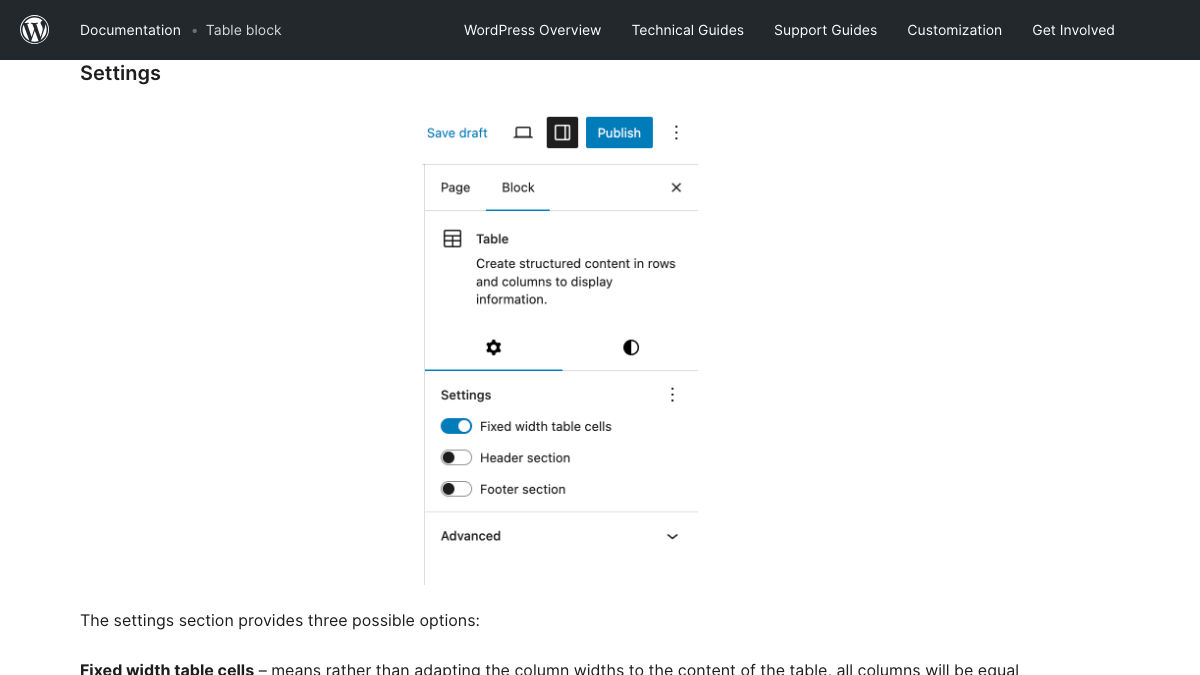
The settings panel has three toggles. Fixed width table cells has been on by default since WordPress 6.6. Header section and Footer section add a header and footer row, and you can add a caption from the toolbar. There's also a Stripes style that shades every other row.
Here's what the block saves to your post, going by the Gutenberg source code.
<figure class="wp-block-table">
  <table class="has-fixed-layout">
    <thead><tr><th>Plan</th><th>Price</th></tr></thead>
    <tbody><tr><td>Starter</td><td>$9</td></tr></tbody>
  </table>
  <figcaption class="wp-element-caption">Prices checked November 2026</figcaption>
</figure>
That's a plain HTML table with a real header row, sent with the page. There's no setting that loads rows later, so a crawler that can reach the page gets every cell. One small gap is that the editor has no field for a header's scope, so a hand-built table never says whether a header labels a column or a row. With a single header row on top, that's clear enough.
The block has no button for merging cells. But if you copy a range from Google Sheets and paste it into the editor, Gutenberg turns it into a Table block and keeps merged cells and alignment. Pasting from Excel has a known bug, logged on GitHub in 2022, where the paste can land as a paragraph instead. After any paste, click the result and check that the block toolbar says Table.
AI search traffic grew 835% this year. Is your content ready?
RankControl generates 26 content formats optimized for ChatGPT, Claude, and Perplexity. Published on your domain, matched to your brand.

Step 2: If you use a plugin, find the setting that loads rows later
Plugins add sorting, search, filters and big data sets. Three popular ones are TablePress, Ninja Tables and wpDataTables, and all three can put the full table in your HTML. Two of them also have a mode that doesn't.
| Plugin | Active installs on November 4 | Out of the box | Setting that keeps rows out of the HTML |
|---|---|---|---|
| TablePress | 600,000+ | Full table in the HTML | None found. Sorting and search run on top of the table |
| Ninja Tables | 70,000+ | Depends on the mode you pick | Rendering Settings, "Ajax table" |
| wpDataTables | 60,000+ | Full table in the HTML | "Server-side processing," which is forced on above 2,000 rows |
Ninja Tables offers two rendering modes, Ajax table and Advanced table (Legacy). Its docs say Ajax mode loads the data in chunks, and that the Legacy mode, which is a Pro feature, loads the table in full HTML and "is totally readable by Google." Its own demo page and its pricing table examples both run in Legacy mode.
wpDataTables explains its switch the same way. Without server-side processing, it sends every row to the page at once and splits it into pages with JavaScript. With it on, the page only holds the rows on screen, and the rest arrive by AJAX when a visitor clicks to the next page. A crawler never clicks, so it only reads page one.
On TablePress's own demo page, the raw HTML held 70 data cells and the page in a browser held the same 70. Its scrolling header copies the header row with JavaScript but doesn't hide any data.
Step 3: Check what the crawler gets
I ran the same check on four pages on November 4. Each page was fetched with no JavaScript as a browser and as several AI crawlers.
| Page | Built with | As a browser | As AI crawlers |
|---|---|---|---|
| A mattress comparison on naplab.com | TablePress and six Table blocks | 336 cells | 336 cells as OAI-SearchBot, PerplexityBot, ClaudeBot and GPTBot |
| A VPN comparison | Table block | 49 cells | 49 as OAI-SearchBot and ChatGPT-User, a 403 as GPTBot, PerplexityBot and ClaudeBot |
| A wpDataTables demo league table | wpDataTables, server-side processing off | Team names and stats | The same team names and stats as GPTBot |
| A wpDataTables customer page | wpDataTables | Cloudflare's "Verify you are human" page, in a headless browser too | The same Cloudflare page |
None of the tables I found hid rows behind a script. Both failures happened before the table loaded. One server blocked three crawlers by name, and the other put a Cloudflare challenge in front of every automated visitor, headless browsers included.
To check your own page, pick one value from the table, such as a price, and fetch the page as a crawler.
curl -s -A "Mozilla/5.0 (compatible; PerplexityBot/1.0; +https://perplexity.ai/perplexitybot)" https://example.com/pricing/ | grep -c "29.99"
A count of zero means the crawler didn't get that cell. If the same command with a browser user agent finds it, your server or CDN is blocking that crawler. Our post on Cloudflare Bot Fight Mode covers the most common cause. If neither finds it, the rows load by JavaScript. Our guide on whether to block AI crawlers explains which ones affect citations.

Built by the team that got cited in 48 hours.
Content generation, backlink building, AI visibility tracking, and Google rankings. One platform, zero guesswork.
Does a table help you get cited?
I couldn't find a clean study that measures it. Two numbers get passed around, a 25.7% lift for pages with three or more tables and 67% more citations for lists. When those were traced to the pages they're credited to, neither page said it. The 25.7% figure on one of them was about how fresh cited content is.
Google's guide to its AI features says you don't need special markup for them. In May, Ahrefs reported that 1,885 pages that added schema markup saw no gain in AI citations. So the case for a table is the plain one. It puts facts like prices, limits and specs in labelled rows, in the HTML, where both readers and crawlers can find them.
You also don't need a plugin for that. In February, someone new to building websites asked r/Wordpress for a free table plugin to compare their courses, since TablePress's design features were paid. The top reply said plain HTML would do, and they ended up writing the table in HTML with an AI chatbot's help.
Best Free Table Plugin?
Hii! Im currently making a website (very new to this) and wanted to add a table that compares the different courses we provide. I was looking into a table with functionality like this plugin https://unlimited-elements.com/comparison-list-wi...
Another reply in that thread pointed out the accessibility side. A table needs a caption and real header cells, which is the same structure the Table block's Header section gives you. Our WordPress SEO checklist covers the rest of the page around it.
Doing it by hand or with help
My estimate for a ten-row comparison in the Table block is about 15 minutes, plus two minutes for the curl check on each page you publish.
You can keep doing that by hand. Or RankControl's content engine adds a comparison table to an article when the topic calls for one, and our WordPress plugin publishes it as a plain HTML table with a header row. RankControl also tests your site every day as each AI search crawler, and if one is blocked, it shows in Action Items and you get a notification.
See your first AI citation report in under 5 minutes.
No setup calls. No onboarding meetings. Connect your domain and see where AI mentions your brand right now.