
Most of what gets sold as ChatGPT search SEO in 2026 comes down to two jobs. The technical one is letting OpenAI read your pages. The editorial one is having the specific pages ChatGPT's searches go hunting for, and neither calls for special markup or tricks.
The steps follow the order ChatGPT itself works in. They rest on tests we ran through OpenAI's API in September and on a fresh check of 40 pages ChatGPT's search had cited, each one fetched by us to see what they shared.
How ChatGPT search finds a page
Once ChatGPT decides a question needs current information, it turns the question into searches of its own. It reads what those return, then cites the pages it used. Where do the results come from? OpenAI's help page lists Microsoft and Shopify among its search partners, and OpenAI also runs a crawler of its own called OAI-SearchBot.
On ranking, OpenAI stays vague, and that's deliberate. Its ChatGPT search help page only says that ChatGPT "ranks search results using multiple factors intended to help users find relevant, reliable information. Placement is not guaranteed."
Nobody outside OpenAI can game a formula they can't see, so spend your effort on what you do control: whether ChatGPT can read your site, and whether the page it wants exists.
Let OAI-SearchBot in
Of everything in this guide, this is the only hard requirement. OpenAI's crawler documentation says that sites which opt out of OAI-SearchBot "will not be shown in ChatGPT search answers, though can still appear as navigational links."
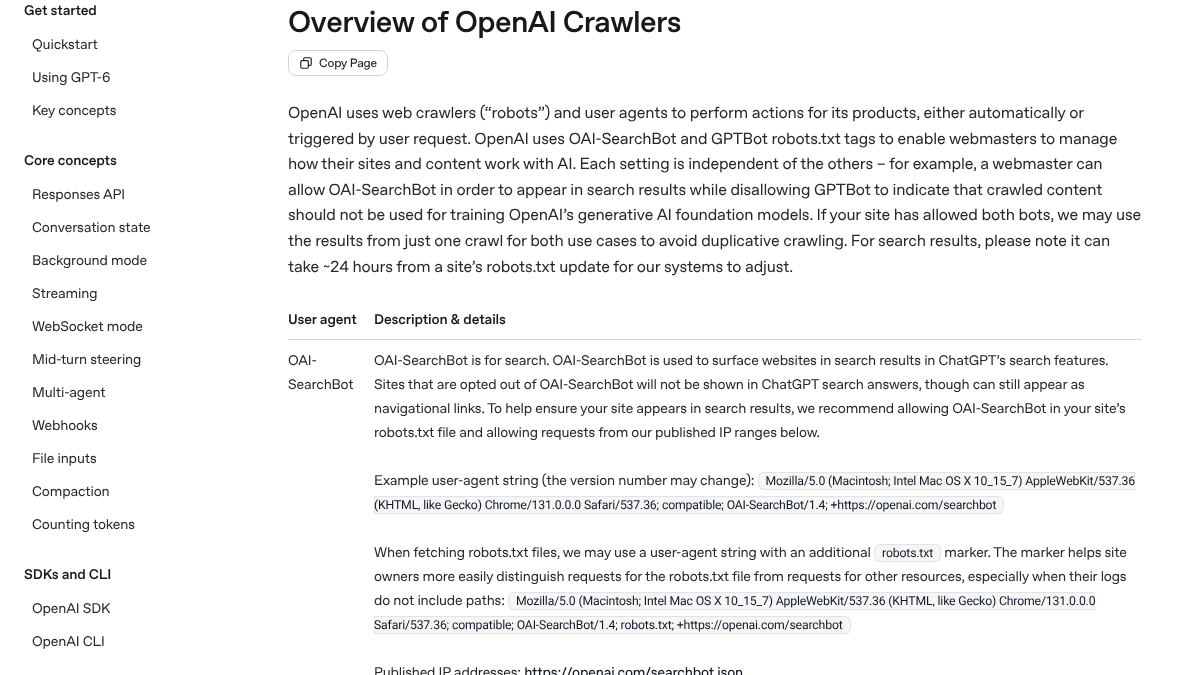
Two lines on that page deserve a second read. One is about timing, since OpenAI says search can take about 24 hours to catch up after you update robots.txt. The other recommends allowing requests from OpenAI's published IP ranges as well as the user agent name.
We ran into that second point ourselves. When we fetched the 40 cited pages with a request labeled as OAI-SearchBot, 36 loaded normally. Salesforce's page turned the OAI-SearchBot label away from our machine while serving a normal browser, and ChatGPT had cited it anyway. Our best guess is that Salesforce checks crawlers against OpenAI's IP ranges instead of trusting the name. A firewall that verifies crawlers that way is fine. What you shouldn't do is block the name outright.
Then there's the naming problem, because OpenAI runs three crawlers and they're easy to confuse. GPTBot is the one that gathers training data. Search depends on OAI-SearchBot, which builds the index, while ChatGPT-User fetches a page only when someone's request calls for it. That means you can say no to training and still show up in search, with a robots.txt like this:
User-agent: GPTBot
Disallow: /

User-agent: OAI-SearchBot
Allow: /
Plenty of big sites already run this setup. We also checked the top 1,000 domains. Of the 68 that blocked GPTBot by name, 40 still left OAI-SearchBot open, and our AI crawler statistics have the rest of that data.
And if you want a page gone from ChatGPT's answers entirely? OpenAI's publishers FAQ says to add a noindex tag and keep the page crawlable, so OpenAI can read it. Blocking the page in robots.txt alone can still leave a bare link in the results.
Make sure Bing can find you
This takes about an hour and is easy to skip. Most SEO checks start and end with Google, but OpenAI names Microsoft as a search partner, so Bing deserves the same attention. Verify the site in Bing Webmaster Tools, submit your sitemap there, and confirm your important pages made it into the index.
Keep your facts in plain HTML
Picture a pricing table, a list of plan limits or a feature list that only appears after a script runs. A crawler that never runs scripts sees nothing where those should be, and according to a Vercel and MERJ study of real crawler traffic, "none of the major AI crawlers currently render JavaScript."
The cited pages in our check backed this up: nearly all could be read without scripts. Thirty-four of the 36 that loaded had at least 300 words of text in the plain HTML. The median page carried about 1,500 words. To test your own page, view its source, or load it with JavaScript switched off and see whether the price is still there.

Built by the team that got cited in 48 hours.
Content generation, backlink building, AI visibility tracking, and Google rankings. One platform, zero guesswork.
Pass the official test
Most teams miss this one, and we only spotted it by watching what ChatGPT searches for. We asked 12 B2B software questions through OpenAI's API. Behind those answers, the model ran 198 searches. The word "official" showed up in 135 of them, while "best" or "top" showed up in only 14.
A typical one read "FreshBooks pricing invoicing software 2026 official", and some were restricted to a single site. With a shortlist in hand, ChatGPT checks the details on each vendor's own pages.
You can check your own site the same way. Search for "[your product] [a feature buyers ask about] official", then for "[your product] pricing official". If the top result isn't a clear page of yours that answers the question, ChatGPT will fill that gap with somebody else's page.
So what passes? Among the 40 cited pages, about a third were pricing or plan pages and about a third were help center or documentation articles. Product and integration pages made up most of what was left. For the full breakdown of those searches, see our post on why AI search cites fewer listicles.
Keep the facts current
ChatGPT asks for the current year a lot. Look back at the searches from our test and 114 of them had "2026" in the query, because it's after this year's plans and limits, not last year's.
That makes a stale page expensive. If your pricing page still shows old plan names, or a help article describes a feature that has since changed, that's the page ChatGPT reads and quotes back to a buyer. Put a visible updated date on your pricing and plan pages. Retire any PDFs that are out of date, and whenever a plan or feature changes, review the help articles that get cited most.
Short pages count if they answer one thing
Length isn't what earns the citation. Two of the pages in our check had under 300 words of text. One was a single integration page connecting a status page tool to PagerDuty, and the other was a product demo page. Each got cited because it answered one requirement in the buyer's question, and answered it directly.
That's the pattern behind most citations we've seen. A buyer asks for a tool with a particular integration, price or capability, ChatGPT searches for exactly that, and whichever page states it plainly gets cited. Our guide to building AI search visibility without chasing listicles calls these constraint pages and walks you through planning them.
Aim at questions that trigger a search
Plenty of questions never reach the web. We checked 10 new posts from well-known SaaS blogs. For 6 of their 10 target questions, ChatGPT answered from memory without searching at all, and most of those were definitions like "what is a risk register". Your page can't be cited in an answer like that until a future model learns from it.
When ChatGPT does search a topic that a standards body or regulator owns, it goes to them. BigCommerce's PCI compliance guide ranked second in Google, yet ChatGPT cited only documents from the PCI Security Standards Council and Visa. Spend your effort where your own page is the one holding the facts, meaning your pricing, your integrations and your product's limits. The full results are in our 90 day AI SEO timeline.
See your first AI citation report in under 5 minutes.
No setup calls. No onboarding meetings. Connect your domain and see where AI mentions your brand right now.

Measure what happens
Traffic is the easy half. OpenAI says ChatGPT adds utm_source=chatgpt.com to its referral links, so clicks from citations arrive in your analytics under that source. Citations take more work. Ask your most important questions in ChatGPT with search turned on, ask each one more than once, and write down which of your pages get cited. A single check can mislead you, because answers change from one run to the next. Our guide to checking ChatGPT citations lays out the routine.
The checklist
Here's the whole guide on one screen:
| Step | The check |
|---|---|
| Access | OAI-SearchBot allowed in robots.txt and your firewall |
| Bing | Site verified, sitemap submitted, important pages indexed |
| Plain HTML | Prices and specs visible with JavaScript off |
| Official test | Your own page comes first for "[product] [topic] official" |
| Current facts | Pricing and plan pages dated and up to date |
| Constraint pages | One page for each requirement buyers ask about |
| Measurement | Questions rerun monthly, utm_source=chatgpt.com tracked |
Doing it yourself or handing it off
The setup is mostly a one-time job. You check robots.txt and your firewall, set up Bing Webmaster Tools, test your main pages with JavaScript off and put your top ten buyer questions through the official test. From then on it's a monthly check plus whatever pages you add.
If you'd rather hand off the ongoing part, RankControl can take it. Our content engine drafts each article against the pages that already rank for the keyword, gives it a score for how easily AI engines can quote it, with a fix list, and publishes it on your own site. Every week, our AI visibility tracking runs up to 50 buyer questions on seven AI engines, ChatGPT among them, and logs the sources behind each answer. For a quick first look, try the free AI visibility check.
Your competitors are building backlinks while you read this.
Organic outreach, social mentions, and citations from Editorial Circle member sites, with managed backlinks available as an add-on. Grow your domain authority without running the campaign yourself.