
A developer choosing an error monitoring tool for a Node app types the question into ChatGPT or Google. The answer names two or three tools, cites a handful of pages and suggests where to start. By the time the developer opens a vendor's docs, the shortlist already exists.
For devtool marketers, that shortlist is the new top of the funnel. This playbook covers how developers use AI to pick tools, what Google's AI Overviews cited when we asked five developer-tool questions, and what to build so your tool is on the list.
How developers ask AI which tool to use
Developers use AI tools heavily and trust them less than you'd expect. Stack Overflow's 2025 Developer Survey found that 84% of respondents use or plan to use AI tools in their work, up from 76% the year before. About half of professional developers use them daily. ChatGPT led the tools respondents used, at 81.7%, and Perplexity sat far behind at 16.2%.
Trust is the other half of the picture.
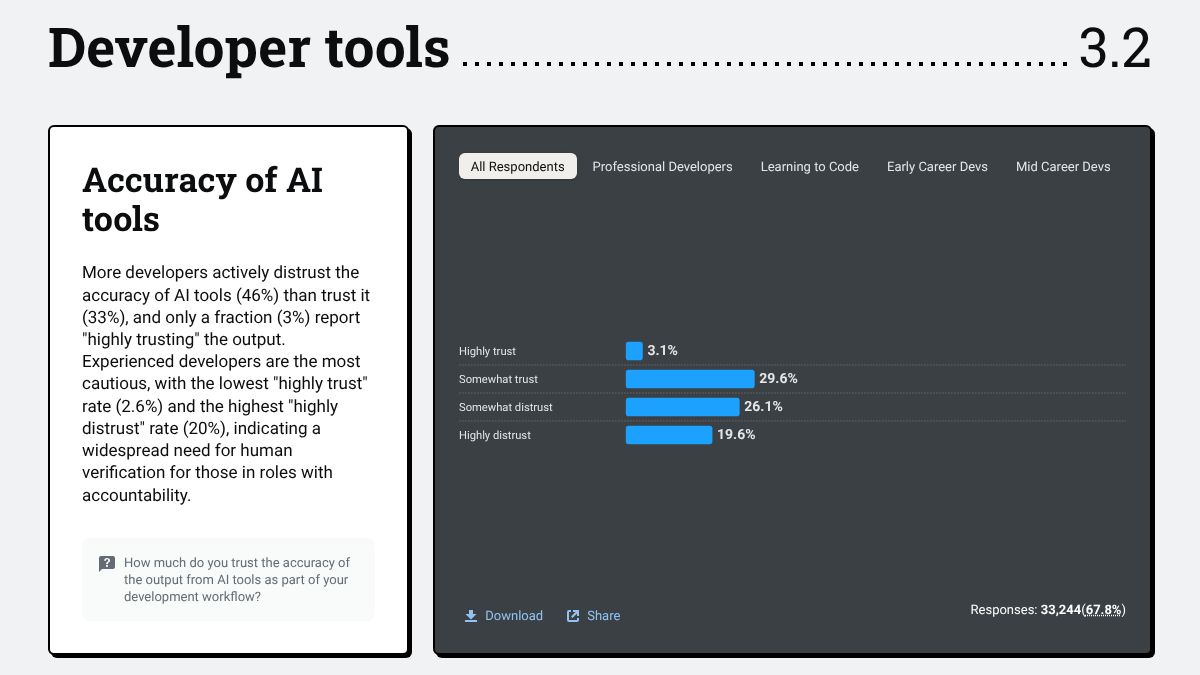
More developers distrust the accuracy of AI tools (46%) than trust it (33%), and only 3% say they highly trust the output. Three in four said they'd still ask another person when they didn't trust an AI answer.
That combination shapes how AI search works for devtools. Developers use AI to build the shortlist, then verify it on the vendor's own pages. So the AI answer decides which tools get looked at, and your docs, pricing and comparison pages decide what happens next.
What Google's AI Overviews cited for five devtool questions
On September 27, 2026, we pulled Google's AI Overviews for five questions a developer might ask when buying a tool. They covered feature flags for startups, error monitoring for Node, vector databases for RAG, auth for Next.js and API testing. Every one returned an AI Overview, with 50 cited sources in total.
| Source type | Citations | Share |
|---|---|---|
| Vendor blogs and comparison pages | 20 | 40% |
| Vendor docs and integration pages | 6 | 12% |
| Vendor product and pricing pages | 6 | 12% |
| 7 | 14% | |
| YouTube | 4 | 8% |
| Independent review and media sites | 4 | 8% |
| GitHub | 2 | 4% |
| dev.to | 1 | 2% |
| Stack Overflow | 0 | 0% |
Vendors' own pages made up 32 of the 50 citations. And the biggest single group was vendors' blog posts and comparison pages, which often named their competitors. We call this the vendor-written shortlist: in developer tools, the lists AI answers draw on are mostly written by the vendors being listed.
The answers themselves named clear winners where a category had one. The error monitoring answer called Sentry "widely considered the overall best error monitoring tool for Node.js," and the API testing answer called Postman "the industry standard." Crowded or newer categories got split answers instead. The Next.js auth question named no single winner, dividing its picks between managed services and open-source libraries.
Reddit and YouTube only showed up for two of the five questions: the vector database and Next.js auth, the two most fragmented categories. For the three established categories, vendor content filled almost every slot.
This matches what we found in other engines. When we sent developer questions to OpenAI's model and Perplexity for our developer AI search workflow, OpenAI cited only official docs, official GitHub pages and vendors' pricing pages.
AI search traffic grew 835% this year. Is your content ready?
RankControl generates 26 content formats optimized for ChatGPT, Claude, and Perplexity. Published on your domain, matched to your brand.

Write the comparison page yourself
If vendors write the shortlist, the most useful page you can publish is a comparison of your category that developers can trust, written by you.
Write it for a developer, not for a sales deck. Name the real competitors, including the ones that beat you on some criteria. Compare on things a developer checks, like SDK support, pricing at a given event volume and self-hosting options. And put a date on it, so both readers and AI answers can tell it's current.
A comparison that ranks you first on everything reads as an ad, and developers, who distrust AI output already, will notice. One that says plainly "choose us for X, choose them for Y" is more likely to be quoted, and more likely to be believed when a developer clicks through. Write a page for each head-to-head comparison buyers ask about, and one for the category as a whole.
Treat your docs as the page AI quotes
Docs and integration pages were a smaller share of Google's citations for buying questions, but they're what the other engines lean on for how-to questions, and they're where developers go to verify an AI answer. Three things make docs easy for AI answers to use.
First, let the search crawlers in. OpenAI's crawler documentation lists OAI-SearchBot as the crawler "used to surface websites in search results in ChatGPT's search features." Anthropic runs a separate Claude-SearchBot for search. Check that your docs subdomain doesn't block either, since docs sites often sit on different infrastructure from the marketing site.
Second, make sure the content is in the HTML. Many docs platforms render pages with JavaScript, and most AI crawlers don't run it. Fetch a docs page with curl and check that your first code sample is there.
Third, keep facts in one place. Supported languages, version requirements and limits should appear once, clearly, and match what your pricing page says.
On llms.txt, keep expectations low. In our check of 40 well-known software domains, 32 served one, so it's common in devtools. But Google says you don't need "new machine readable files, AI text files, markup, or Markdown" to appear in its search. On r/SEO, Google's John Mueller joined a thread about it and pointed out that the file has existed for years, yet none of the AI systems use it:
LLMs.txt: Google saying two different things?
Google Search Central says you don’t need special AI files like LLMs.txt to appear in generative AI search, but Chrome Developers says LLMs.txt can help agents understand a site’s structure and primary content. I’m anti-LLMs.txt, but is thi...
Our explainer on what an llms.txt file is covers where it can still help.
GitHub and Stack Overflow: cited less than you'd think
Most devtool marketers assume GitHub and Stack Overflow carry a lot of weight in AI answers. For buying questions, our check says otherwise. GitHub appeared twice in 50 citations: the official repository of an open-source auth library, and one developer's personal comparison repo. Stack Overflow didn't appear at all.
That doesn't make them irrelevant. It means they work differently. Stack Overflow's content reaches models through licensing: in May 2024, Stack Overflow announced it would make its OverflowAPI available to OpenAI "for model development and integration into ChatGPT." What developers write about your tool there can shape what a model believes about it, even when no answer cites the page. Troubleshooting questions are also different from buying questions, and in our earlier developer test, Perplexity did cite GitHub issues for how-to questions.
So keep your README and GitHub issues accurate, answer questions about your tool where developers ask them, and don't expect either to get you onto a buying shortlist on its own.

Built by the team that got cited in 48 hours.
Content generation, backlink building, AI visibility tracking, and Google rankings. One platform, zero guesswork.
List your MCP server where agents look
Developers increasingly work through AI agents that connect to tools directly, and the Model Context Protocol is how many of them do it. The official MCP Registry calls itself "the official centralized metadata repository for publicly accessible MCP servers." Anthropic, GitHub, PulseMCP and Microsoft are among its backers.
If your tool has a public MCP server, list it. Registry entries give each server a unique name, install instructions and a description, and the registry notes that marketplaces and aggregators pull from it on a regular schedule. It's a discovery channel of its own: an agent looking for a way to work with your category can find you there without any search engine involved.
The registry was still marked as in preview when we checked, so expect the details to change.
Track the questions developers ask
Write down 20 to 40 questions a developer asks when choosing a tool in your category, in their words. Mix category questions ("best error monitoring for a Node API on a budget"), constraint questions ("feature flags with a self-hosted option and an OpenFeature SDK") and questions about your tool by name. Our guide to building AI search prompt sets covers how to balance the list across buyer types.
Run them weekly in the engines developers use most, starting with ChatGPT and Google, and log which tools get named and which pages get cited. Ask the important ones several times, since answers change between runs. Our guide to checking ChatGPT citations explains how many runs you need.
The pattern you're looking for is which comparison pages keep winning slots. If a competitor's roundup is cited every week and yours isn't, that's the page to rewrite first.
Doing it yourself or handing it off
The first pass takes about a week: two days for comparison pages, a day on docs crawlability, an afternoon for the MCP Registry if it applies, and a day to set up the question list. After that, expect four to six hours a week to publish and check.
You can do it by hand, or RankControl can carry the steady part. Our AI visibility tracking checks up to 50 buyer questions every week across seven AI engines, marks each answer as mentioned, cited or both, and records every source it used, including competitors' comparison pages. Our content engine writes each article against the pages already ranking for its keyword and publishes it on your own site.
See your first AI citation report in under 5 minutes.
No setup calls. No onboarding meetings. Connect your domain and see where AI mentions your brand right now.