
When we asked ChatGPT which CRM a small business should use, it didn't search for that question. It searched for the best CRM for small businesses in 2026 with official pricing and five vendor names attached, then cited two pages. One was HubSpot's pricing page.
That's the short version of SaaS SEO in 2026. Buyers and the AI tools they ask both go looking for the pages a software company controls, like its prices, comparisons, integrations and docs. This playbook is built around those pages and the order to build them, so a small B2B team spends its first six months on the pages closest to revenue. If you're still deciding whether search deserves the budget at all, our take on whether B2B SaaS should invest in SEO and AI search covers that question first.
What SaaS buyers actually search
In October we ran four software buying questions through ChatGPT search, covering CRM, project management, payroll and email marketing. Every one of the searches it wrote added the year and asked for official pricing by name, and all four named four to six vendors before reading a single page.
What it cited is the useful part for a SaaS team. HubSpot's pricing page, Gusto's product page, Omnisend's pricing article in its help center, and two vendor-written lists, ClickUp's "10 Best PM Software" and Shopify's guide to email marketing software. Seven of the nine cited pages were published by software companies themselves.
So SaaS SEO is less about ranking a blog and more about owning the pages a buyer reads right before a demo. I think of it as building the page map bottom-up, starting from the pricing page and working away from the purchase.
The build order
Here's the order I'd build in for a B2B SaaS site with fewer than 50 pages today.
| Order | Page type | The search it answers | Build when |
|---|---|---|---|
| 1 | Pricing | "[your product] pricing", "[category] cost" | Week one |
| 2 | Comparison and alternatives | "[you] vs [rival]", "[rival] alternatives" | Month one |
| 3 | Your own category list | "best [category] for [audience]" | Month two |
| 4 | Integrations | "[you] [tool] integration" | As each integration ships |
| 5 | Use case and industry | "[category] for [industry]" | Month three |
| 6 | Docs and help center | How-to questions about the product | Always |
| 7 | Guides and blog | Broad questions in your field | After 1 to 5 exist |
The bottom of the table is where most SaaS blogs start, and it's why so many of them get traffic that never turns into trials.
We'll show you exactly where your brand stands in AI search.
No commitment. $0 due today, cancel anytime. See how ChatGPT, Perplexity, Claude, Gemini, Grok, and Google AI Mode talk about your brand today.
1. A pricing page a machine can read
Put your prices on the page in plain text, with what each plan includes and the date you last changed them. If your pricing hides behind "contact sales", ChatGPT reads a review site's guess about you instead of your own numbers.
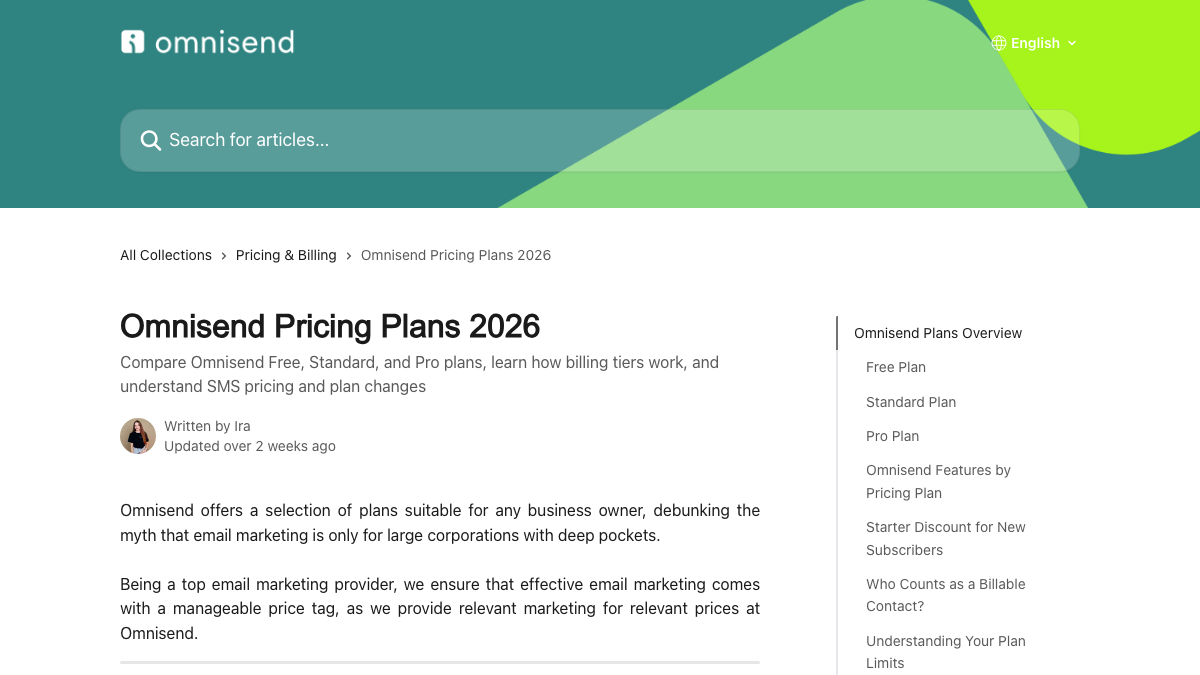
Omnisend's cited page shows a pattern worth copying. It's a help-center article with the year in the title and an update date under the author. Each plan gets its own heading, and so do billing questions like who counts as a billable contact.
If you can't publish exact prices because of enterprise deals, publish starting prices and what changes the quote. A range is still something an answer can quote.
2. Comparison and alternatives pages
These are the pages SaaS founders most often say worked first. In an r/WebsiteSEO thread asking founders what moved the needle early, two of the top answers named competitor research and comparison pages. They target searches with clear buying intent, on domains too new to rank for anything broad. In our check of 15 SaaS buyer searches, both vendors' own comparison pages ranked on page one for hubspot vs salesforce and gusto vs adp.
Two rules keep them working. Check every rival price on the rival's own pricing page and put the check date on the page. A founder in r/SaaS recently found three "best of 2026" guides all listing a free tier that no longer existed. And give a straight verdict for each type of buyer instead of a wall of feature ticks. Our breakdown of why alternatives pages win AI citations goes deeper on the structure.
3. Your own "best of" list for the category
This one surprises people. ClickUp's own list of project management software was cited for the project management question, and Shopify's own roundup was cited for the email question. Vendors writing the category list for their own market is normal, and it works.
Include the real rivals, give each one a fair line on who it suits, and put your own product first where it genuinely fits. One founder in that r/WebsiteSEO thread pointed out that listicles get cited in AI answers. Even when a list doesn't win you the recommendation, it helps you get mentioned elsewhere.
4. Integration pages
Every integration you ship is a page someone will search for, like "[your product] HubSpot integration" or "connect [your product] to Slack". These searches are small, but the person typing one is usually already using a tool next to yours.
Give each integration its own page with what it syncs, how to set it up in a few steps and one screenshot of the settings. A single "Integrations" grid with logos answers none of those searches.
5. Use case and industry pages
"CRM for real estate agents" and "project management software for construction" are separate searches with separate buyers. A page per audience that uses their words, shows their workflow and names the features they care about will beat a generic features page for each of them.
Only build the ones you can back with real detail. If you don't have a single customer or a dedicated feature for an industry, the page will read thin and convert worse than it ranks.
Know exactly what AI says about your competitors.
RankControl's Recon Agent monitors competitor citations across ChatGPT, Perplexity, Claude, Gemini, Grok, and Google AI Mode. See where they show up and you don't.

6. Docs and help center
Omnisend's pricing answer came from its help center, which is easy to forget is part of your SEO. Docs answer the exact how-to questions existing users and late-stage evaluators search, and they're often the most specific pages on the whole site.
Make sure they're on your main domain or a subdomain you've set up in Search Console, and that they load as real HTML. A help center behind a login, or one that renders only in the browser, can't be read by search engines or AI crawlers.
7. Guides and blog, last
Broad guides still matter, mostly for links and for being the source an AI answer quotes on a definition. Build them once the pages above exist, and link every guide to the comparison or use case page it naturally leads to. If you want to sequence the first three months in detail, our 90-day timeline for B2B SaaS lays it out week by week.
The technical trap SaaS sites fall into
A lot of SaaS marketing sites are now built with the same tools as the product, and some of them serve almost nothing to a crawler. When we ran our What AI Sees check on 22 sites built with an AI app builder in October, 9 of them served zero readable words to AI crawlers. None of the 61 ordinary ranking homepages we checked had that problem.
The reason is rendering. Vercel and MERJ's crawler study found the major AI crawlers don't run JavaScript, so a page that builds its text in the browser is blank to them. If your pricing or comparison pages render client-side, fix that before writing a single new page.
Published isn't finished
The most useful line in a recent r/micro_saas thread wasn't the growth chart, though six months of clicks went from 537 to 3,760. It was the point that published pages need a second pass. Pages sitting on positions 8 to 20 in Search Console are the cheapest wins on the site, because Google already thinks they're relevant.
Check Search Console monthly, sort by position, and rewrite the titles and openings of anything on page two. Then check whether those pages show up in AI answers too, since Google rankings and AI citations often move separately. Our AI visibility tracking checks 50 buyer questions weekly across six engines for exactly that.
What to measure for each page type
Each page type has its own signal, and lumping them into one traffic number hides which ones work. Here's what I'd watch.
| Page type | The signal that it's working | Where to look |
|---|---|---|
| Pricing | Impressions for "[product] pricing" and trial starts from the page | Search Console, your analytics |
| Comparisons | Impressions for "vs" and "alternatives" searches, plus AI answers that name you | Search Console, AI answer tracking |
| Category list | Citations of the list in AI answers for "best [category]" | AI answer tracking |
| Integrations | Signups that came from partner-name searches | Your analytics |
| Docs | Fewer support tickets on the topics the docs cover | Your help desk |
The AI side is the one most SaaS teams skip, because Search Console can't show it. Our free AI visibility check shows who ChatGPT cites for three questions from your market, and our guide to LLM SEO strategies covers what to change once you see the gaps.
What this costs in hours
A pricing rewrite takes a day. Five comparison pages, researched against live rival pricing, take about 20 to 30 hours. Integration and use case pages run three to four hours each, and a monthly refresh pass on page-two pages is another four to six hours.
You can do all of this by hand, one page type at a time. Or RankControl's content engine can plan and write the comparison, use case and guide pages for you every month. It publishes them on your own domain and tracks how they do in Google and AI answers, while you focus on your product.
26 content formats. Published on your domain. Matched to your brand.
Guides, comparisons, listicles, case studies, and more. RankControl generates content that gets cited by ChatGPT, Perplexity, Claude, Gemini, Grok, and Google AI Mode.