
Wix still makes a lot of SEO people wince. An r/WIX thread this year asked whether Wix SEO really is as bad as its reputation, and the replies split. One user dismissed the reputation as "very old and outdated misinformation," while another said their mobile pages still scored poorly on speed, even after they'd stripped out the animations.
For AI search, most of that debate is beside the point. Wix now handles the technical basics that decide whether ChatGPT, Perplexity and Google's AI answers can read your pages in the first place. The rest is your job: mostly the content, plus a few settings and a couple of Wix quirks that can lose you citations without you noticing. We'll go through each of them.
Is SEO for Wix as bad as they say, or is that more of an outdated stereotype?
I'm getting ready to launch my site in the coming weeks or months. It's a community driven site with an emphasis on public forums, and members being able to access helpful resources. With that in mind, I felt Wix was a better platform than...
What AI-optimized means on a Wix site
Nothing about the bar changes because you're on Wix. An AI engine lifts passages out of your page and drops them into its answer, which means each section has to answer its question within the first line or two. It should also carry a specific fact and still make sense when someone reads it on its own. Beyond that, write headings the way buyers phrase their questions, put comparisons in tables, and give every number a source and a date.
We went deep on that in GEO for ChatGPT. Here we're sticking to the Wix-specific part, meaning what the platform does for you and where it gets in your way.
What Wix already handles
Start with rendering, since it's the part that would sink you if Wix got it wrong. Its developer docs say Wix "uses server-side rendering (SSR) to render your page's components on the server and return them to the browser as HTML." You want that, because many AI crawlers don't run JavaScript at all, and a page that only exists after its scripts run can look blank to them.
Most of the structure comes built in, too. Every Wix blog post ships with preset structured data, and Wix generates your sitemap for you. The dashboard gives away where Wix thinks all this is heading as well, since its SEO section is now called SEO & GEO.
Support for llms.txt is only partial. Wix says it creates the file automatically for sites on premium eCommerce plans and plans a wider rollout. If you're on a Blog-only plan, you can ignore it for now. Most AI engines don't rely on llms.txt, so it won't be the thing that decides whether you get cited.
One newer addition, sitting in the same dashboard, is aimed at AI agents. In March 2026, Wix launched an NLWeb integration, built with Microsoft, which lets agents query your site's structured content through something Wix calls the ASK protocol. At launch it was limited to premium-domain sites in English-language markets. It sits on top of normal indexing and changes nothing about how search engines crawl or rank you, so we'd file it under extras and come back to it once the basics are done.
Settings to check before you publish
Robots.txt comes first. Wix's help center has a full article on blocking AI crawlers, and it treats blocking as something you have to choose. That's good news with one catch, which is that somebody may have chosen it on your behalf. If an agency or a previous owner has been in there, or a plugin, open the file and look.
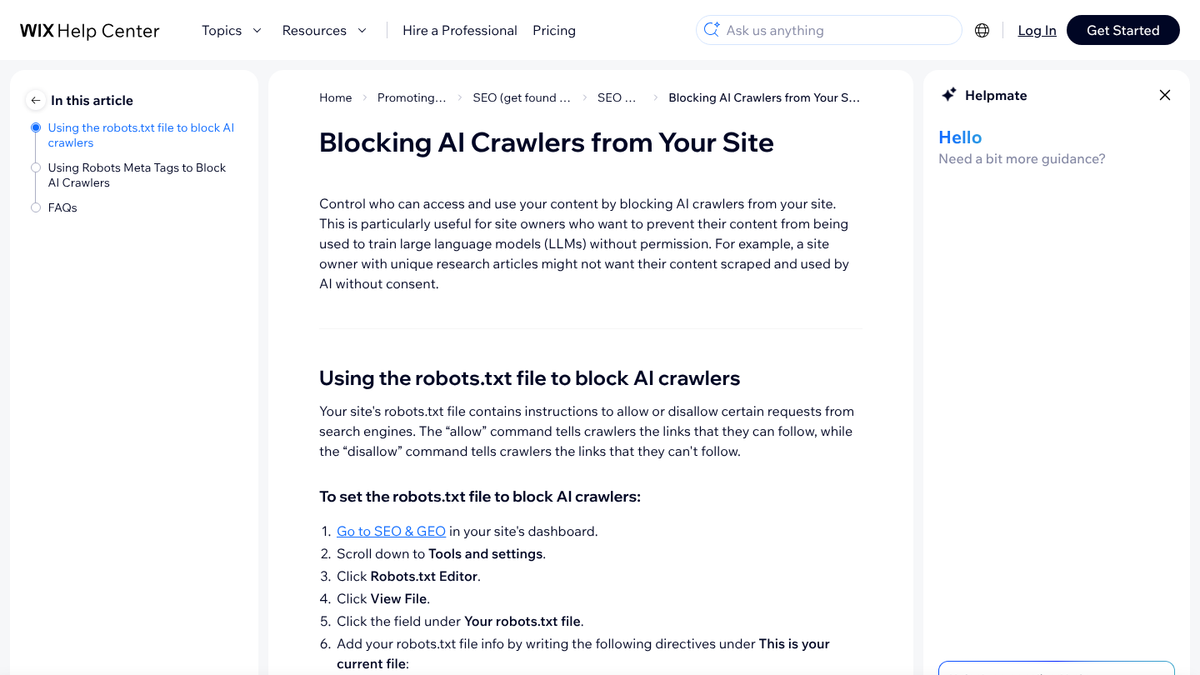
To get there, open SEO & GEO in your dashboard, go to Tools and settings, then Robots.txt Editor, and click View File. What you're looking for is Disallow: / under GPTBot or OAI-SearchBot. The same line under PerplexityBot, ClaudeBot or Google-Extended matters too, and in every case you should decide whether it was deliberate. Blocking OAI-SearchBot keeps you out of ChatGPT's search answers, and our AI crawler list explains what the others do.
Then check that the site has been published at least once. It sounds too obvious to mention, but a brand-new Wix site where nobody has ever clicked Publish in the editor serves a "not published" page on every URL, and that includes blog posts you add through the API.
FAQ markup is the last call, and it's optional. Wix lets you add your own JSON-LD in a post's SEO settings, up to five markups per setting counting the preset one, and its SEO settings guide lists FAQs among the rich results markup can help with. A clear FAQ section in the body of the post does most of the work without it, though. Our structured data guide covers when markup is worth the effort.
We'll show you exactly where your brand stands in AI search.
No commitment. $0 due today, cancel anytime. See how ChatGPT, Perplexity, Claude, Gemini, Grok, Google AI Mode, and Google AI Overviews talk about your brand today.

Getting articles into your Wix Blog
You've got three options. The simplest is writing or pasting each post in the Wix Blog editor. You can also push posts through Wix's API, with your own script or a no-code tool, and if you'd rather not touch any of it, a publishing tool can write to Wix for you.
Going the API route yourself? Check your first few posts carefully. We learned this building RankControl's Wix destination: when Wix converts HTML into its own post format, it drops external images and strips out links. Tables get flattened too, into one paragraph per cell. So anything that pushes HTML through that converter has to rebuild those pieces, or you'll find your comparison table turned into a pile of loose sentences and your sources missing their links.
RankControl's Wix destination does that rebuilding, so your tables, links and images arrive the way they were written. Setting it up takes about ten minutes:
- In Wix, open manage.wix.com/account/api-keys, click Generate API Key and tick All site permissions. The key starts with
IST.and Wix shows it only once, so copy it right away. - Grab your site ID from the address bar of your site dashboard. It's the long ID in
manage.wix.com/dashboard/<site-id>/. - In RankControl, go to Brand Control, then Publishing, then Add a destination, and pick Wix. Fill in a name, your site URL, the API key and the site ID, then click Test connection.
- Choose the post author. Wix requires every blog post to belong to a site member, so the list shows your site's members (on most sites, that's just you).
- Decide how articles arrive: as published posts, or as drafts waiting for review in your Wix dashboard.
Nothing goes live until you approve it, because auto-publish stays off unless you switch it on. Each article becomes a native post on your Wix Blog, on your own domain and inside your theme. You don't need a paid Wix plan for any of this: the free one is enough, and the blog works on a wixsite.com address. Wix is one of nine publishing destinations, along with WordPress, Webflow and Shopify.
A per-post checklist for Wix
Whichever way you publish, hold every post to this list before it goes live:
| Check | What passing looks like |
|---|---|
| Opening line | The first sentence under the title answers the question in the title |
| Headings | They match the questions buyers ask, and each section works on its own |
| Comparisons | In a real table, confirmed on the live post |
| Numbers | Each one has a source and a date, and the links work |
| SEO title and meta description | Filled in, not left to Wix's defaults |
| Category | Set, so the post groups with related posts |
| Images | At least one in the body of the post, for the reason below |
That last row is about a Wix quirk. Unlike most WordPress themes, Wix post pages don't put the cover image at the top of the article. You'll only see the cover on blog cards and in social previews, which means a post with no images in its body reads as one long wall of text. Wix's own sample posts get around this by repeating the image inside the article, and RankControl does the same whenever an article has no other images.
Know exactly what AI says about your competitors.
RankControl's Recon Agent monitors competitor citations across ChatGPT, Perplexity, Claude, Gemini, Grok, Google AI Mode, and Google AI Overviews. See where they show up and you don't.

Check what a crawler sees
Don't take the rendering on faith. Pick one live post and open its page source (the source, not the rendered page), then search it for a sentence from your first paragraph and after that for your meta description. If both turn up, the text is being served as HTML and AI crawlers can read it.
Then try a number from your comparison table. When it shows on the page but not in the source, a script is loading it, and a crawler that skips scripts will never see it. Wix renders pages on the server, so a standard post should pass. We'd still run the check once, on your first post, and then stop worrying about it.
Checking that it's working
Give crawlers a couple of weeks with each new post. After that, put the questions each post answers to ChatGPT and Perplexity with web search switched on, and write down whether your page gets cited, or which competitor does if it doesn't. In your analytics, look for visits from chatgpt.com and perplexity.ai that land on those posts.
If you're an agency, Wix Studio has AI search reports of its own, though what you get depends on the plan, so check yours. With only a handful of posts, the manual check comes to about an hour a month.
All of this can stay in your hands: you write every post to the checklist, paste or push it into Wix, and ask the engines about it each month. Or you can hand most of it to RankControl. The content engine plans and writes articles around your buyers' questions and publishes them to your Wix Blog. Then AI visibility tracking checks up to 50 of those questions every week on seven engines, ChatGPT, Perplexity, Google AI Mode and Google AI Overviews among them.
For a baseline before you start, run a free check of your brand in AI answers.
26 content formats. Published on your domain. Matched to your brand.
Guides, comparisons, listicles, case studies, and more. RankControl generates content that gets cited by ChatGPT, Perplexity, Claude, Gemini, Grok, Google AI Mode, and Google AI Overviews.