
A site that's leaned on Bing's NoArchive tag since 2023 to keep its pages out of AI answers is about to lose that signal. There's no warning banner for it either. Microsoft is replacing NoArchive and NoCache with two new settings, and it already posted the exact dates that matter.
What Microsoft actually changed on October 30
Microsoft's own post, written by Krishna Madhavan, a principal product manager at Bing, says the company was first to offer any AI controls at all. It added NoArchive and NoCache back in 2023, ahead of other search engines. Those two tags are now being split into something more precise.
Madhavan frames the reason plainly in the post. Publishers shouldn't have to choose between staying in Bing and deciding how AI models use their work, he wrote. That line matters because the old tags never let you split the two. Blocking NoArchive meant losing both at once, whether you wanted to or not.
Training and grounding are now two choices, not one. Training is about whether a model learns from your content at all. Grounding is narrower, whether your content can feed a live AI answer, the way Bing, Copilot and Microsoft 365 do it today.
Training and grounding, two separate dials now
Training uses the same shared robots.txt token that Google also said it would honor the same day. Bing also lets you set training at the page level, and a page setting overrides whatever your robots.txt file says for that one page.
# Robots.txt: disallow AI training site-wide
User-Agent: __usage_ai-training
Disallow: /
<!-- Page-level: disallow training for one page -->
<meta name="Bingbot" content="ai-training:disallow">
Grounding only works at the page level. There's no site-wide robots.txt option for it. Add a meta tag instead, or send the same instruction as an HTTP header if that fits your setup better.
<!-- Page-level: disallow grounding for one page -->
<meta name="Bingbot" content="ai-grounding:disallow">
The header version does the same job without touching your templates:
X-Robots-Tag: Bingbot: ai-grounding:disallow
That matters for sites built on a static generator or a CMS where adding a meta tag to every page is awkward. Setting the header once at the server level covers the whole site in one change, which is closer in spirit to how the old NoArchive tag worked.
Your competitors are building backlinks while you read this.
Organic outreach, social mentions, and citations from Editorial Circle member sites, with managed backlinks available as an add-on. Grow your domain authority without running the campaign yourself.

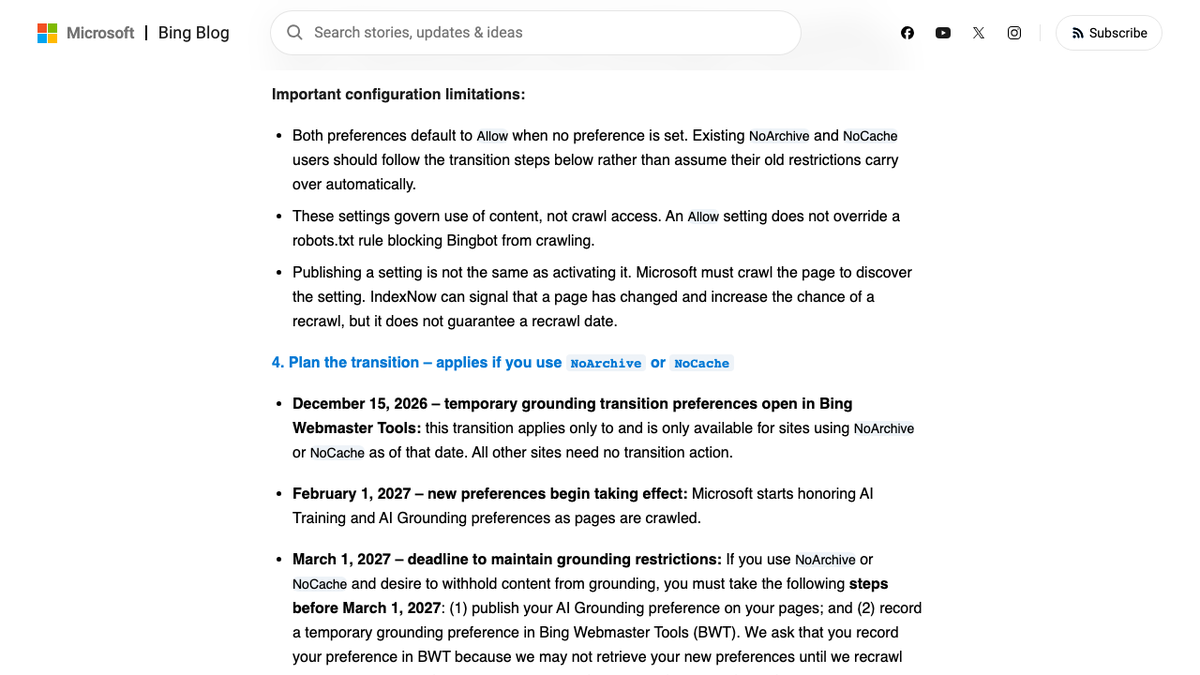
The four dates that matter
| Date | What happens |
|---|---|
| December 15, 2026 | Temporary grounding transition preferences open in Bing Webmaster Tools, for sites currently using NoArchive or NoCache only |
| February 1, 2027 | Microsoft starts honoring the new AI Training and AI Grounding preferences as it crawls your pages |
| March 1, 2027 | Deadline to publish real preferences. After this date, NoArchive and NoCache stop being read for training or grounding at all |
| September 30, 2027 | Any temporary Bing Webmaster Tools grounding preference expires, or sooner once Bing recrawls the page |
Only the December 15 step applies if you currently use NoArchive or NoCache. Everyone else can publish the new preferences whenever they're ready, with no deadline pressure attached. Search Engine Roundtable reported the same four dates from its own read of Microsoft's post, which is a useful second check if you'd rather not parse the original yourself.
What happens if you do nothing
Miss March 1, 2027 while still relying on NoArchive or NoCache, and Bing stops reading those tags as a preference at all. Your content defaults to Allow for both training and grounding, same as a page that never set a preference in the first place.
That default matters more than it sounds. Allow doesn't block anything. It lets your content train models and feed AI answers, the exact outcome the old tags were meant to stop.
Microsoft says it won't carry the old restriction over for you. Its own guide tells NoArchive and NoCache users to follow the move steps, not assume the old rules still apply once the new system goes live.
You're getting AI traffic. But do you know where it comes from?
RankControl credits every visit to the assistant that sent it: ChatGPT, Perplexity, Claude, Gemini, Copilot, or Grok. Full source attribution, next to your Google traffic.
The three grounding levels, and what "reduced visibility" costs
Grounding isn't a simple on-off switch. Allow is the default and needs no action. Disallow blocks your content from feeding any AI-made answer. In between sits DisallowExtended, which keeps your content live inside Microsoft's own products, things like AI Mode, AI Overview, Copilot and Microsoft 365, while shutting out the grounding services Microsoft resells to outside firms, such as Web IQ and the Foundry API.
Microsoft's own guide puts the tradeoff in plain terms. Pick DisallowExtended or Disallow and your reach in AI-made answers drops a lot, Microsoft said. Regular Bing search results aren't touched either way. Allowing grounding doesn't guarantee a citation, and allowing training doesn't guarantee your content shapes a future model. Neither one promises traffic or payment.
Two limits worth knowing before you publish anything
Publishing a setting isn't the same as activating it. Bing has to crawl the page again to discover whatever you changed, and nothing in this system forces that to happen on a schedule. IndexNow can nudge a faster recrawl, but Microsoft is explicit that it doesn't guarantee a date.
The other limit is simpler. An Allow setting never overrides a robots.txt rule that blocks Bingbot from crawling in the first place. Fix crawl access before you worry about training or grounding preferences, or the second setting never even gets read. Our free AI crawler checker reads your live robots.txt and shows whether Bingbot can even reach your pages today.
The manual way, and the easier one
You can track all four dates yourself, set the robots.txt token, add a meta tag to every page that needs one, and remember to check Bing Webmaster Tools before March 1. Or treat it the way a lot of site owners will this winter: set it once, then let something else keep watching whether it held.
The harder problem isn't this one migration. It's noticing later, quietly, that a setting reset somewhere and a page that used to show up in Copilot answers stopped showing up at all. RankControl's traffic and AI crawler tracking puts a change like that in your dashboard, and weekly AI search visibility checks across all seven engines, Copilot included, cover the citation side too, instead of leaving you to guess from a chart months later.
We'll show you exactly where your brand stands in AI search.
No commitment. $0 due today, cancel anytime. See how ChatGPT, Perplexity, Claude, Gemini, Grok, Google AI Mode, and Google AI Overviews talk about your brand today.